Best MCP Servers for Web Browsing, Tested (2026)
Playwright MCP, Chrome DevTools MCP, agent-browser, Browserbase and Cloudflare compared on the same tasks, with timings, token costs, CSV and script.
Disclosure. RenderScreenshot sells a screenshot API. We do not have an MCP server today, so we are not in this ranking. We will join the table only after one ships, measured with the same script.
Method in short. On 2026-10-15 we drove three browser MCP servers locally (Playwright MCP 0.0.83, Chrome DevTools MCP 1.10.1, agent-browser 0.39.1) with the official MCP TypeScript client over stdio. Each server ran the same five tasks on two pages (example.com and our own homepage), three times. We recorded wall time, success, the size of every text result, the dimensions and bytes of every image, and the estimated visual tokens of each image. We also measured each server's tool list, because the client sends it to the model on every turn. Browserbase and Cloudflare Browser Run need cloud accounts, so for them we report what we could verify locally and from their docs, and we say so in each section. The CSV and the script are below.
This comparison is part of our guide to giving AI agents web vision.
At a glance
| Server | Runs the browser | Tools (default) | Tool schema size | Screenshot options | Best for |
|---|---|---|---|---|---|
| Playwright MCP 0.0.83 | Local Chromium (or Firefox, WebKit) | 25 | 20,286 B | viewport, full page, element, PNG/JPEG/WebP, save to file | General agent browsing on your machine |
| Chrome DevTools MCP 1.10.1 | Local Chrome, or a remote CDP endpoint | 30 | 25,691 B | viewport, full page, element by uid, PNG/JPEG/WebP, quality | Debugging: network, console, performance traces |
| agent-browser MCP 0.39.1 | Local Chrome via a daemon; cloud providers optional | 29 (core profile) | 78,064 B | viewport, full page, element, annotated, PNG/JPEG, only-if-changed | Compact snapshots; CLI and MCP from one tool |
| Browserbase MCP 2.4.3 | Browserbase cloud browsers | 9 | 5,340 B | full page, named | Remote, stealth-oriented sessions with natural-language actions |
| Cloudflare Browser Run | Cloudflare's network | Depends on the MCP server you connect | n/a | Through the connected server | No local Chrome; Workers-native teams |
| Your own server on Workers | Cloudflare's network | As many as you write (we wrote 3) | Small | What you code | Fixed, task-level tools with your own limits |
All five off-the-shelf packages are Apache-2.0 on npm.
Benchmark: same tasks, same pages
Setup
| Item | Value |
|---|---|
| Date | 2026-10-15 |
| Machine | macOS 27.0.1, Apple M1 Pro, Node 22.18.0 |
| Client | @modelcontextprotocol/sdk 1.32.1, stdio transport |
| Servers | @playwright/mcp 0.0.83 (--headless --isolated --viewport-size 1280x720), chrome-devtools-mcp 1.10.1 (--headless --isolated --viewport 1280x720 --no-usage-statistics), agent-browser 0.39.1 (mcp --tools core,mobile, viewport set to 1280x720) |
| Pages | https://example.com (tiny), https://renderscreenshot.com (a 5,657 px tall marketing page) |
| Runs | 3 per server per page; medians reported |
| Image tokens | ceil(w/28) × ceil(h/28) after scaling to the model's limit, per Anthropic's vision docs (checked 2026-10-15) |
The five tasks:
- Viewport capture after opening the page.
- Full-page capture.
- Read the page with the server's text view (accessibility snapshot).
- Element capture of the first link.
- Fixed-size capture at 1200x630, the Open Graph size, after resizing.
What we did not measure: model accuracy with each server's output, cold-start cost on a fresh machine, and anything that needs a model in the loop. Wall times are local, warm and small; they show overhead differences, not network latency.
Results: renderscreenshot.com
| Task | Playwright MCP | Chrome DevTools MCP | agent-browser MCP |
|---|---|---|---|
| Open page | 1,703 ms | 1,515 ms | 562 ms |
| Viewport, 1280x720 | 44 ms, 61.3 KB | 57 ms, 80.6 KB | 114 ms, 61.6 KB |
| Full page, 1280x5657 | 173 ms, 426.9 KB | 124 ms, 623.6 KB | 259 ms, 424.7 KB |
| Page text (snapshot) | 14,200 chars | 11,349 chars | 3,523 chars |
| Element (first link) | failed 3/3 (strict mode: 32 matches) | 95 ms, 57x20 | 56 ms, 57x20 |
| 1200x630 capture | 70 ms, 59.7 KB | 82 ms, 76.6 KB | 76 ms, 59.9 KB |
Results: example.com
| Task | Playwright MCP | Chrome DevTools MCP | agent-browser MCP |
|---|---|---|---|
| Open page | 665 ms | 817 ms | 152 ms |
| Viewport, 1280x720 | 66 ms, 76.8 KB | 42 ms, 99.4 KB | 76 ms, 77.4 KB |
| Full page, 1280x775 | 52 ms, 78.5 KB | 33 ms, 102.3 KB | 49 ms, 79.3 KB |
| Page text (snapshot) | 1,272 chars | 1,235 chars | 28 chars |
| Element (only link) | 123 ms, 82x19 | 55 ms, 82x18 | 52 ms, 82x18 |
| 1200x630 capture | 105 ms, 75.2 KB | 42 ms, 95.7 KB | 77 ms, 68.6 KB |
Every other call succeeded 3 of 3 times. Raw data: browser-mcp-benchmark-2026-10.csv (108 rows).
What the numbers mean
Image token cost was identical across servers. At the same pixel size, every server's image costs the same visual tokens: 1,196 for 1280x720, 989 for 1200x630. The 5,657 px full page costs 728 tokens on the standard tier and 1,932 on the high-resolution tier, because the model scales it down; at that scale body text is unreadable. Bytes on the wire differed by up to 46% (Chrome DevTools MCP's PNGs were the largest), which matters for logs and storage, not for the model.
The text view is where servers really differ. On our homepage the snapshot sizes ranged from 3,523 characters (agent-browser) to 14,200 (Playwright MCP). agent-browser's default snapshot is compact and lists interactive elements; on example.com it returned only the one link (28 characters) and none of the body text. That is cheap for clicking and useless for reading. Playwright MCP and Chrome DevTools MCP return the full accessibility tree.
Selectors behave differently. Playwright MCP's target: "a" failed on a page with 32 links, because Playwright locators are strict. agent-browser took the first match. Chrome DevTools MCP has no selectors for screenshots at all; you pass a uid from its snapshot, so our harness parsed the first link's uid first.
Open time includes daemons. agent-browser keeps a browser daemon between calls and between our runs, so its later "open" calls were fast. Its first open in run 1 took 2,022 ms on example.com.
The cost you pay before any task: tool schemas
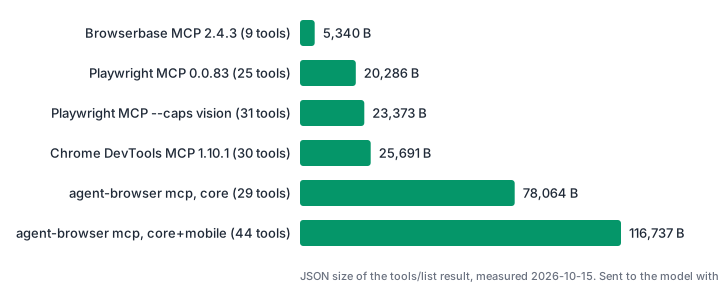
tools/list result, measured 2026-10-15. The client sends this list to the model with every request, so it is a fixed context cost per turn.agent-browser's tool list is large because every tool repeats shared options (session, allowed domains, CA certificates, timeouts). If your agent already has a shell tool, calling the agent-browser CLI costs far less context than its MCP server. Playwright MCP's optional --caps vision adds 6 coordinate-based tools for 3 KB more.
Best for
| Need | Pick | Why |
|---|---|---|
| A coding agent that tests your web app locally | Playwright MCP | Mature tool set, strict locators, codegen of the Playwright calls it ran |
| Debugging network, console and performance | Chrome DevTools MCP | Network requests, console messages, Lighthouse and performance traces in the same server |
| Long agent sessions where context is tight | agent-browser CLI (not MCP) | Small snapshots, annotated screenshots, and no 78 KB tool list |
| No local Chrome, sites with bot protection | Browserbase MCP | Cloud browsers; actions described in natural language |
| Teams already on Cloudflare Workers | Cloudflare Browser Run | Chrome DevTools MCP or Playwright MCP against Cloudflare-hosted browsers |
| A few fixed capabilities for many users | Your own server | Three task-level tools instead of 25 browser-level ones, your own auth and limits |
| Only "capture this URL" | Not a browser MCP server | One HTTP tool is lighter; see the end of this page |
Scorecard
A checklist is only useful if every option is scored against it. We scored each criterion from what we measured or read in the server's own schema on 2026-10-15. "n/t" means not tested.
| Criterion | Playwright MCP | Chrome DevTools MCP | agent-browser MCP | Browserbase MCP |
|---|---|---|---|---|
| Five tasks completed on both pages | 9 of 10 (element failed on an ambiguous selector) | 10 of 10 | 10 of 10 | n/t |
| Viewport, full page and element capture | All three | All three (element by uid only) | All three | Full page only |
| Formats | PNG, JPEG, WebP | PNG, JPEG, WebP with quality | PNG, JPEG with quality | Not configurable |
| Save to disk without sending the image | Yes (filename, --image-responses omit) |
Yes (filePath) |
Always saves and returns the path; it also returned the image for every capture in our test | Saved as an MCP resource |
| Text view size on our homepage | 14,200 chars | 11,349 chars | 3,523 chars | n/t (uses extract with an instruction) |
| Tool schema size | 20,286 B | 25,691 B | 78,064 B | 5,340 B |
| Runs without a local browser | No | Yes, with a remote CDP endpoint | Yes, with a cloud provider | Yes |
| Destination controls | Allowed and blocked origins (not a security boundary, per its own help) | Not in the default tools | --allowed-domains |
Account-level |
| Debugging tools (network, console, traces) | Network and console | Network, console, Lighthouse, performance, heap | Network and console in extra profiles | No |
| Release maturity | 0.0.x, pin the version | 1.x | 0.x | 2.x, last release January 2026 |
How to read it:
- Where Playwright MCP loses: it was the only server to fail a task, and its full snapshot was four times larger than agent-browser's on a real marketing page. The failure is a strictness choice that prevents clicking the wrong element, which many teams want; the snapshot size is a real cost on long sessions.
- Where Chrome DevTools MCP loses: larger files on disk, a
pageIdon every call and data sent to Google by default unless you opt out. If you do not need its debugging tools, you pay for 30 tools in context and use a handful. - Where agent-browser loses: the MCP tool list. At 78 KB, it is about four times Playwright MCP's, and the default snapshot is too thin for reading tasks. As a CLI behind a shell tool, both problems disappear, which is why NanoClaw ships it that way.
- Where Browserbase loses: control. One screenshot tool with no viewport, element or format options, and natural-language actions that call a model on the server side, so part of the agent's reasoning runs outside your model and your logs. In exchange you get no local browser and the smallest tool list here.
- Where Cloudflare Browser Run fits: it is infrastructure, not a tool set. Its MCP experience is whichever server you connect; the benefit is that the browser runs on Cloudflare instead of your laptop or container.
The scores do not include speed rankings. Our wall times are local and differ by tens of milliseconds for most screenshots; a cloud browser adds network latency that would dominate them.
Playwright MCP
Microsoft's server exposes Playwright as 25 tools: navigation, snapshot, click, type, fill form, tabs, network inspection, browser_evaluate and browser_take_screenshot. It speaks in accessibility snapshots with element refs, and each result repeats the Playwright code it ran, which you can paste into a test.
{ "mcpServers": { "playwright": { "command": "npx", "args": ["@playwright/[email protected]", "--headless"] } } }
Strengths: supports Chromium, Firefox and WebKit (--browser); options to save screenshots to disk without returning image blocks (filename, --image-responses omit); --isolated profiles; an allowed and blocked origins list.
Weaknesses: largest full-text snapshot in our test (14,200 characters on our homepage); strict selectors fail on ambiguous targets; pre-1.0 versioning, so pin the version.
Tested: all five tasks, both pages, 3 runs. Element capture with an ambiguous selector failed by design. Deep dive: Playwright MCP screenshots and token costs.
Chrome DevTools MCP
Google's Chrome DevTools team ships this server. Its 30 tools mirror DevTools: pages, navigation, input, emulation, console messages, network requests, Lighthouse audits, performance traces and heap snapshots. Screenshots target elements by snapshot uid.
{ "mcpServers": { "chrome-devtools": { "command": "npx", "args": ["[email protected]", "--headless", "--isolated"] } } }
Strengths: the best debugging surface of the group; emulate sets viewport, device pixel ratio, color scheme, network throttling and geolocation in one call; it can attach to a remote browser over CDP, which is how Cloudflare documents connecting it to Browser Run.
Weaknesses: largest image files in our test; every tool needs a pageId; it prints a notice that it sends usage statistics to Google by default (opt out with --no-usage-statistics) and that performance tools may send trace URLs to the CrUX API (--no-performance-crux).
Tested: all five tasks, both pages, 3 runs, no failures. Our Chrome DevTools MCP screenshot guide covers its options in detail.
agent-browser
Vercel Labs' agent-browser is a CLI first, with an MCP server (agent-browser mcp) built in. Tools come in profiles: the default core has 29; mobile, network, state, debug, tabs and react add more.
{ "mcpServers": { "agent-browser": { "command": "npx", "args": ["[email protected]", "mcp"] } } }
Strengths: compact snapshots; annotated screenshots whose numbered labels map to element refs; ifChanged screenshots that skip unchanged images; safety flags such as --allowed-domains and --content-boundaries.
Weaknesses: the largest tool schema we measured (78,064 bytes for core); the default snapshot omits non-interactive text; screenshots are PNG or JPEG only; the browser follows the OS color scheme unless you pin it.
Tested: all five tasks, both pages, 3 runs, no failures. Recipes and pitfalls: agent-browser screenshots.
Browserbase
Browserbase's MCP server runs sessions on Browserbase's cloud browsers and uses its Stagehand library for actions. Its 9 tools are high level: create and close a session, navigate, act, extract and observe with natural-language instructions, an autonomous agent tool, the current URL, and browserbase_screenshot, described as a full-page capture.
{
  "mcpServers": {
    "browserbase": {
      "command": "npx",
      "args": ["@browserbasehq/[email protected]"],
      "env": { "BROWSERBASE_API_KEY": "...", "BROWSERBASE_PROJECT_ID": "...", "MODEL_API_KEY": "..." }
    }
  }
}
Strengths: by far the smallest tool list (5,340 bytes); no local browser; natural-language actions suit models that struggle with refs.
Weaknesses: needs a Browserbase account and, for Stagehand's natural-language tools, a model API key on the server side, so some reasoning happens outside your agent's model; the screenshot tool has no viewport, element or format options in this version. The npm package's latest release (2.4.3) is from January 2026.
Tested: we installed 2.4.3 and listed its tools and schemas. We did not run the five tasks, because that needs a paid cloud account; no timings are reported. Check Browserbase's pricing page for current plans.
Cloudflare Browser Run
Cloudflare renamed Browser Rendering to Browser Run in April 2026. There are three MCP routes onto it:
- Chrome DevTools MCP over CDP. Since 2026-04-10, Browser Run exposes a Chrome DevTools Protocol endpoint, and Cloudflare documents pointing
chrome-devtools-mcpat it from Claude Desktop, Claude Code, Cursor and others. You get the Chrome DevTools MCP tool set with Cloudflare's browsers. - Cloudflare's Playwright MCP fork (
@cloudflare/playwright-mcp, 0.0.5 on npm), deployed as a Worker. - Your own Worker, covered in the next section.
Pricing, as listed on Cloudflare's Browser Run pricing page in October 2026: Workers Free includes 10 minutes of browser time per day and 3 concurrent browsers; Workers Paid includes 10 hours per month and 10 concurrent browsers (averaged monthly), then $0.09 per additional browser hour, plus $2.00 per additional concurrent browser for Workers Bindings.
Tested: not with a Cloudflare account for this article. The browser-level behavior of route 1 is the Chrome DevTools MCP behavior measured above; network latency to Cloudflare will add to every call.
Build your own
When agents need a few capabilities ("capture this URL", "give me the text of this URL"), a server with task-level tools beats a browser-level one: one call per job instead of five, and a tool list you control. Our tutorial builds one on Cloudflare Workers with createMcpHandler, three tools, SSRF checks and token auth, and runs it end to end in wrangler dev. In local mode, warm calls took 0.6 to 0.9 seconds each. Read build an MCP server on Cloudflare Browser Run.
Price and licensing, checked 2026-10-15
| Option | Software | Where the browser runs | What you pay for |
|---|---|---|---|
| Playwright MCP | Free, Apache-2.0 | Your machine or server | Your compute |
| Chrome DevTools MCP | Free, Apache-2.0 | Your machine, or any CDP endpoint | Your compute, or the remote browser |
| agent-browser | Free, Apache-2.0 | Your machine; optional cloud providers | Your compute, or the provider |
| Browserbase MCP | Free, Apache-2.0 | Browserbase cloud | Browserbase plan, plus model calls for Stagehand tools |
| Cloudflare Browser Run | Platform service | Cloudflare | Browser hours and concurrency beyond the included amounts (see above) |
Run the benchmark yourself
mkdir mcp-bench && cd mcp-bench && npm init -y
npm i @modelcontextprotocol/[email protected] @playwright/[email protected] [email protected] [email protected]
# save tokcalc.mjs (from our Playwright MCP post) and compare.mjs here, then:
for run in 1 2 3; do
  for s in playwright-mcp chrome-devtools-mcp agent-browser-mcp; do
    for u in https://example.com https://your-site.example; do node compare.mjs $s $u $run; done
  done
done
tokcalc.mjs is listed in full in Playwright MCP screenshots. compare.mjs:
// Runs the same 5 tasks against three local browser MCP servers and writes CSV rows.
import { Client } from '@modelcontextprotocol/sdk/client/index.js';
import { StdioClientTransport } from '@modelcontextprotocol/sdk/client/stdio.js';
import { appendFileSync, existsSync, writeFileSync } from 'node:fs';
import { imageSize, visualTokens } from './tokcalc.mjs';

const BIN = './node_modules/.bin/';
const SERVERS = {
  'playwright-mcp': { cmd: BIN + 'playwright-mcp', args: ['--headless', '--isolated', '--output-dir', './out', '--viewport-size', '1280x720'] },
  'chrome-devtools-mcp': { cmd: BIN + 'chrome-devtools-mcp', args: ['--headless', '--isolated', '--no-usage-statistics', '--viewport', '1280x720'] },
  'agent-browser-mcp': { cmd: BIN + 'agent-browser', args: ['mcp', '--tools', 'core,mobile'] },
};

function measure(res) {
  let text = 0, img = null;
  for (const p of res.content ?? []) {
    if (p.type === 'text') text += p.text.length;
    if (p.type === 'image') {
      const buf = Buffer.from(p.data, 'base64');
      const { w, h } = imageSize(buf);
      img = { w, h, kb: +(buf.length / 1024).toFixed(1), std: visualTokens(w, h, 'standard'), hi: visualTokens(w, h, 'high') };
    }
  }
  return { text, img, error: !!res.isError };
}

const firstUid = (txt, role) => (txt.match(new RegExp(`uid=(\\S+) ${role}`)) ?? [])[1];

const TASKS = {
  'playwright-mcp': {
    open: (c, url) => c('browser_navigate', { url }),
    viewport: (c) => c('browser_take_screenshot', { scale: 'css' }),
    fullpage: (c) => c('browser_take_screenshot', { scale: 'css', fullPage: true }),
    text: (c) => c('browser_snapshot', {}),
    og: async (c) => { await c('browser_resize', { width: 1200, height: 630 }); return c('browser_take_screenshot', { scale: 'css' }); },
    element: (c) => c('browser_take_screenshot', { scale: 'css', target: 'a', element: 'first link' }),
  },
  'chrome-devtools-mcp': {
    open: (c, url) => c('navigate_page', { pageId: 1, type: 'url', url }),
    viewport: (c) => c('take_screenshot', { pageId: 1 }),
    fullpage: (c) => c('take_screenshot', { pageId: 1, fullPage: true }),
    text: (c) => c('take_snapshot', { pageId: 1 }),
    og: async (c) => { await c('emulate', { pageId: 1, viewport: '1200x630x1' }); return c('take_screenshot', { pageId: 1 }); },
    element: async (c) => {
      const snap = await c('take_snapshot', { pageId: 1 });
      const uid = firstUid(snap.content.map(p => p.text ?? '').join('\n'), 'link');
      return c('take_screenshot', { pageId: 1, uid });
    },
  },
  'agent-browser-mcp': {
    open: async (c, url) => { await c('agent_browser_set_viewport', { session: 'cmp', width: 1280, height: 720 }).catch(() => {}); return c('agent_browser_open', { url, session: 'cmp' }); },
    viewport: (c) => c('agent_browser_screenshot', { session: 'cmp' }),
    fullpage: (c) => c('agent_browser_screenshot', { session: 'cmp', fullPage: true }),
    text: (c) => c('agent_browser_snapshot', { session: 'cmp' }),
    og: async (c) => { await c('agent_browser_set_viewport', { session: 'cmp', width: 1200, height: 630 }); return c('agent_browser_screenshot', { session: 'cmp' }); },
    element: (c) => c('agent_browser_screenshot', { session: 'cmp', selector: 'a' }),
  },
};

const out = 'compare.csv';
if (!existsSync(out)) writeFileSync(out, 'run,server,url,task,ms,ok,text_chars,img_w,img_h,img_kb,tok_standard,tok_high\n');

const [serverName, url, run] = process.argv.slice(2);
const s = SERVERS[serverName];
const client = new Client({ name: 'compare', version: '1.0.0' });
await client.connect(new StdioClientTransport({ command: s.cmd, args: s.args, stderr: 'ignore' }));
const { tools } = await client.listTools();
console.error(serverName, 'tools', tools.length, 'schema bytes', JSON.stringify(tools).length);
const call = (name, args) => client.callTool({ name, arguments: args }, undefined, { timeout: 90_000 });

for (const task of ['open', 'viewport', 'fullpage', 'text', 'element', 'og']) {
  const t0 = performance.now();
  let m;
  try { m = measure(await TASKS[serverName][task](call, url)); }
  catch (e) { m = { text: 0, img: null, error: true }; console.error(task, e.message); }
  const ms = Math.round(performance.now() - t0);
  const i = m.img ?? {};
  appendFileSync(out, [run, serverName, url, task, ms, !m.error, m.text, i.w ?? '', i.h ?? '', i.kb ?? '', i.std ?? '', i.hi ?? ''].join(',') + '\n');
}
await client.close();
Two things to know when you adapt it. The MCP stdio transport passes only a small default set of environment variables to the server process, so pass API keys through the transport's env option. And add a server by writing its five task functions; tool names and argument shapes differ for every server.
When you do not need a browser MCP server
Every server above gives the agent a whole browser: 9 to 44 tools, a session to manage, and several calls per page. If the agent's job is "show me this URL" or "attach a screenshot to the report", one HTTP tool does it in a single call, with a fixed output size and therefore a fixed token cost. That is what RenderScreenshot does. A capture takes a preset such as og_card (1200x630) or desktop_hd, and the response includes a public CDN link in X-Cache-URL that the agent can cite. The tool definition for OpenAI, Anthropic and the Vercel AI SDK is on our agents page. Get a free API key and run the same five tasks against it with your own harness.
Changelog
- 2026-10-15: first edition. Benchmarked Playwright MCP 0.0.83, Chrome DevTools MCP 1.10.1 and agent-browser 0.39.1 on two pages, 3 runs each. Browserbase MCP 2.4.3 schema only. Cloudflare Browser Run from documentation; not benchmarked.
Related guides
- Playwright MCP screenshots: parameters, file locations and token costs
- agent-browser screenshots: every CLI screenshot command, tested
- Chrome DevTools MCP screenshots: element, emulation and remote browsers
- How AI agent harnesses browse the web: OpenClaw, Hermes Agent, NanoClaw and NemoClaw
Related in this topic
- Screenshot API for AI Agents Give AI agents web vision with one HTTP tool. Tool definitions for OpenAI, Anthropic and the Vercel AI SDK, plus measured token costs per capture.
- Screenshots for AI Agents and Agent Reports Let AI agents observe rendered pages and attach screenshot evidence to their reports. Tool schema, evidence records, capture modes and token cost per mode.
- Website Screenshots for GPT and Claude Vision Pick the viewport, scale and format that vision models read best per token. Capture settings, token math for Claude and GPT, and a tested Python example.
- Screenshot vs DOM vs Accessibility Tree: Token Costs We measured what 26 real web pages cost an LLM agent as raw HTML, cleaned HTML, text, accessibility tree and screenshot. Data, script and method included.
- AI Landing Page Review with Screenshots Capture desktop, mobile and full-page screenshots of a landing page and get a scored AI review as JSON. Rubric prompt, schema and tested Node script.
- Claude Tool Use Screenshot Tool Give Claude a screenshot tool with the Anthropic Messages API. The tool returns image blocks in tool_result. Full Python file, limits and error handling.