Disclosure: I build RenderScreenshot. thum.io is one of the cheapest and simplest ways to put a website thumbnail on a page, and for many sites it is all they need. This page measures it, then explains where a different model fits better.
thum.io's model is unusual and very convenient: you put https://image.thum.io/get/<url> straight into an <img> tag, and the image appears. No backend code, no key for the first 1,000 views a month. The two things that send people looking for a thum.io alternative are built into that model: you pay per hit (every view), not per render, and the URL is public, so access control depends on referrer checks or thum.io's signed keys. RenderScreenshot uses signed URLs generated on your server, with an expiry, and bills renders rather than views. This page shows thum.io's real output and timing, maps its URL options, and gives you code to rewrite existing <img> tags. It is a spoke of our best screenshot API comparison.
Last verified: October 15, 2026, against the thum.io URL API documentation and the pricing section of thum.io, and by calling thum.io's free endpoint ourselves.
Should you switch?
| Stay with thum.io if | Move to RenderScreenshot if |
|---|---|
You want zero backend code: paste a URL into <img> and you are done |
You can generate URLs on your server (any framework can) |
| Your traffic is small; 1,000 free hits a month covers you | High page views would multiply per-hit charges |
| A 1200 px browser and a 600 px thumbnail suit you | You need other viewports, retina, element capture, WebP or AVIF |
| You like the animated loader as a progressive placeholder | You want a final image on the first byte, every time |
| You need wait conditions, cookie-banner blocking, or social-card presets |
What thum.io actually returns: measured
We called thum.io's free endpoint from one machine on October 15, 2026, with no account. To get uncached renders, each URL had a unique query string (https://example.com/?rs-b08-...), which thum.io treats as a new page. Then we requested the same URL again for the cached case.
| Request | Runs | Median | Range | Output |
|---|---|---|---|---|
/get/noanimate/<url>, uncached |
5 | 1.21 s | 1.12 to 1.84 s | PNG, 600×600, 29,025 bytes |
/get/noanimate/<url>, repeated |
5 | 0.38 s | 0.33 to 0.43 s | same PNG |
/get/<url>, uncached (default) |
3 | 1.76 s | 1.30 to 1.81 s | animated GIF, 600×600, 77 to 108 KB, 10 frames |
Method: curl timing (time_total) from a single client, sequential requests, target example.com. Five or three samples are enough to show behaviour, not to rank services. The responses whose headers we inspected carried cache-control: max-age=86400.
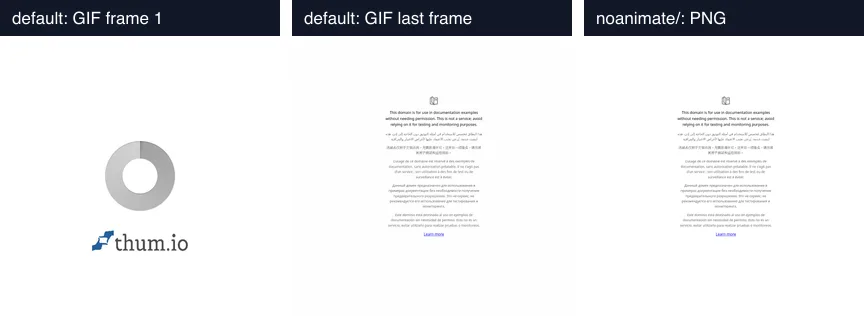
Left and centre: first and last frame of the default response for an uncached URL. Right: the same URL with noanimate/. Captured from image.thum.io on October 15, 2026.
Three things to take from this:
- The default is an animation, not a screenshot. On an uncached URL, thum.io streams a GIF whose first frames are a branded loading ring (the Good plan lists a "Thum.io branded loader"). In a browser that is a nice progressive placeholder. In a backend job that downloads images, you save a GIF of a spinner unless you add
noanimate/. The documentation recommendsnoanimate/for batch jobs, and our test shows why. - The default framing is 1200×1200 scaled to 600×600. The browser is 1200 px wide, the capture is cropped at 1200 px high, and the thumbnail is half the width. That is a square thumbnail, not a 16:9 or Open Graph shape.
- Caching is fast. A repeat request came back in under half a second. That is also the hit you pay for on a paid plan.
We have not yet published RenderScreenshot timings from the same client for comparison, so this page shows no side-by-side render from our API. You can produce one in a minute with the request at the end of the page.
Per-hit vs per-render pricing
thum.io's prices, as listed on its home page on October 15, 2026:
- Good: $2 per 10,000 hits, $1 monthly minimum, first 1,000 hits free, branded loader.
- Better: $1 per 10,000 hits, $20 monthly minimum, first 1,000 hits free, unbranded loader, queue priority, viewport width and full-page options.
- Enterprise: by email.
These are low numbers, and for a site with few views thum.io is close to free. The model matters at scale because a hit is a view. Put 20 thumbnails on a directory page that gets 50,000 views a month and you serve 1,000,000 hits, whether the underlying screenshots changed or not.
| Scenario | thum.io Good | thum.io Better | RenderScreenshot |
|---|---|---|---|
| 1,000 hits (1,000 views of one image) | free | $20 minimum | 1 render per image per cache period |
| 10,000 hits | about $1.80 | $20 minimum | 1 render per image per cache period |
| 100,000 hits | about $19.80 | $20 minimum | same |
| 1,000,000 hits (20 images × 50,000 views) | about $200 | about $100 | 20 renders per cache period |
The RenderScreenshot column assumes you serve the cached image. With the default 24-hour cache, 20 images cost about 600 renders a month; with a 30-day cache.ttl, about 20. Free plan: 150 credits a month. Paid plans start at $10 for 2,500 credits (pricing). Cache hits are not billed as renders (caching docs).
For a small site, thum.io is cheaper and simpler. For a high-traffic page of thumbnails, per-render billing with a long cache wins by a wide margin.
URL options mapped
thum.io encodes options as path segments before the target URL. Here is each one in RenderScreenshot terms:
| thum.io path option | RenderScreenshot | Notes |
|---|---|---|
/get/<url> |
GET /v1/screenshot?url=... with a signed URL |
Signed on your server, see below |
width/600/ (thumbnail width, default 600) |
output.resize.width |
|
crop/1200/ (capture height, default 1200) |
viewport.height |
|
viewportWidth/1200/ (max 2400, Better plan) |
viewport.width (up to 7680) |
|
fullpage/ (Better plan) |
capture.mode: full_page or the full_page preset |
|
wait/3/ (seconds, Better plan) |
wait.delay: 3000 or wait.for_selector |
|
maxAge/24/ (hours) |
cache.ttl: 86400 (seconds) |
|
png/ / allowJPG/ |
output.format (png, jpeg, webp, avif) |
|
noanimate/ |
not needed | We never return a loader animation |
iphoneX/, iphone14promax/, galaxys5/ ... |
viewport.device (iphone_14_pro, iphone_14_pro_max, pixel_7, ...) |
|
prefetch/ + callbackUrl |
POST /v1/batch or webhook.url |
|
/image/... (resize an image) |
not offered | |
/pdfSource/... (PDF page to image) |
not offered | |
| auth by referer, or signed requests | signed URLs with expires (max 30 days) |
Two ways to replace a live thum.io URL
1. Signed URLs in templates. Generate the URL on your server when you render the page. It contains the options, an expiry and an HMAC signature, never your secret key. If someone changes a parameter, the signature fails. This is the closest to thum.io's "URL in an <img>" workflow.
2. Render once, store the CDN link. Call the API when content is published, store the CDN URL from the response, and put that URL in the page. Views never touch the API. This is the cheapest pattern for high-traffic pages.
Node: rewrite thum.io tags to signed URLs
// rewrite-img-tags.mjs: replace thum.io <img> URLs in HTML with signed RenderScreenshot URLs.
// Node 22+, npm i renderscreenshot. Run it server-side (it needs your key); never ship the key.
// Usage: RS_API_KEY=rs_live_... node rewrite-img-tags.mjs < page.html > page.signed.html
import { Client, TakeOptions } from 'renderscreenshot';
import { text } from 'node:stream/consumers';

const client = new Client(process.env.RS_API_KEY);
const THIRTY_DAYS = 30 * 24 * 60 * 60 * 1000; // the maximum lifetime of a signed URL

// Matches //image.thum.io/get/<options>/<target>, e.g. /get/width/600/crop/800/https://example.com/
const THUM = /(?:https?:)?\/\/image\.thum\.io\/get\/((?:[a-zA-Z0-9]+\/(?:\d+\/)?)*?)(https?:\/\/[^"'\s<>]+)/g;

export function toSigned(optionPath, target, expiresAt = new Date(Date.now() + THIRTY_DAYS)) {
  const parts = optionPath.split('/').filter(Boolean);
  const get = (name) => { const i = parts.indexOf(name); return i >= 0 ? Number(parts[i + 1]) : undefined; };
  // thum.io renders a 1200 px wide browser and scales the result to `width` (default 600).
  let opts = TakeOptions.url(target).width(get('viewportWidth') ?? 1200).height(get('crop') ?? 1200).format('webp');
  if (parts.includes('fullpage')) opts = opts.fullPage();
  return client.generateUrl(opts, expiresAt);
}

const html = await text(process.stdin);
process.stdout.write(html.replace(THUM, (_m, optionPath, target) => toSigned(optionPath, target)));
Use it as a build step for static pages, or call toSigned from your template helper for dynamic ones. Regenerate pages before the 30-day expiry; a page cached longer than that will show broken images.
Python: render on publish, store the link
"""render_on_publish.py: render a thumbnail once when content is published and store
its CDN URL, instead of pointing every page view at a live screenshot URL.

Python 3.10+, standard library only.
Usage: RS_API_KEY=rs_live_... python3 render_on_publish.py https://example.com
"""
import json
import os
import sys
import urllib.error
import urllib.request

RS = os.environ.get("RS_BASE_URL", "https://api.renderscreenshot.com")


def thumbnail_url(page_url: str) -> str:
    body = {
        "url": page_url,
        "viewport": {"width": 1200, "height": 1200},              # thum.io's browser size
        "output": {"format": "webp", "resize": {"width": 600}},   # thum.io's default width
        "cache": {"ttl": 2592000},                                 # keep the CDN copy 30 days
    }
    req = urllib.request.Request(
        f"{RS}/v1/screenshot", data=json.dumps(body).encode(), method="POST",
        headers={
            "Authorization": f"Bearer {os.environ['RS_API_KEY']}",
            "Content-Type": "application/json",
            "Accept": "application/json",
        },
    )
    with urllib.request.urlopen(req, timeout=60) as res:
        return json.load(res)["image"]["url"]


if __name__ == "__main__":
    try:
        print(thumbnail_url(sys.argv[1] if len(sys.argv) > 1 else "https://example.com"))
    except urllib.error.HTTPError as err:
        print(f"HTTP {err.code}: {err.read()[:200]!r}", file=sys.stderr)
        sys.exit(1)
The stored link stays valid until the cache entry expires (30 days here). Re-render on a schedule or when the target page changes.
Ruby: a view helper with expiry tracking
# thumbnail_helper.rb: a view helper that replaces image.thum.io/get/<url> in templates.
# It renders once, then serves the stored CDN URL until it is close to expiry.
# gem install renderscreenshot
require 'renderscreenshot'
require 'time'

module ThumbnailHelper
  CLIENT = RenderScreenshot.client(ENV.fetch('RS_API_KEY'), base_url: ENV['RS_BASE_URL'])
  STORE = {} # use Rails.cache or a database column in a real app

  def self.thumbnail_url(page_url)
    cached = STORE[page_url]
    return cached[:url] if cached && cached[:expires_at] > Time.now + 3600

    response = CLIENT.take_json(
      RenderScreenshot::TakeOptions.url(page_url).width(1200).height(1200).format('webp').cache_ttl(2_592_000)
    )
    expires = response.dig('cache', 'expires_at')
    STORE[page_url] = {
      url: response.dig('image', 'url'),
      expires_at: expires ? Time.parse(expires) : Time.now + 86_400
    }
    STORE[page_url][:url]
  end
end

puts ThumbnailHelper.thumbnail_url(ARGV.fetch(0, 'https://example.com')) if $PROGRAM_NAME == __FILE__
In a Rails view, pass ThumbnailHelper.thumbnail_url(site.url) to image_tag where the template used to build the image.thum.io/get/ URL.
Tested on October 15, 2026: the Node rewriter with Node 22.18.0 and [email protected] on sample HTML (URL generation runs locally, so no request was sent); the Python and Ruby versions (Python 3.14.8; Ruby 4.0.7 with the renderscreenshot gem 1.0.0) against a local mock of the API. None were run against production.
When thum.io is the better choice
thum.io is the better choice for a small site, a prototype or an internal tool where pasting one URL into an <img> tag is worth more than any feature list, and where traffic stays near the free 1,000 hits. Its image resizing and PDF-to-image endpoints are also things we do not offer. If you are comparing other "URL in an img tag" services, see the url2png alternative page too.
Move when page views start to cost real money, when you need a non-square framing, or when you cannot have a loader animation in your downloads. To see the difference on your own page, create a free key and request GET https://api.renderscreenshot.com/v1/screenshot?url=<your page>&width=1200&height=1200&format=webp with your key as a Bearer token; compare it with https://image.thum.io/get/noanimate/<your page>.