HTML to Image in Python: imgkit, html2image, Playwright
Convert HTML to an image in Python with html2image, Playwright or an API, compared on five templates with timings and renders, and why imgkit is a dead end.
To convert HTML to an image in Python, load the HTML into a real browser engine and screenshot it. The shortest reliable way is Playwright:
from playwright.sync_api import sync_playwright

with sync_playwright() as p:
    browser = p.chromium.launch()
    page = browser.new_page(viewport={"width": 1200, "height": 630})
    page.set_content(html_doc, wait_until="load")
    page.evaluate("document.fonts.ready.then(() => true)")
    page.screenshot(path="card.png")
    browser.close()
There are three other names you will find in search results: imgkit, html2image and hosted APIs. We ran the same five templates through each option that we could run and timed them. Here is what we found, the complete code, and the problems that are specific to Python.
Tested on 2026-10-15 on macOS 27 (Apple M1 Pro), Python 3.14.8 in a
uvvirtual environment:playwright==1.64.0(Chromium 156.0.8078.4),html2image==2.0.7driving Google Chrome 155.0.8059.40,requests==2.34.2. imgkit 1.2.3 installed, but it could not run; see below. API examples were checked against a local mock of our API that validates the request body.
Results at a glance
| imgkit | html2image | Playwright | HTML to image API | |
|---|---|---|---|---|
| Engine | wkhtmltoimage (Qt WebKit) | Your installed Chrome or Edge, via its CLI | Bundled Chromium (or Firefox, WebKit) | Chrome on the provider's servers |
| Modern CSS (grid, gap, variables) | No | Yes | Yes | Yes |
| Wait for fonts or a selector | javascript-delay or window-status |
No control | Yes | Yes (wait options) |
| Transparent background | Yes (transparent option) |
Yes, with a Chrome flag | Yes | Yes |
| Per image, our test | Not run | 2,960 to 4,052 ms | 22 to 383 ms warm | Network round trip |
| Install | A wkhtmltox binary | pip + a browser on the machine | pip + playwright install chromium |
pip or nothing |
The five test templates
They are the same documents we used for HTML to image in Node.js, saved as .html files: a 1200 x 630 social card with Google Fonts, a 600 x 760 receipt with a table, a 480 x 160 transparent badge, a 1200 x 630 card that uses CSS grid, conic-gradient, backdrop-filter and clip-path, and a card with Japanese, Chinese, Korean, Arabic and emoji text.
imgkit: why we did not run it
imgkit is a thin wrapper that shells out to the wkhtmltoimage binary. That binary comes from the wkhtmltopdf project, whose GitHub repository is archived, and it renders with a Qt WebKit engine from long before CSS grid, flexbox gap or custom properties. Our test machine is Apple Silicon without Rosetta, and we found no native arm64 macOS build of wkhtmltoimage to install, so we could not run it. We did not want to publish numbers from an emulated or patched setup.
You do not need our numbers to make the call: four of our five templates use CSS that this engine predates. If you have imgkit code today, our wkhtmltoimage alternative page has a drop-in shim that keeps the imgkit.from_string() call shape and swaps the engine for Chromium.
html2image: your installed Chrome, one process per image
html2image finds Chrome or Edge on the machine, writes your HTML to a temporary file and runs the browser's --headless --screenshot command line for it.
pip install html2image==2.0.7
"""render_h2i.py: HTML string to PNG with html2image (drives your installed Chrome or Edge)."""
import html
from pathlib import Path

from html2image import Html2Image

doc = Path("../html/card.html").read_text()  # any full HTML document; escape user values before inserting them
hti = Html2Image(output_path="out", custom_flags=["--hide-scrollbars", "--default-background-color=00000000"])
paths = hti.screenshot(html_str=doc, save_as="h2i-card.png", size=(1200, 630))
print(paths)
| Template | Time per image (median of 3) | PNG bytes |
|---|---|---|
| card | 3,422 ms | 175,070 |
| receipt | 3,216 ms | 28,475 |
| badge | 4,052 ms | 16,334 |
| modern | 3,808 ms | 156,090 |
| i18n | 2,960 ms | 59,880 |
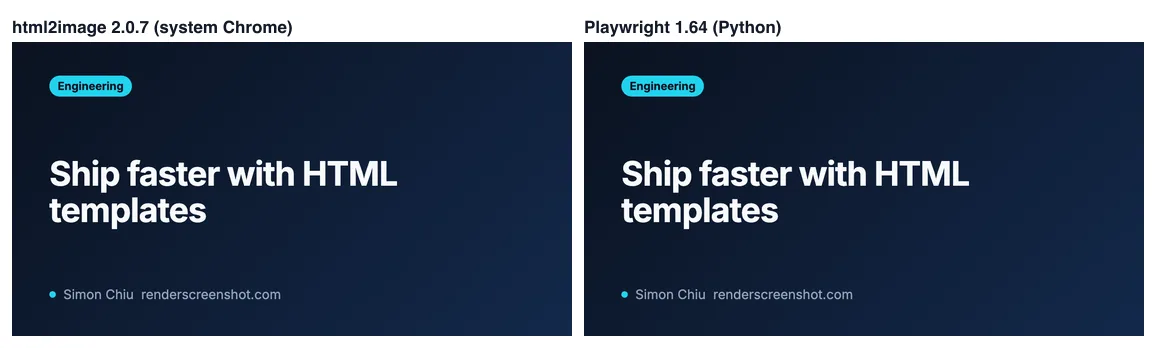
The pixels were right: same engine, same fonts, and the card's bytes matched our Puppeteer render exactly. The --default-background-color=00000000 flag gave the badge a transparent corner (alpha 0). The time is the problem. Every call starts and stops a full Chrome, so 100 images cost about five minutes. There is also no way to wait for a selector or for fonts, which matters for templates that draw with JavaScript. html2image is a good fit for a script that makes a handful of images on a developer laptop. It is not a fit for a web request handler.
On a server it also requires a browser installed system-wide. On Linux that usually means installing Chromium and its fonts yourself (fonts-noto-cjk and fonts-noto-color-emoji on Debian and Ubuntu for the i18n template).
Playwright: the default choice
pip install playwright==1.64.0
playwright install --with-deps chromium   # --with-deps installs Linux system libraries
"""render_pw.py: HTML string to PNG with Playwright (sync API)."""
import html
import sys

from playwright.sync_api import sync_playwright

TEMPLATE = """<!doctype html>
<html><head><meta charset="utf-8">
<link href="https://fonts.googleapis.com/css2?family=Inter:wght@400;700&display=block" rel="stylesheet">
<style>
  html, body {{ margin: 0; width: 1200px; height: 630px; }}
  body {{ box-sizing: border-box; padding: 72px 80px; display: flex; flex-direction: column;
          justify-content: space-between; background: #0b1220; color: #f8fafc; font-family: Inter, sans-serif; }}
  h1 {{ margin: 0; font-size: 72px; line-height: 1.08; }}
  p {{ margin: 0; font-size: 28px; color: #94a3b8; }}
</style></head>
<body><p>renderscreenshot.com</p><h1>{title}</h1><p>{author}</p></body></html>"""


def render(title: str, author: str, out: str) -> None:
    doc = TEMPLATE.format(title=html.escape(title), author=html.escape(author))
    with sync_playwright() as p:
        browser = p.chromium.launch()
        try:
            page = browser.new_page(viewport={"width": 1200, "height": 630}, device_scale_factor=1)
            page.set_content(doc, wait_until="load", timeout=15_000)
            page.evaluate("document.fonts.ready.then(() => true)")  # web fonts are not covered by 'load'
            page.screenshot(path=out, type="png")
        finally:
            browser.close()


if __name__ == "__main__":
    title = sys.argv[1] if len(sys.argv) > 1 else "Ship faster with HTML templates"
    render(title, "Simon Chiu", sys.argv[2] if len(sys.argv) > 2 else "card.png")
    print("wrote card")
Python details that trip people up:
- The CSS braces. The template uses
str.format, so literal CSS braces are doubled ({{ }}). Forgetting that raisesKeyError. A template engine such as Jinja2 with autoescaping avoids both this and manual escaping. html.escapeescapes quotes by default (quote=True), so values are safe inside quoted attributes too. It is not safe inside<script>orstyleattributes.page.evaluate("document.fonts.ready.then(() => true)").document.fonts.readyresolves to aFontFaceSet, which cannot be serialized back to Python; the.then(() => true)returns a plain value. We run it becauseloadfired before Google Fonts arrived in our Puppeteer tests of the same card.device_scale_factorbelongs onnew_pageornew_context, not onset_viewport_size.
| Template | Render time, browser already running (median of 5) | PNG bytes |
|---|---|---|
| card | 383 ms | 292,087 |
| receipt | 29 ms | 30,495 |
| badge | 22 ms | 15,155 |
| modern | 82 ms | 176,905 |
| i18n | 44 ms | 60,705 |
The card is slow because it waits for Google Fonts; inline the font as a data: URI if you render many cards. Launching Chromium took about 100 ms on this machine, so even a one-image script finishes in well under a second.
Many images: async and one browser
For a batch, keep one browser and limit concurrent pages with a semaphore:
"""batch_async.py: render many HTML documents with one browser and a small page pool."""
import asyncio
import html
import time
from pathlib import Path

from playwright.async_api import async_playwright

CARD = Path("../html/card.html").read_text()
TITLE = "Ship faster with HTML templates"


async def render_all(titles: list[str], concurrency: int = 4) -> None:
    sem = asyncio.Semaphore(concurrency)
    async with async_playwright() as p:
        browser = await p.chromium.launch()
        try:
            async def one(i: int, title: str) -> None:
                async with sem:
                    page = await browser.new_page(viewport={"width": 1200, "height": 630})
                    try:
                        await page.set_content(CARD.replace(TITLE, html.escape(title)), wait_until="load")
                        await page.evaluate("document.fonts.ready.then(() => true)")
                        await page.screenshot(path=f"out/batch-{i}.png")
                    finally:
                        await page.close()

            await asyncio.gather(*(one(i, t) for i, t in enumerate(titles)))
        finally:
            await browser.close()


if __name__ == "__main__":
    t0 = time.perf_counter()
    asyncio.run(render_all([f"Post number {i + 1}" for i in range(20)]))
    print(f"20 cards in {(time.perf_counter() - t0) * 1000:.0f} ms")
Twenty cards took 3.9 to 4.0 seconds in three runs, including browser launch, against roughly 70 seconds at html2image's per-image time. In a Django or FastAPI app, do not launch a browser per request; run renders in a worker (Celery, RQ, or an asyncio task with a shared browser) and store the result.
The API option
If you cannot or do not want to install a browser where your Python runs (serverless functions, slim containers, shared hosting), send the HTML over HTTP. With requests you can use every parameter in the API, including the two the SDK builder does not cover yet, html_base_url and output.transparent:
"""api_requests.py: HTML to PNG through the RenderScreenshot API with plain requests."""
import html
import os

import requests

API = "https://api.renderscreenshot.com/v1/screenshot"

title = html.escape("Tom & Jerry <script>")
doc = f"""<!doctype html><html><head><meta charset="utf-8">
<link href="https://fonts.googleapis.com/css2?family=Inter:wght@700&display=block" rel="stylesheet">
<style>html,body{{margin:0;background:transparent}}body{{display:grid;place-items:center;height:160px;
font:700 40px Inter,sans-serif;color:#0f172a}}</style></head><body><img src="/img/logo.svg" alt="" height="48"> {title}</body></html>"""

resp = requests.post(
    API,
    headers={"Authorization": f"Bearer {os.environ['RS_API_KEY']}"},
    json={  # requests encodes the body; never build the JSON by hand
        "html": doc,
        "html_base_url": "https://assets.example.com",  # resolves /img/logo.svg
        "viewport": {"width": 800, "height": 160, "scale": 2},
        "output": {"format": "png", "transparent": True},
        "wait": {"until": "networkidle", "timeout": 20},
    },
    timeout=60,
)
if resp.status_code != 200:
    err = resp.json().get("error", {})
    raise SystemExit(f"{err.get('code')}: {err.get('message')} (retryable={err.get('retryable')})")

with open("title.png", "wb") as f:
    f.write(resp.content)
print("CDN copy:", resp.headers.get("X-Cache-URL"))
With the Python SDK the common case is shorter:
import os
from renderscreenshot import Client, TakeOptions

with Client(os.environ['RS_API_KEY']) as client:
    image = client.take(TakeOptions.html(doc).width(1200).height(630).format('png').wait_for('networkidle'))
The X-Cache-URL header is a public CDN link to the same image, valid for the cache TTL (24 hours by default). It is handy when you need to put the image in an email or a database without uploading it yourself. Parameter details are in the HTML to image guide.
Troubleshooting
| Symptom | Cause | Fix |
|---|---|---|
KeyError when building the template |
CSS braces in a str.format template |
Double them ({{ }}) or use Jinja2 |
| Fallback font in the image | Screenshot before the web font loaded | page.evaluate("document.fonts.ready.then(() => true)"); inline the font |
Executable doesn't exist from Playwright |
Browsers not installed for this version | playwright install chromium in the same environment |
| Missing libraries on Linux | Chromium system dependencies | playwright install --with-deps chromium |
| Boxes instead of CJK or emoji | No fonts for those scripts on the server | Install fonts-noto-cjk and fonts-noto-color-emoji, or use an API |
| html2image output has a white background | Chrome default canvas | custom_flags=["--default-background-color=00000000"] |
| html2image is slow | One Chrome start per image | Switch to Playwright with one browser |
OSError: wkhtmltoimage not found (imgkit) |
Binary not installed or not on PATH | Replace imgkit; see the wkhtmltoimage alternative |
validation_error from the API |
JSON built by hand | Pass a dict to json= |
Summary
- Playwright for anything that runs more than occasionally. It is fast once the browser is up, and it gives you waits and transparency.
- html2image for quick local scripts on a machine that already has Chrome.
- imgkit only to keep legacy code alive while you migrate.
- An API when the Python process cannot host a browser. Get a free API key and send the
requestsexample above as your first call.
For PNG-specific detail (transparency, file size, how far non-browser renderers fall behind on CSS), read render HTML to PNG.
Related in this topic
- HTML to Image API: Render HTML and CSS to PNG Send HTML and CSS, get a PNG, JPEG, WebP or PDF back from real Chrome. Base URLs for assets, web fonts, transparent backgrounds and signed URLs.
- html2canvas Alternative: Render the DOM in Real Chromium We tested html2canvas 1.4.1 against real Chromium on 14 CSS features. See what it drops, when it is still the right tool, and how to move capture server-side.
- HTML to Image in Node.js: 4 Ways, Same 6 Templates HTML to image in Node.js with Puppeteer, node-html-to-image, satori and an API, run on the same six templates. Measured times, what broke, and code that works.
- HTML to Image in JavaScript: 4 Libraries Tested HTML to image in the browser with html2canvas, html-to-image, modern-screenshot and dom-to-image-more, tested on 16 CSS edge cases, and when to go server-side.
- Render HTML to an Image With Puppeteer (setContent) Render an HTML string to PNG with Puppeteer setContent: fonts that really loaded, transparent backgrounds, escaping user input, batching, and measured timings.