Disclosure: RenderScreenshot is our product. html2canvas is a free, open-source library that we do not compete with on price, and for some jobs it is the better choice. This page says which ones.
html2canvas does not take a screenshot. It reads the DOM and computed styles, then repaints the page onto a <canvas> with its own drawing code. Every CSS feature it does not reimplement comes out wrong or missing. A server-side renderer such as the RenderScreenshot HTML to image API loads the same HTML in real Chromium and returns the pixels the browser painted.
We wanted to know how large that gap is, so we measured it.
TL;DR: which one to use
| Choose html2canvas if | Choose a server-side Chromium render if |
|---|---|
| The capture must work offline or without a backend | The image must match what the browser shows, pixel for pixel |
| The content must never leave the visitor's device | Your CSS uses filter, mix-blend-mode, backdrop-filter, clip-path, conic-gradient() or oklch() |
| The area is simple: text, flat colors, borders, plain images | The page loads images or fonts from another origin without CORS headers |
| You capture a few images per day and cost must be zero | You need iframes, embeds or video posters in the image |
| You need the image instantly, with no network round trip | You need the same image for every visitor (OG cards, reports, archives) |
What we tested
We built one test page with 14 boxes, each 240 x 160 px and each using one CSS feature. For every box we:
- took Chromium's own element screenshot (Playwright
locator.screenshot()), which is the ground truth, - ran
html2canvas(box, { scale: 1 })in the same page and exported the canvas as PNG, - compared the two images with
pixelmatchat a threshold of 0.1 and counted the pixels that differ.
Method box: html2canvas 1.4.1 (latest on npm), Playwright 1.64.1, Chromium 156.0.8078.4 headless shell, macOS on an Apple M1 Pro, device scale factor 1, run on 2026-10-15. The cross-origin test serves the image from 127.0.0.1 to a page on localhost without an Access-Control-Allow-Origin header.
| CSS feature | Pixels that differ | What html2canvas drew |
|---|---|---|
transform: rotate() |
0% | Correct |
text-shadow |
0% | Correct |
writing-mode: vertical-rl |
3.7% | Close, small glyph offsets |
box-shadow |
5.6% | Close, edges differ |
object-fit: cover |
21.0% | Image stretched instead of cropped |
clip-path: polygon() |
49.6% | Full rectangle, no clip |
backdrop-filter: blur() |
74.0% | Blank box |
filter: grayscale() blur() |
80.1% | Original colors, no blur |
background-clip: text |
93.1% | Solid gradient block, text lost |
iframe |
98.5% | Empty box |
conic-gradient() |
98.6% | Empty box |
Cross-origin <img> without CORS |
99.7% | Empty box |
mix-blend-mode: multiply |
100% | Top layer only, no blending |
oklch() color |
no output | The call threw: Attempting to parse an unsupported color function "oklch" |
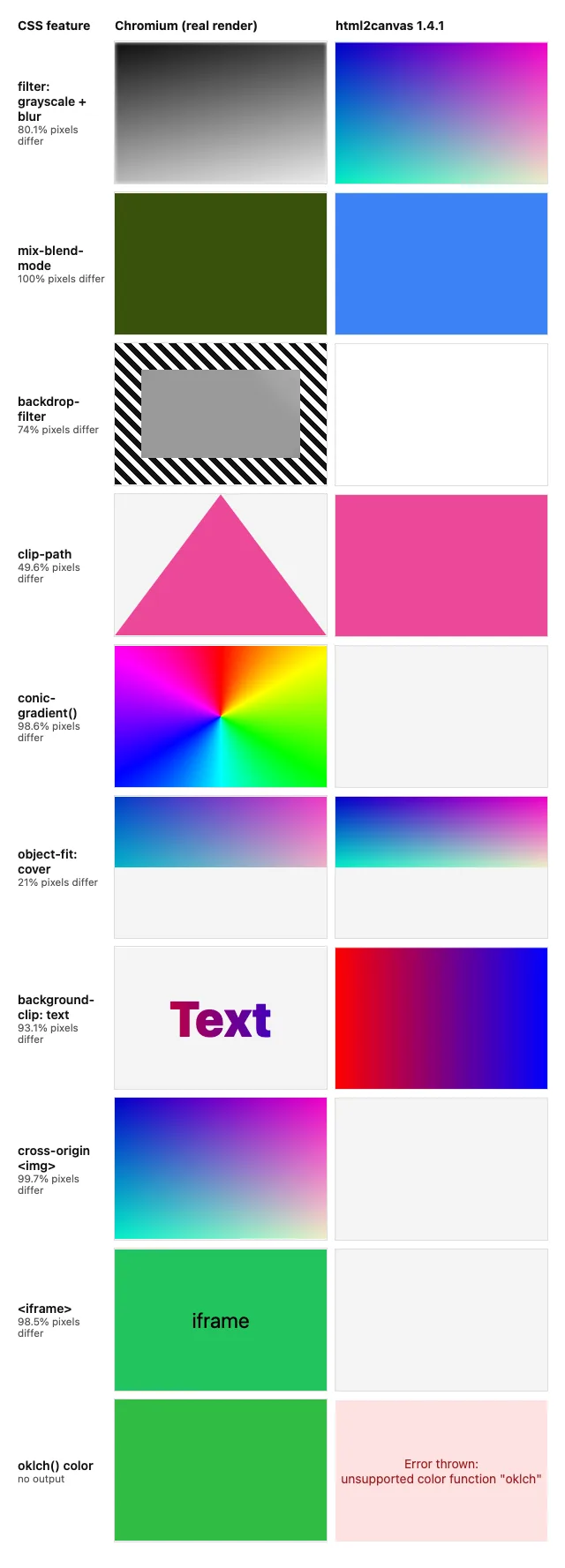
Two results matter more than the rest:
oklch()breaks the whole capture, not one box. When we ran html2canvas on the full test page, it rejected until we removed the singleoklch()element. Tailwind CSS v4 writes its default color palette inoklch(), so a new Tailwind project can hit this on the first try. The html2canvas troubleshooting guide covers the usual workarounds.- Cross-origin images vanish silently. There is no error. The box is just empty. The fix in html2canvas is
useCORS: trueplus correct CORS headers on every image host, or a proxy you run. A server-side browser loads the image like any other page load, so CORS does not apply.
Speed was not the problem. On the full test page (with the oklch() box removed), html2canvas took a median 72 ms and Chromium's native full-page screenshot took 45 ms in the same browser (8 runs each). If you move capture to a server, you add a network round trip instead. That trade is worth it only when correctness matters.
Why the gap exists
html2canvas is a CSS reimplementation. For each element it reads getComputedStyle(), works out boxes, and calls Canvas 2D drawing methods. Layout comes from the browser, so positions are right. Painting comes from html2canvas, so any visual effect it has not written code for is skipped. That is why rotation and text shadows pass (they map to canvas transforms and shadow options) while blend modes, filters and newer color spaces fail.
Canvas security adds the second class of failures. A canvas that draws a cross-origin image without CORS becomes "tainted", and the browser blocks toDataURL(). html2canvas avoids the exception by leaving those images out. Iframes fail for a related reason: a page script cannot read another document's pixels.
A screenshot API has neither limitation, because the browser paints the page and the API reads the compositor output. The html2canvas vs html-to-image comparison covers the other client-side option, which uses SVG foreignObject and has a different list of failures.
Parameter mapping
| html2canvas option | RenderScreenshot equivalent | Notes |
|---|---|---|
html2canvas(element) |
capture.mode: "element" + capture.selector |
Or send only that element's HTML. See capture options. |
scale |
viewport.scale (1 to 3) |
Device scale factor, applied by Chromium. See viewport. |
width, height, windowWidth, windowHeight |
viewport.width, viewport.height |
The renderer lays out at this size. |
x, y + width, height (crop) |
capture.clip {x, y, width, height} |
Crop region in CSS pixels. |
backgroundColor: null |
output.transparent: true |
PNG or WebP only. See output options. |
useCORS, proxy, allowTaint |
Not needed | The page loads in a normal browser context. |
ignoreElements |
page.hide or page.remove |
Selectors to hide or remove before capture. |
onclone(doc) |
page.styles, page.scripts |
Inject CSS or JS before capture. See page modifications. |
imageTimeout |
wait.until: "networkidle", wait.timeout |
Wait for images and fonts, with a total timeout in seconds. See wait. |
canvas.toDataURL('image/jpeg', q) |
output.format, output.quality |
png, jpeg, webp, avif, pdf. |
Migration: move the capture to your server
The browser keeps one job: serialize the DOM and send it to your backend. Your backend holds the API key and calls the renderer. Never put an rs_live_ key in browser code.
// Browser: replaces `const canvas = await html2canvas(document.body)`.
async function snapshotPage() {
  // Serialize the live DOM without <script> tags, so the app does not boot a second time
  // inside the renderer.
  const root = document.documentElement.cloneNode(true);
  root.querySelectorAll('script').forEach((s) => s.remove());

  const res = await fetch('/api/snapshot', {
    method: 'POST',
    headers: { 'Content-Type': 'application/json' },
    body: JSON.stringify({
      html: '<!doctype html>' + root.outerHTML,
      baseUrl: location.href,
      width: window.innerWidth,
      height: window.innerHeight,
    }),
  });
  if (!res.ok) throw new Error(`snapshot failed: ${res.status}`);
  return res.blob(); // image/png: use URL.createObjectURL() or upload it
}
Two details make the server-side copy match the live page:
- Relative URLs. The renderer sees the HTML without the page's address, so
/styles.csswould not resolve. The server inserts a<base href>tag with the page URL. - Scripts. We remove
<script>tags before sending. The DOM is already rendered, and a second boot of a React or Vue app inside the renderer can duplicate or reset content.
Node.js (no dependencies, Node 22+)
// POST /api/snapshot {html, baseUrl, width, height} -> image/png import { createServer } from 'node:http'; const API = 'https://api.renderscreenshot.com/v1/screenshot'; const MAX_BODY = 2 * 1024 * 1024; // refuse snapshots over 2 MB // Put a <base> tag first in <head> so relative CSS, fonts and images resolve // against the page the user was on. function withBase(html, baseUrl) { const base = `<base href="${new URL(baseUrl).href.replace(/"/g, '"')}">`; return /<head[^>]*>/i.test(html) ? html.replace(/<head[^>]*>/i, (m) => m + base) : base + html; } async function render({ html, baseUrl, width = 1280, height = 800 }) { const res = await fetch(API, { method: 'POST', headers: { Authorization: `Bearer ${process.env.RS_API_KEY}`, 'Content-Type': 'application/json', }, body: JSON.stringify({ html: withBase(html, baseUrl), viewport: { width: Math.min(width, 1920), height: Math.min(height, 1080), scale: 2 }, output: { format: 'png' }, wait: { until: 'networkidle', timeout: 30 }, }), signal: AbortSignal.timeout(45_000), }); if (!res.ok) throw new Error(`render failed: ${res.status} ${await res.text()}`); return Buffer.from(await res.arrayBuffer()); } createServer(async (req, res) => { if (req.method !== 'POST' || req.url !== '/api/snapshot') return res.writeHead(404).end(); // Authenticate your own user here before you spend a credit on their request. let body = ''; for await (const chunk of req) { body += chunk; if (body.length > MAX_BODY) return res.writeHead(413).end(); } try { const png = await render(JSON.parse(body)); res.writeHead(200, { 'Content-Type': 'image/png' }).end(png); } catch (err) { console.error(err); res.writeHead(502, { 'Content-Type': 'text/plain' }).end('snapshot failed'); } }).listen(Number(process.env.PORT ?? 3000));
Python
import os
import re
from html import escape

import requests

API = "https://api.renderscreenshot.com/v1/screenshot"


def with_base(html: str, base_url: str) -> str:
    tag = f'<base href="{escape(base_url, quote=True)}">'
    if re.search(r"<head[^>]*>", html, re.I):
        return re.sub(r"(<head[^>]*>)", lambda m: m.group(1) + tag, html, count=1, flags=re.I)
    return tag + html


def render_snapshot(html: str, base_url: str, width: int = 1280, height: int = 800) -> bytes:
    resp = requests.post(
        API,
        headers={"Authorization": f"Bearer {os.environ['RS_API_KEY']}"},
        json={
            "html": with_base(html, base_url),
            "viewport": {"width": min(width, 1920), "height": min(height, 1080), "scale": 2},
            "output": {"format": "png"},
            "wait": {"until": "networkidle", "timeout": 30},
        },
        timeout=45,
    )
    resp.raise_for_status()
    return resp.content
Call render_snapshot() from your Django, Flask or FastAPI view and return the bytes with Content-Type: image/png.
Ruby
require 'net/http'
require 'json'
require 'cgi'

API = URI('https://api.renderscreenshot.com/v1/screenshot')

def with_base(html, base_url)
  tag = %(<base href="#{CGI.escapeHTML(base_url)}">)
  html.match?(/<head[^>]*>/i) ? html.sub(/<head[^>]*>/i) { |m| m + tag } : tag + html
end

def render_snapshot(html, base_url, width: 1280, height: 800)
  body = {
    html: with_base(html, base_url),
    viewport: { width: [width, 1920].min, height: [height, 1080].min, scale: 2 },
    output: { format: 'png' },
    wait: { until: 'networkidle', timeout: 30 }
  }
  res = Net::HTTP.start(API.host, API.port, use_ssl: true, read_timeout: 45) do |http|
    http.post(API.path, body.to_json,
              'Authorization' => "Bearer #{ENV.fetch('RS_API_KEY')}",
              'Content-Type' => 'application/json')
  end
  raise "render failed: #{res.code} #{res.body}" unless res.is_a?(Net::HTTPSuccess)

  res.body
end
In Rails, call it from a controller action and finish with send_data png, type: 'image/png', disposition: 'inline'.
Tested on 2026-10-15 with Node 22.18.0, Python 3.14 (requests 2.34.2) and Ruby 4.0.7. The browser snippet ran in Chromium through Playwright 1.64.1 against the Node server. All three servers sent their requests to a local mock of api.renderscreenshot.com, and we checked the logged JSON bodies against the content input reference. The live API was not called in this test.
Pitfalls when you serialize the DOM
- Typed form values are not in
outerHTML. html2canvas reads the.valueproperty; serialization reads attributes. Before you clone, copy each input's value into itsvalueattribute, and setcheckedandselectedattributes to match. - Canvas and WebGL content is not in the HTML. Convert each
<canvas>to an<img src="data:...">withcanvas.toDataURL()before you serialize. - Fonts and images must be reachable from the internet. The renderer cannot load
localhostor intranet assets. Inline them as data URIs if needed. - The HTML leaves the device. Remove tokens, personal data and anything else you do not need in the image. Treat the endpoint like any upload endpoint: authenticate, rate-limit and cap the size.
If the view you capture has its own URL, skip serialization. Send url instead of html, plus cookies or headers for authenticated pages.
Cost at three volumes
html2canvas costs nothing per image, because your visitors' devices do the work. RenderScreenshot charges 1 credit per render. The table uses our plans as listed on /pricing, checked on 2026-10-15.
| Images per month | html2canvas | RenderScreenshot |
|---|---|---|
| 1,000 | $0 | Starter, $10/month (2,500 credits) |
| 10,000 | $0 | Growth, $40/month (12,000 credits) |
| 100,000 | $0 | More than the Scale plan's 60,000 credits ($100/month). Contact us, or use the cache below. |
Caching changes the arithmetic when many requests produce the same image. Identical requests can come back from the cache, and the X-Cache-URL header gives you a public CDN link. See caching for how cache hits are billed. The free plan includes 150 credits every month with no credit card, which is enough to run the migration code above on your own pages.
When to stay with html2canvas
Stay with it when the image is a convenience for one user and not a record. "Save this chart as PNG" in a dashboard, a bug-report screenshot attached to a support ticket, or an offline-first app are good fits. Also stay when the DOM holds data you may not send to any third party.
In those cases, reduce the failures inside html2canvas:
- convert
oklch()colors torgb()in theonclonecallback, or pin the affected elements to hex values, - enable
useCORS: trueand add CORS headers to your image CDN, - avoid blend modes, filters and backdrop blur in the captured area.
Move to a server-side render when the image must be correct for someone else: a social card, an invoice preview, a shared report, or a visual record of what a customer saw. Get a free API key and run the migration snippet on the page that html2canvas gets wrong today.