Disclosure: I build RenderScreenshot, which renders HTML to images on a server with real Chrome. That is a different approach from both libraries on this page. Everything below was measured with the libraries themselves; our API is only discussed in the last section.
Short answer: html-to-image matched Chrome's own pixels on our test card, ran 2.5 to 3 times faster after the first capture, and is about one ninth of the gzipped bundle size. html2canvas got four CSS features wrong, including the card's shadow, but it does one thing better: when an image fails to load, it leaves a gap and still gives you a picture, where html-to-image rejects the whole capture.
Both libraries run in the user's browser. If you need the same output for every user, or you need to capture pages you do not control, see the other screenshot tool comparisons and the server-side option at the end.
How the two libraries work
The difference in results comes from one design choice.
- html2canvas walks the DOM, reads computed styles, and repaints every box, border, background and text run onto a
<canvas>with its own JavaScript renderer. Anything its renderer does not know is skipped or approximated. - html-to-image clones the node, inlines computed styles, fonts and images as data URLs, wraps the clone in an SVG
<foreignObject>, and lets the browser draw that SVG onto a canvas. The browser's own engine paints the CSS.
So html2canvas output is limited by its CSS coverage, and html-to-image output is limited by what can be serialized and embedded (images, fonts, cross-origin resources).
Test setup
Tested on 2026-10-15 with Node 22.18.0, [email protected] (Chrome for Testing 154, headless), [email protected] and [email protected], on macOS with an Apple M1 Pro.
- Test card: a 640 px wide card built to cover features people use in share images and export buttons: a gradient background with rounded corners and a box shadow, a pill badge, gradient text with
background-clip: text, a::beforequote mark, emoji and Japanese text, a CSS grid with aconic-gradienttile, a rotated tile and a dashed border withtext-shadow, a blurred circle usingfilter: blur(), an inline SVG, and two images. - Reference: Puppeteer's element screenshot of the same card, which is what Chrome paints.
- Method: load the page, inject the library, call it 7 times on the card. The first call is reported as "cold", the median of the other 6 as "warm". The whole run was repeated in 3 fresh browser sessions.
- Calls used:
html2canvas(card, { useCORS: true, logging: false }), thencanvas.toDataURL('image/png')htmlToImage.toPng(card, { cacheBust: true })
Render results
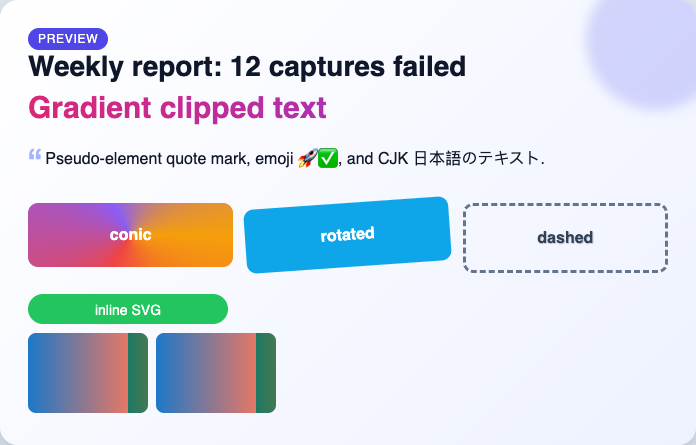
elementHandle.screenshot()).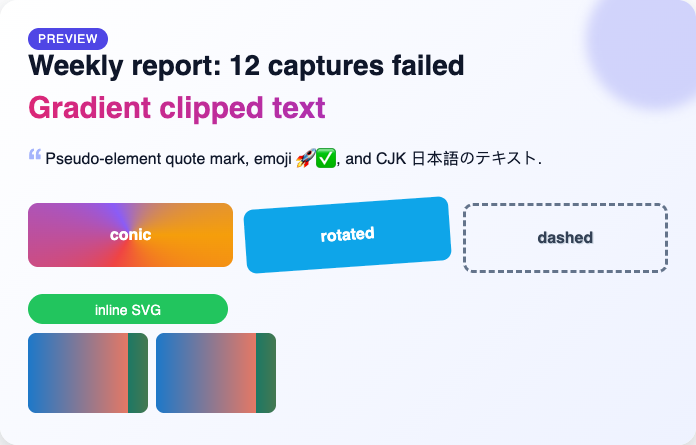
toPng(): matches the reference on every feature we checked.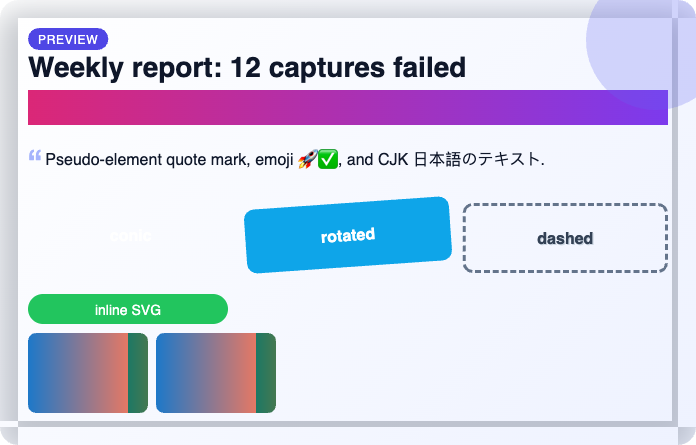
| Feature | html2canvas 1.4.1 | html-to-image 1.11.13 |
|---|---|---|
| Linear gradient background, border radius | Yes | Yes |
Soft box-shadow on a rounded card |
No: hard gray bands and square corners | Yes |
background-clip: text (gradient text) |
No: solid gradient bar, text lost | Yes |
conic-gradient |
No: background missing | Yes |
filter: blur() |
No: drawn sharp | Yes |
transform: rotate() |
Yes | Yes |
Dashed border, text-shadow |
Yes | Yes |
::before pseudo-element content |
Yes | Yes |
| Emoji and CJK text | Yes | Yes |
| Inline SVG | Yes | Yes |
| Same-origin image | Yes | Yes |
| Cross-origin image with CORS headers | Yes (with useCORS: true) |
Yes |
Speed and size
| Measure | html2canvas | html-to-image |
|---|---|---|
| First capture (3 sessions) | 141 to 415 ms | 41 to 51 ms |
| Later captures, median (3 sessions) | 77 to 91 ms | 29 to 31 ms |
| PNG output for the card | 201.5 KB | 210.9 KB |
| Minified bundle, esbuild 0.25.0 | 204.8 KB | 12.8 KB (toPng only) |
| Gzipped bundle | 47.5 KB | 5.2 KB |
| Latest release on npm (checked 2026-10-15) | 1.4.1, January 2022 | 1.11.13, February 2025 |
The times are for one 640 px card on a fast laptop. On a mid-range phone, multiply by several times. The cold html2canvas number moved a lot between sessions, so treat it as a range.
The failure that will bite you: cross-origin images
We served the second image from another origin without an Access-Control-Allow-Origin header, which is common for third-party avatars and CDN images, and ran each library again.
| Library and options | Result |
|---|---|
| html2canvas, default | Capture succeeded. The cross-origin image was silently missing. |
html2canvas, useCORS: true |
Capture succeeded. CORS error in the console, image missing. |
| html-to-image, default | Promise rejected with a DOM Event, not an Error. No image at all. |
html-to-image, imagePlaceholder set |
Capture succeeded with the placeholder in place of the image. |
Two practical rules follow.
- With html-to-image, always catch, and log something useful, because
err.messageisundefinedon anEvent:
import { toPng } from 'html-to-image';

const GRAY_PIXEL = 'data:image/gif;base64,R0lGODlhAQABAIAAAMzMzP///yH5BAEAAAAALAAAAAABAAEAAAICRAEAOw==';

export async function captureCard(node) {
  try {
    return await toPng(node, {
      pixelRatio: 2,                 // sharper output on any screen
      imagePlaceholder: GRAY_PIXEL,  // keep going if one image cannot be fetched
      cacheBust: true,
    });
  } catch (err) {
    const reason = err instanceof Error ? err.message : `resource failed to load (${err?.type ?? 'unknown'})`;
    throw new Error(`Card capture failed: ${reason}`);
  }
}
- With html2canvas, a "successful" capture can still be wrong. If images matter, check that every
<img>in the node is same-origin or served with CORS headers before you trust the output.
Does foreignObjectRendering close the gap?
html2canvas has a foreignObjectRendering: true option that uses the same SVG trick as html-to-image. We tried it on the same card.
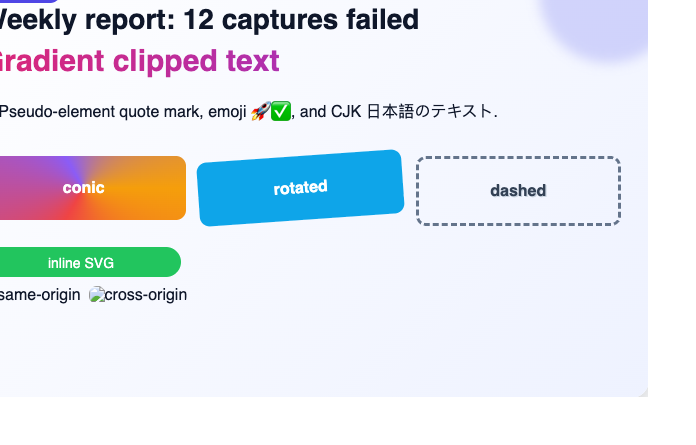
foreignObjectRendering: true: correct CSS, wrong position, no images.The CSS problems went away, but the card was offset by the page padding, the top line was clipped, and both images appeared as broken-image icons because this mode does not inline them. Warm captures took about 80 ms. In our test it was not a drop-in fix.
Minimal usage for each
html2canvas:
import html2canvas from 'html2canvas';

const node = document.querySelector('#card');
const canvas = await html2canvas(node, {
  scale: 2,           // device pixel ratio for the output
  useCORS: true,      // try CORS for cross-origin images
  backgroundColor: null, // transparent instead of the default white
  logging: false,
});
const dataUrl = canvas.toDataURL('image/png');
html-to-image:
import { toPng, toBlob } from 'html-to-image';

const node = document.querySelector('#card');
const dataUrl = await toPng(node, { pixelRatio: 2 });
// toBlob avoids a large base64 string when you upload the result
const blob = await toBlob(node, { pixelRatio: 2 });
Both run only in a browser. In Node you need a headless browser around them, which is what the test harness below does.
Decision table
| Situation | Choose |
|---|---|
| Modern CSS (gradients, filters, clipped text, shadows) must look right | html-to-image |
| Bundle size matters (a widget, a landing page) | html-to-image |
| The node contains images you do not control and a partial picture is better than an error | html2canvas, or html-to-image with imagePlaceholder |
| You already use html2canvas and your layouts are simple boxes and text | Keep html2canvas |
| Output must be identical for every user, browser and device | Neither: render on a server |
| You need to capture another site, not your own DOM | Neither: both only see the current document |
A note on scope: we tested in Chromium only. html-to-image relies on the browser's SVG foreignObject support, which differs between engines, so run your own cards in Safari and Firefox before you ship. Our html2canvas troubleshooting guide covers more failure cases, and the JavaScript HTML-to-image tutorial goes deeper into the html-to-image options.
Reproduce the test
Install [email protected] [email protected] [email protected], put your page at corpus/features.html with the target node as #card, serve the project folder (any static server that sends Access-Control-Allow-Origin: * works), and run this with BASE_URL set to that server:
// Compare html2canvas and html-to-image inside headless Chrome.
import puppeteer from 'puppeteer';
import { mkdir, writeFile } from 'node:fs/promises';

const BASE = process.env.BASE_URL ?? 'http://127.0.0.1:8080';
const RUNS = 7;
const libs = {
  html2canvas: {
    script: '/node_modules/html2canvas/dist/html2canvas.min.js',
    run: `async () => (await html2canvas(document.getElementById('card'), { useCORS: true, logging: false })).toDataURL('image/png')`,
  },
  'html-to-image': {
    script: '/node_modules/html-to-image/dist/html-to-image.js',
    run: `async () => htmlToImage.toPng(document.getElementById('card'), { cacheBust: true })`,
  },
};
const median = (xs) => [...xs].sort((a, b) => a - b)[Math.floor(xs.length / 2)];

await mkdir('out', { recursive: true });
const browser = await puppeteer.launch();
try {
  for (const [name, lib] of Object.entries(libs)) {
    const page = await browser.newPage();
    await page.setViewport({ width: 800, height: 700 });
    await page.goto(`${BASE}/corpus/features.html`, { waitUntil: 'networkidle0' });
    await page.addScriptTag({ url: lib.script });
    const times = [];
    let dataUrl;
    for (let i = 0; i < RUNS; i++) {
      const t0 = performance.now();
      dataUrl = await page.evaluate(`(${lib.run})()`);
      times.push(performance.now() - t0);
    }
    const png = Buffer.from(dataUrl.split(',')[1], 'base64');
    await writeFile(`out/${name}.png`, png);
    console.log(name, `cold ${times[0].toFixed(0)} ms`, `warm ${median(times.slice(1)).toFixed(0)} ms`, `${png.length} bytes`);
    await page.close();
  }
} finally {
  await browser.close();
}
When the browser is the problem: render on a server
Both libraries depend on the visitor's browser: its fonts, its engine, its memory, and its CORS rules. When that is not acceptable, render the same HTML on a server with real Chrome. With RenderScreenshot you can send the markup directly (see HTML content input):
curl -o card.png \
  -H "Authorization: Bearer $RS_API_KEY" \
  -H "Content-Type: application/json" \
  -d '{"html": "<div style=\"width:640px;padding:28px;font-family:sans-serif\"><h2>Weekly report</h2></div>", "viewport": {"width": 700, "height": 400}, "output": {"format": "png"}}' \
  https://api.renderscreenshot.com/v1/screenshot
Or capture one element of a live page with the Node SDK:
import { writeFile } from 'node:fs/promises';
import { Client, TakeOptions } from 'renderscreenshot';

const client = new Client(process.env.RS_API_KEY);
const png = await client.take(TakeOptions.url('https://example.com').element('body p').scale(2));
await writeFile('element.png', png);
Images on the page load like they do for any visitor, so there is no canvas CORS step, and every user gets the same pixels. If you escape user input before you put it into the html string, this is also safe for user-generated cards. Try it with a free API key, or test markup in the HTML to image tool.
Last tested: 2026-10-15 in Chromium only. Re-test planned on the next release of either library.