HTML to Image in JavaScript: 4 Libraries Tested
HTML to image in the browser with html2canvas, html-to-image, modern-screenshot and dom-to-image-more, tested on 16 CSS edge cases, and when to go server-side.
To turn a piece of a web page into an image in the browser, call a DOM-to-image library on the element:
import { domToPng } from 'modern-screenshot';

const dataUrl = await domToPng(document.querySelector('#report'), { scale: 2 });
No library in this category takes a real screenshot. JavaScript in a page cannot read the pixels the browser painted, so each library rebuilds the element as an image in one of two ways: html2canvas reads computed styles and repaints everything on a canvas itself, while html-to-image, modern-screenshot and dom-to-image-more clone the DOM with inlined styles into an SVG <foreignObject> and let the browser draw that. The second approach inherits the browser's CSS support, and our test shows it.
This post is about rendering an element of your own UI (a chart, a card, a receipt) to an image. If you want an image of a whole page, the Screen Capture API and server-side options are compared in taking a screenshot of a web page with JavaScript.
Tested on 2026-10-15 in headless Chrome 155.0.8059.79 (Puppeteer 25.14.0) on macOS 27 (Apple M1 Pro), with
[email protected],[email protected],[email protected]and[email protected]loaded from their published builds. The test page was served from127.0.0.1:8791; the cross-origin image came from127.0.0.1:8792with no CORS headers.
The test: 16 edge cases, compared pixel by pixel
We built a grid of sixteen 260 x 150 tiles, one CSS feature or DOM situation per tile, all on the same gradient. Chrome's own element screenshot of the grid is the reference. Each library rendered the whole grid at scale 1, and we compared every tile with the reference using pixelmatch (threshold 0.1). A tile counts as a match below 1% different pixels; we also checked each tile by eye.
| Tile | html2canvas 1.4.1 | html-to-image 1.11.13 | modern-screenshot 4.7.0 | dom-to-image-more 3.11.0 |
|---|---|---|---|---|
Web font (@font-face, same origin) |
Match | Match | Match | Match |
box-shadow + spread ring |
Wrong (8.5%) | Match | Match | Match |
backdrop-filter: blur() |
Match* | Match* | Match* | Match* |
clip-path: polygon() |
Ignored (17.2%) | Match | Match | Match |
mix-blend-mode: difference |
Ignored (32.2%) | Match | Match | Match |
conic-gradient + mask ring |
Missing (11.6%) | Match | Match | Match |
::before content |
Match | Match | Match | Match |
| Input value typed at runtime | Match** | Match** | Match** | Match** |
<canvas> element |
Match | Match | Match | Match |
Same-origin <iframe srcdoc> |
Blank (50.1%) | Blank (49.8%) | Match | Blank (49.9%) |
Cross-origin <img>, no CORS |
Blank (10.9%) | Whole call rejected | Blank (10.9%) | Broken-image icon (12.0%) |
| Inline SVG | Match | Match | Match | Match |
Scrolled container (scrollTop = 100) |
Match | Reset to top (2.4%) | Reset to top (1.6%) | Reset to top (2.4%) |
| Emoji | Slightly different (3.0%) | Match | Match | Match |
text-decoration: wavy |
Lost (1.7%) | Match | Match | Match |
3D perspective + rotateY |
Flattened (2.4%) | Match | Match | Match |
| Tiles matched | 7 of 16 | 13 of 16 (image removed); 0 with it | 14 of 16 | 13 of 16 |
* The test gradient behind the glass tile is smooth, so blurring it changes almost nothing. This tile does not prove backdrop-filter support in any library; test it on your own design. ** All four drew the typed value; the 2.4% difference is the text caret and focus ring area.
The html-to-image row comes from a second run with the cross-origin image removed, because with it the call rejected and produced nothing.
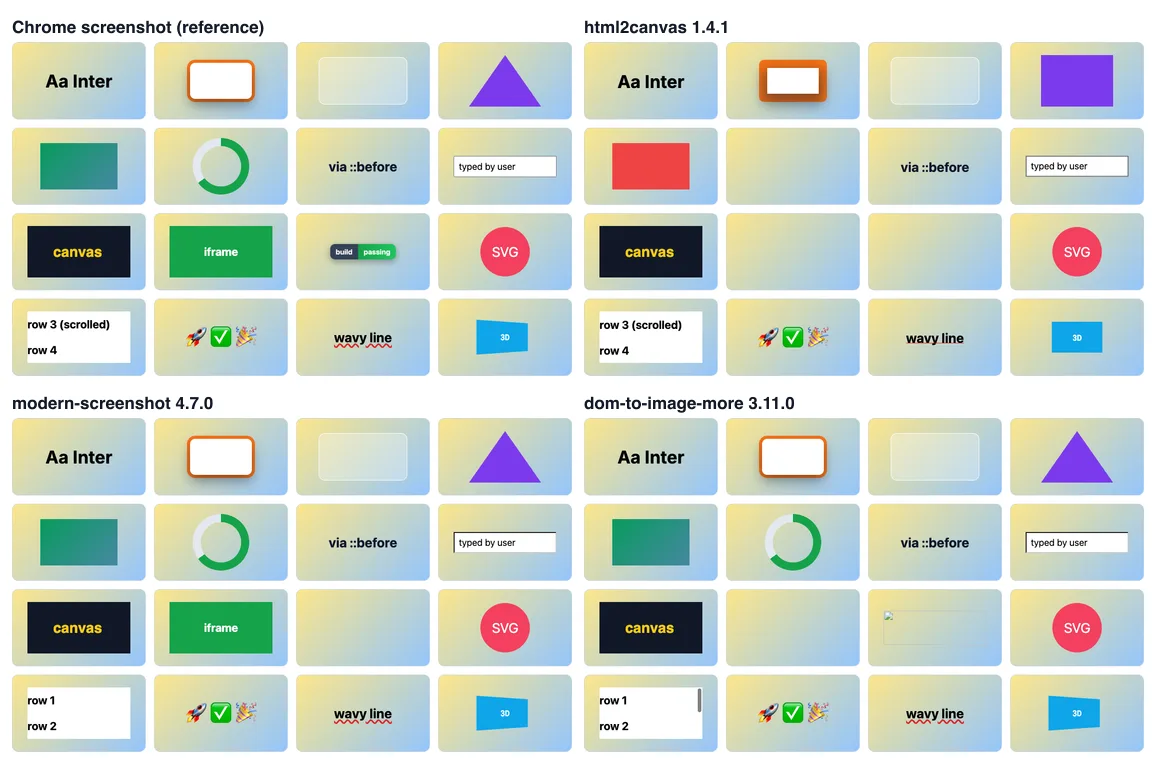
Time to render the whole 1088 x 648 grid, median of 5 per run, over several runs: html2canvas 99 to 102 ms, modern-screenshot 61 to 72 ms, dom-to-image-more 68 to 83 ms, html-to-image 68 ms (without the cross-origin image). All are fast enough for a button click.
What the results mean
html2canvas is a CSS reimplementation. It walks the DOM, reads computed styles and paints boxes, borders, text and images with the Canvas 2D API. Anything it has not implemented is drawn without that effect: the triangle became a rectangle, the blend mode and mask vanished, the 3D box went flat. On our modern-CSS template it differed from Chrome by 71% of pixels; on a plain receipt and on a chart it differed by under 1%. If your UI is boxes, text and images, it is fine. Its one advantage in our grid: it kept the scroll position of a scrolled container.
The foreignObject libraries let Chrome paint. They serialize the element with its computed styles into SVG and draw that SVG to a canvas, so CSS the browser supports usually just works. The costs are elsewhere:
- Everything the clone references must be inlined. Fonts, images and backgrounds are fetched and turned into
data:URLs. A cross-origin resource without CORS cannot be fetched, so it goes blank (modern-screenshot), shows a broken icon (dom-to-image-more) or, in html-to-image, rejects the entire promise with a bareEvent. SettingimagePlaceholderdid not stop that rejection in our test. - State that is not in the DOM is lost. Scroll positions reset to the top in all three.
- iframes are a separate document. Only modern-screenshot drew our same-origin
srcdocframe. No library can read a cross-origin frame's content; that is the browser's same-origin policy, not a missing feature.
modern-screenshot builds on the same approach as html-to-image and had the best results here. dom-to-image-more is a maintained fork of the original dom-to-image. If you are on unmaintained dom-to-image, either one is a straightforward swap.
A download button, done properly
// export-button.js: "Download as PNG" for one element of your own UI.
import { domToPng } from 'modern-screenshot';

export async function downloadElementAsPng(el, filename = 'export.png') {
  await document.fonts.ready; // a web font still loading would be drawn in the fallback font
  const dataUrl = await domToPng(el, {
    scale: Math.min(window.devicePixelRatio || 1, 2), // sharp on retina, bounded size
    backgroundColor: '#ffffff',                        // transparent by default
    filter: (node) => !(node instanceof Element && node.matches('[data-export-ignore]')),
  });
  const a = document.createElement('a');
  a.href = dataUrl;
  a.download = filename;
  a.click();
}

document.querySelector('#export').addEventListener('click', async (event) => {
  const button = event.currentTarget;
  button.disabled = true;
  try {
    await downloadElementAsPng(document.querySelector('#report'), 'report.png');
  } catch (err) {
    console.error('Export failed', err);
    alert('Could not export the image. Some images on this page may block it.');
  } finally {
    button.disabled = false;
  }
});
Points that matter in production:
- Mark controls you do not want in the image with
data-export-ignore(the export button itself, tooltips) and filter them out. - Serve your images with CORS headers (
Access-Control-Allow-Origin) or from your own origin. This one change removes the most common failure in all four libraries. - Cap the scale. A 3x export of a tall dashboard can exceed the browser's canvas size limit, and the call fails or returns a blank image.
- Catch errors. As the html-to-image result shows, a single bad resource can reject the whole call.
When to go server-side instead
Client-side export is free and instant, and it sees exactly the state the user is looking at. Move the work to a server when one of these is true:
| Need | Why the browser libraries struggle | Server-side answer |
|---|---|---|
| Pixel-exact output for any CSS | Clones and repaints are approximations (see the table) | A real browser screenshot |
| Third-party images, embeds, iframes | CORS and same-origin rules | A server browser loads them as a normal page |
| The same image for every user | Fonts, zoom and OS rendering differ per client | One renderer with fixed fonts |
| Images without a user present | No browser tab is open (emails, scheduled reports) | A job renders on a schedule |
| PDF output or very tall pages | Canvas size limits | Full-page capture or PDF from the renderer |
The server-side version of the button sends the page URL (with the user's session) to a renderer and captures one element. With the RenderScreenshot API:
// server: POST /exports/:reportId/png (Node 22). Forwards the user's session to the renderer.
const res = await fetch('https://api.renderscreenshot.com/v1/screenshot', {
  method: 'POST',
  headers: { Authorization: `Bearer ${process.env.RS_API_KEY}`, 'Content-Type': 'application/json' },
  body: JSON.stringify({
    url: `https://app.example.com/reports/${reportId}`,
    network: { cookies: [{ name: 'session', value: sessionToken, domain: 'app.example.com', secure: true, http_only: true }] },
    capture: { mode: 'element', selector: '#report' },
    viewport: { width: 1280, height: 800, scale: 2 },
    wait: { for_selector: '#report[data-ready]', timeout: 30 },
    output: { format: 'png' },
    cache: { ttl: 3600 },
  }),
});
if (!res.ok) throw new Error(`export failed: ${res.status}`);
The whole pattern, including signed download links and how to keep exported images private, is in the export to image use case. For your own HTML templates rather than live pages, the HTML to image API takes an HTML string. You can test the request with a free key.
Troubleshooting
| Symptom | Library | Cause | Fix |
|---|---|---|---|
Promise rejects with Event and no message |
html-to-image | A resource (often a cross-origin image) failed to load | Add CORS headers, proxy the image, or filter the node out |
| Image areas blank | All | Cross-origin image without CORS, or a tainted canvas | Access-Control-Allow-Origin on the image host; crossorigin="anonymous" on the <img> |
| Fallback font in the export | All | Font not loaded yet, or the font file is cross-origin without CORS | await document.fonts.ready; host fonts on your origin or with CORS |
| Shapes, blends or masks missing | html2canvas | Feature not implemented in its painter | Use a foreignObject library or render on a server |
| Scrolled list shows the top | foreignObject libraries | Scroll state is not in the cloned DOM | Expand the container before export, or render on a server |
| iframe is empty | All but modern-screenshot | The frame is a separate document | modern-screenshot for same-origin frames; a server render otherwise |
| Export is blurry | All | Scale 1 on a high-DPI screen | scale: 2 (modern-screenshot), pixelRatio: 2 (html-to-image), scale: 2 (html2canvas) |
| Blank image or failure on tall pages | All | Canvas size limit | Lower the scale, split the element, or render on a server |
For a head-to-head of the two most downloaded libraries on other cases, see html2canvas vs html-to-image; if html2canvas is failing you today, the html2canvas alternative page covers migration.
Related in this topic
- HTML to Image API: Render HTML and CSS to PNG Send HTML and CSS, get a PNG, JPEG, WebP or PDF back from real Chrome. Base URLs for assets, web fonts, transparent backgrounds and signed URLs.
- html2canvas Alternative: Render the DOM in Real Chromium We tested html2canvas 1.4.1 against real Chromium on 14 CSS features. See what it drops, when it is still the right tool, and how to move capture server-side.
- HTML to Image in Node.js: 4 Ways, Same 6 Templates HTML to image in Node.js with Puppeteer, node-html-to-image, satori and an API, run on the same six templates. Measured times, what broke, and code that works.
- HTML to Image in Python: imgkit, html2image, Playwright Convert HTML to an image in Python with html2image, Playwright or an API, compared on five templates with timings and renders, and why imgkit is a dead end.
- Render HTML to an Image With Puppeteer (setContent) Render an HTML string to PNG with Puppeteer setContent: fonts that really loaded, transparent backgrounds, escaping user input, batching, and measured timings.