HTML to Image in Node.js: 4 Ways, Same 6 Templates
HTML to image in Node.js with Puppeteer, node-html-to-image, satori and an API, run on the same six templates. Measured times, what broke, and code that works.

There are four practical ways to turn HTML into an image in Node.js. We ran all four on the same six templates (a social card with Google Fonts, a receipt with a table, a transparent badge, a modern-CSS grid, a CJK/emoji/RTL card and a Chart.js chart) and timed them:
| Approach | What renders the HTML | Runs real HTML/CSS? | Per image (our test) | Install weight |
|---|---|---|---|---|
Puppeteer (setContent) |
Chrome for Testing | Yes | 84 to 372 ms warm; 540 to 838 ms with launch | Chrome download |
| node-html-to-image | Puppeteer + chrome-headless-shell | Yes | 222 to 704 ms per call; 229 ms per card in a batch | Chrome download |
| satori + resvg | Its own layout engine, no browser | A subset, after a port | 142 to 255 ms | Two npm packages + font files |
| HTML to image API | Chrome on someone else's servers | Yes | Network round trip | None |
Short version: if your templates are real HTML and CSS, use a browser you launch once and reuse, or an API. Pick satori only when you design the template for satori from the start. The rest of this post shows the code for each, and the specific things that went wrong.
Tested on 2026-10-15 on macOS 27 (Apple M1 Pro), Node 22.18.0:
[email protected](Chrome 155.0.8059.79),[email protected],[email protected],@resvg/[email protected],@fontsource/[email protected]. Warm figures are the median of 5 runs, cold of 3. The API examples were run against a local mock of our API that checks the request body; we did not time the live API for this post.
The test templates
All six are full HTML documents at a fixed size, with user values passed through an escape function. They are the same templates we used for the Python version of this test, so the numbers can be compared across languages.
| Template | Size | What it exercises |
|---|---|---|
| card | 1200 x 630 | Google Fonts (Inter), gradient, flexbox gap |
| receipt | 600 x 760 | <table>, tabular-nums, dashed borders, rotated stamp |
| badge | 480 x 160 | Transparent background, box-shadow |
| modern | 1200 x 630 | Grid, custom properties, conic-gradient, backdrop-filter, clip-path, mask, mix-blend-mode |
| i18n | 1200 x 630 | Japanese, Chinese, Korean, Arabic (RTL), emoji |
| chart | 800 x 450 | Chart.js 4.5 from a CDN, animation: false |
Method 1: Puppeteer and setContent
This is the baseline, and the method the other browser-based tools wrap. The complete script, with escaping and font handling explained step by step, is in render HTML to an image with Puppeteer. The core:
import puppeteer from 'puppeteer';

const browser = await puppeteer.launch({ headless: 'shell' });
try {
  const page = await browser.newPage();
  await page.setViewport({ width: 1200, height: 630 });
  await page.setContent(html, { waitUntil: 'load' });
  await page.evaluate(() => document.fonts.ready); // web fonts are not covered by 'load'
  const png = await page.screenshot({ type: 'png' });
} finally {
  await browser.close();
}
| Template | Launch + render (cold) | Render only (warm) | PNG bytes |
|---|---|---|---|
| card | 838 ms | 372 ms | 175,070 |
| receipt | 540 ms | 97 ms | 29,505 |
| badge | 690 ms | 84 ms | 16,334 |
| modern | 588 ms | 122 ms | 155,840 |
| i18n | 632 ms | 119 ms | 59,880 |
| chart | 700 ms | 266 ms | 8,564 |
The cold column used headless: true. The card and chart are slow even warm because they wait for the network: Google Fonts and the Chart.js CDN. Inlining the font cut the card to about 100 ms in a separate test. Everything rendered as designed; this is the reference for the pixel comparisons below.
Method 2: node-html-to-image
node-html-to-image wraps Puppeteer, adds Handlebars templating and manages a small puppeteer-cluster. Version 6.2.0 launches with headless: "shell", which starts faster than full Chrome. That is why its single calls beat our cold Puppeteer numbers.
npm install [email protected]
// nhti-card.mjs: node-html-to-image renders HTML with Puppeteer + Handlebars.
import nodeHtmlToImage from 'node-html-to-image';
import { readFile } from 'node:fs/promises';

const template = await readFile('card.hbs', 'utf8'); // {{title}} is escaped by Handlebars; {{{title}}} is not
await nodeHtmlToImage({
  output: 'nhti-card.png',
  html: template,
  content: { title: process.argv[2] ?? 'Ship faster with HTML templates' },
  type: 'png',
  waitUntil: 'load',
  // The default viewport is 800x600; set it to the card size or backgrounds repeat at 800px.
  puppeteerArgs: { defaultViewport: { width: 1200, height: 630 } },
});
console.log('wrote nhti-card.png');
| Template | One call (starts a browser) |
|---|---|
| card | 704 ms |
| receipt | 243 ms |
| badge | 222 ms |
| modern | 271 ms |
| i18n | 251 ms |
| chart | 545 ms |
Things to know:
- Batch, or pay the launch every time. Pass an array as
contentand it renders all items in one browser. Twenty cards took 4,570 ms, 229 ms each, with the defaultmaxConcurrency: 2. Our own Puppeteer loop on one reused page did the same 20 cards in 1,662 ms. - Escaping is Handlebars' job.
{{title}}escapes;{{{title}}}inserts raw HTML. We passedTom & Jerry <script>and the image showed the text, not a tag. - It screenshots the
bodyelement by default (selector: 'body'), so a body smaller than the viewport gives a smaller image. - It inherits Puppeteer's font timing. The
loadwait has the same font gap described in the Puppeteer post. Add abeforeScreenshothook that waits fordocument.fonts.readywhen you use remote fonts.
Method 3: satori (no browser)
satori, from Vercel, converts an element tree to SVG with its own layout engine. You convert the SVG to PNG with @resvg/resvg-js. No Chrome is involved, which makes it fast and small. The cost: it is not a browser, so it implements a subset of CSS.
npm install [email protected] @resvg/[email protected] @fontsource/[email protected]
// satori-card.mjs: element tree -> SVG (satori) -> PNG (resvg). No browser, no JSX build step.
import { readFile, writeFile } from 'node:fs/promises';
import satori from 'satori';
import { Resvg } from '@resvg/resvg-js';

// A tiny h() so we can skip JSX. Text children are plain strings: satori draws them as text,
// so user input needs no HTML escaping here (there is no HTML parser involved).
const h = (type, style, ...children) =>
  ({ type, props: { style, children: children.length === 1 ? children[0] : children } });

const title = process.argv[2] ?? 'Ship faster with HTML templates';

// satori needs font data as TTF, OTF or WOFF (not WOFF2).
const fonts = [
  { name: 'Inter', weight: 400, style: 'normal', data: await readFile('node_modules/@fontsource/inter/files/inter-latin-400-normal.woff') },
  { name: 'Inter', weight: 700, style: 'normal', data: await readFile('node_modules/@fontsource/inter/files/inter-latin-700-normal.woff') },
];

const card = h('div', {
    display: 'flex', flexDirection: 'column', justifyContent: 'space-between', width: '100%', height: '100%', boxSizing: 'border-box',
    padding: '72px 80px', background: 'linear-gradient(135deg, #0b1220, #13294b)', color: '#f8fafc', fontFamily: 'Inter',
  },
  h('div', { display: 'flex', alignSelf: 'flex-start', padding: '8px 18px', borderRadius: 999, background: '#22d3ee', color: '#0b1220', fontWeight: 700, fontSize: 24 }, 'Engineering'),
  h('div', { fontSize: 72, fontWeight: 700, lineHeight: 1.08 }, title),
  h('div', { display: 'flex', fontSize: 28, color: '#94a3b8' }, 'Simon Chiu, renderscreenshot.com'),
);

const svg = await satori(card, { width: 1200, height: 630, fonts });
const png = new Resvg(svg).render().asPng();
await writeFile('satori-card.png', png);
console.log(`satori-card.png: ${png.length} bytes`);
Four details in that file each cost us a failed render first:
boxSizing: 'border-box'. Without it the 72 px padding was added to the 630 px height and the author line fell off the bottom of the card, with no error.- A single child must not be wrapped in an array. With
children: ['text']on the last element, the line was silently missing. - Do not escape text for satori. We first used
satori-html, which parses an HTML string. It escapes interpolated values itself, and satori draws entities literally: our title came out asTom & Jerry <script>. The element-tree form above has no HTML parser, so plain strings are safe. - WOFF2 is not accepted. Pass
.woff,.ttfor.otfdata.
What happened when we ported our HTML templates
We fed the five static templates to satori through satori-html, first unchanged and then with a minimal port (rules for html, body and :root moved to a root div, and the font shorthand expanded, because satori 0.59.1 rejects it with Failed to parse declaration "font: ..."). Ported results:
| Template | Time (warm) | Result vs Chrome |
|---|---|---|
| card | 150 ms | Matches |
| receipt | 143 ms | Table collapsed into one line of text; stamp rotated around the wrong origin |
| badge | 151 ms | Shape right, shadow and corner rendering differ (37% of pixels) |
| modern | 255 ms | Grid layout right; conic-gradient ring, backdrop-filter and the CSS variable on clip-path lost |
| i18n | 142 ms | Every CJK, Arabic and emoji glyph drawn as a box (only Inter was loaded) |
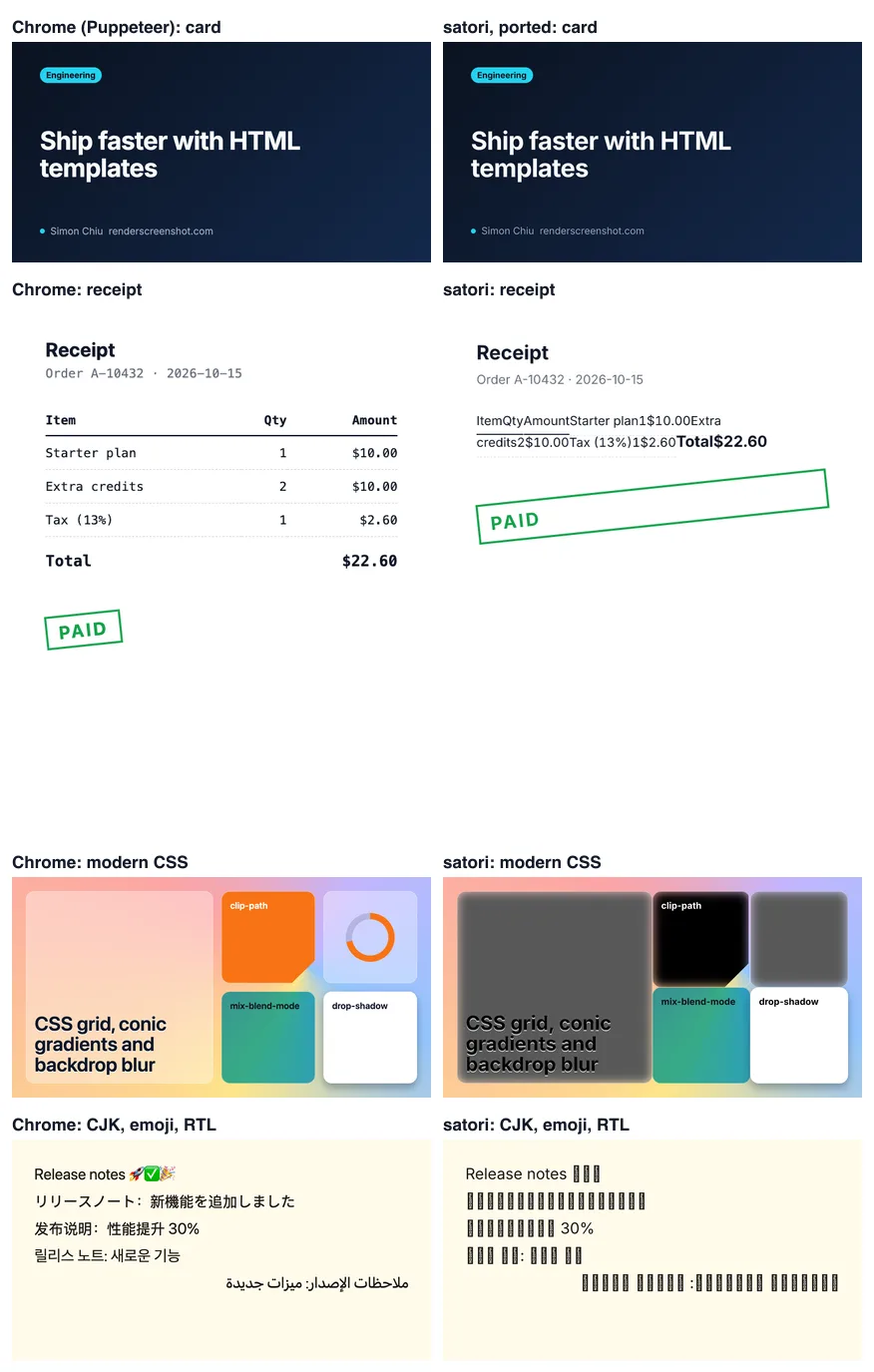
None of this is a bug report against satori: its README documents a CSS subset, and the fix for each item is to design for that subset (flexbox, no tables, font files for every script you need, loadAdditionalAsset for emoji). The lesson for tool choice is that satori is a separate template language that looks like HTML, not an HTML renderer. Our node-html-to-image vs satori comparison looks at the card case in more detail.
Method 4: an HTML to image API
The fourth option keeps your HTML templates as they are and moves Chrome out of your process. With the RenderScreenshot Node SDK:
npm install renderscreenshot
// api-card.mjs: same HTML, rendered by the RenderScreenshot API.
import { writeFile } from 'node:fs/promises';
import { Client, TakeOptions, RenderScreenshotError } from 'renderscreenshot';
import { templates } from './templates.mjs'; // your template functions, values escaped

const client = new Client(process.env.RS_API_KEY);

try {
  const image = await client.take(
    TakeOptions.html(templates.card.html({ title: 'Ship faster with HTML templates' }))
      .width(1200)
      .height(630)
      .format('png')
      .waitFor('networkidle') // the card links Google Fonts
  );
  await writeFile('api-card.png', image);
} catch (err) {
  if (err instanceof RenderScreenshotError) {
    console.error(`${err.code} (retryable: ${err.retryable}): ${err.message}`);
  }
  process.exitCode = 1;
}
The SDK builder has no method for transparency, so the badge goes through the raw JSON body with "output": { "format": "png", "transparent": true }; the HTML to image API page shows that request. For many images, send them in one batch request instead of a loop.
When the API is the better trade:
- Your app runs on a platform where Chrome is painful (serverless size limits, Alpine images, no fonts installed).
- You need the CJK and emoji fonts that a minimal Linux container does not have.
- You render in bursts and do not want a browser process idling between them.
When it is not: you already run Chrome in the same process, your volume is tiny, or you need images without any network call.
Troubleshooting
| Symptom | Tool | Cause | Fix |
|---|---|---|---|
| Fallback font | Puppeteer, node-html-to-image | Captured at load, before Google Fonts arrived |
Wait for document.fonts.ready, or inline the font |
| Background repeats at 800 px | node-html-to-image | Default 800 x 600 viewport | puppeteerArgs.defaultViewport set to the image size |
| Image smaller than the viewport | node-html-to-image | Screenshots the body element |
Give body a fixed width and height |
Failed to parse declaration "font: ..." |
satori | font shorthand not supported |
Use fontSize, fontWeight, fontFamily, lineHeight |
| Bottom content missing, no error | satori | Content-box sizing plus padding | boxSizing: 'border-box' on the root |
| Boxes instead of characters | satori | No font for that script | Pass font data for each script; use loadAdditionalAsset for emoji |
& printed in the image |
satori with satori-html | Values escaped twice | Build the element tree directly, or do not pre-escape |
| Each image takes 0.5 s or more | Any browser method | A new browser per image | Launch once, reuse pages, or batch |
| Chart drawn half-way | Any browser method | Chart animation still running | animation: false; see chart to image |
Which one to choose
- A few templates you control, simple layouts, latency matters: satori, designed for satori from the first line.
- Real HTML/CSS, you already run Node on a server with Chrome: Puppeteer with one long-lived browser. Skip node-html-to-image unless you want Handlebars and its batching.
- Real HTML/CSS, and you would rather not operate Chrome: an API. The HTML to image API takes the templates above unchanged; get a free key and send the card template as your first request.
For the same comparison in another language, see HTML to image in Python. For what each approach does to PNG output specifically (transparency, size, CSS support across renderers), see render HTML to PNG.
Related in this topic
- HTML to Image API: Render HTML and CSS to PNG Send HTML and CSS, get a PNG, JPEG, WebP or PDF back from real Chrome. Base URLs for assets, web fonts, transparent backgrounds and signed URLs.
- html2canvas Alternative: Render the DOM in Real Chromium We tested html2canvas 1.4.1 against real Chromium on 14 CSS features. See what it drops, when it is still the right tool, and how to move capture server-side.
- HTML to Image in Python: imgkit, html2image, Playwright Convert HTML to an image in Python with html2image, Playwright or an API, compared on five templates with timings and renders, and why imgkit is a dead end.
- HTML to Image in JavaScript: 4 Libraries Tested HTML to image in the browser with html2canvas, html-to-image, modern-screenshot and dom-to-image-more, tested on 16 CSS edge cases, and when to go server-side.
- Render HTML to an Image With Puppeteer (setContent) Render an HTML string to PNG with Puppeteer setContent: fonts that really loaded, transparent backgrounds, escaping user input, batching, and measured timings.