node-html-to-image and satori both turn a template into a PNG in Node.js, and both are popular for Open Graph cards. They share almost nothing underneath.
- node-html-to-image renders real HTML and CSS in headless Chrome through Puppeteer. Anything Chrome can draw, it can draw. You pay Chrome's start-up time and memory.
- satori (from Vercel) converts a React-style element tree to SVG without a browser, using its own layout engine. You convert the SVG to PNG with a library such as
@resvg/resvg-js. It is fast and small, and it supports a subset of CSS.
In our test, satori rendered a 1200x630 card in about 163 ms warm. node-html-to-image took about 2.3 seconds for one card and about 170 ms per card in a tuned batch. Choose satori for cards built from simple layouts at request time. Choose node-html-to-image when the design needs full browser CSS or you already have HTML templates.
Disclosure: I build RenderScreenshot, a hosted API that renders HTML to images in Chromium. Both libraries are open source and not ours. Every number here comes from our run on 2026-10-15.
This page is part of our comparison hub. If you are comparing satori with raw Puppeteer instead of this wrapper, read satori vs Puppeteer for OG images.
Verdict
| You want... | node-html-to-image | satori |
|---|---|---|
| Lowest latency per card | No: Chrome start per call | Yes: about 163 ms warm, PNG included |
| Run in an edge or serverless function with no Chrome | No | Yes (it powers @vercel/og) |
Full CSS: any selector, @font-face, web fonts by URL |
Yes | Partial: inline styles and <style> rules, fonts passed as buffers |
Templates as HTML files with {{variables}} |
Yes, Handlebars | No: JSX or element objects |
| Emoji without setup | Yes, from system fonts | No: needs an emoji image loader |
| Many cards in one call | Yes: pass an array of contexts | Loop in your own code |
| Smallest dependency | No: Puppeteer downloads Chrome | Yes |
| Browser version you control | Pinned: 5.0.0 depends on Puppeteer 23.2.2 | No browser |
The test
We built one 1200x630 card twice: as HTML and CSS for node-html-to-image, and as a satori element tree with the same styles. Both used the same Inter WOFF files from @fontsource/inter, so fonts were not a variable.
Method: 2026-10-15, macOS on an Apple M1 Pro, Node 22.18.0. node-html-to-image 5.0.0 with the Puppeteer it pins, 23.2.2, which launched Chrome 128.0.6613.119. satori 0.57.2 with @resvg/resvg-js 2.6.2. Single-card times are the median of five calls for node-html-to-image and of twenty for satori. Batch times are one call with 20 titles.
| Measure | node-html-to-image | satori + resvg |
|---|---|---|
| One card, first call | 2,540 ms | 297 ms (1,242 ms in an earlier run) |
| One card, median | 2,261 ms | 163 ms (SVG 3 ms, PNG 160 ms) |
| 20 cards, default settings | 21,701 ms (1,085 ms per card) | 20 x 163 ms, about 3.3 s in a loop |
20 cards, tuned (waitUntil: 'load', viewport set) |
3,396 ms (170 ms per card) | Same |
| PNG size | 352 KB (tuned) | 263 KB |
| SVG size | n/a | 47 KB |
Two results surprised us:
- node-html-to-image's default wait cost 6x. Its default
waitUntilisnetworkidle0, which waits for 500 ms with no network traffic, per image. Our template loads nothing from the network, so that was pure waiting. Switching to'load'cut the batch from 21.7 s to 3.4 s. - satori's PNG step is the slow part. Layout to SVG took 3 ms. Rasterizing 1200x630 with resvg took 160 ms. If you can serve the SVG (some platforms accept it, most social networks do not), satori is very fast.
The defaults that broke our first renders
Our first attempt with each library produced a wrong card. Both bugs came from defaults, not from the libraries being broken, and both are easy to miss in review.
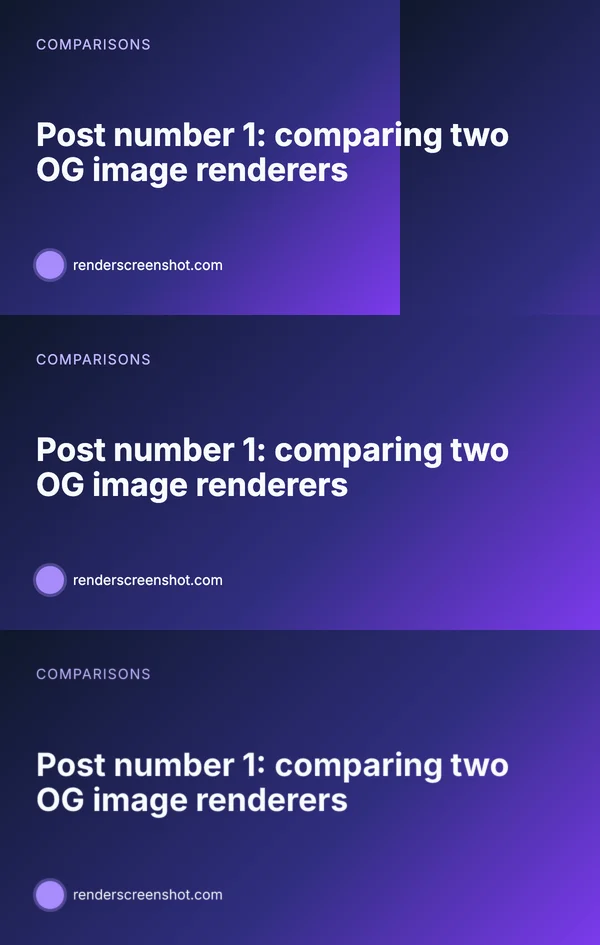
puppeteerArgs: { defaultViewport: { width: 1200, height: 630 } }. Bottom: satori 0.57.2 with boxSizing: 'border-box', PNG by resvg. 2026-10-15.node-html-to-image: the 800px seam. The library screenshots the body element, and Puppeteer's default viewport is 800x600. Our body was 1200px wide with a gradient background. CSS paints a body background relative to the viewport, so the gradient ended at 800px and started again. The fix is one option: set the viewport to the card size.
satori: the missing footer. Our first satori card had no footer row. Satori follows the browser default box-sizing: content-box, so width: 100% plus 72px of padding made the root 1,344px wide and pushed the footer below the 630px canvas. The HTML version had box-sizing: border-box in its CSS and we forgot to carry it over. Add boxSizing: 'border-box' to the root.
Code for both
node-html-to-image, with both fixes applied:
// node-html-to-image 5: Handlebars template in, PNG buffers out.
import { writeFile } from 'node:fs/promises';
import nodeHtmlToImage from 'node-html-to-image';

const html = `<html><head><style>
  body { margin: 0; width: 1200px; height: 630px; box-sizing: border-box; padding: 72px;
         display: flex; flex-direction: column; justify-content: center;
         background: linear-gradient(135deg, #0f172a, #7c3aed); color: #f8fafc;
         font-family: Inter, system-ui, sans-serif; }
  h1 { font-size: 64px; margin: 0; }
</style></head><body><h1>{{title}}</h1><p>{{site}}</p></body></html>`;

const posts = [
  { title: 'Puppeteer vs Playwright', site: 'acme.dev' },
  { title: 'Fonts on Linux servers', site: 'acme.dev' },
];

const images = await nodeHtmlToImage({
  html,
  content: posts,                 // an array renders one image per item
  type: 'png',
  waitUntil: 'load',              // default is networkidle0, which was 6x slower in our test
  puppeteerArgs: { defaultViewport: { width: 1200, height: 630 } },  // default viewport is 800x600
});
await Promise.all(images.map((buf, i) => writeFile(`card-${i + 1}.png`, buf)));
console.log(`saved ${images.length} cards`);
Handlebars escapes {{title}} for you. Use {{{title}}} (three braces) only for HTML you trust.
One more thing we found while measuring: node-html-to-image 5.0.0 depends on Puppeteer 23.2.2 exactly, so npm install gave us a second, older Puppeteer next to our own 24.x and a Chrome 128 download. The library accepts a puppeteer option, which lets you pass the Puppeteer module you already maintain so you get its Chrome and its security fixes.
satori, without JSX so it runs in plain Node:
// satori 0.57 + resvg: element tree to SVG to PNG, no browser.
import { readFile, writeFile } from 'node:fs/promises';
import satori from 'satori';
import { Resvg } from '@resvg/resvg-js';

const font = await readFile('node_modules/@fontsource/inter/files/inter-latin-700-normal.woff');
const el = (type, style, children) => ({ type, props: { style, children } });

const card = (title, site) => el('div', {
  width: '100%', height: '100%', boxSizing: 'border-box', padding: 72,
  display: 'flex', flexDirection: 'column', justifyContent: 'center',
  backgroundImage: 'linear-gradient(135deg, #0f172a, #7c3aed)', color: '#f8fafc', fontFamily: 'Inter',
}, [el('div', { fontSize: 64 }, title), el('div', { fontSize: 28, marginTop: 24 }, site)]);

const svg = await satori(card('Puppeteer vs Playwright', 'acme.dev'), {
  width: 1200,
  height: 630,
  fonts: [{ name: 'Inter', data: font, weight: 700, style: 'normal' }],
});
const png = new Resvg(svg, { fitTo: { mode: 'width', value: 1200 } }).render().asPng();
await writeFile('card-satori.png', png);
console.log(`saved card-satori.png (${png.length} bytes, SVG ${svg.length} chars)`);
satori places text as text, not markup, so a title with < or & is safe without escaping. The element objects are what JSX compiles to. In a React or Next.js project you would write <div style={{...}}> instead.
CSS coverage we checked
We rendered one small tile per feature through satori 0.57.2 and looked at each result. Chrome (node-html-to-image) handled all of them.
| Feature | satori 0.57.2 result |
|---|---|
| Flexbox row | Rendered |
display: grid with 1fr 1fr |
Rendered as a grid |
linear-gradient background |
Rendered |
box-shadow |
Rendered |
transform: rotate() |
Rendered |
CSS variable (--c then var(--c)) |
Rendered |
calc(100% - 40px) width |
Rendered |
filter: blur() |
Rendered |
lineClamp: 1 |
Rendered with an ellipsis |
position: absolute |
Rendered |
| Emoji (🚀) with no emoji loader | Empty box |
Satori's own README lists the limits that our tiles did not hit: no @font-face (fonts come in as buffers), no external stylesheets, interaction pseudo-classes such as :hover never match, display: table throws, and percentages inside calc() only work for sizes and spacing. Invalid inline styles throw and fail the whole render unless you pass onStyleError.
Many blog posts say satori supports only flexbox. That was true of early versions. Check the README of the version you install.
Operations
| node-html-to-image | satori | |
|---|---|---|
| What you deploy | Puppeteer and a Chrome binary (hundreds of MB) | Two npm packages, plus your font files |
| Memory | A Chrome process per call, or per cluster | Your Node process only |
| Concurrency | Built on puppeteer-cluster; tune puppeteerArgs and cluster options |
As many renders as your CPU allows |
| Runs on edge runtimes | No | Yes, with the WASM build of resvg |
| Linux fonts and emoji | Install fonts in the image | Load font and emoji assets yourself |
When each one wins
satori wins for OG images generated on request, at the edge, from a small set of layouts: a title, an author, a logo, a background. Most Next.js sites fit this. The Next.js OG image guide shows that setup.
node-html-to-image wins when the card is real HTML: it reuses your site's CSS, uses fonts by URL, shows emoji from system fonts, or includes an SVG chart. It is also the simpler path when designers hand you HTML.
Neither fits when you want browser-accurate rendering without Chrome in your deployment. That is what a rendering API is for. With RenderScreenshot you send the same HTML as the node-html-to-image template, emoji included, and get the image back rendered in Chromium and cached on a CDN. HTML input is described under content input.
// RenderScreenshot: the satori card's HTML, rendered in Chromium, returned as WebP. import { writeFile } from 'node:fs/promises'; import { Client, TakeOptions } from 'renderscreenshot'; const escapeHtml = (s) => s.replace(/[&<>"']/g, (c) => ({ '&': '&', '<': '<', '>': '>', '"': '"', "'": ''' })[c]); const client = new Client(process.env.RS_API_KEY); const card = (title, site) => `<div style="width:1200px;height:630px;box-sizing:border-box;padding:72px; display:flex;flex-direction:column;justify-content:center;color:#f8fafc;font-family:system-ui; background:linear-gradient(135deg,#0f172a,#7c3aed)"><div style="font:700 64px system-ui">${escapeHtml(title)}</div> <div style="font-size:28px;margin-top:24px">${escapeHtml(site)} 🚀</div></div>`; const image = await client.take( TakeOptions.html(card('Puppeteer vs Playwright', 'acme.dev')).preset('og_card').format('webp') ); await writeFile('card-rs.webp', image); console.log('saved card-rs.webp');
We tested this against a local mock of our API, not the live service. A network call will not beat satori's 163 ms on your own server, so keep satori if its CSS subset covers your design. Get a free API key if you want Chrome output without running Chrome.
Last tested 2026-10-15 with Node 22.18.0, node-html-to-image 5.0.0 (bundled Puppeteer 23.2.2, Chrome 128.0.6613.119), satori 0.57.2 and @resvg/resvg-js 2.6.2 on macOS (Apple M1 Pro).