Playwright Full Page Screenshot: Limits and Lazy Images
Playwright full page screenshot guide: fullPage limits measured per engine, a wheel-scroll helper for lazy images and the style option for sticky headers.
To take a full page screenshot in Playwright, pass fullPage: true to page.screenshot():
import { chromium } from 'playwright';

const url = process.argv[2] ?? 'https://example.com';
const browser = await chromium.launch();
try {
  const page = await browser.newPage({ viewport: { width: 1280, height: 800 } });
  await page.goto(url, { waitUntil: 'load' });
  await page.screenshot({ path: 'full-page.png', fullPage: true });
} finally {
  await browser.close();
}
That captures the whole scrollable page at the viewport width. It does not scroll, it does not wait for lazy images, and its maximum height depends on the browser engine. This guide measures all three and gives a tested script that handles them. If you are new to Playwright, start with taking screenshots with Playwright; for other tools, see full page screenshots compared.
Tested on 2026-10-15 with Playwright 1.64.1 (Chromium 156.0.8078.4, Firefox 157.0, WebKit 27.2), Node 22.18.0, sharp 0.35.5, and Python 3.14.8 with playwright 1.64.0, on macOS 27.0.1 (Apple Silicon). Our test pages ran on a local server. Code and raw results are in our test harness.
Setup
npm i [email protected] [email protected]
npx playwright install chromium firefox webkit
The examples are ES modules ("type": "module" in package.json) and use top-level await. They work unchanged in TypeScript.
How tall can a Playwright full page screenshot be?
We captured pages from 8,000 to 100,000 px tall, made of 1,000 px colored bands, and checked every band in the output:
| Engine (Playwright 1.64.1) | 1x | 2x (deviceScaleFactor: 2) |
Above the limit |
|---|---|---|---|
| Chromium, default headless | 100,000 px correct (1,314 ms) | 40,000 CSS px correct | — |
Chromium as full Chrome (args: ['--headless=new'], or executablePath set to Google Chrome) |
16,384 px | 8,192 CSS px (measured with Puppeteer on the same Chrome) | Right image size, content repeats from the top |
| Firefox | 32,000 px correct | 16,000 CSS px correct | Cannot take screenshot larger than 32767 |
| WebKit | 100,000 px correct (1,049 ms) | 40,000 CSS px correct | — |
The Chromium row needs care. Playwright's default headless mode runs chrome-headless-shell, which drew our 100,000 px page correctly. When we made Playwright run full Chrome (with --headless=new, and with executablePath pointing to Google Chrome 155), the output stopped drawing new content after 16,384 device pixels and repeated the top of the page. The file had the correct size, so nothing failed. If your config sets channel: 'chrome' to match what users see, expect the same limit; we did not test the channel option itself.
Firefox fails loudly instead, which is easier to handle. The script later in this guide splits Firefox captures above 32,000 px into clips.
Lazy images: scroll with the mouse wheel, then wait
fullPage draws the document without scrolling, so IntersectionObserver callbacks and scroll listeners never fire for content below the first screen. On our lazy test page (20 images, each served after 800 ms):
Before page.screenshot |
Images drawn (Chromium) | Median time |
|---|---|---|
| Nothing | 0–10% | 0.5–1.3 s |
window.scrollTo bottom, then top |
0–10% | 0.5–1.3 s |
| Scroll one screen at a time, 100 ms pauses | 60–65% | 2.6–3.4 s |
| Same, then wait until every image is complete | 100% | 3.7–4.1 s |
Firefox and WebKit gave the same pattern within 15 points.
In Playwright, page.mouse.wheel() is the most realistic scroll: it sends real wheel events, so pages that listen for wheel as well as scroll react to it. Then page.waitForFunction() waits for a condition in the page instead of a fixed time:
const viewportHeight = page.viewportSize().height;
for (let i = 0; i < 40; i++) {
  const atBottom = await page.evaluate(
    () => window.scrollY + window.innerHeight >= document.documentElement.scrollHeight - 2,
  );
  if (atBottom) break;
  await page.mouse.wheel(0, viewportHeight);
  await page.waitForTimeout(150); // let observers and scroll handlers run
}
await page.waitForFunction(
  () => [...document.images].every((img) => !img.getAttribute('src') || img.complete),
  null,
  { timeout: 15_000 },
);
await page.evaluate(() => window.scrollTo(0, 0));
The loop stops at 40 steps, so an infinite feed cannot keep it running. The wait checks the src attribute, not currentSrc: an image whose src was set a moment ago has no currentSrc yet, and a check on it passes too early.
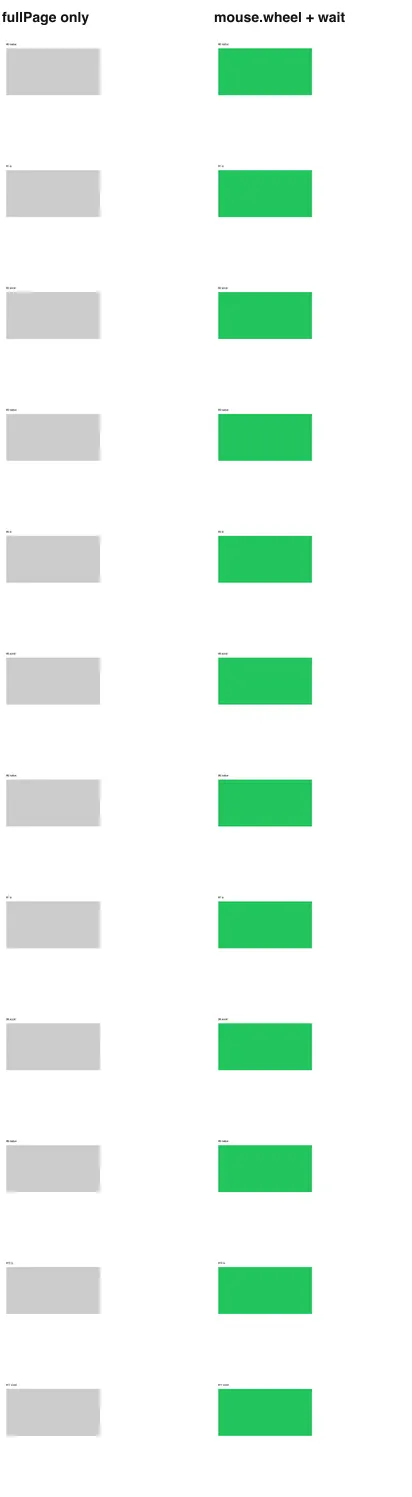
fullPage only (left) and after the wheel loop plus waitForFunction (right). 2026-10-15.Sticky headers and cookie bars: the style option
Playwright's page.screenshot() takes a style option: a CSS string that it applies only while it takes the screenshot, then removes. That is the right tool for fixed elements, because the page is unchanged for the rest of your test.
On our sticky page, a native fullPage capture drew the fixed header once at the top, which is correct, but drew the fixed cookie bar across the content where the first screen ended. Playwright did not repeat the header, because it does not stitch screens together.
await page.screenshot({
  path: 'full-page.png',
  fullPage: true,
  style: `
    header.site-header { position: absolute !important; }
    #cookie-banner, .chat-launcher { display: none !important; }
  `,
});
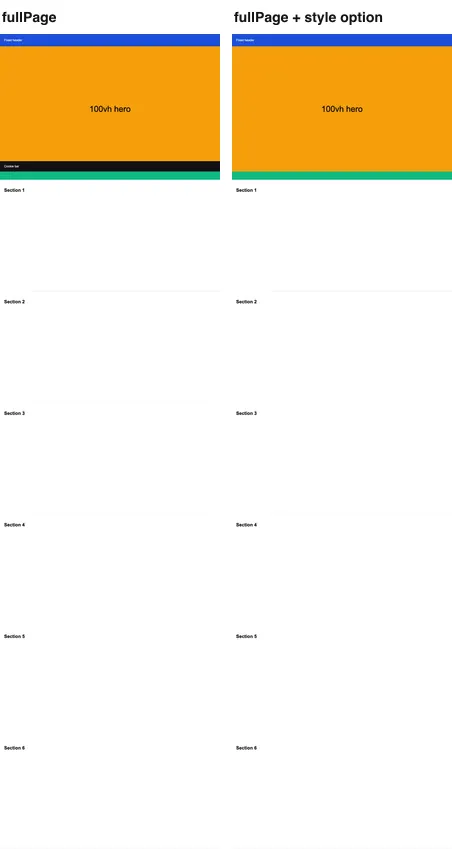
fullPage (left) and fullPage with the style option (right). 2026-10-15.Use exact selectors when you know the site. For unknown sites, the sticky header guide has a generic function that finds fixed and sticky elements by computed style.
Two more screenshot options help with long pages:
animations: 'disabled'stops CSS animations and transitions, so a carousel halfway through a slide does not blur the capture.mask: [page.locator('.ad-slot')]paints a box over elements whose content changes, which keeps visual comparisons stable.
The complete script
This is the script we ran against our three test pages and https://example.com. Pass the URL, the output file and the engine.
import { chromium, firefox, webkit } from 'playwright';
import sharp from 'sharp';

const url = process.argv[2] ?? 'https://example.com';
const out = process.argv[3] ?? 'full-page.png';
const engine = { chromium, firefox, webkit }[process.argv[4] ?? 'chromium'];

// CSS applied only while the screenshot is taken (Playwright's `style` option).
const CAPTURE_CSS = `
  header, [class*="sticky"], [class*="fixed"] { position: absolute !important; }
  [id*="cookie"], [class*="cookie"], [class*="chat"] { display: none !important; }
`;

const browser = await engine.launch();
try {
  const page = await browser.newPage({ viewport: { width: 1280, height: 800 } });
  await page.goto(url, { waitUntil: 'load', timeout: 60_000 });

  // 1. Wheel-scroll one viewport at a time, like a reader would.
  const viewportHeight = page.viewportSize().height;
  for (let i = 0; i < 40; i++) {
    const atBottom = await page.evaluate(
      () => window.scrollY + window.innerHeight >= document.documentElement.scrollHeight - 2,
    );
    if (atBottom) break;
    await page.mouse.wheel(0, viewportHeight);
    await page.waitForTimeout(150);
  }

  // 2. Wait until every image that has a src has finished loading.
  await page.waitForFunction(
    () => [...document.images].every((img) => !img.getAttribute('src') || img.complete),
    null,
    { timeout: 15_000 },
  );
  await page.evaluate(() => window.scrollTo(0, 0));

  // 3. Capture. Firefox refuses images taller than 32,767 px, so clip there.
  const height = await page.evaluate(() => document.documentElement.scrollHeight);
  if (engine !== firefox || height <= 32_000) {
    await page.screenshot({ path: out, fullPage: true, style: CAPTURE_CSS, animations: 'disabled' });
  } else {
    const parts = [];
    for (let y = 0; y < height; y += 16_000) {
      const clip = { x: 0, y, width: 1280, height: Math.min(16_000, height - y) };
      parts.push({ input: await page.screenshot({ clip, fullPage: true, style: CAPTURE_CSS }), top: y, left: 0 });
    }
    await sharp({ create: { width: 1280, height, channels: 4, background: '#fff' }, limitInputPixels: false })
      .composite(parts).png().toFile(out);
  }
  console.log(`saved ${out}, ${height} px tall`);
} finally {
  await browser.close();
}
Results: 20 of 20 images on the lazy page, one header and no cookie bar on the sticky page, and all 40 bands of a 40,000 px page in both Chromium and Firefox (the Firefox run used the clip branch). The CAPTURE_CSS selectors are deliberately broad; replace them with the selectors of the sites you capture. clip together with fullPage: true lets Playwright cut a region outside the viewport.
The same thing in Python
Playwright for Python has the same API with snake_case names. This sync version ran against the same lazy page and drew all 20 images:
import sys

from playwright.sync_api import sync_playwright

url = sys.argv[1] if len(sys.argv) > 1 else 'https://example.com'
with sync_playwright() as p:
    browser = p.chromium.launch()
    try:
        page = browser.new_page(viewport={'width': 1280, 'height': 800})
        page.goto(url)
        for _ in range(40):
            if page.evaluate('scrollY + innerHeight >= document.documentElement.scrollHeight - 2'):
                break
            page.mouse.wheel(0, 800)
            page.wait_for_timeout(150)
        page.wait_for_function("[...document.images].every(i => !i.getAttribute('src') || i.complete)")
        page.evaluate('scrollTo(0, 0)')
        page.screenshot(path='full-page.png', full_page=True)
    finally:
        browser.close()
Install with pip install playwright==1.64.0 and playwright install chromium.
Troubleshooting
| Symptom | Cause | Fix |
|---|---|---|
| Bottom of the image repeats the top | Chromium runs as full Chrome (channel: 'chrome', --headless=new) above 16,384 device px |
Use the default headless Chromium, or capture clips |
Cannot take screenshot larger than 32767 |
Firefox engine limit | Clip at 16,000 px and join with sharp |
| Grey placeholders below the first screen | Lazy loading did not fire | Wheel-scroll, then waitForFunction on images |
| A few images still missing | Wait checked currentSrc or a fixed timeout |
Check getAttribute('src') and complete |
| Cookie bar across the middle of the image | Fixed bottom bar drawn at the end of the first screen | style: '#cookie-banner { display: none !important; }' |
waitForFunction times out |
An image request never finishes (a broken URL counts as complete, a hanging one does not) | Lower the timeout and catch the error, then capture anyway |
| Capture is blurry in parts | An animation was mid-way | animations: 'disabled' |
| Image is soft on a Retina screen | Playwright captures at deviceScaleFactor 1 unless you set it |
Pass deviceScaleFactor: 2 to browser.newContext() or newPage(), and halve the height limits above |
| Image wider than the viewport | Content overflows horizontally | Fix the overflow with style, or clip to the viewport width |
The same capture with one API call
The script above is about 50 lines that you keep up to date with Playwright releases. RenderScreenshot does the scroll and the wait on its side with the full_page preset:
import { writeFile } from 'node:fs/promises';
import { Client, TakeOptions } from 'renderscreenshot';

const client = new Client(process.env.RS_API_KEY);
const image = await client.take(
  TakeOptions.url('https://example.com').preset('full_page').format('webp')
);
await writeFile('full-page.webp', image);
The scroll step, delay and height cap are POST parameters, listed in the full-page API guide. Get a free API key to compare its output with your Playwright capture on the same URL.
Related guides
- Puppeteer full page screenshot: the same problems with Puppeteer's API
- Screenshots of lazy-loaded images: five scroll strategies measured
- Full page screenshots with sticky headers: repeated headers and
100vhheroes - Playwright wait for page load: when
loadis not enough
Related in this topic
- Taking Screenshots with Playwright: The Complete Guide Learn how to capture web page screenshots with Playwright — from installation and browser contexts to full-page captures, element screenshots, and production-ready patterns.
- How to Use Playwright with Cloudflare Browser Rendering A practical tutorial on running Playwright inside Cloudflare Workers using the Browser Rendering API — installation, locators, auto-waiting, session reuse, and gotchas from running it in production.
- Full Page Screenshots: Every Method Tested on One Page How to take a full page screenshot with DevTools, Puppeteer, Playwright, Selenium or an API. Each method tested on one 20,000 px page, with times and failures.
- Full-Page Screenshots: Scroll, Lazy Images and Height Capture a whole page with the full page screenshot API: full_page mode, scroll simulation for lazy images, step, delay and max_height, with SDK examples.
- Full Page Screenshot in Chrome Without an Extension Take a full page screenshot in Chrome with the DevTools command, the command line or a Console snippet. Tested limits, lazy images and fixed headers.
- Puppeteer Full Page Screenshot: Limits, Lazy Images, Fixes Puppeteer full page screenshot guide: the 16,384 px limit we measured, captureBeyondViewport, lazy-load scrolling, sticky headers and a tested script.