Screenshot Lazy-Loaded Images: 5 Strategies Measured
Why full page screenshots miss lazy-loaded images, and which scroll strategy fixes it. Five strategies measured in Chromium, Firefox and WebKit, with code.

Full page screenshots miss lazy-loaded images because the capture does not scroll. Puppeteer's and Playwright's fullPage, Selenium's Firefox full-page call and Chrome's "Capture full size screenshot" all draw the whole document at once. Lazy loaders wait for an image to come near the viewport, and in a capture that never happens. The fix is to scroll one screen at a time and then wait for the images:
// Inside the page, before the capture (Puppeteer: page.evaluate, Selenium: execute_async_script)
for (let y = 0; y < document.documentElement.scrollHeight; y += innerHeight) {
  scrollTo(0, y);
  await new Promise((r) => setTimeout(r, 150));
}
scrollTo(0, 0);
await Promise.all([...document.images]
  .filter((img) => img.getAttribute('src') && !img.complete)
  .map((img) => img.decode().catch(() => {})));
This guide measures five strategies on a test page that uses the three common kinds of lazy loading, in three browser engines, and explains why the cheaper strategies fail. It is part of our full page screenshot guide.
Tested on 2026-10-15 with Puppeteer 25.14.0 (Chrome 155) and Playwright 1.64.1 (Chromium 156, Firefox 157, WebKit 27.2) on Node 22.18.0, macOS 27.0.1. Each number is the median of 3 runs. Images came from a local HTTP/1.1 server with a fixed delay.
The three kinds of lazy loading
| Kind | How it works | What triggers it |
|---|---|---|
| Native | <img loading="lazy" src="..."> |
The browser loads the image when it is within a distance of the viewport that the browser chooses |
| IntersectionObserver | <img data-src="...">, a script copies data-src to src when an observer reports the image as visible |
The image enters the viewport plus the observer's rootMargin |
| Scroll listener | A scroll event handler checks each image's position |
A scroll event while the image is near the viewport |
Our test page has 20 sections of 780 px, each with one 600 x 300 image: native, observer and scroll-listener images in separate runs. The server sends each image after a delay: 200 ms in a fast run, 800 ms in a slow run. A script reads the center pixel of every image slot in the final PNG; green means the image is in the screenshot, grey means the placeholder is.
Results: five strategies, slow images (800 ms)
Puppeteer with Chrome 155. "Time" runs from goto to the end of the screenshot.
| Strategy | Native | Observer | Scroll listener | Time |
|---|---|---|---|---|
1. No scroll, capture after load |
0% | 0% | 10% | 0.2–1.0 s |
| 2. Jump to the bottom, back to the top | 0% | 0% | 10% | 0.2–1.0 s |
| 3. Scroll one screen at a time, 100 ms per step | 60% | 60% | 60% | 2.2–3.1 s |
| 4. Strategy 3, then wait for every image | 100% | 100% | 100% | 3.4–4.2 s |
| 5. Force eager loading, then wait | 100% | 100% | 100% | 3.4–3.6 s |
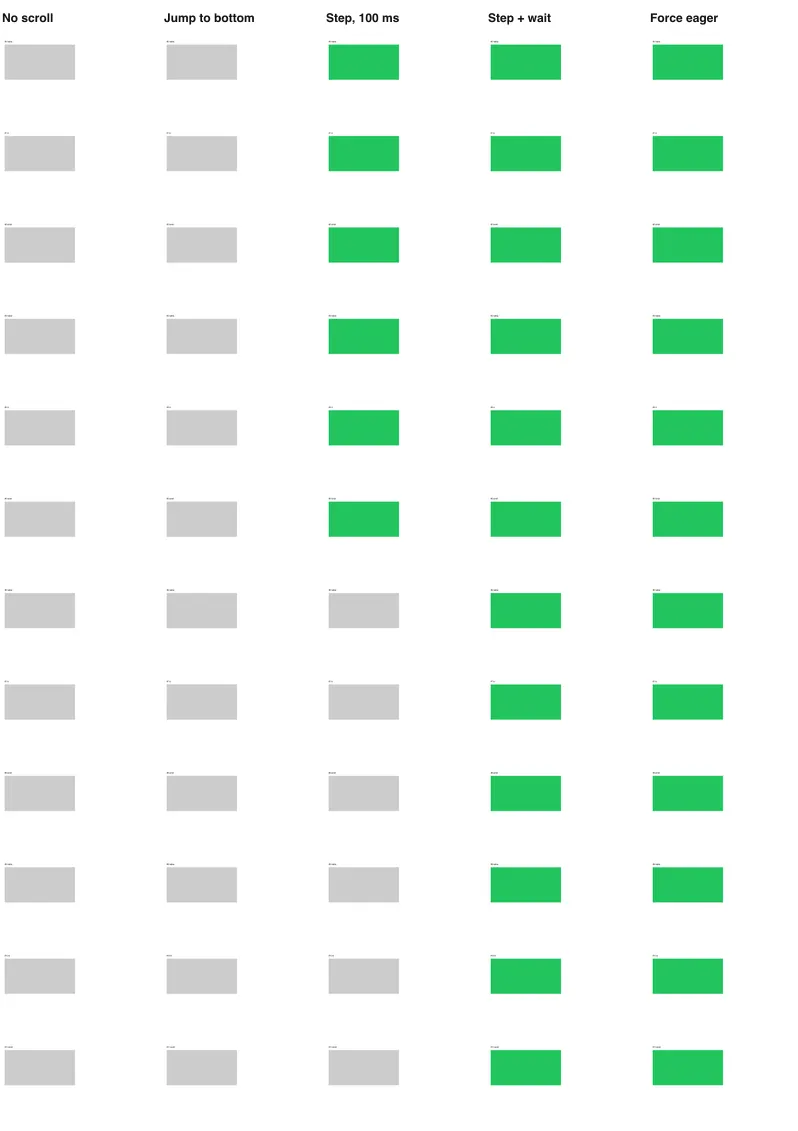
The other engines, with Playwright and the same page:
| Strategy | Chromium 156 | Firefox 157 | WebKit 27.2 |
|---|---|---|---|
| 1. No scroll | 0–10% | 0–10% | 0–10% |
| 2. Jump to bottom and back | 0–10% | 0–10% | 0–10% |
| 3. Step scroll, no wait | 60–65% | 60–65% | 50–60% |
| 4. Step scroll + wait | 100% | 100% | 100% |
| 5. Force eager + wait | 100% | 100% | 100% |
The engines agree. This is not a browser bug that a different engine fixes.
Why each cheap strategy fails
No scroll. Even the first image, which is on screen, was not in most captures: it was requested after load, and 800 ms later the screenshot was already taken. The 10% in the scroll-listener column are the two images that the page's own startup code loaded.
Jump to the bottom. Observers and scroll handlers check positions when they run, not along the path. A jump from 0 to 15,600 px and back puts the viewport over the last section for less than a frame, then over the first. Nothing in between was ever "visible".
Step scroll without a wait. Every image was requested, but the last ones were still on the way when the screenshot ran. The share you lose depends on how slow the images are compared with the scroll. With 200 ms images the same strategy reached 100% in every engine; with 800 ms images it reached 60%. A strategy that passes on your fast office connection can fail on a slow CDN.
That is the main lesson: scroll to request, wait to complete. The scroll speed matters less than the wait at the end.
Why force-eager is fast, and when it is wrong
Strategy 5 skips scrolling: it sets loading = 'eager' on native lazy images and copies data-src to src on the others. All requests start at once. It took about as long as the scroll-and-wait strategy here, because 20 images over one HTTP/1.1 host load at most 6 at a time: about 4 rounds of 800 ms.
// Inside the page. Only works for loaders that use data-src.
for (const img of document.querySelectorAll('img')) {
  img.loading = 'eager';
  if (img.dataset.src && !img.getAttribute('src')) img.src = img.dataset.src;
}
It is fragile on real sites:
- Loaders use other attribute names:
data-lazy-src,data-original,data-srcset. <picture>sources keep their owndata-srcseton<source>elements.- CSS background images are often added by toggling a class when the element is visible.
- Some pages render whole sections, not just images, when you scroll (comment threads, product grids).
Strategy 4 handles all of these because it runs the site's own code. Use strategy 5 only on pages you know.
Check before you capture
The cheapest test is to ask the page which images will be missing. This function ran in our harness before and after the scroll:
// Runs inside the page right before the capture. Lists images that will not be drawn.
export function auditImages() {
  return [...document.images]
    .filter((img) => !img.complete || img.naturalWidth === 0)
    .map((img) => ({
      src: img.getAttribute('src') ?? img.dataset.src ?? '(none)',
      reason: !img.getAttribute('src') ? 'no src yet (lazy loader did not run)'
        : !img.complete ? 'still loading' : 'failed to load',
      top: Math.round(img.getBoundingClientRect().top + window.scrollY),
    }));
}
On a 6-image version of our page it listed 6 problems before the scroll and 0 after. Log the result next to each screenshot; an empty list is evidence that the capture is complete, and a non-empty one tells you which part of the page to check.
Wait on the src attribute, not img.currentSrc. We first wrote the wait with currentSrc. An image whose src was set a moment earlier has an empty currentSrc, so the wait skipped it, and 2 of 20 images were missing from the PNG.
A complete helper
This is the version we use in the Puppeteer full page guide. It combines strategies 4 and 5, caps the scroll for infinite feeds and gives up after a timeout instead of hanging:
// Runs inside the page. Returns when lazy images have loaded or after `timeout`.
export async function preloadLazyContent({ pause = 150, maxHeight = 16000, timeout = 15000 } = {}) {
  const sleep = (ms) => new Promise((r) => setTimeout(r, ms));
  for (const img of document.querySelectorAll('img[loading="lazy"]')) img.loading = 'eager';
  let y = 0;
  while (y < Math.min(document.documentElement.scrollHeight, maxHeight)) {
    y += window.innerHeight;
    window.scrollTo(0, y);
    await sleep(pause);
  }
  window.scrollTo(0, 0);
  const pending = [...document.images].filter((img) => img.getAttribute('src') && !img.complete);
  await Promise.race([
    Promise.all(pending.map((img) => img.decode().catch(() => {}))),
    sleep(timeout),
  ]);
}
In Puppeteer: await page.evaluate(preloadLazyContent, { pause: 150 }). In Playwright the same call works, or use real wheel events as in the Playwright full page guide. In Selenium, wrap the body in execute_async_script and call the callback at the end. On our page it reached 100% in 3 of 3 runs.
The re-read of scrollHeight on every step matters on infinite feeds: the page grows while you scroll. maxHeight decides where you stop. A step of one viewport worked for every loader on our page; observers with a negative rootMargin can need a smaller step, for example innerHeight * 0.5.
Single-page apps
On a single-page app, images often do not exist until data arrives. The scroll then has nothing to trigger. Wait for the content first, for example for a selector that exists only with data, then run the scroll. The single-page application guide covers those waits.
With a screenshot API
RenderScreenshot runs the scroll for you when capture.scroll.simulate is on; the full_page preset turns it on with a 400 ms pause per step. For slow images, raise the pause and add a network-idle wait in a POST body:
{
  "url": "https://example.com/gallery",
  "capture": {
    "mode": "full_page",
    "scroll": { "simulate": true, "step": 600, "delay": 800 }
  },
  "wait": { "until": "networkidle", "timeout": 60 }
}
The full-page API guide explains step, delay and max_height. We did not run the API in this test series; the strategies above are what its parameters control. Create a free account to try it on a page that gives you missing images today.
Troubleshooting
| Symptom | Cause | Fix |
|---|---|---|
| All images below the first screen are placeholders | No scroll before the capture | Step scroll + wait |
| Top half loaded, bottom half not | Scroll ended before the last images arrived | Wait for images after the scroll |
| Images present in the DOM, blank in the PNG | Image loaded but not decoded at capture time | await img.decode() before the capture |
| Background images missing | Loader adds a class on intersection; no <img> to wait for |
Step scroll, then wait for the class or for network idle |
| Wait never finishes | One image never loads | Add a timeout, as the helper does |
| Scroll never ends | Infinite feed | Cap with maxHeight |
| Images load, but the page also got much taller | Content appended on scroll | Capture after the scroll; decide where to stop |
| Works locally, fails in CI | Slower network, slower images | Never rely on fixed sleeps; wait for completion |
Related in this topic
- Full Page Screenshots: Every Method Tested on One Page How to take a full page screenshot with DevTools, Puppeteer, Playwright, Selenium or an API. Each method tested on one 20,000 px page, with times and failures.
- Full Page Screenshot in Chrome Without an Extension Take a full page screenshot in Chrome with the DevTools command, the command line or a Console snippet. Tested limits, lazy images and fixed headers.
- Full Page Screenshot in Firefox: Menu, Console and CLI Take a full page screenshot in Firefox with the built-in screenshot tool, the :screenshot command or the command line. Height limits measured, plus fixes.
- Full Page Screenshot in Safari on Mac and iPhone Take a full page screenshot in Safari: Web Inspector on Mac, Export as PDF, and Full Page on iPhone. WebKit limits measured, lazy images and fixed bars.
- Sticky Headers in Full Page Screenshots: 4 Bugs, 1 Fix Why full page screenshots repeat sticky headers, stretch 100vh heroes and put cookie bars mid-page. Each bug reproduced per tool, with a tested CSS fix.
- Best Full Page Screenshot Extensions for Chrome (2026) The best full page screenshot extensions for Chrome compared with built-in tools, plus a free test page and five checks to score any extension yourself.