Full Page Screenshots: Every Method Tested on One Page
How to take a full page screenshot with DevTools, Puppeteer, Playwright, Selenium or an API. Each method tested on one 20,000 px page, with times and failures.
A full page screenshot captures the whole scrollable document, not only the part in the browser window. Every major tool has a one-line way to do it:
// Puppeteer
await page.screenshot({ path: 'full-page.png', fullPage: true });
// Playwright
await page.screenshot({ path: 'full-page.png', fullPage: true });
# Selenium with Firefox
driver.get_full_page_screenshot_as_file('full-page.png')
The one-liners work on short pages. On long pages they fail in three ways that this guide measures: the image repeats its top after a size limit, lazy images stay blank, and fixed headers or cookie bars land in the wrong place. We built three test pages for this, ran every method against them, and recorded what came out. RenderScreenshot is a screenshot API, so the last section shows the same capture as one request, but the rest of the guide works without it.
Tested on 2026-10-15 on macOS 27.0.1 (Apple Silicon) with Node 22.18.0, Puppeteer 25.14.0 (Chrome for Testing 155.0.8059.79), Playwright 1.64.1 (Chromium 156.0.8078.4, Firefox 157.0, WebKit 27.2), Google Chrome 155.0.8059.40, Python 3.14.8 with Selenium 4.51.0, Firefox 158.0 and geckodriver 0.37.1. Times are the median of 3 runs on one machine against a local server, so they show relative cost, not what you will see over a network.
The test pages
All numbers in this guide come from three pages served from a local Node server:
| Page | What it contains | What it checks |
|---|---|---|
| Long page | 1,000 px colored bands to a total of 20,000 px (also built at 8,000 to 150,000 px), a magenta END band at the bottom | Does every band appear in the right place, and is the END band there? |
| Lazy page | 20 images, 600 x 300 px, each served with an 800 ms delay. One third use loading="lazy", one third an IntersectionObserver, one third a scroll event listener |
What share of the images is drawn in the final image? |
| Sticky page | A position: fixed header, a 100vh hero, a position: sticky sub-navigation and a fixed cookie bar at the bottom |
How many copies of the header appear, and where does the cookie bar land? |
A script reads pixels from each output: the center of every band, the center of every image slot, and colored rows of the header and the cookie bar. "Complete" means every check passed.
Results on the 20,000 px page
| Method | Output height | Content correct | Median time |
|---|---|---|---|
| Chrome DevTools "Capture full size screenshot" (same protocol call, Chrome 155) | 20,000 px | No: bands repeat from 16,384 px | 285 ms |
Chrome command line, --screenshot --window-size=1280,20000 |
20,000 px | Yes | not timed |
Puppeteer fullPage: true (default new headless) |
20,000 px | No: repeats from 16,384 px | 281 ms |
| Puppeteer, 8,000 px clips joined with sharp | 20,000 px | Yes | 372 ms |
Puppeteer headless: 'shell' (chrome-headless-shell) |
20,000 px | Yes | not timed |
Playwright Chromium fullPage: true (default headless shell) |
20,000 px | Yes | 280 ms |
Playwright Firefox fullPage: true |
20,000 px | Yes | 225 ms |
Playwright WebKit fullPage: true |
20,000 px | Yes | 263 ms |
Selenium + Chrome, CDP Page.captureScreenshot |
20,000 px | No: repeats from 16,384 px | 273 ms |
| Selenium + Chrome, window resized to page height | 19,857 px | Last 143 px cut | 20,978 ms |
| Selenium + Chrome, scroll and stitch | 20,000 px | Yes (but see the sticky page) | 1,846 ms |
Selenium + Firefox get_full_page_screenshot_as_png |
20,000 px | Yes | 160 ms |
| Selenium + Firefox, scroll and stitch | 20,000 px | Yes | 655 ms |
The most surprising row is the first group. Full Chrome returned an image of the right size, but after 16,384 device pixels it drew the top of the page again. There is no error and no warning. Your monitoring sees a 20,000 px PNG and moves on.

fullPage (Chrome 155, new headless), Playwright Chromium (headless shell) and Playwright Firefox, 2026-10-15. Scaled down; the left image has no magenta END band.How tall can a full page screenshot be?
We repeated the long page at heights from 8,000 to 150,000 px:
| Engine and mode | Largest correct capture | What happens above it |
|---|---|---|
Chrome 155/156, headed or new headless (DevTools, Puppeteer default, Selenium CDP, Playwright --headless=new) |
16,384 device px | Image has the right size, content repeats from the top |
chrome-headless-shell 155 (Puppeteer headless: 'shell', Playwright default) |
100,000 px tested, no limit found | — |
| Firefox 157 in Playwright | 32,767 px | Error: Cannot take screenshot larger than 32767 |
| Firefox 158 with geckodriver 0.37.1 | 65,535 px | Error: exceeds the maximum allowed screenshot height of 65535 pixels |
| WebKit 27.2 in Playwright | 100,000 px tested, no limit found | — |
The limit counts device pixels, not CSS pixels. At deviceScaleFactor: 2, Puppeteer's default Chrome already repeated content on an 8,500 CSS px page, because 8,500 x 2 is more than 16,384.
Three ways to stay below the limit in Chrome:
- Use chrome-headless-shell. Puppeteer launches it with
headless: 'shell'afternpx puppeteer browsers install chrome-headless-shell. Playwright uses it by default in headless mode. - Capture clips of at most 8,000 CSS px with
captureBeyondViewportand join them. The Puppeteer full page guide has a complete script that does this with sharp, and the Selenium guide does the same with Pillow. - Resize the window to the page height. It worked in the Chrome command line, but through Selenium it took 21 seconds and cut 143 px, because the window size includes browser UI.
Lazy images: the most common failure
A full-page capture does not scroll. The browser draws the whole document at once, but images that wait for scroll position or an IntersectionObserver never start to load. On our lazy page, with images that take 800 ms to arrive:
| Strategy before the capture | Native loading="lazy" |
IntersectionObserver | Scroll listener | Median time (Puppeteer) |
|---|---|---|---|---|
None, capture after load |
0% | 0% | 10% | 0.2–1.0 s |
| Jump to the bottom and back | 0% | 0% | 10% | 0.2–1.0 s |
| Scroll one screen at a time, 100 ms per step | 60% | 60% | 60% | 2.2–3.1 s |
| Same, then wait for every image | 100% | 100% | 100% | 3.4–4.2 s |
Set loading="eager" and copy data-src to src, then wait |
100% | 100% | 100% | 3.4–3.6 s |
Playwright Chromium, Firefox and WebKit gave the same pattern within 15 points. Two lessons:
- Scrolling alone is not enough. The scroll finished before the last images arrived, so 40% stayed grey. You need the wait.
- Jumping straight to the bottom triggers almost nothing. Observers only see the element that is on screen at the moment they check.
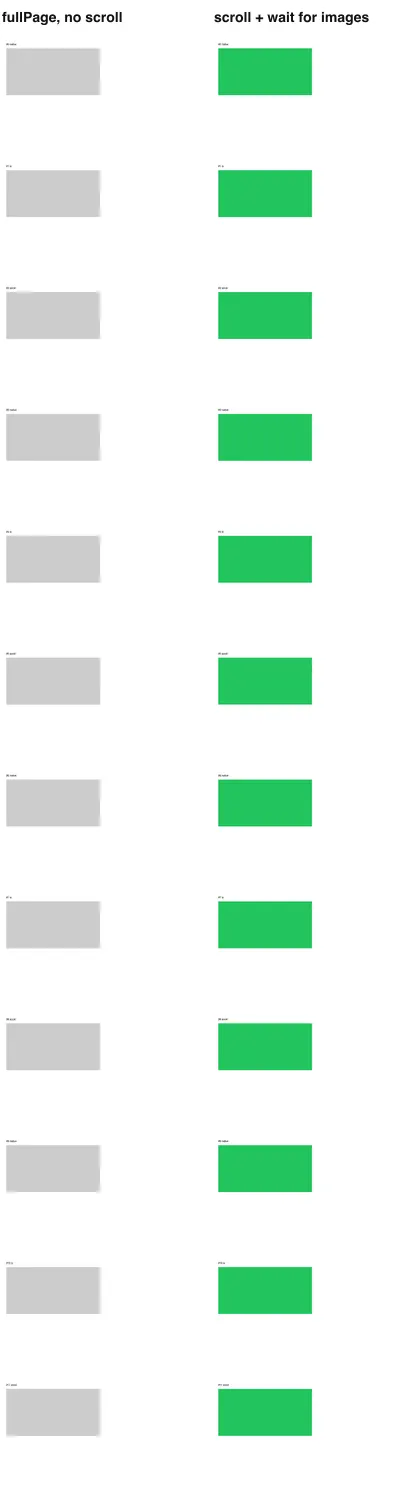
fullPage: no scroll (left) and scroll one screen at a time, then wait for images (right). 2026-10-15.This browser-side helper worked in Puppeteer, Playwright and Selenium (pass it to page.evaluate or execute_script):
// Runs inside the page. Returns when lazy images have loaded or after `timeout`.
async function preloadLazyContent({ pause = 150, maxHeight = 16000, timeout = 15000 } = {}) {
  const sleep = (ms) => new Promise((r) => setTimeout(r, ms));
  for (const img of document.querySelectorAll('img[loading="lazy"]')) img.loading = 'eager';
  let y = 0;
  while (y < Math.min(document.documentElement.scrollHeight, maxHeight)) {
    y += window.innerHeight;
    window.scrollTo(0, y);
    await sleep(pause);
  }
  window.scrollTo(0, 0);
  const pending = [...document.images].filter((img) => img.getAttribute('src') && !img.complete);
  await Promise.race([
    Promise.all(pending.map((img) => img.decode().catch(() => {}))),
    sleep(timeout),
  ]);
}
One trap we hit while writing it: our first version filtered on img.currentSrc. An image whose src was set a moment before has an empty currentSrc, so the helper did not wait for it and the capture lost 2 of 20 images. Filter on the src attribute. The lazy-loading guide covers background images, infinite scroll and the cases this helper does not fix.
Fixed headers, cookie bars and 100vh heroes
Each capture method treats fixed elements differently. On the sticky page:
| Method | Header copies | Cookie bar | 100vh hero |
|---|---|---|---|
| Native capture (Puppeteer, Playwright, Firefox, WebKit) | 1 | Painted over the content at the bottom of the first screen | Normal (800 px) |
| Scroll and stitch | 6, one per screen | 6 copies | Normal |
Window resized to page height (Puppeteer captureBeyondViewport: false, Chrome command line) |
1 | At the very bottom | Grows to 4,604 px, almost the whole page |
| Any method after the CSS fix below | 1 | Removed | Normal |
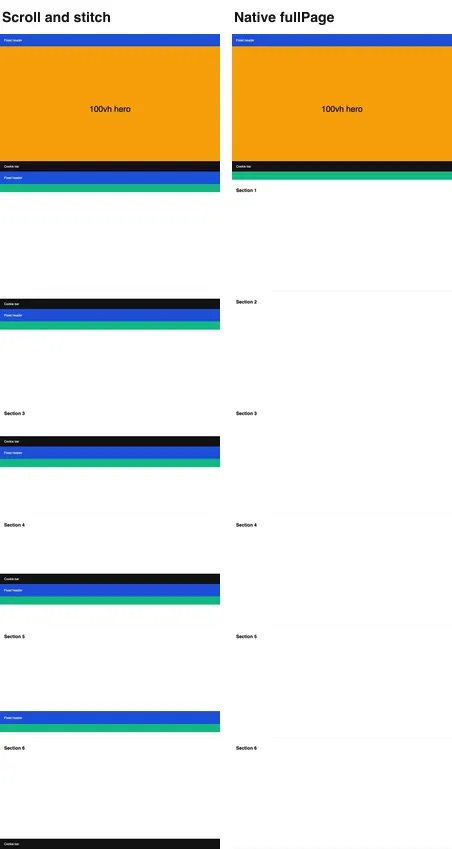
fullPage (right), 2026-10-15.The fix is to change the page before the capture: pin fixed elements to the top of the document, drop bars anchored to the bottom, make sticky elements static, and freeze anything sized from the viewport height. This function did all four on our sticky page in every engine:
// Runs inside the page, after the page is scrolled to the top.
function neutralizeFixedElements() {
  window.scrollTo(0, 0);
  const vh = window.innerHeight;
  const boxes = [...document.querySelectorAll('body *')]
    .map((el) => [el, getComputedStyle(el).position, el.getBoundingClientRect()]);
  for (const [el, position, box] of boxes) {
    if (Math.abs(box.height - vh) < 2) el.style.setProperty('height', `${vh}px`, 'important');
    if (position === 'fixed') {
      if (box.top > vh / 2) el.style.setProperty('display', 'none', 'important');
      else el.style.setProperty('position', 'absolute', 'important');
    } else if (position === 'sticky') {
      el.style.setProperty('position', 'static', 'important');
    }
  }
}
It reads every layout box before it writes any style, so the page does not reflow once per element. On a real site, prefer exact selectors when you know them; the sticky header guide explains when the generic version hides too much.
Method by method
In the browser, by hand
- Chrome: open DevTools, press
Cmd+Shift+P(macOS) orCtrl+Shift+P, type "full size" and run Capture full size screenshot. It sendsPage.captureScreenshotwithcaptureBeyondViewport: true(we read this in the DevTools frontend source), so it shares the 16,384 px limit. The Chrome guide has a Console snippet that loads lazy images first. - Firefox: right-click the page, choose Take Screenshot, then Save full page. The DevTools console command
:screenshot --fullpagedoes the same from the keyboard. See the Firefox guide. - Safari: in Web Inspector, right-click the
<html>node and choose Capture Screenshot, or use File > Export as PDF. The Safari guide covers macOS and iPhone.
From the command line
# Chrome: the window height decides the image height
"/Applications/Google Chrome.app/Contents/MacOS/Google Chrome" --headless \
  --screenshot=page.png --window-size=1280,20000 --hide-scrollbars https://example.com

# Firefox: give only a width and it captures the whole page
firefox --headless --screenshot page.png --window-size=1280 https://example.com
Chrome needs you to know the height in advance; extra height becomes white space, and a 100vh hero grows with it. Firefox measured the page itself and captured our 40,000 px page correctly.
Puppeteer
import puppeteer from 'puppeteer';

const url = process.argv[2] ?? 'https://example.com';
const browser = await puppeteer.launch();
try {
  const page = await browser.newPage();
  await page.setViewport({ width: 1280, height: 800 });
  await page.goto(url, { waitUntil: 'networkidle2' });
  await page.screenshot({ path: 'full-page.png', fullPage: true });
} finally {
  await browser.close();
}
Add headless: 'shell' to launch() for pages taller than 16,384 device pixels, or use the clip-and-join script in the Puppeteer guide.
Playwright
import { chromium } from 'playwright';

const url = process.argv[2] ?? 'https://example.com';
const browser = await chromium.launch();
try {
  const page = await browser.newPage({ viewport: { width: 1280, height: 800 } });
  await page.goto(url, { waitUntil: 'load' });
  await page.screenshot({ path: 'full-page.png', fullPage: true });
} finally {
  await browser.close();
}
Playwright's style option applies CSS only while the screenshot is taken, which is the cleanest way to hide a cookie bar. Its Firefox engine stops at 32,767 px. The Playwright guide has the full recipe.
Selenium
import sys

from selenium import webdriver

url = sys.argv[1] if len(sys.argv) > 1 else 'https://example.com'
options = webdriver.FirefoxOptions()
options.add_argument('-headless')
driver = webdriver.Firefox(options=options)
try:
    driver.set_window_size(1280, 800)
    driver.get(url)
    driver.get_full_page_screenshot_as_file('full-page.png')
finally:
    driver.quit()
get_full_page_screenshot_as_file exists only for Firefox. With Chrome, Selenium's save_screenshot returns the viewport, so you call the DevTools protocol yourself; the Selenium guide shows how to do that without hitting the 16,384 px limit.
Troubleshooting
| Symptom | Cause | Fix |
|---|---|---|
| The bottom part repeats the top of the page | Full Chrome stops drawing after 16,384 device px | chrome-headless-shell, clips of 8,000 px joined together, or Firefox |
Same, but only at deviceScaleFactor: 2 |
The limit counts device pixels | Halve the page length per clip, or capture at 1x |
Cannot take screenshot larger than 32767 |
Playwright Firefox limit | Clip at 16,000 px and join, or use Chromium |
| Grey boxes where images should be | Lazy loading never fired | Scroll one screen at a time, then wait for images |
| Some images still missing after scrolling | The capture ran before they arrived | Wait for img.complete on every image with a src |
| Header appears at the start of every screen | Scroll-and-stitch captured the fixed header each time | Use a native full-page capture, or make the header absolute first |
| Cookie bar sits in the middle of the page | A fixed bottom bar is drawn where the first screen ended | Remove it before the capture |
| Hero section fills most of the image | The tool resized the viewport and 100vh followed |
Freeze 100vh elements to pixel heights first |
| Image is 143 px shorter than the page | Selenium window size includes browser UI | Use CDP clips instead of resizing |
| Capture never finishes on a feed | Infinite scroll keeps adding content | Cap the scroll height (maxHeight in the helper) |
The same capture with one API request
If you capture pages you do not control, the preparation code above becomes maintenance. RenderScreenshot runs the scroll for you when you use the full_page preset:
curl -G "https://api.renderscreenshot.com/v1/screenshot" \
  -H "Authorization: Bearer $RS_API_KEY" \
  --data-urlencode "url=https://example.com" \
  --data-urlencode "preset=full_page" \
  --data-urlencode "format=webp" \
  -o full-page.webp
To tune the scroll and remove a cookie bar, use POST:
curl -X POST https://api.renderscreenshot.com/v1/screenshot \
  -H "Authorization: Bearer $RS_API_KEY" \
  -H "Content-Type: application/json" \
  -d '{
    "url": "https://example.com",
    "capture": {
      "mode": "full_page",
      "scroll": { "simulate": true, "step": 800, "delay": 600, "max_height": 16000 }
    },
    "page": { "remove": ["#cookie-banner"] },
    "output": { "format": "webp", "quality": 80 }
  }' \
  -o full-page.webp
capture.scroll.max_height defaults to 16,000 px, which is below the 16,384 px point where our Chrome tests started to repeat content. We did not run the API in this test series, and its default cap would cut our 20,000 px page; if you raise max_height, check the bottom of the result. The full-page screenshot API guide lists every scroll parameter and the SDK calls, and capture parameters is the reference. You can create a free account and try the same URL; plan limits are on the pricing page.
Related guides
- Puppeteer full page screenshot: clip-and-join script,
captureBeyondViewport, measured limits - Playwright full page screenshot:
styleoption, wheel scrolling, Firefox limit - Selenium full page screenshot: Firefox native vs Chrome CDP vs stitching
- Screenshots of lazy-loaded images: five strategies measured
- Full page screenshots with sticky headers: four failure modes and the CSS fix
Related in this topic
- Full Page Screenshot in Chrome Without an Extension Take a full page screenshot in Chrome with the DevTools command, the command line or a Console snippet. Tested limits, lazy images and fixed headers.
- Screenshot Lazy-Loaded Images: 5 Strategies Measured Why full page screenshots miss lazy-loaded images, and which scroll strategy fixes it. Five strategies measured in Chromium, Firefox and WebKit, with code.
- Full Page Screenshot in Firefox: Menu, Console and CLI Take a full page screenshot in Firefox with the built-in screenshot tool, the :screenshot command or the command line. Height limits measured, plus fixes.
- Full Page Screenshot in Safari on Mac and iPhone Take a full page screenshot in Safari: Web Inspector on Mac, Export as PDF, and Full Page on iPhone. WebKit limits measured, lazy images and fixed bars.
- Sticky Headers in Full Page Screenshots: 4 Bugs, 1 Fix Why full page screenshots repeat sticky headers, stretch 100vh heroes and put cookie bars mid-page. Each bug reproduced per tool, with a tested CSS fix.
- Best Full Page Screenshot Extensions for Chrome (2026) The best full page screenshot extensions for Chrome compared with built-in tools, plus a free test page and five checks to score any extension yourself.