Sticky Headers in Full Page Screenshots: 4 Bugs, 1 Fix
Why full page screenshots repeat sticky headers, stretch 100vh heroes and put cookie bars mid-page. Each bug reproduced per tool, with a tested CSS fix.
Fixed and sticky elements break full page screenshots in four different ways, and which one you get depends on how your tool captures the page. A stitching tool repeats the header on every screen. A tool that resizes the window stretches 100vh heroes. A native full-page capture puts a bottom cookie bar in the middle of the page. And sticky navigation can freeze in an odd place. One fix covers all four: change the page before the capture.
// Inject before the capture, after scrolling back to the top.
const CAPTURE_CSS = `
  .site-header { position: absolute !important; }   /* fixed header: stays at the top, once */
  .subnav { position: static !important; }          /* sticky bar: back in normal flow */
  .cookie-bar, .chat-launcher { display: none !important; }
  .hero { height: 800px !important; }               /* 100vh hero: freeze to the viewport height */
`;
This guide reproduces each failure on one test page, measures it in Puppeteer, Playwright, Selenium and Chrome DevTools, and gives the fix for each tool, plus a generic version for sites whose selectors you do not know. It is part of our full page screenshot guide.
Tested on 2026-10-15 with Puppeteer 25.14.0 (Chrome 155), Playwright 1.64.1 (Chromium 156, Firefox 157, WebKit 27.2), Selenium 4.51.0 with Chrome 155 and Firefox 158, Node 22.18.0 and Python 3.14.8 on macOS 27.0.1. A script counted header and cookie-bar copies and the hero height in each PNG.
The test page
The page is 4,742 px tall at a 1280 x 800 viewport and has:
- a 72 px
position: fixedheader at the top; - a hero with
height: 100vh; - a 48 px
position: stickysub-navigation withtop: 72px; - six 600 px content sections;
- a 60 px
position: fixedcookie bar at the bottom of the window.
Four failures, side by side
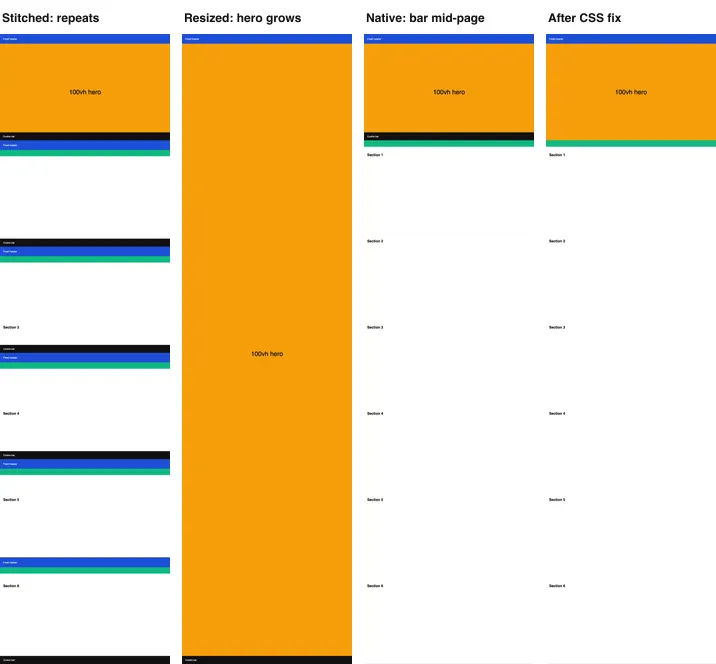
captureBeyondViewport: false, native fullPage, and native fullPage after the CSS fix. 2026-10-15, cropped.| How the tool captures | Tools we measured | Header copies | Cookie bar | Hero height |
|---|---|---|---|---|
| Stitches viewport screenshots | Puppeteer loop, Selenium Chrome and Firefox loops | 6 to 7 | 6 to 7 copies | 800 px |
| Resizes the viewport to the page height | Puppeteer captureBeyondViewport: false, Chrome --window-size=1280,4742 (Selenium window resize: header and bar same, hero not measured) |
1 | Once, at the bottom | 4,604 px |
| Draws beyond the viewport (native) | Puppeteer and Playwright fullPage, Chrome DevTools, Firefox and WebKit |
1 | Once, across the content at 740–800 px | 800 px |
| Any of the above, after the CSS fix | Puppeteer (all three modes), Playwright (all three engines) | 1 | Removed | 800 px |
1. Repeated header (stitching)
A stitching tool scrolls, takes a viewport screenshot, scrolls again. A fixed header is in every viewport screenshot, so it is in every slice of the result. Our page needed 6 slices in Puppeteer and 7 in Selenium Chrome, whose headless window has a 657 px viewport, and the header appeared that many times. Older Selenium answers and some browser extensions still stitch.
2. Stretched hero (viewport resize)
Some tools make the viewport as tall as the page and take one screenshot. CSS viewport units then follow the new size: 100vh became 4,742 px, and the hero grew to 4,604 px of the 4,742 px image. The content sections were pushed below it. The cookie bar, fixed to the bottom of a now huge window, landed at the very end, which looks right by accident.
3. Cookie bar in the middle (native capture)
Modern tools draw the page beyond the viewport without resizing it. Fixed elements are drawn once, at their place in the first viewport. The header at top: 0 is correct. The cookie bar at bottom: 0 is drawn at 740–800 px, across whatever content sits there. On a real site that is often the first heading below the hero.
4. Sticky navigation
position: sticky elements behave like normal elements in a native capture, because nothing scrolls: our sub-navigation stayed under the hero, which is correct. In a stitched capture, they stick to the top of each slice, under the fixed header, so they repeat too. Making them static removes that difference.
The fix: change the page, then capture
The order matters:
- Scroll back to the top. A fixed header switched to
absolutelands at the current scroll position. - Freeze anything sized from the viewport height, while the viewport is still the normal size.
- Switch fixed elements at the top to
position: absolute, hide fixed elements at the bottom, set sticky elements tostatic. - Capture.
When you know the selectors
Inject CSS. In Puppeteer:
await page.evaluate(() => window.scrollTo(0, 0));
await page.addStyleTag({
  content: `
    .site-header { position: absolute !important; }
    .subnav { position: static !important; }
    .cookie-bar, .chat-launcher { display: none !important; }
    .hero { height: 800px !important; }
  `,
});
await page.screenshot({ path: 'full-page.png', fullPage: true });
In Playwright, the style option of page.screenshot() applies the CSS only during the capture, so the page is unchanged afterwards:
await page.screenshot({
  path: 'full-page.png',
  fullPage: true,
  style: '.site-header{position:absolute!important}.cookie-bar{display:none!important}',
});
In Selenium, run the same CSS through execute_script:
driver.execute_script('''
  window.scrollTo(0, 0);
  const style = document.createElement('style');
  style.textContent = arguments[0];
  document.head.append(style);
''', '.site-header{position:absolute!important}.cookie-bar{display:none!important}')
With the fix, every Puppeteer and Playwright method we ran gave 1 header, no cookie bar and an 800 px hero, including the stitched capture. We did not re-run the Selenium captures with the fix.
When you do not know the selectors
For a crawler or a monitoring job that visits many sites, find fixed and sticky elements by their computed style:
// Runs inside the page. Pins top bars, drops bottom bars, freezes 100vh elements.
function neutralizeFixedElements() {
  window.scrollTo(0, 0);
  const vh = window.innerHeight;
  const boxes = [...document.querySelectorAll('body *')]
    .map((el) => [el, getComputedStyle(el).position, el.getBoundingClientRect()]);
  for (const [el, position, box] of boxes) {
    if (Math.abs(box.height - vh) < 2) el.style.setProperty('height', `${vh}px`, 'important');
    if (position === 'fixed') {
      if (box.top > vh / 2) el.style.setProperty('display', 'none', 'important');
      else el.style.setProperty('position', 'absolute', 'important');
    } else if (position === 'sticky') {
      el.style.setProperty('position', 'static', 'important');
    }
  }
}
Run it with page.evaluate(neutralizeFixedElements) in Puppeteer or Playwright, or driver.execute_script in Selenium (paste the body). It reads every box before it writes any style, so the browser lays out the page once, not once per element.
Know its limits before you run it on every site:
- Elements that are exactly one viewport tall are frozen even if they do not use
100vh. That is harmless: they keep the height they had. - Fixed elements in the lower half are hidden. That includes chat buttons and "back to top" buttons, which you probably want gone, but also any fixed panel that starts below the middle of the screen.
- A fixed header inside a positioned or transformed parent moves relative to that parent when it becomes
absolute. If the header jumps, settop: 0on it as well, or use a selector-based rule for that site. - Headers that change on scroll (shrinking logos, color changes) keep their state at the moment of the capture. Scroll to the top first, as the function does.
- Units other than
vh, such assvh,dvhor heights set by JavaScript fromwindow.innerHeight, are frozen only if they match the viewport height exactly.
The function is also part of the complete scripts in the Puppeteer full page guide and, as CSS in the style option, the Playwright full page guide.
By hand in a browser
The same problems appear in Chrome's Capture full size screenshot, Firefox's Save full page and Safari's Web Inspector capture. In each one you can delete the cookie bar in the element inspector before the capture. Chrome's DevTools Console accepts the function above as-is; the Chrome guide has a version that also loads lazy images.
With RenderScreenshot
The API uses the same idea: change the page in the request, then capture. page.styles injects CSS, page.remove deletes elements, and block.cookie_banners dismisses common consent banners:
curl -X POST https://api.renderscreenshot.com/v1/screenshot \
  -H "Authorization: Bearer $RS_API_KEY" \
  -H "Content-Type: application/json" \
  -d '{
    "url": "https://example.com",
    "capture": { "mode": "full_page", "scroll": { "simulate": true } },
    "block": { "cookie_banners": true },
    "page": {
      "styles": [".site-header { position: absolute !important; } .hero { height: 800px !important; }"],
      "remove": [".chat-launcher"]
    }
  }' \
  -o full-page.png
page.hide sets visibility: hidden and keeps the space, while page.remove closes the gap; for a bar fixed over the content either works, because fixed elements take no space. The parameters are in page modifications and the full-page API guide. We did not run the API on this test page. Create a free account to try it on a page that gives you a repeated header today.
Troubleshooting
| Symptom | Cause | Fix |
|---|---|---|
| Header on every screen of the image | Stitched viewport screenshots | Native full-page capture, or position: absolute first |
| Sub-navigation repeated under each header | Sticky element in a stitched capture | position: static |
| Hero fills most of the image | Viewport resized; 100vh followed |
Freeze the hero height before the capture |
| Cookie bar across the content | Fixed bottom bar drawn at the end of the first screen | display: none, page.remove or block.cookie_banners |
| Header missing after the fix | It was hidden, not pinned | Pin top elements with absolute, hide only bottom ones |
| Header appears halfway down the page | Switched to absolute while the page was scrolled |
Scroll to the top before the change |
| Header is offset or narrower after the fix | Its parent is positioned or transformed | Add top: 0; left: 0; right: 0, or a site rule |
| Chat button still visible | It is in an iframe or a shadow root | Remove the host element or iframe by selector |
Related in this topic
- Full Page Screenshots: Every Method Tested on One Page How to take a full page screenshot with DevTools, Puppeteer, Playwright, Selenium or an API. Each method tested on one 20,000 px page, with times and failures.
- Full Page Screenshot in Chrome Without an Extension Take a full page screenshot in Chrome with the DevTools command, the command line or a Console snippet. Tested limits, lazy images and fixed headers.
- Screenshot Lazy-Loaded Images: 5 Strategies Measured Why full page screenshots miss lazy-loaded images, and which scroll strategy fixes it. Five strategies measured in Chromium, Firefox and WebKit, with code.
- Full Page Screenshot in Firefox: Menu, Console and CLI Take a full page screenshot in Firefox with the built-in screenshot tool, the :screenshot command or the command line. Height limits measured, plus fixes.
- Full Page Screenshot in Safari on Mac and iPhone Take a full page screenshot in Safari: Web Inspector on Mac, Export as PDF, and Full Page on iPhone. WebKit limits measured, lazy images and fixed bars.
- Best Full Page Screenshot Extensions for Chrome (2026) The best full page screenshot extensions for Chrome compared with built-in tools, plus a free test page and five checks to score any extension yourself.