DocRaptor and PDFShift both turn HTML into PDF over a REST call, but they use different engines. DocRaptor runs Prince, a print-first typesetting engine. PDFShift runs Chromium, the engine inside Chrome. That one fact predicts most of what you will see: Prince is strong at print features such as running headers, footnotes and page counters, and Chromium is strong at the CSS and JavaScript that web apps use today.
Pick DocRaptor when the PDF is a designed print document and your team will write print CSS for it. Pick PDFShift when the PDF is a web page or app view that already looks right in Chrome.
Disclosure: I build RenderScreenshot, which also makes PDFs from HTML. Neither DocRaptor nor PDFShift is our product. The tests below ran on 2026-10-15. The last section says where our API fits and where it does not.
This page is part of our comparison hub. For a wider list of PDF services, see the HTML to PDF API roundup.
The verdict in one table
| If you need... | Choose | Why |
|---|---|---|
| Print typography: footnotes, running headers, cross-references, PDF/UA or PDF/A output | DocRaptor | Prince implements paged-media CSS that browsers do not |
| Output that matches what users see in Chrome | PDFShift | Same engine as the browser |
CSS grid, :has(), color-mix(), CSS nesting |
PDFShift | Prince ignored all four in our test |
| Excel (XLS/XLSX) files from the same API | DocRaptor | PDFShift makes PDF and images only |
| Images as well as PDFs | PDFShift | It has PNG, JPEG and WebP endpoints |
| No surprise charges for large documents | DocRaptor | It bills per document, at any size |
| Lowest entry price per document | PDFShift | Cheaper at every volume we priced below |
What we tested and how
We could not run PDFShift without a paid account, so this is an engine test, not a service benchmark. We sent four HTML files from our test corpus through two engines:
- Prince, through DocRaptor's API in test mode (
test: true), default pipeline 10.1 (Prince 15.1). - Chromium 148, through Puppeteer
page.pdf()on our machine. PDFShift is not Chromium 148: itsX-Processor-Versionheader accepts Chromium 116 or 142. We use local Chromium to show how the Chromium engine treats the same CSS, not to measure PDFShift's servers.
Method: 2026-10-15, macOS on an Apple M1 Pro, Node 22.18, three runs per file and engine. DocRaptor test documents carry a watermark band. Each file has text markers that pdftotext can find, and we checked the layout by eye on a 50 dpi raster of page 1.
| Test file | What it checks | Prince (DocRaptor) | Chromium |
|---|---|---|---|
invoice.html |
60-row table over 3 A4 pages, repeated thead, @page margin box with counter(page) |
3 pages, header repeats, "Page 1 of 3" printed | 3 pages, header repeats, "Page 1 of 3" printed |
layout.html |
Flexbox row, CSS grid with a spanning cell, floats | Flex row correct, grid stacked into one column, floats correct | All three correct |
modern-css.html |
Ten modern CSS features | 5 of 10 applied (see below) | 10 of 10 applied |
js.html |
A sync script, a script-drawn chart, and a text update after 800 ms | With javascript: true: sync text and chart ran, the 800 ms update did not |
Sync text and chart ran, the 800 ms update did not (no wait set) |
The CSS feature results for Prince were: custom properties, calc(), linear-gradient, box-shadow and transform worked. clamp(), aspect-ratio, color-mix(), :has() and CSS nesting were ignored. Neither engine waited for the 800 ms timer by default. DocRaptor waits if your page calls docraptorJavaScriptFinished(). PDFShift waits if you pass wait_for with the name of a global function that returns true.
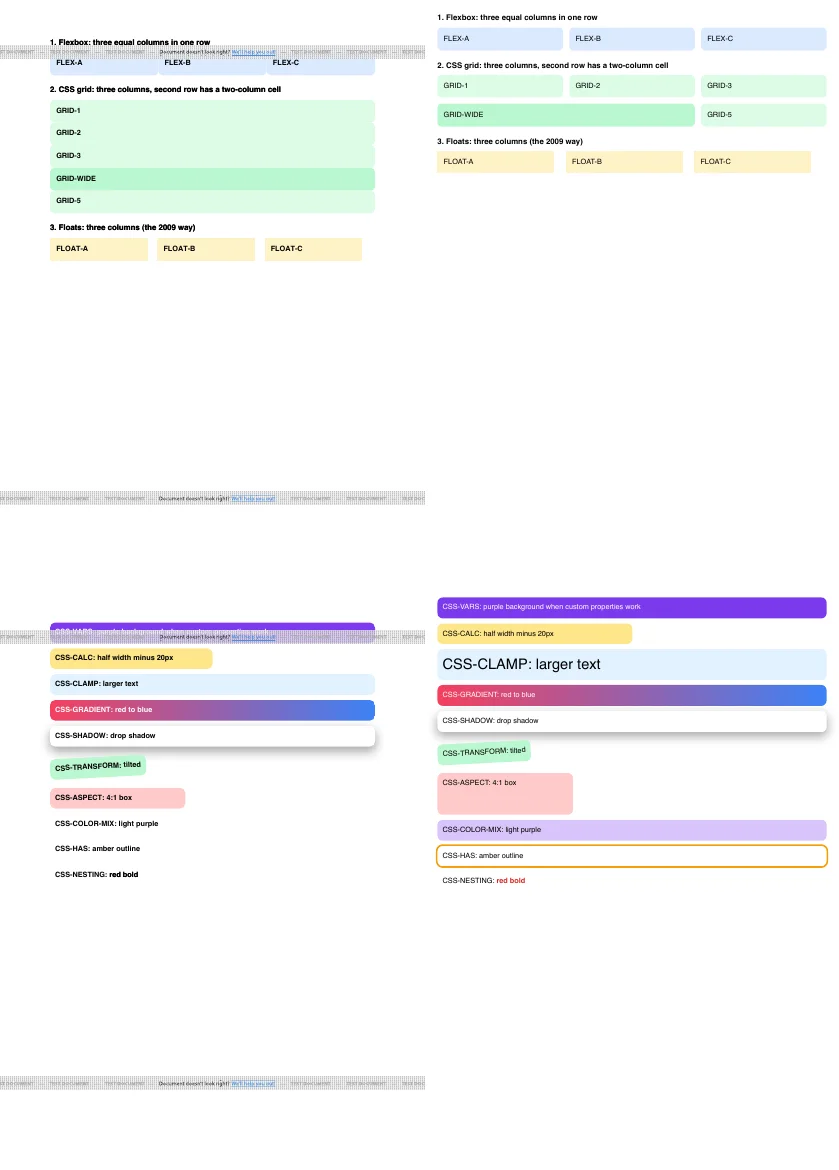
layout.html (top) and modern-css.html (bottom). Left: Prince 15.1 via DocRaptor, test mode (the grey band is DocRaptor's test watermark). Right: Chromium 148, page.pdf({ format: 'A4', printBackground: true }). 2026-10-15.What the numbers do not show. DocRaptor's test-mode calls took between 1.5 and 2.2 seconds from our machine. That is network plus queue plus render, from one location, for watermarked documents. We do not compare it with local Chromium times, because a local call has no network hop. Run the script at the end of this page from your own region to get a fair number.
Feature and parameter map
Both APIs take JSON. The table maps the common options. Names are checked against DocRaptor's API reference and PDFShift's convert endpoint on 2026-10-15.
| Task | DocRaptor | PDFShift |
|---|---|---|
| Endpoint | POST https://api.docraptor.com/docs |
POST https://api.pdfshift.io/v3/convert/pdf |
| Auth | API key as the HTTP Basic username | X-API-Key header |
| HTML input | document_content |
source (HTML string) |
| URL input | document_url |
source (URL; detected automatically) |
| Free test output | test: true (watermarked, unlimited) |
sandbox: true (watermarked, 10 per minute) |
| Run JavaScript | Off by default; javascript: true |
On by default; disable_javascript: true turns it off |
| Wait for the page | docraptorJavaScriptFinished() in your page |
wait_for (global function), delay (max 10 s), wait_for_network |
| Print or screen CSS | prince_options[media], default print |
use_print, default false (screen) |
| Paper size | CSS @page { size: ... } |
format (A4, Letter, or {width}x{height}) |
| Long jobs | async: true, then poll /status/{id} or set callback_url |
webhook |
| Store the file | Hosted documents (extra cost) | filename (S3 link kept 2 days) or s3_destination |
| Other outputs | XLS, XLSX | PNG, JPEG, WebP endpoints |
The most common DocRaptor surprise is in that table: it applies print media rules by default. If your PDF looks nothing like the page in the browser, set prince_options: { media: 'screen' } first. PDFShift starts from screen CSS, which is why a page that looks right in Chrome usually looks right in its output.
Pricing at three volumes
List prices from each vendor's pricing page, checked on 2026-10-15. Each cell is the cheapest monthly plan whose quota covers the volume.
| PDFs per month | DocRaptor | PDFShift |
|---|---|---|
| 1,000 | $75 (Premium, 1,250 docs) | $24 (Boost, 2,500 credits) |
| 10,000 | $399 (Bronze, 15,000 docs) | $99 (Business, 25,000 credits) |
| 100,000 | Enterprise, contact sales (largest listed plan is 40,000 docs for $1,000) | $249 (100k plan) |
Two billing rules change these numbers for some workloads:
- PDFShift counts one credit per 5 MB of output. A 14 MB PDF uses 3 credits. Image-heavy reports cost more than the table shows.
- DocRaptor charges per document at any size and lets paid plans go over the limit at a per-document rate. Its free plan allows 5 documents a month with no overage.
Both free tiers are small: 5 documents (DocRaptor) and 50 credits (PDFShift) a month. The watermarked test modes are where you will do most of your evaluation.
Code: the same invoice through both
Both scripts are Node 22 ESM with no dependencies. Each throws on a non-2xx response, so a failed render exits with a non-zero code.
DocRaptor. We ran this against DocRaptor's live API with a test key on 2026-10-15. The page counter in @page printed "Page 1 of 1".
// DocRaptor: HTML to PDF with the Prince engine.
// test: true makes free, watermarked documents, so you can try this before you pay.
import { writeFile } from 'node:fs/promises';

const key = process.env.DOCRAPTOR_API_KEY;
if (!key) throw new Error('Set DOCRAPTOR_API_KEY');

const html = `<!doctype html><html><head><style>
  @page { size: A4; margin: 18mm;
          @bottom-right { content: "Page " counter(page) " of " counter(pages); } }
  body { font: 11pt Helvetica, Arial, sans-serif; }
</style></head><body><h1>Invoice INV-1015</h1><p>Total due: $3,141.59</p></body></html>`;

const res = await fetch('https://api.docraptor.com/docs', {
  method: 'POST',
  headers: {
    'Content-Type': 'application/json',
    Authorization: 'Basic ' + Buffer.from(`${key}:`).toString('base64'),
  },
  body: JSON.stringify({
    test: true,            // remove for billable, unwatermarked output
    type: 'pdf',
    document_content: html,
    javascript: false,     // true runs DocRaptor's JavaScript engine before Prince
  }),
});
if (!res.ok) throw new Error(`DocRaptor ${res.status}: ${await res.text()}`);
await writeFile('invoice-docraptor.pdf', Buffer.from(await res.arrayBuffer()));
console.log('saved invoice-docraptor.pdf');
PDFShift. We do not have a PDFShift account, so we ran this against a local mock that checks the documented auth header and the required source field. It has not run against PDFShift's live API.
// PDFShift: HTML or URL to PDF with Chromium. sandbox: true makes free, watermarked documents.
import { writeFile } from 'node:fs/promises';

const key = process.env.PDFSHIFT_API_KEY;
if (!key) throw new Error('Set PDFSHIFT_API_KEY');

const html = `<!doctype html><html><head><style>
  @page { size: A4; margin: 18mm; }
  body { font: 11pt Helvetica, Arial, sans-serif; }
</style></head><body><h1>Invoice INV-1015</h1><p>Total due: $3,141.59</p></body></html>`;

const res = await fetch('https://api.pdfshift.io/v3/convert/pdf', {
  method: 'POST',
  headers: { 'X-API-Key': key, 'Content-Type': 'application/json' },
  body: JSON.stringify({
    source: html,          // a URL works here too; PDFShift detects which one you sent
    sandbox: true,         // remove for billable, unwatermarked output
    format: 'A4',
  }),
});
if (!res.ok) throw new Error(`PDFShift ${res.status}: ${await res.text()}`);
await writeFile('invoice-pdfshift.pdf', Buffer.from(await res.arrayBuffer()));
console.log('saved invoice-pdfshift.pdf');
Both responses are the PDF bytes on success. That makes a switch between them a small change: keep your HTML, swap the request builder. The work is in the CSS. A template tuned for Prince's print features (@footnote, string-set, prince-* properties) will lose those features in Chromium. A template that uses grid or :has() will lose layout in Prince.
Run the engine test on your own templates
Do not trust our four files for your documents. This loop sends each of your HTML files to DocRaptor in test mode and prints the page count and any text markers. Put a marker string such as MARKER-END at the bottom of each template, so a missing marker tells you content was cut.
// Send every .html file in ./templates to DocRaptor test mode; report pages and markers.
import { readdir, readFile, writeFile } from 'node:fs/promises';
import { execFileSync } from 'node:child_process';

const auth = 'Basic ' + Buffer.from(`${process.env.DOCRAPTOR_API_KEY}:`).toString('base64');
for (const name of (await readdir('templates')).filter((f) => f.endsWith('.html'))) {
  const t0 = performance.now();
  const res = await fetch('https://api.docraptor.com/docs', {
    method: 'POST',
    headers: { 'Content-Type': 'application/json', Authorization: auth },
    body: JSON.stringify({ test: true, type: 'pdf', document_content: await readFile(`templates/${name}`, 'utf8') }),
  });
  if (!res.ok) { console.error(name, res.status, await res.text()); process.exitCode = 1; continue; }
  const file = `out-${name.replace('.html', '.pdf')}`;
  await writeFile(file, Buffer.from(await res.arrayBuffer()));
  const pages = execFileSync('pdfinfo', [file]).toString().match(/Pages:\s+(\d+)/)[1];
  const markers = execFileSync('pdftotext', [file, '-']).toString().match(/MARKER-[A-Z-]+/g) ?? [];
  console.log(name, `${Math.round(performance.now() - t0)} ms`, `${pages} pages`, markers.join(' '));
}
We ran this loop against DocRaptor test mode with two of our corpus files on 2026-10-15. It needs pdfinfo and pdftotext from Poppler (brew install poppler or apt install poppler-utils). To do the same against PDFShift, change the URL, the auth header and the body to the PDFShift shape shown above, and keep sandbox: true.
When DocRaptor is the better choice
- Books, reports and statements with print rules. Prince supports paged-media CSS such as footnotes, running headers and leaders that Chromium does not.
- Accessible or archival PDFs. If a regulator asks for PDF/UA or PDF/A, a print engine built for that is the safer start.
- Big documents. One price per document regardless of size, and an async mode that allows up to 600 seconds per job.
- Excel output. The same API makes XLS and XLSX files.
When PDFShift is the better choice
- Your HTML was built for browsers. Dashboards, receipts from your web app, pages with charts drawn by JavaScript.
- Price. At each of the three volumes above, its list price is lower.
- Compliance flags.
is_hipaaandis_gdprswitch off features that would store your document on PDFShift's side. - You also need images. The same key converts to PNG, JPEG and WebP.
Where RenderScreenshot fits
RenderScreenshot also renders with Chromium, so its PDFs behave like the Chromium column above. It is a screenshot API first: the same request can return a PNG, WebP or PDF, and every render is cached with a public CDN link in the X-Cache-URL header. The PDF options are listed in the PDF parameters reference.
// RenderScreenshot: the same HTML to PDF through the Node SDK.
import { writeFile } from 'node:fs/promises';
import { Client, TakeOptions } from 'renderscreenshot';

const client = new Client(process.env.RS_API_KEY);
const html = '<h1>Invoice INV-1015</h1><p>Total due: $3,141.59</p>';

const pdf = await client.take(
  TakeOptions.html(html).format('pdf').pdfPaperSize('a4').pdfPrintBackground()
);
await writeFile('invoice-rs.pdf', pdf);
console.log('saved invoice-rs.pdf');
We tested this snippet against a local mock of our API, not the live service. Choose DocRaptor over us for print-typography work. Choose us if you need screenshots and PDFs from one key. If you are still choosing between two Chromium services, read PDFShift vs Api2Pdf.
To run the engine test above with RenderScreenshot as a third column, get a free API key. No credit card is needed.
Last tested 2026-10-15 with Node 22.18.0, Puppeteer 24.43.1 (Chromium 148.0.7778.97) and DocRaptor pipeline 10.1 in test mode. Prices and parameters checked on the vendors' sites on the same date.