dompdf and Browsershot are the two packages most PHP and Laravel teams try first for PDFs, and they work in opposite ways. dompdf is a layout engine written in PHP: it reads your HTML and CSS and draws the PDF itself. Browsershot is a thin PHP wrapper that runs Node, Puppeteer and a real Chrome, then saves what Chrome prints.
In our test, dompdf was 8 to 190 times faster (23 times on a three-page invoice) and made files 4 to 20 times smaller. Browsershot was the only one that got modern layout and JavaScript right. Choose dompdf for simple documents that you design for it. Choose Browsershot when the PDF must look like the web page.
Disclosure: I build RenderScreenshot, a hosted API that renders with Chromium. dompdf and Browsershot are open-source projects we do not maintain. All numbers below come from our own run on 2026-10-15.
More pairs like this one are in our comparison hub.
The verdict
| You need... | Choose | Reason from our test |
|---|---|---|
| Invoices, receipts, letters built with tables | dompdf | 6 to 60 ms per PDF, no Node or Chrome to install |
| A PDF of a page that uses flexbox or grid | Browsershot | dompdf stacked both layouts into one column |
| Charts or content drawn by JavaScript | Browsershot | dompdf does not run scripts |
| Page numbers like "Page 2 of 3" | Either | Browsershot reads CSS @page margin boxes; dompdf needs one PHP call |
| Screenshots as well as PDFs | Browsershot | dompdf makes PDFs only |
| Shared hosting with no Node and no shell access | dompdf | Pure PHP |
| Small files to store or email | dompdf | 1 to 6 KB vs 18 to 163 KB on our pages |
The test
We ran both libraries on the same five inputs, three times each, from one PHP script.
Method: 2026-10-15, macOS on an Apple M1 Pro, PHP 8.5.10, dompdf 3.1.6, Browsershot 5.4.0 with Puppeteer 24.43.1 and Chrome 148. Four pages came from a local server; the fifth was https://example.com. dompdf received the HTML as a string (loadHtml); Browsershot received the URL and waited for network idle. We report the median of three runs. Each Browsershot call started a new Chrome, which is how the package works by default. We read text markers in each PDF with pdftotext and checked the layout by eye.
| Page | dompdf time | dompdf size | Browsershot time | Browsershot size | Notes |
|---|---|---|---|---|---|
| Invoice, 60 rows, 3 pages | 59 ms | 6.4 KB | 1,372 ms | 125 KB | Both repeated the table header on each page. Only Browsershot printed "Page 1 of 3" from @page. |
| Layout: flexbox, grid, floats | 9 ms | 5.8 KB | 1,366 ms | 25 KB | dompdf stacked flex and grid; floats were correct in both. |
| JavaScript: sync text, chart, 800 ms update | 6 ms | 4.6 KB | 1,167 ms | 17.8 KB | dompdf showed the static fallback text. Browsershot showed all three script results. |
| Modern CSS: 10 features | 10 ms | 5.2 KB | 1,370 ms | 45.8 KB | dompdf applied 3 of 10; Browsershot applied 10 of 10. |
| example.com (live) | 198 ms | 1.3 KB | 1,570 ms | 163 KB | dompdf kept only the first paragraph. The other five languages on that page are added by a script. |
The dompdf time for example.com includes the HTTP fetch. The other dompdf times are pure render time, because the HTML came from a server on the same machine.
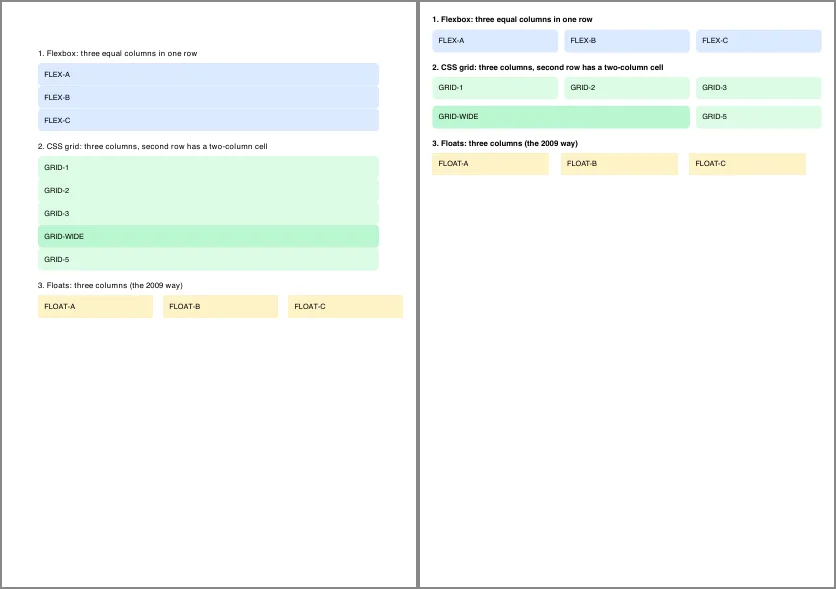
layout.html. Left: dompdf 3.1.6. Right: Browsershot 5.4.0 (Chrome 148), format('A4'), showBackground(). 2026-10-15.Which CSS survived in dompdf
dompdf applied custom properties (var(--brand)), calc() and 2D transforms. It ignored clamp(), linear-gradient, box-shadow, aspect-ratio, color-mix(), :has() and CSS nesting. A gradient header or a card shadow in your design turns into a flat box. The page is still readable, but it no longer matches your web view.
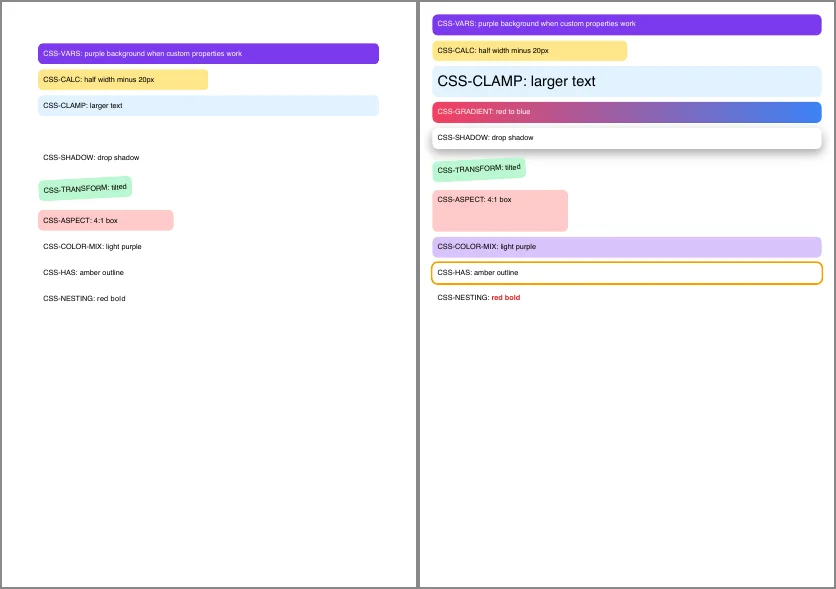
modern-css.html. Left: dompdf. Right: Browsershot. Same input, same date.Code you can paste
dompdf
Install with composer require dompdf/dompdf. dompdf needs the dom and mbstring PHP extensions, and gd if your HTML has images.
<?php
// dompdf 3.1: pure PHP, no browser. composer require dompdf/dompdf
require __DIR__ . '/vendor/autoload.php';

use Dompdf\Dompdf;
use Dompdf\Options;

$options = new Options();
$options->setIsRemoteEnabled(false);   // keep false unless you trust every URL in the HTML
$options->setDefaultFont('Helvetica');

$dompdf = new Dompdf($options);
$dompdf->loadHtml(<<<'HTML'
<!doctype html><html><head><style>
  @page { size: A4; margin: 18mm; }
  body { font: 11pt Helvetica, sans-serif; }
  table { width: 100%; border-collapse: collapse; }
  td, th { border-bottom: 1px solid #ddd; padding: 4px; text-align: left; }
</style></head><body>
  <h1>Invoice INV-1015</h1>
  <table><tr><th>Item</th><th>Amount</th></tr><tr><td>Screenshot credits</td><td>$40.00</td></tr></table>
</body></html>
HTML);
$dompdf->setPaper('A4');
$dompdf->render();

// dompdf ignores @page margin boxes, so stamp page numbers on the canvas instead.
$dompdf->getCanvas()->page_text(500, 810, 'Page {PAGE_NUM} of {PAGE_COUNT}', null, 9);

file_put_contents('invoice-dompdf.pdf', $dompdf->output());
echo "saved invoice-dompdf.pdf\n";
The page_text coordinates are in points from the top-left of an A4 page (595 x 842). Adjust them for Letter paper.
Browsershot
Install with composer require spatie/browsershot and npm install puppeteer in the same project root. Puppeteer downloads a matching Chrome.
<?php
// Browsershot 5.4: PHP API over Node + Puppeteer + Chrome.
// composer require spatie/browsershot && npm install puppeteer
require __DIR__ . '/vendor/autoload.php';

use Spatie\Browsershot\Browsershot;

Browsershot::url('https://example.com')
    ->windowSize(1280, 800)
    ->waitUntilNetworkIdle()
    ->save('example-browsershot.png');

Browsershot::html('<h1>Invoice INV-1015</h1><p>Total due: $3,141.59</p>')
    ->format('A4')
    ->margins(18, 18, 18, 18)        // millimetres
    ->showBackground()
    ->save('invoice-browsershot.pdf');

echo "saved example-browsershot.png and invoice-browsershot.pdf\n";
The first time we ran this, it failed with Cannot find module 'puppeteer'. Browsershot's Node script looks for node_modules next to Composer's vendor folder. If your node_modules lives somewhere else, point to it with ->setNodeModulePath('/path/to/node_modules'), and to a custom Chrome with ->setChromePath(...).
What each one costs you to run
| dompdf | Browsershot | |
|---|---|---|
| Runtime | PHP only | PHP, Node.js and Chrome |
| Install size we measured | 9.7 MB in vendor/dompdf |
13 MB of puppeteer-core plus a 346 MB Chrome download (macOS arm64) |
| Work per PDF | In-process; memory grows with document size | A new Node process and a new Chrome per call |
| Server setup | None beyond PHP extensions | Chrome's system libraries and fonts on Linux; ->noSandbox() if Chrome runs as root in a container |
| Failure mode | Wrong layout, but always some PDF | Timeouts or crashes when Chrome cannot start or a page hangs |
On a busy queue the per-call Chrome start dominates Browsershot's time. That is the 1.2 to 1.6 seconds in our table, and most of it repeats on every job. A pool of warm browsers removes most of that cost, but Browsershot does not keep one for you. You would move to a long-running Node service, or to a hosted renderer.
Security notes for both
- dompdf: leave
isRemoteEnabledoff unless you control every URL in the HTML. With it on, the HTML can make your server fetch any address. Setchroot($options->setChroot(...)) to the folder that holds your templates and assets, so local file paths in the HTML cannot reach other files. - Browsershot: a URL from a user can point Chrome at internal addresses such as cloud metadata endpoints. Validate URLs against an allow list before you pass them to
Browsershot::url(). - Both: escape user text before you put it into HTML.
htmlspecialchars($title, ENT_QUOTES)is enough for text nodes and attribute values.
When dompdf wins
- The document is yours to design: invoices, packing slips, certificates.
- You run on shared hosting or a serverless PHP runtime with no Node and no Chrome.
- You make many small PDFs and speed or storage cost matters.
When Browsershot wins
- The PDF must match a page that already exists, built with flexbox, grid or a CSS framework.
- The page draws charts or loads data with JavaScript.
- You also need PNG screenshots, and you are fine running Chrome on the server.
A third option: Chrome without Chrome on your server
If you want Browsershot's output but not the Node and Chrome install, a hosted renderer gives you the same Chromium result over HTTP. With the RenderScreenshot PHP SDK the invoice becomes:
<?php
// RenderScreenshot PHP SDK: Chrome-quality PDFs without Node on your server.
require __DIR__ . '/vendor/autoload.php';

use RenderScreenshot\Client;
use RenderScreenshot\TakeOptions;

$client = new Client(getenv('RS_API_KEY'));

$pdf = $client->take(
    TakeOptions::html('<h1>Invoice INV-1015</h1><p>Total due: $3,141.59</p>')
        ->format('pdf')
        ->pdfPaperSize('a4')
        ->pdfPrintBackground()
);
file_put_contents('invoice-rs.pdf', $pdf);
echo "saved invoice-rs.pdf\n";
We tested this snippet against a local mock of our API, not the live service. The options are listed in the PDF parameters reference. It still costs a network round trip per PDF, so dompdf stays the faster choice for simple table documents. For a Laravel walkthrough of all three approaches, see HTML to PDF in Laravel.
Get a free API key and run the same five test pages through it. No credit card is needed.
Last tested 2026-10-15 with PHP 8.5.10, dompdf 3.1.6, Browsershot 5.4.0, Puppeteer 24.43.1 and Chrome 148.0.7778.97 on macOS (Apple M1 Pro).