Disclosure: I build RenderScreenshot, a hosted API whose PDF output uses Chromium's print engine. Neither WeasyPrint nor Chrome is our product. Where WeasyPrint is the better engine, this page says so.
Short answer: WeasyPrint is a print-first layout engine: it implements the CSS paged-media features that documents need (running headers, cross-references, a table of contents with page numbers) and it is quick on short documents, but it runs no JavaScript and does not support every modern CSS feature. Chrome renders anything a browser renders, including JavaScript output and container queries, and it was four times faster on our long report, but it ignores most of the paged-media spec beyond page margin boxes. Pick by your templates, not by benchmark headlines.
This page belongs to our comparison hub. If you are moving off wkhtmltopdf, read wkhtmltopdf vs Puppeteer first. This page is for the next decision: a dedicated print engine or a browser.
Tested on October 15, 2026 on macOS (Apple Silicon) with Python 3.14.8 and WeasyPrint 70.0, and with Node.js 22.18.0, Puppeteer 25.14.0 and Chrome for Testing 155.0.8059.79.
The decision table
| Choose WeasyPrint if | Choose Chrome (Puppeteer, Playwright or an API) if |
|---|---|
| Your documents are print-first: reports, books, contracts, invoices made from server-side templates | Your source is a web page or a template that needs JavaScript (charts, client-side rendering) |
You need a CSS table of contents with page numbers (target-counter), running headers (string-set) or leaders |
You use container queries or other new CSS features as soon as Chrome ships them |
| You want a Python library with no browser binary to install and update | You already run headless Chrome for screenshots and want one engine |
| Most documents are one or two pages and you care about cold-start time | Documents are long (dozens of pages) and you care about render time per document |
| You need PDF/A or PDF/UA output from the same call | You want a tagged, accessible PDF by default |
What we tested
Four HTML documents, written for this test and rendered from local files so that network time does not count:
- Invoice: one A4 page, a table, a flex header and an
@pagefooter withcounter(page)andcounter(pages). - Report: a cover with a CSS table of contents, three sections that each start on a new page (
break-before: page), 540 table rows with a header that must repeat on every page,break-inside: avoidon rows, a running chapter header made withstring-set, and page numbers in@pagemargin boxes. - Layout: CSS grid, flexbox with
gap, custom properties,:has(), a container query,clamp(), gradients, box shadows and rounded corners. - JS chart: a bar chart that an inline script builds at load time, with a fallback paragraph that the script removes.
Each engine rendered each document once to warm up and then five more times in the same process. Chrome opened a new tab per render. I also timed three cold runs of each command-line script on the invoice, from process start to file written.
Results: what each engine printed
| Feature | WeasyPrint 70.0 | Chrome 155 |
|---|---|---|
@page size and margins |
Yes | Yes (with preferCSSPageSize: true) |
@page margin boxes with counter(page) / counter(pages) |
Yes ("Page 1 of 1") | Yes ("Page 1 of 1") |
Running header with string-set / string() |
Yes | No, the header box stayed empty |
Table of contents with target-counter() and leader() |
Yes (pages 2, 6, 10) | No, the entries had no page numbers |
Repeated <thead> on every page |
Yes | Yes |
| PDF bookmarks from headings | Yes, by default | Only with Puppeteer's outline: true |
| Tagged (accessible) PDF | With pdf_variant='pdf/ua-1' |
Yes, by default |
Grid, flex gap, :has(), gradients, shadows, border-radius |
Yes | Yes |
| Container queries | No | Yes |
| JavaScript | No | Yes |
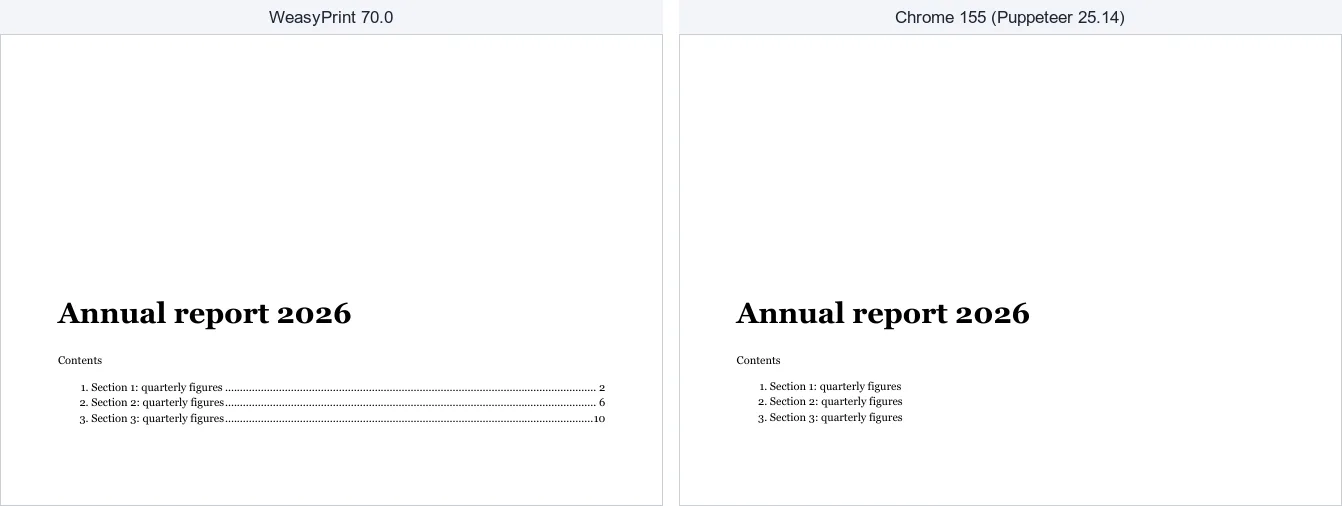
Page 1 of report.html, rendered by HTML('report.html').write_pdf() (left) and Puppeteer page.pdf({ printBackground: true, preferCSSPageSize: true }) (right), then rasterized at 80 dpi with pdftoppm.
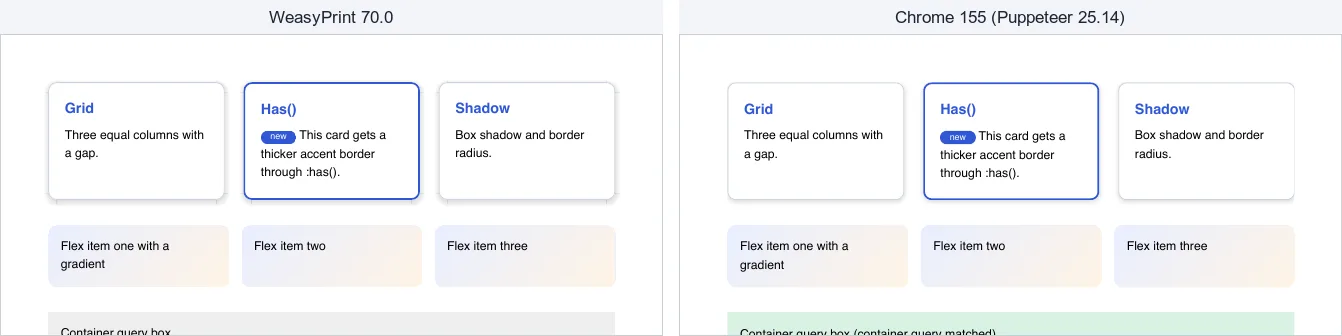
layout.html in both engines. The only visible difference is the container query row.
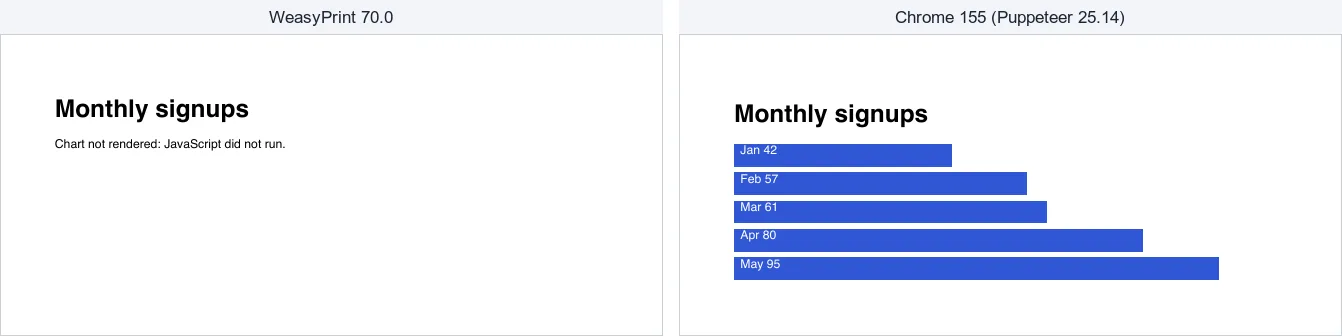
js-chart.html. WeasyPrint prints the fallback text because it never runs the script.
One more difference shows up only when you inspect the fonts. WeasyPrint finds fonts through fontconfig, and Chrome uses its own font settings. On our Mac, the generic sans-serif family in the invoice footer became Verdana in WeasyPrint and Helvetica in Chrome. Name the font you want, ship it with @font-face, and check the result with pdffonts.
Results: time and size
Median of five warm runs, in milliseconds. "Chrome (load)" waits for the load event. "Chrome (networkidle0)" waits until the page has had no network connections for 500 ms.
| Document | WeasyPrint | Chrome (load) | Chrome (networkidle0) |
|---|---|---|---|
| Invoice, 1 page | 84 | 137 | 1,111 |
| Report, 13 to 16 pages | 1,026 | 242 | 1,216 |
| Layout, 1 page | 86 | 134 | 1,114 |
| JS chart, 1 page | 59 | 124 | 1,116 |
Cold runs on the invoice, from process start to PDF on disk: WeasyPrint 0.41 to 0.49 s, Chrome (launch, render, close) 0.70 to 1.18 s.
File size in bytes, and page count where it differs:
| Document | WeasyPrint | Chrome |
|---|---|---|
| Invoice | 38,060 | 41,350 |
| Report | 90,094 (13 pages) | 993,276 (16 pages); 93,818 with tagged: false |
| Layout | 42,219 | 56,111 |
| JS chart | 30,617 (no chart) | 16,311 |
What the numbers say:
- WeasyPrint wins on short documents and on cold starts. If you print one invoice per request in a fresh worker, it finishes before Chrome has opened.
- Chrome wins on long documents. WeasyPrint's time grew with the 540-row report to about one second; Chrome stayed under 250 ms.
networkidle0costs about one second per document, even for a local file with no requests, because it waits for 500 quiet milliseconds. For HTML you generate yourself, wait forloador for a selector your template sets when it is ready.- Chrome's size difference is tagging. The tagged report is about 11 times the size of the untagged one. Turn tagging off only if you do not need accessible PDFs.
- The page counts differ (13 against 16) because the two engines measure fonts and table rows differently. Do not assume a template that fits on one page in one engine fits in the other.
These are single-machine numbers from a laptop. A Linux server with fewer cores and different fonts will give different absolute times, but the shape (WeasyPrint grows faster with document length, networkidle0 adds a fixed second) is the part to rely on. Run the scripts below on your own templates.
The code we ran
WeasyPrint (Python)
python -m venv .venv && .venv/bin/pip install weasyprint==70.0
On Linux, WeasyPrint also needs Pango from the system packages. Follow the installation page of the WeasyPrint documentation for your distribution.
# weasy.py: render an HTML file or URL to PDF with WeasyPrint.
#   python weasy.py corpus/invoice.html invoice.pdf
import sys

from weasyprint import HTML


def main(src: str, out: str) -> None:
    # base_url lets relative paths (images, CSS) resolve for HTML strings;
    # for a file path or URL WeasyPrint works it out itself.
    HTML(src).write_pdf(out)
    print(f'{out} written')


if __name__ == '__main__':
    if len(sys.argv) != 3:
        sys.exit('usage: python weasy.py <html-file-or-url> <out.pdf>')
    main(sys.argv[1], sys.argv[2])
For PDF/UA (tagged) or PDF/A output, pass the variant: HTML(src).write_pdf(out, pdf_variant='pdf/ua-1'). Our invoice came back tagged with that option.
Chrome (Node.js and Puppeteer)
npm i [email protected]
// chrome-pdf.mjs: render an HTML file or URL to PDF with headless Chrome (Puppeteer).
//   node chrome-pdf.mjs corpus/invoice.html invoice.pdf
import { pathToFileURL } from 'node:url';
import puppeteer from 'puppeteer';

const [src, out] = process.argv.slice(2);
if (!src || !out) {
  console.error('usage: node chrome-pdf.mjs <html-file-or-url> <out.pdf>');
  process.exit(2);
}
const url = /^https?:\/\//.test(src) ? src : pathToFileURL(src).href;

const browser = await puppeteer.launch();
try {
  const page = await browser.newPage();
  // Local files: 'load' is enough. Live pages: wait for the network to go quiet.
  const waitUntil = url.startsWith('file:') ? 'load' : 'networkidle0';
  await page.goto(url, { waitUntil, timeout: 30_000 });
  await page.pdf({
    path: out,
    printBackground: true,     // Chrome drops backgrounds by default
    preferCSSPageSize: true,   // honour @page size and margins from the CSS
  });
  console.log(`${out} written`);
} finally {
  await browser.close();
}
Two options matter more than they look. Without printBackground: true, Chrome drops background colors, so table header shading and callout boxes disappear. Without preferCSSPageSize: true, Chrome ignores your @page size and prints on Letter. Add outline: true for PDF bookmarks and tagged: false if file size matters more than accessibility.
In Python, Playwright's page.pdf() drives the same Chrome print engine, so the results in the table above apply to it too.
The timing loops
# bench_weasy.py: warm-process timing for WeasyPrint. RUNS=5 python bench_weasy.py > weasy.csv
import csv, os, sys, time
from weasyprint import HTML

DOCS = ['invoice', 'report', 'layout', 'js-chart']
RUNS = int(os.environ.get('RUNS', '5'))
w = csv.writer(sys.stdout)
w.writerow(['engine', 'doc', 'run', 'ms', 'bytes'])
for doc in DOCS:
    src = f'corpus/{doc}.html'
    HTML(src).write_pdf()  # warm-up, not recorded
    for run in range(RUNS):
        t0 = time.perf_counter()
        pdf = HTML(src).write_pdf()
        w.writerow(['weasyprint', doc, run + 1, round((time.perf_counter() - t0) * 1000), len(pdf)])
// bench_chrome.mjs: warm-browser timing for Chrome. WAIT=load RUNS=5 node bench_chrome.mjs > chrome.csv
import { pathToFileURL } from 'node:url';
import { resolve } from 'node:path';
import puppeteer from 'puppeteer';

const DOCS = ['invoice', 'report', 'layout', 'js-chart'];
const RUNS = Number(process.env.RUNS ?? 5);
const WAIT = process.env.WAIT ?? 'load';
const browser = await puppeteer.launch();
console.log('engine,doc,run,ms,bytes');
try {
  for (const doc of DOCS) {
    const url = pathToFileURL(resolve(`corpus/${doc}.html`)).href;
    for (let run = 0; run <= RUNS; run++) {
      const t0 = performance.now();
      const page = await browser.newPage();
      await page.goto(url, { waitUntil: WAIT });
      const pdf = await page.pdf({ printBackground: true, preferCSSPageSize: true });
      await page.close();
      if (run > 0) console.log(`chrome-${WAIT},${doc},${run},${Math.round(performance.now() - t0)},${pdf.length}`); // run 0 warms up
    }
  }
} finally {
  await browser.close();
}
Each script exits with a non-zero code if a render throws. All four scripts ran on the date at the top of this page.
Running each one in production
WeasyPrint is a library call inside your app process. There is no browser to launch, crash or leak, and memory is freed when the document object goes away. The costs are elsewhere: system libraries (Pango and its dependencies) in your container image, fonts you must install and test, and render time that grows with document length. Long reports belong in a background job, not in a web request.
Chrome is a second process tree next to your app. Launch it once and reuse it, cap the number of open tabs, close every page in a finally block, and restart the browser when it stops responding. The Chrome binary is a few hundred megabytes, and it needs updates for security fixes. In return, any template a browser can show will print, and long documents stay fast.
If you need to protect yourself from user-supplied HTML, both engines can fetch URLs that the HTML references. WeasyPrint takes a url_fetcher function where you can refuse private addresses. In Chrome, intercept requests and block anything you did not expect.
When WeasyPrint is the right answer
- Books, manuals, reports and contracts where the table of contents, cross-references and running headers must come from CSS.
- A Python stack where adding a browser to the image is the larger cost.
- Short documents at high volume in short-lived workers, where Chrome's cold start dominates.
- Archival output: PDF/A from the same call.
For layout details that both engines share, see CSS page breaks for PDF. For more Python options, see HTML to PDF in Python.
When Chrome is the right answer
- Your HTML is a live web page, or your template draws charts or tables in JavaScript.
- You want the PDF to look exactly like the page a user sees in a browser.
- Long documents, where Chrome's render time grew much less than WeasyPrint's in our test.
- You want tagged PDFs without extra settings.
The same Chrome output without running Chrome
RenderScreenshot prints with Chromium on Cloudflare's browser fleet, so everything in the Chrome column above applies to it: JavaScript runs, container queries work, and target-counter() does not. What changes is the operations work. There is no browser to install, update or restart. Send the HTML and the PDF options, and the PDF comes back in the response:
# HTML string to PDF with curl; jq builds the JSON so quotes in the HTML are escaped.
jq -n --rawfile html invoice.html '{
  html: $html,
  output: { format: "pdf" },
  pdf: { paper: "a4", print_background: true, prefer_css_page_size: true }
}' | curl -sS -X POST "https://api.renderscreenshot.com/v1/screenshot" \
  -H "Authorization: Bearer $RS_API_KEY" \
  -H "Content-Type: application/json" \
  --data-binary @- \
  --fail-with-body -o invoice.pdf
The same request from Python, if you are replacing a WeasyPrint call in place:
# rs_pdf.py: the WeasyPrint call, replaced by one HTTP request. pip install httpx==0.28.1
import os
import sys

import httpx

API = os.environ.get('RS_API_BASE', 'https://api.renderscreenshot.com')


def html_to_pdf(html: str) -> bytes:
    res = httpx.post(
        f'{API}/v1/screenshot',
        headers={'Authorization': f"Bearer {os.environ['RS_API_KEY']}"},
        json={
            'html': html,
            'output': {'format': 'pdf'},
            'pdf': {'paper': 'a4', 'print_background': True, 'prefer_css_page_size': True},
        },
        timeout=90,
    )
    res.raise_for_status()  # errors are JSON with a code, a message and a retryable flag
    return res.content


if __name__ == '__main__':
    src = sys.argv[1] if len(sys.argv) > 1 else 'invoice.html'
    with open(src, encoding='utf-8') as f:
        pdf = html_to_pdf(f.read())
    with open('invoice.pdf', 'wb') as f:
        f.write(pdf)
    print(f'invoice.pdf: {len(pdf)} bytes')
Both requests were checked against a local mock of the API for the endpoint, the auth header and the parameter names (October 15, 2026). The html input and its limits are in the content input reference. If your templates depend on target-counter() or string-set, an API built on Chrome will not fix that, and WeasyPrint stays the better choice.
To compare the API with your current engine on your own templates, create a free API key and run the curl command above next to weasy.py. The PDF generation API page covers headers, footers and page ranges in more detail.
Related
- wkhtmltopdf vs Puppeteer: the migration most teams make before this one.
- DocRaptor vs PDFShift: two hosted HTML-to-PDF APIs, one of them built on a print-first engine.
- Gotenberg vs Browserless: self-hosting Chrome-based PDF rendering as a service.
- WeasyPrint alternative: when you want to leave WeasyPrint.
- PDF options reference: paper sizes, margins, headers and footers for API requests.