For screenshots, new headless Chrome and headful Chrome produce almost the same pixels. In our test they differed in under 0.4% of pixels. The difference that will bite you is not headless vs headful at all: it is headless shell vs the full Chrome binary, and settings such as dark mode that one mode inherits from the host and the other does not.
So the practical choice in 2026 is between three modes, not two:
| Mode | Puppeteer 24 | Playwright 1.64 | Binary |
|---|---|---|---|
| New headless | headless: true |
headless: true, channel: 'chromium' |
Full Chrome |
| Headless shell | headless: 'shell' |
headless: true (the default) |
chrome-headless-shell |
| Headful | headless: false |
headless: false |
Full Chrome with a window |
Disclosure: I build RenderScreenshot, a hosted screenshot API that runs headless Chromium. This page compares ways to run Chrome yourself. All numbers are from our run on 2026-10-15.
This page sits in our comparison hub. If you are new to Puppeteer captures, start with the Puppeteer screenshot tutorial.
Verdict
- Use new headless (
headless: truein Puppeteer) for production screenshots. It is the real Chrome, it matched headful output in our test, and it needs no display. - Use headless shell when launch time dominates, such as one capture per short-lived process or serverless function. It started almost four times faster for us. Test your pages with it, because it renders some things differently.
- Use headful to debug: watch the page load, open DevTools, see the cookie banner your script missed. Do not ship it to a server unless a site truly behaves differently without a window.
What we measured
Method: 2026-10-15, macOS on an Apple M1 Pro with a built-in display, dark appearance on. Puppeteer 24.43.1 with Chrome for Testing 148.0.7778.97 and chrome-headless-shell 148.0.7778.97. Each mode: five launches; four pages captured once per launch at a 1280x800 or 1200x630 viewport and deviceScaleFactor: 1; a separate warm-page run of seven screenshots of the 1200x630 card (first one dropped). Pixel differences use ImageMagick compare -metric AE -fuzz 2%. A Linux server without a GPU will give different times; we did not test one for this page.
| New headless | Headless shell | Headful | |
|---|---|---|---|
| Launch to first page, median of 5 | 510 ms | 136 ms | 568 ms |
| Screenshot of a 1200x630 gradient card, warm page, median of 6 | 91 ms | 136 ms | 89 ms |
| PNG size of that card | 227,633 B | 356,516 B | 226,292 B |
| User agent token | HeadlessChrome/148.0.0.0 |
HeadlessChrome/148.0.7778.97 |
Chrome/148.0.0.0 |
navigator.webdriver |
true | true | true |
| WebGL renderer | Apple GPU (ANGLE Metal) | none | Apple GPU (ANGLE Metal) |
screen.width x screen.height |
800x600 | 1280x800 | 1512x982 (the real display) |
navigator.plugins.length |
5 | 0 | 5 |
Notification.permission |
default | denied | default |
| Followed the host's dark mode | yes | no | yes |
The shell's card PNG was 57% larger, but the pixels were the same: 8 pixels out of 756,000 differed from new headless. The shell's encoder compressed the file less. If you store millions of PNGs, re-encode them or switch to WebP rather than picking a mode for file size.
The dark mode surprise
example.com sets color-scheme: light dark. Our test Mac was in dark appearance. New headless and headful Chrome both read that setting and rendered a dark page. Headless shell rendered it light. That one setting made 78% of the pixels differ between two "headless" captures of the same page.
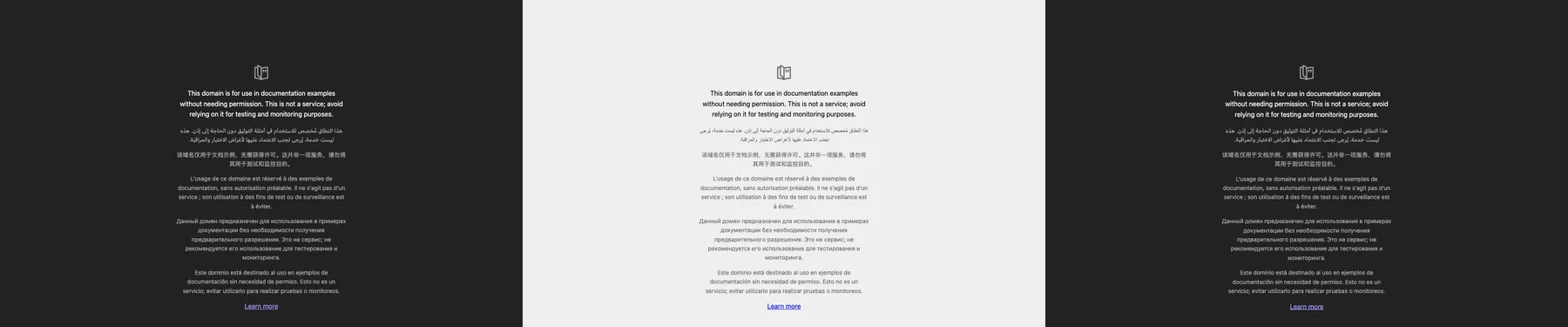
headless: true. Middle: headless: 'shell'. Right: headless: false.On a server this shows up as "screenshots changed after we upgraded Chrome" or "staging and production disagree". The fix is to stop inheriting the setting. After we pinned prefers-color-scheme, the three modes differed by 0.27% (shell) and 0.30% (headful) of pixels, which is anti-aliasing noise.
Pixel differences against new headless
| Page | Headful | Headless shell |
|---|---|---|
| example.com (dark mode inherited) | 0.30% | 78.3% |
| 1200x630 gradient card | 0.40% | 0.001% |
| Modern CSS test page | 0.39% | 0.002% |
| 8,657 px page with lazy images, full page | 0.06% | 0.61% |
example.com with prefers-color-scheme: light pinned |
0.30% | 0.27% |
Code: one script, three modes
Run it as node headless-modes.mjs headless, shell or headful. It pins the color scheme so the three outputs match.
// Puppeteer 24: the three ways to run Chrome, plus the setting that made our captures match.
import puppeteer from 'puppeteer';

const mode = process.argv[2] ?? 'headless';
const headless = { headless: true, shell: 'shell', headful: false }[mode];
if (headless === undefined) throw new Error('mode must be headless, shell or headful');

const browser = await puppeteer.launch({ headless });
try {
  const page = await browser.newPage();
  await page.setViewport({ width: 1280, height: 800, deviceScaleFactor: 1 });
  // Pin the color scheme: new headless and headful follow the host OS setting.
  await page.emulateMediaFeatures([{ name: 'prefers-color-scheme', value: 'light' }]);
  await page.goto('https://example.com', { waitUntil: 'networkidle0' });
  console.log(mode, await browser.version(), await page.evaluate(() => navigator.userAgent));
  await page.screenshot({ path: `example-${mode}.png` });
} finally {
  await browser.close();
}
Puppeteer 24 downloads both binaries on install. If you only use one mode, skip the other download with Puppeteer's configuration file to save space in your image.
Playwright
Playwright's default is the opposite of Puppeteer's. Plain headless: true launches chromium-headless-shell. To get new headless, add channel: 'chromium'. We checked this with Playwright 1.64.1 and Chromium 156: the default launch reported HeadlessChrome/156.0.8078.4 (the shell's full version string) and the channel: 'chromium' launch reported HeadlessChrome/156.0.0.0.
// Playwright: default headless uses chromium-headless-shell; channel 'chromium' uses new headless.
import { chromium } from 'playwright';
for (const opts of [{ headless: true }, { headless: true, channel: 'chromium' }, { headless: false }]) {
  const browser = await chromium.launch(opts);
  try {
    const page = await browser.newPage();
    await page.goto('https://example.com');
    const ua = await page.evaluate(() => navigator.userAgent);
    console.log(JSON.stringify(opts), browser.version(), ua.match(/(HeadlessChrome|Chrome)\/[\d.]+/)[0]);
  } finally {
    await browser.close();
  }
}
If you move a project from Puppeteer to Playwright, or the reverse, check which binary you get. A changed default mode is a common reason for a sudden batch of visual diffs.
Settings to pin in every mode
Each of these differed between modes or between our laptop and a typical server. Set them, and the mode stops mattering for most pages:
| Setting | Why | Puppeteer |
|---|---|---|
| Color scheme | Inherited from the host in new headless and headful | page.emulateMediaFeatures([{ name: 'prefers-color-scheme', value: 'light' }]) |
| Viewport and scale | Window size and display DPR differ per mode | page.setViewport({ width, height, deviceScaleFactor }) |
| Locale and timezone | Inherited from the host | --lang=en-US launch arg, page.emulateTimezone('UTC') |
| Fonts | The host's installed fonts decide fallbacks | Install the same fonts in every environment, or load web fonts |
| Readiness | Network idle is not "rendered" | Wait for a selector or a function that checks your content |
| Reduced motion | Animations caught mid-frame | page.emulateMediaFeatures([{ name: 'prefers-reduced-motion', value: 'reduce' }]) |
The page on blank Puppeteer screenshots covers the readiness problem in depth.
Headful on a server
If a site really does need a window, you need a display. On Linux that usually means Xvfb:
# Debian/Ubuntu: virtual display for headful Chrome
apt-get install -y xvfb
xvfb-run --auto-servernum --server-args='-screen 0 1280x800x24' node headless-modes.mjs headful
We did not run this on Linux for this page. Expect a slower launch than our Mac numbers, no GPU unless you pass one through, and one more process to watch. In our test headful gave the same pixels as new headless, so first make sure the window is the actual cause before you take on that cost.
About detection
Some sites serve a different page, or a challenge, to automated browsers. Headful mode removes the HeadlessChrome token from the user agent, and headless shell is the easiest mode to spot (no plugins, no WebGL, a full version number in the UA). But navigator.webdriver was true in all three modes under Puppeteer. A visible window does not make automation invisible, and it should not be your plan for sites that do not want to be captured. Our headless detection study measures how often this matters on real sites.
Or skip the mode decision
RenderScreenshot runs headless Chromium for you and makes the settings above explicit request parameters. Dark mode is browser.dark_mode, viewport and scale are viewport.width, viewport.height and viewport.scale, and waits are wait.for_selector. See the browser parameters for the full list.
// RenderScreenshot: a URL screenshot as binary, with the CDN link in a header.
import { writeFile } from 'node:fs/promises';

const res = await fetch('https://api.renderscreenshot.com/v1/screenshot', {
  method: 'POST',
  headers: {
    Authorization: `Bearer ${process.env.RS_API_KEY}`,
    'Content-Type': 'application/json',
  },
  body: JSON.stringify({ url: 'https://example.com', viewport: { width: 1280, height: 800 }, output: { format: 'webp' } }),
});
if (!res.ok) throw new Error(`RenderScreenshot ${res.status}: ${await res.text()}`);
await writeFile('example.webp', Buffer.from(await res.arrayBuffer()));
console.log('CDN copy:', res.headers.get('x-cache-url'));
Add browser: { dark_mode: true } to the body to get the dark version on purpose. We tested this snippet against a local mock of our API, not the live service. If you need a visible browser, a debugger or your own scripts, keep running Chrome yourself; we do not offer headful mode.
Get a free API key and compare its output with your own headless captures.
Last tested 2026-10-15 with Node 22.18.0, Puppeteer 24.43.1 (Chrome for Testing and chrome-headless-shell 148.0.7778.97) and Playwright 1.64.1 (Chromium 156.0.8078.4) on macOS (Apple M1 Pro).