Disclosure: I build RenderScreenshot, a screenshot API that renders with Chromium only. This page compares three engines that you run yourself with Playwright, and it says plainly when our API is the wrong tool (any time you need Firefox or WebKit pixels).
If you need one engine for screenshots, use Chromium: it is what most of your visitors run, it launched fastest in our test, and almost every hosted screenshot API uses it. Use WebKit when you need to see what Safari users see, and Firefox when Firefox users matter to you or when you want a second opinion on a layout bug. The engines agreed on modern CSS in our tests. They disagreed on native form controls, full-page lazy loading and PNG size, and those are the differences that break screenshot pipelines.
This is part of our comparison hub. For Playwright basics (contexts, device scale factor, locators) start with the Playwright screenshot tutorial.
Last tested: October 15, 2026 with Playwright 1.56.1: Chromium 141.0.7390.37 (headless shell), Firefox 142.0.1, WebKit 26.0. Node 22.18.0, macOS 27.0.1, Apple M1 Pro, 32 GB.
The short answer
| Use Chromium when | Use Firefox when | Use WebKit when |
|---|---|---|
| You need one engine for social cards, thumbnails, PDFs or archives | Your analytics show a real Firefox audience | Your audience is on iPhone, iPad or Safari |
| You want the fastest launch and the smallest PNGs on simple pages | You debug a layout bug and want an independent engine | You test forms, because Safari-style controls differ most |
| You want parity with a hosted screenshot API | You test standards behaviour, not Chrome quirks | You need a Safari-like render without a Mac in CI |
WebKit in Playwright is not Safari. It is the same engine with Playwright's patches, running on your OS, so system fonts and some platform features differ from a real iPhone. It is still the closest you can get in a Linux container.
The test corpus
We wrote five small pages to isolate one kind of difference each, and served them from localhost so the network was not part of any measurement:
- example: a mirror of example.com, as a baseline.
- typography: serif heading,
text-wrap: balance, monospace, small caps, CJK text, emoji (including a ZWJ sequence and a flag), text shadow, outlined text. - css-features: CSS Grid,
:has(),color-mix()in OKLCH,backdrop-filter, a container query, CSS nesting,conic-gradient,clip-path, all over a gradient background. - forms: text input, select, checkbox, radio, range, date, color, progress, button, with no styling.
- lazy-fullpage: eight
loading="lazy"images, each in a 700 px section, captured full page.
Each page was captured 10 times per engine at 1280x800, device scale factor 1, PNG, one browser per engine and a new context per capture, timed from goto (waiting for load) to the returned buffer.
Results
| Page | Engine | p50 | p95 | PNG bytes |
|---|---|---|---|---|
| example | Chromium | 47 ms | 56 ms | 18,497 |
| example | Firefox | 59 ms | 159 ms | 36,386 |
| example | WebKit | 28 ms | 119 ms | 35,378 |
| typography | Chromium | 67 ms | 83 ms | 76,575 |
| typography | Firefox | 73 ms | 112 ms | 100,599 |
| typography | WebKit | 66 ms | 87 ms | 97,492 |
| css-features | Chromium | 96 ms | 99 ms | 183,829 |
| css-features | Firefox | 62 ms | 217 ms | 110,273 |
| css-features | WebKit | 62 ms | 73 ms | 857,164 |
| forms | Chromium | 47 ms | 61 ms | 19,652 |
| forms | Firefox | 70 ms | 73 ms | 39,752 |
| forms | WebKit | 33 ms | 53 ms | 37,627 |
| lazy-fullpage | Chromium | 156 ms | 164 ms | 58,061 |
| lazy-fullpage | Firefox | 111 ms | 370 ms | 170,541 |
| lazy-fullpage | WebKit | 85 ms | 87 ms | 151,983 |
Browser launch (median of 3 launches): Chromium 74 ms, WebKit 197 ms, Firefox 571 ms. Success rate: 150 of 150 captures for every engine.
What the numbers say:
- Capture speed is a wash. No engine was fastest on every page, and every median is under 160 ms. On a real site, network and fonts dominate. Do not choose an engine for speed per capture.
- Launch time is not a wash. Firefox took about eight times longer than Chromium to start. If your design launches a browser per job (serverless functions often do), that cost lands on every request. Keep the browser warm, or use Chromium.
- PNG size varies a lot. WebKit's PNG of the gradient-heavy page was 4.7 times the size of Chromium's for the same 1280x800 pixels, and Firefox and WebKit produced roughly double Chromium's bytes on the simple pages. If you store engine screenshots, convert them to WebP or AVIF before you keep them; our format comparison has the measurements.
- First runs are slow. On the very first run on a fresh machine, one Chromium capture of the typography page took about 4 seconds while the OS built its font cache for CJK and emoji. It did not happen again. Warm up new containers with one throwaway capture.
Where the pixels differ
Native form controls
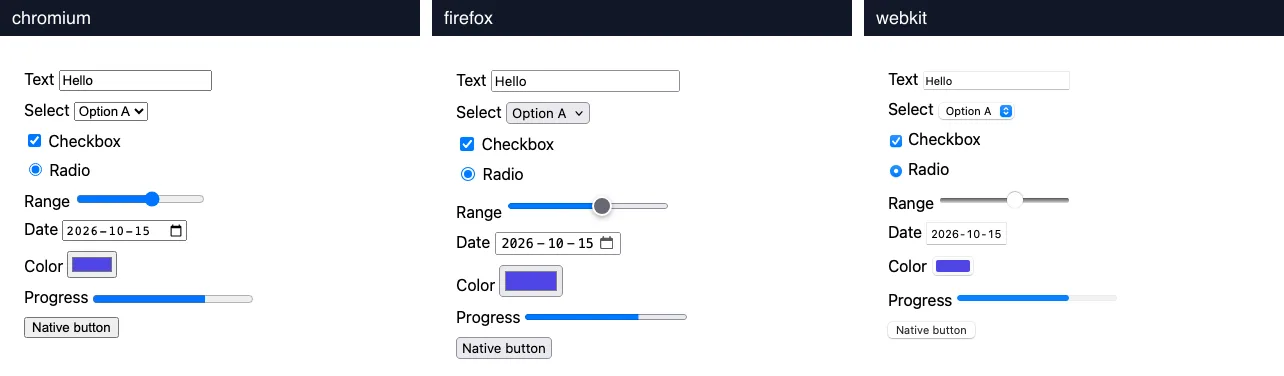
Rendered with Playwright 1.56.1, 1280x800, cropped to 420x340, October 15, 2026.
This is the largest difference in the corpus. Every control has its own engine look: Firefox draws a large round range thumb and a taller date field, WebKit uses Safari's rounded select with a blue stepper and a flatter button. Firefox's controls are also taller, so the same form ends about 20 px lower. If you use pixel diffs, that one row of height shifts everything below it, and the whole page shows as changed.
The fix for visual tests is per-engine baselines. The fix for marketing screenshots is to style controls explicitly (appearance: none plus your own CSS), so all engines draw the same thing.
Modern CSS

Same setup, full 1280x480 crop, scaled to 520 px per engine.
Everything rendered in all three: the grid, the :has() outline, color-mix(), backdrop-filter, the container query (green box), nesting (red text), the conic gradient and the clip path. Differences are sub-pixel text positions. In 2026, "this CSS does not work in engine X" is rarely why screenshots differ between current engines. It is a common reason when one side is old, as in our wkhtmltopdf vs Puppeteer comparison.
Typography, emoji and CJK
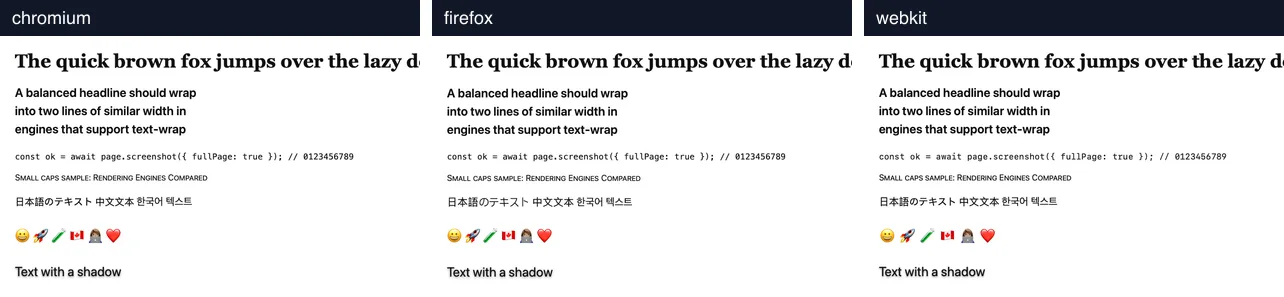
Same setup, cropped to 900x560.
On macOS, all three engines look nearly identical, because they share the operating system's fonts, including the colour emoji font. That is a property of the test machine, not of the engines. On Linux, the result depends on which fonts are installed in the container, and each engine walks its fallback list differently. Missing CJK or emoji fonts show up as empty boxes. Install them explicitly (for Debian or Ubuntu: fonts-noto-cjk and fonts-noto-color-emoji) and test each engine after the install.
Lazy images in full-page captures
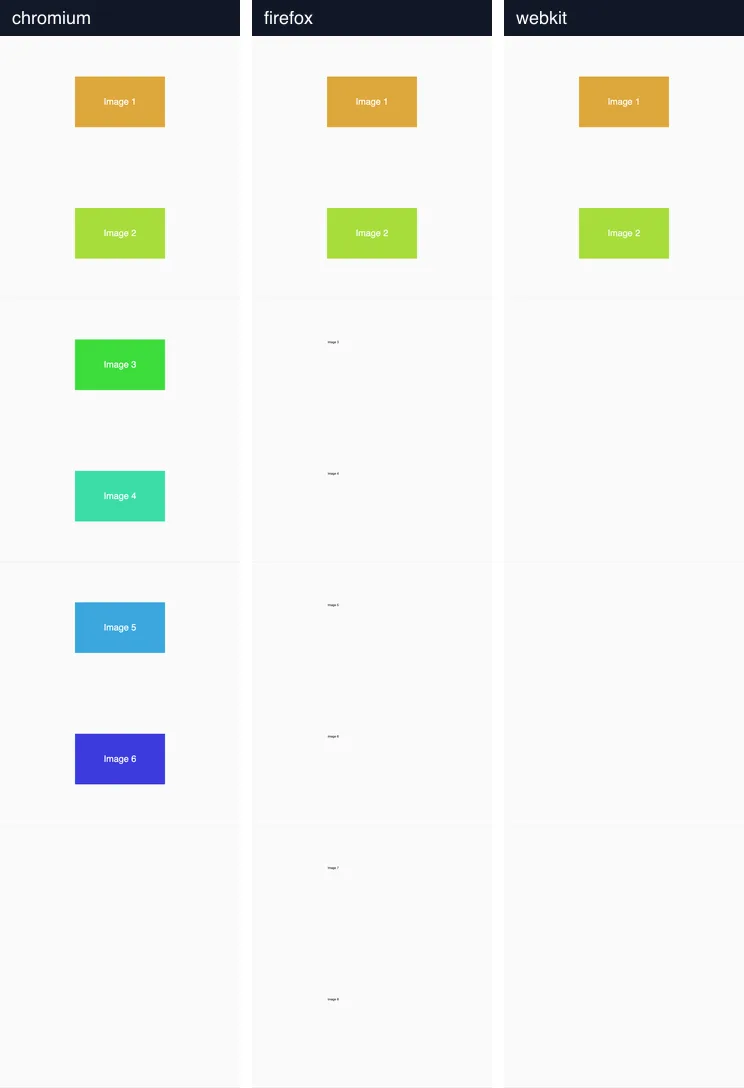
Same setup, full page (1280x5608), captured right after the load event.
This is the difference most likely to hurt you in production. At the load event, none of the eight lazy images had finished in any engine; what appears in the capture depends on what each engine loads while it builds the full-page image. Chromium showed 6 of 8, Firefox 2 of 8 (with alt text where the others should be), WebKit 2 of 8 (with blank space). None of them is "correct", and a test that passes in Chromium can fail in the other two.
The fix works in all three. Scroll through the page one screen at a time, then wait until every image has decoded:
// Scroll so lazy images start loading, then wait for all of them to decode.
// Works the same in Chromium, Firefox and WebKit with Playwright 1.56.
async function loadLazyImages(page) {
  await page.evaluate(async () => {
    for (let y = 0; y < document.body.scrollHeight; y += window.innerHeight) {
      window.scrollTo(0, y);
      await new Promise((r) => setTimeout(r, 150));
    }
    window.scrollTo(0, 0);
  });
  await page.waitForFunction(() =>
    [...document.images].every((img) => img.complete && img.naturalWidth > 0));
}
With this step before page.screenshot({ fullPage: true }), all three engines rendered 8 of 8 images. Give waitForFunction a timeout in production; a single broken image URL will otherwise hold the capture until the default timeout. Our Puppeteer full-page guide covers the same problem with sticky headers and infinite scroll.
Code: one page, three engines
// three-engines.mjs: one page, three engines, same viewport.
// npm i [email protected] && npx playwright install chromium firefox webkit
import { chromium, firefox, webkit } from 'playwright';

const url = process.argv[2] ?? 'https://example.com/';
for (const [name, engine] of Object.entries({ chromium, firefox, webkit })) {
  const browser = await engine.launch();
  try {
    const context = await browser.newContext({ viewport: { width: 1280, height: 800 }, deviceScaleFactor: 1 });
    const page = await context.newPage();
    await page.goto(url, { waitUntil: 'load' });
    await page.screenshot({ path: `${name}.png`, fullPage: true });
    console.log(`${name} ${browser.version()} -> ${name}.png`);
  } finally {
    await browser.close();
  }
}
Tested on October 15, 2026 with Node 22.18.0 and [email protected] against the local corpus.
Set deviceScaleFactor on the context; page.setViewportSize() has no such option. Note that page.screenshot() in Playwright writes PNG or JPEG only. If you want WebP for storage, convert the buffer afterwards.
The benchmark harness behind the table is the same loop with timing, 10 runs per page, a fresh context per run, and a CSV writer. Run three launches first and discard them if you want warm numbers.
Engines in production
For a screenshot service, the engine choice also decides your operations:
| Chromium | Firefox | WebKit | |
|---|---|---|---|
| Puppeteer support | Yes (primary) | Yes (via WebDriver BiDi) | No |
| Playwright support | Yes | Yes (patched build) | Yes (patched build) |
| Hosted screenshot APIs | Nearly all, including RenderScreenshot | Rare | Rare |
| Launch in our test | 74 ms | 571 ms | 197 ms |
| Biggest screenshot risk | Lazy images partly loaded | Lazy images, slow launch | Lazy images, large PNGs |
Running all three engines in one service triples the browser binaries, the font testing and the update work. Most teams that need Firefox or WebKit renders need them for testing, not for production images, and run them in CI rather than in a public service.
Where RenderScreenshot fits
Our API renders with Chromium on Cloudflare Browser Rendering, so it is the right tool when Chromium output is what you want: social cards, link previews, PDFs, archives, and monitoring. It handles the lazy-image problem from this page with the full_page preset, which captures the full page with scroll simulation (capture.scroll.simulate), and you can wait for a selector or network idle with the wait parameters.
If your requirement is "what does this page look like in Safari", it is the wrong tool: use Playwright's WebKit as shown above. If your requirement is "a correct Chromium screenshot without running Chromium", get a free key and compare our render of your hardest page with your local Chromium capture.