Disclosure: I build RenderScreenshot, a hosted screenshot API with a Go SDK. chromedp and rod are free, open-source libraries and I am not involved in either. The measurements below were run by me on one machine and are reproducible with the code on this page.
chromedp and rod both drive Chrome over the DevTools Protocol from Go, and both produce the same pixels for a simple page, because the browser does the rendering. The choice between them is about API style, error handling, process management, and two full-page behaviours that silently change your output. In short: pick rod if you want a chainable API, automatic browser download and helpers for waiting; pick chromedp if you want a small, context-driven API that feels like the rest of your Go code. Then read the full-page section, because both libraries have a trap there.
This page is part of our comparison hub. If you came here to build a Go screenshot service, the Go screenshot API guide covers the hosted route as well.
Last verified: October 15, 2026, with Go 1.27.1, chromedp v0.14.2 and go-rod/rod v0.116.2.
The short answer
| Choose chromedp if | Choose rod if |
|---|---|
You like context.Context for timeouts and cancellation everywhere |
You prefer chained calls (page.MustNavigate(u).MustWaitStable()) for scripts and tests |
You want every step as an action in one chromedp.Run list |
You want the library to download a matching Chromium on a fresh machine |
| You run many short captures in one long-lived browser (lower per-capture time in our test) | You start a browser per job (faster launch in our test) |
You want full-page captures that keep 100vh sections at screen height |
You want full-page captures that trigger lazy images without extra code |
| You already use cdproto types elsewhere | You want a guard process (leakless) that kills Chrome if your Go process dies |
Two full-page behaviours you need to know
This is the most useful part of the comparison, and it is not in either README. The two libraries implement "full page" differently, and each method fails on a different kind of page.
chromedp (chromedp.FullScreenshot) calls Page.captureScreenshot with captureBeyondViewport: true. The viewport stays at 1280x800 while Chrome paints the whole document. rod (page.Screenshot(true, ...)) reads the content size, then calls Emulation.setDeviceMetricsOverride to make the viewport as tall as the page, captures, and restores the old viewport.
Lazy images
We built a test page with eight loading="lazy" images, each in a 700 px section. Same Chromium, same 1280x800 starting viewport, capture right after the load event:
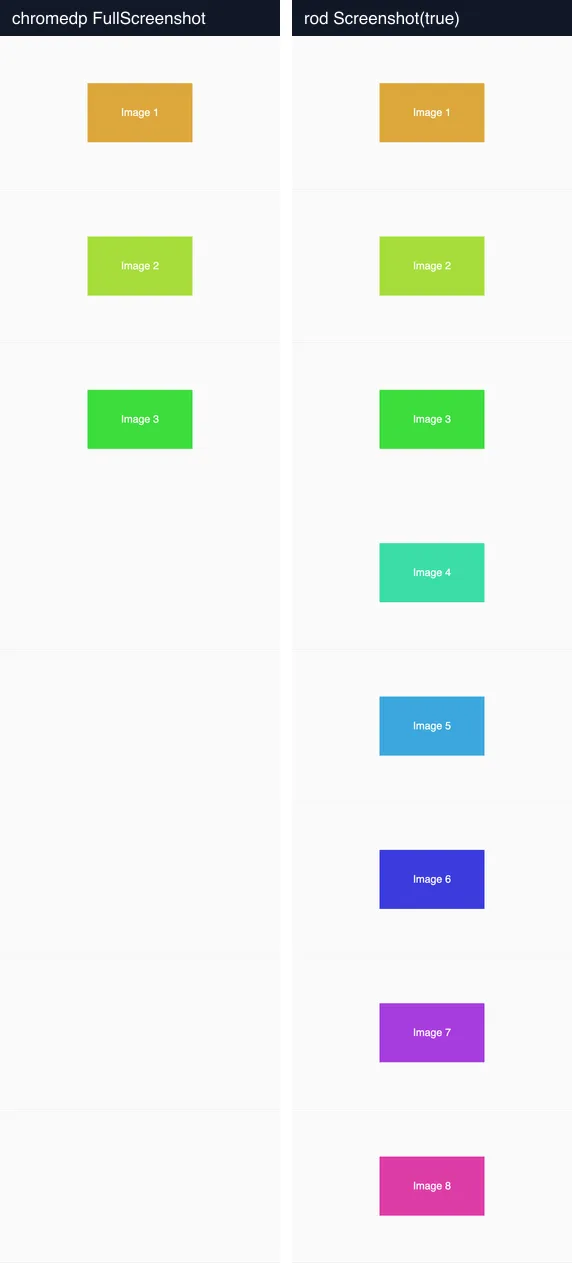
Rendered locally on October 15, 2026 with Chromium 141.0.7390.37: left chromedp.FullScreenshot(&buf, 100), right page.Screenshot(true, png). First capture of each run.
chromedp rendered 3 of 8 images. rod rendered all 8, because a viewport the height of the page puts every image "in view", so Chrome starts loading them. This is a side effect of rod's method, not a lazy-loading feature.
Viewport-height layouts
The same side effect breaks pages that size things with vh. Our second test page has a height: 100vh hero followed by three 600 px sections:
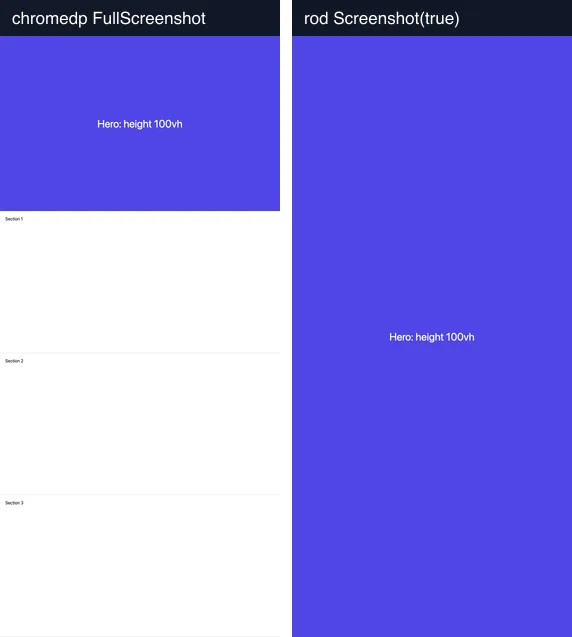
Same setup. Both images are 2,747 px tall.
chromedp keeps the hero at one screen (800 px). rod makes the viewport 2,747 px tall, so 100vh becomes 2,747 px and the hero covers the whole capture; the sections are pushed below the bottom edge. Many landing pages use 100vh or min-height: 100vh heroes, so this is not an edge case.
What to do: with chromedp, scroll through the page and wait for images before FullScreenshot. With rod, either do the same and capture with a clip, or freeze vh-based heights with injected CSS before the full-page call. The scroll helper is the same idea in both libraries; this is the chromedp version:
// Fragment: run before chromedp.FullScreenshot. Scrolls one screen at a time,
// then waits until every <img> has decoded (or 10 s pass).
chromedp.Evaluate(`(async () => {
  for (let y = 0; y < document.body.scrollHeight; y += innerHeight) {
    scrollTo(0, y);
    await new Promise(r => setTimeout(r, 150));
  }
  scrollTo(0, 0);
  const deadline = Date.now() + 10000;
  while (![...document.images].every(i => i.complete && i.naturalWidth > 0) && Date.now() < deadline) {
    await new Promise(r => setTimeout(r, 100));
  }
})()`, nil, func(p *runtime.EvaluateParams) *runtime.EvaluateParams { return p.WithAwaitPromise(true) }),
(runtime is github.com/chromedp/cdproto/runtime.) With this step before FullScreenshot, chromedp loaded 8 of 8 images on the test page. The same scroll-then-wait logic also fixed the page in Chromium, Firefox and WebKit through Playwright; the three-engine comparison has the details.
One more chromedp detail: FullScreenshot(&buf, quality) returns PNG only when quality is 100. Any other value switches the format to JPEG.
Measured launch and capture times
Method. One Go program per library, built with Go 1.27.1, both pointed at the same Chromium 141.0.7390.37 binary. Pages served from localhost (a mirror of example.com, a CSS-heavy page, the lazy-image page), so the network is not in the numbers. Launch time is measured once per program run. Then 10 captures per mode, each in a new tab of the same browser, timed from tab creation to PNG bytes, with navigation waiting for the load event. Apple M1 Pro, 32 GB, macOS 27.0.1, October 15, 2026. With 10 samples, p95 is effectively the slowest run.
| Page | Library | Browser launch | Viewport p50 | Viewport p95 | Full page p50 | Full page p95 | Full-page PNG bytes |
|---|---|---|---|---|---|---|---|
| example.com mirror | chromedp | 828 ms | 117 ms | 1,181 ms | 129 ms | 230 ms | 18,565 |
| example.com mirror | rod | 287 ms | 184 ms | 471 ms | 200 ms | 253 ms | 18,565 |
| CSS features page | chromedp | 621 ms | 149 ms | 1,130 ms | 151 ms | 169 ms | 129,623 |
| CSS features page | rod | 249 ms | 219 ms | 304 ms | 212 ms | 234 ms | 129,623 |
| Lazy images page | chromedp | 390 ms | 108 ms | 132 ms | 197 ms | 224 ms | 45,363 |
| Lazy images page | rod | 259 ms | 183 ms | 491 ms | 277 ms | 407 ms | 66,120 |
How to read it:
- Per capture, chromedp was faster by about 70 ms at the median. Most of that is our rod harness doing more round trips per tab (create, set viewport, navigate, wait), so treat it as "chromedp's action list is lean", not as a law.
- chromedp's p95 spikes to over a second on the first two pages. That is the first tab of a fresh browser; later tabs were fast. Warm the browser with one throwaway capture if your p95 matters.
- rod launched faster in every run. chromedp's launch varied from 390 to 828 ms between program runs, so the difference is real but noisy.
- Bytes match where both libraries produced the same pixels, which confirms the rendering is Chrome's, not the library's. The lazy-page bytes differ because rod's image contains five more photos.
None of these numbers matter much against a real network: a page that loads web fonts and a hero image from a CDN spends more time in goto than either library spends in its own code.
Minimal code for each
Both programs write viewport.png and full.png. Pass a URL as the first argument.
chromedp
package main

import (
    "context"
    "log"
    "os"
    "time"

    "github.com/chromedp/chromedp"
)

func main() {
    url := "https://example.com/"
    if len(os.Args) > 1 {
        url = os.Args[1]
    }

    // Allocator = the Chrome process; context = one tab.
    allocCtx, cancelAlloc := chromedp.NewExecAllocator(context.Background(),
        append(chromedp.DefaultExecAllocatorOptions[:], chromedp.WindowSize(1280, 800))...)
    defer cancelAlloc()
    ctx, cancel := chromedp.NewContext(allocCtx)
    defer cancel()
    ctx, cancelTimeout := context.WithTimeout(ctx, 30*time.Second)
    defer cancelTimeout()

    var viewport, full []byte
    err := chromedp.Run(ctx,
        chromedp.EmulateViewport(1280, 800),
        chromedp.Navigate(url), // waits for the load event
        chromedp.CaptureScreenshot(&viewport),
        chromedp.FullScreenshot(&full, 100), // quality 100 = PNG; anything else = JPEG
    )
    if err != nil {
        log.Fatal(err)
    }
    if err := os.WriteFile("viewport.png", viewport, 0o644); err != nil {
        log.Fatal(err)
    }
    if err := os.WriteFile("full.png", full, 0o644); err != nil {
        log.Fatal(err)
    }
}
rod
package main

import (
    "log"
    "os"
    "time"

    "github.com/go-rod/rod"
    "github.com/go-rod/rod/lib/launcher"
    "github.com/go-rod/rod/lib/proto"
)

func main() {
    url := "https://example.com/"
    if len(os.Args) > 1 {
        url = os.Args[1]
    }

    // Use the installed Chrome if there is one; otherwise rod downloads a Chromium build.
    l := launcher.New().Headless(true)
    if path, ok := launcher.LookPath(); ok {
        l = l.Bin(path)
    }
    controlURL, err := l.Launch()
    if err != nil {
        log.Fatal(err)
    }
    browser := rod.New().ControlURL(controlURL)
    if err := browser.Connect(); err != nil {
        log.Fatal(err)
    }
    defer browser.Close()

    page, err := browser.Timeout(30 * time.Second).Page(proto.TargetCreateTarget{URL: url})
    if err != nil {
        log.Fatal(err)
    }
    if err := page.SetViewport(&proto.EmulationSetDeviceMetricsOverride{Width: 1280, Height: 800, DeviceScaleFactor: 1}); err != nil {
        log.Fatal(err)
    }
    if err := page.WaitLoad(); err != nil {
        log.Fatal(err)
    }
    png := &proto.PageCaptureScreenshot{Format: proto.PageCaptureScreenshotFormatPng}
    viewport, err := page.Screenshot(false, png)
    if err != nil {
        log.Fatal(err)
    }
    full, err := page.Screenshot(true, png) // resizes the viewport to the full content size first
    if err != nil {
        log.Fatal(err)
    }
    if err := os.WriteFile("viewport.png", viewport, 0o644); err != nil {
        log.Fatal(err)
    }
    if err := os.WriteFile("full.png", full, 0o644); err != nil {
        log.Fatal(err)
    }
}
Both tested on October 15, 2026 with Go 1.27.1 (darwin/arm64), chromedp v0.14.2, rod v0.116.2 and Google Chrome 155 found on the default path. go vet clean.
Note the style difference in error handling. rod's documentation leans on Must* methods, which panic; they are pleasant in tests and scripts. In a server, use the non-Must methods as above so a bad URL returns an error instead of crashing the process. chromedp returns errors from Run by design.
Operations: what you own with either library
The library choice is a small part of running screenshots in Go. Either way you own:
- Chrome itself. A binary per server or container, kept up to date for security fixes, plus fonts for every script your users write in (CJK and emoji are the usual gaps on Linux).
- Process lifetime. A Chrome that outlives a crashed Go process keeps its memory. rod's launcher starts a small guard process for this; with chromedp, cancel the allocator context on every exit path.
- Concurrency limits. One browser, many tabs, and a semaphore around tab creation. Without a limit, a traffic spike opens hundreds of tabs.
- Timeouts at every level. Context timeouts in chromedp,
browser.Timeout()in rod, and a hard limit on the whole job.
If owning Chrome is the part you want to remove, the RenderScreenshot Go SDK does the capture over HTTP. This is the full-page capture from above, with scroll simulation for lazy images handled by the full_page preset:
package main

import (
    "context"
    "errors"
    "log"
    "os"
    "time"

    rs "github.com/Render-Screenshot/rs-go"
)

func main() {
    client, err := rs.New(os.Getenv("RS_API_KEY"), rs.WithTimeout(60*time.Second))
    if err != nil {
        log.Fatal(err)
    }

    ctx, cancel := context.WithTimeout(context.Background(), 60*time.Second)
    defer cancel()

    image, err := client.Take(ctx, rs.URL("https://example.com/").
        Preset("full_page"). // full page plus scroll simulation for lazy images
        Width(1280).
        WaitFor(rs.WaitNetworkIdle).
        Format(rs.FormatPNG))
    if err != nil {
        var apiErr *rs.Error
        if errors.As(err, &apiErr) && apiErr.IsRetryable() {
            log.Fatalf("retryable: %s", apiErr.Code)
        }
        log.Fatal(err)
    }
    if err := os.WriteFile("full.png", image, 0o644); err != nil {
        log.Fatal(err)
    }
}
Tested on October 15, 2026 with rs-go v1.1.0 against a local mock of the API (request body and error path), not against production.
You can get a free API key and run it on the same test pages. If you stay with a library, which is the right call when screenshots are a small part of a larger browser-automation job, use the measurements above to pick one and the full-page section to avoid the two traps.