Disclosure: I build RenderScreenshot, a hosted screenshot API. Neither library is ours, and we have no .NET SDK, so this page has no product to sell you inside the comparison. The API appears once, near the end, as plain
HttpClientcode.
Short answer: for new .NET screenshot code, pick Playwright for .NET. It is maintained by Microsoft, it isolates each capture in a cheap browser context, its locators wait for elements by themselves, and it was a little faster per capture in our test. Pick PuppeteerSharp if you already have Puppeteer knowledge or code to port, if you want to fetch the browser from your own code at runtime, or if you want Puppeteer's API one-to-one in C#. Whichever you choose, the biggest cold-start difference we measured came from the headless mode, not the library.
This page is part of the comparison hub. For the Node.js version of the same choice, see Puppeteer vs Playwright for screenshots.
Tested on October 15, 2026 on macOS (Apple Silicon) with the .NET 10 SDK (10.0.401): PuppeteerSharp 25.13.1 with Chrome for Testing 154.0.8037.57, and Microsoft.Playwright 1.63.0 with Chromium 156.0.8078.4.
The decision table
| Choose PuppeteerSharp if | Choose Playwright for .NET if |
|---|---|
| You are porting Puppeteer (Node.js) code and want the same method names | You are starting fresh |
You want the app to download its own browser at startup with BrowserFetcher |
You prefer a build-time or image-time browser install |
You only need Chrome (Firefox is also listed in SupportedBrowser) |
You want Chromium, Firefox and WebKit from one API |
| You are comfortable with a community-maintained port | You want a vendor-maintained library with test-runner packages (NUnit, MSTest, xUnit) |
| You manage element waits yourself | You want locators that wait for visible, stable elements |
What we measured
Four local HTML pages, opened as file:// URLs so that network time does not count:
- example: a saved copy of
example.com. The live page now asks people not to use it for testing, and it no longer has an<h1>, so we keep a local copy. - layout: CSS grid, flexbox,
:has(), a container query, shadows and gradients. - js-chart: a bar chart that an inline script draws at load.
- long: twelve 600 px sections (about 7,200 px) under a sticky header.
Each library launched one browser, rendered once to warm up, then made 10 captures per page and mode at 1280x800, device scale factor 1, waiting for the load event. PuppeteerSharp opened a new page per capture. Playwright opened a new browser context and page per capture, which is how you would isolate requests in a service. Cold start is measured inside the process, from launch to the first PNG in memory, three runs each. Every one of the 240 warm captures succeeded.
Results
Warm capture time, median of 10 runs in milliseconds (the maximum is in brackets):
| Page and mode | PuppeteerSharp (default) | PuppeteerSharp (HeadlessMode.Shell) |
Playwright |
|---|---|---|---|
| example, viewport | 94.5 (356) | 90 (93) | 72 (78) |
| example, full page | 93 (97) | 88.5 (92) | 72 (80) |
| layout, viewport | 93 (97) | 100.5 (102) | 82 (86) |
| layout, full page | 94 (109) | 98 (104) | 81 (99) |
| js-chart, viewport | 93.5 (96) | 93.5 (132) | 70.5 (106) |
| js-chart, full page | 92.5 (94) | 86 (110) | 72.5 (89) |
| long, viewport | 93 (95) | 87 (94) | 70 (72) |
| long, full page | 177.5 (195) | 171.5 (211) | 173.5 (186) |
Cold start, launch to first screenshot, three runs:
| Setup | Run 1 | Run 2 | Run 3 |
|---|---|---|---|
PuppeteerSharp, default (Headless = true) |
1,662 ms | 1,396 ms | 842 ms |
| PuppeteerSharp, default, second series | 3,020 ms | 897 ms | 733 ms |
PuppeteerSharp, HeadlessMode.Shell |
501 ms | 338 ms | 371 ms |
| Playwright | 666 ms | 406 ms | 482 ms |
Output bytes (PNG, DPR 1):
| Page | PuppeteerSharp (default) | PuppeteerSharp (Shell) | Playwright |
|---|---|---|---|
| example | 18,566 | 18,497 | 18,497 |
| layout | 51,271 | 64,954 | 64,954 |
| long, full page | 164,367 | 165,190 | 165,190 |
What this means for you:
- The headless mode explains most of the gap. PuppeteerSharp's default launches full Chrome in its new headless mode. Playwright launches
chrome-headless-shell. SetHeadlessMode = HeadlessMode.Shellin PuppeteerSharp and both the cold start and the output bytes match Playwright's. Headless vs headful Chrome explains what differs between the modes. - Playwright was 13 to 23 ms faster per short capture, even with a new context per capture. On a long full-page capture the difference disappeared into the screenshot itself.
- On real sites these numbers are small. A page that loads in two seconds makes a 20 ms library difference noise. The numbers matter when you capture your own HTML templates at volume.
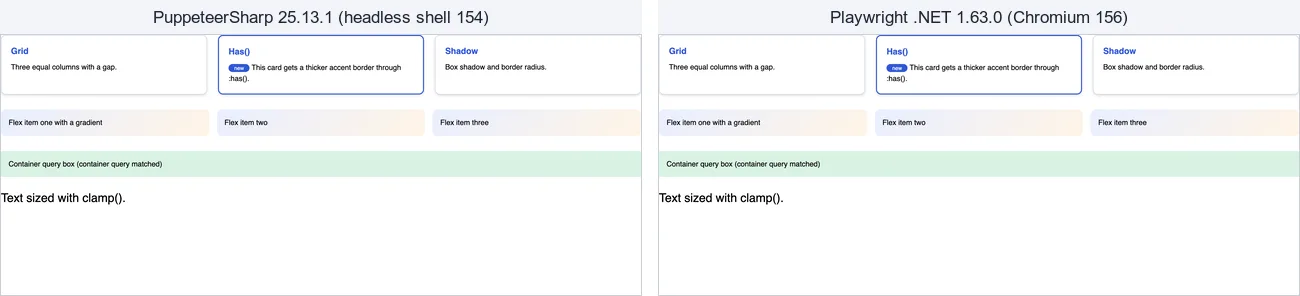
layout.html at 1280x800 and device scale factor 2, captured by the two programs below. The two 2560x1600 PNGs are identical: magick compare -metric AE reports 0 different pixels. The element captures of .card were 824x238 (PuppeteerSharp) and 824x240 (Playwright), so do not compare element screenshots from the two libraries pixel for pixel.
The same capture in both libraries
Both programs take a URL and a CSS selector, then save a viewport capture, a full-page capture and an element capture at device scale factor 2. Unhandled exceptions end the process with a non-zero exit code.
PuppeteerSharp
dotnet new console -n PptrShot && cd PptrShot
dotnet add package PuppeteerSharp --version 25.13.1
// PuppeteerSharp screenshot: viewport + full page + one element.
//   dotnet run -- https://example.com h1
using PuppeteerSharp;

var url = args.Length > 0 ? args[0] : "https://example.com";
var selector = args.Length > 1 ? args[1] : "h1";

// Downloads the Chrome builds that match this PuppeteerSharp version
// (once; later runs find them in the local cache).
await new BrowserFetcher().DownloadAsync();

// HeadlessMode.Shell launches chrome-headless-shell, which started about twice as fast
// as the default (full Chrome in new headless mode) in our tests.
await using var browser = await Puppeteer.LaunchAsync(new LaunchOptions { HeadlessMode = HeadlessMode.Shell });
await using var page = await browser.NewPageAsync();
await page.SetViewportAsync(new ViewPortOptions { Width = 1280, Height = 800, DeviceScaleFactor = 2 });

await page.GoToAsync(url, new NavigationOptions
{
    WaitUntil = [WaitUntilNavigation.Networkidle0],
    Timeout = 30_000,
});

await page.ScreenshotAsync("pptr-viewport.png");
await page.ScreenshotAsync("pptr-full.png", new ScreenshotOptions { FullPage = true });

var element = await page.WaitForSelectorAsync(selector, new WaitForSelectorOptions { Timeout = 5_000 })
    ?? throw new InvalidOperationException($"{selector} not found");
await element.ScreenshotAsync("pptr-element.png");

Console.WriteLine($"Saved 3 screenshots of {url}");
BrowserFetcher().DownloadAsync() in 25.13.1 fetched two builds: Chrome for Testing (a 191 MB zip, 364 MB unpacked) and chrome-headless-shell (99 MB, 205 MB unpacked), into a Chrome and a ChromeHeadlessShell folder next to your binaries. In a container, run the download during the image build, not on the first request. The default HttpClient timeout for the download is 100 seconds, so a slow network fails the first launch.
Playwright for .NET
dotnet new console -n PwShot && cd PwShot
dotnet add package Microsoft.Playwright --version 1.63.0
dotnet build
pwsh bin/Debug/net10.0/playwright.ps1 install chromium
// Playwright for .NET screenshot: viewport + full page + one element.
//   dotnet run -- https://example.com h1
using Microsoft.Playwright;

var url = args.Length > 0 ? args[0] : "https://example.com";
var selector = args.Length > 1 ? args[1] : "h1";

// Installs the Chromium build pinned to this Playwright version (no-op when present).
// The usual route is: pwsh bin/Debug/net10.0/playwright.ps1 install chromium
var installExit = Microsoft.Playwright.Program.Main(["install", "chromium"]);
if (installExit != 0) throw new Exception($"Playwright browser install failed with exit code {installExit}");

using var playwright = await Playwright.CreateAsync();
await using var browser = await playwright.Chromium.LaunchAsync(new() { Headless = true });

// Viewport and device scale factor belong to the context, not the page.
await using var context = await browser.NewContextAsync(new()
{
    ViewportSize = new() { Width = 1280, Height = 800 },
    DeviceScaleFactor = 2,
});
var page = await context.NewPageAsync();

await page.GotoAsync(url, new() { WaitUntil = WaitUntilState.NetworkIdle, Timeout = 30_000 });

await page.ScreenshotAsync(new() { Path = "pw-viewport.png" });
await page.ScreenshotAsync(new() { Path = "pw-full.png", FullPage = true });

// Locators auto-wait for the element to be visible and stable.
await page.Locator(selector).First.ScreenshotAsync(new() { Path = "pw-element.png", Timeout = 5_000 });

Console.WriteLine($"Saved 3 screenshots of {url}");
Playwright installs browsers into a shared cache (~/Library/Caches/ms-playwright on macOS): Chromium (366 MB) and the headless shell (204 MB) for this version. The build output also carries a 130 MB .playwright folder with the Node.js driver that the .NET package talks to. If you cannot run PowerShell in your build, call Microsoft.Playwright.Program.Main(["install", "chromium"]) from a setup step, as above.
API differences that matter for screenshots
| Task | PuppeteerSharp 25.13.1 | Playwright for .NET 1.63.0 |
|---|---|---|
| Get a browser | new BrowserFetcher().DownloadAsync() at runtime |
playwright.ps1 install at build time, or Program.Main(["install", ...]) |
| Browsers | SupportedBrowser: Chrome, ChromeHeadlessShell, Chromium, Firefox |
Chromium, Firefox, Webkit |
| Isolate one request | browser.CreateBrowserContextAsync() |
browser.NewContextAsync(...) |
| Viewport and scale | page.SetViewportAsync(new ViewPortOptions { DeviceScaleFactor = 2 }) |
Context options ViewportSize, DeviceScaleFactor |
| Wait conditions | WaitUntilNavigation: Load, DOMContentLoaded, Networkidle0, Networkidle2 |
WaitUntilState: Load, DOMContentLoaded, NetworkIdle, Commit |
| Wait for an element | WaitForSelectorAsync returns a handle (or null) |
Locators wait on every action |
| Formats | ScreenshotType: Jpeg, Png, Webp |
ScreenshotType: Png, Jpeg, Webp |
| Element capture | IElementHandle.ScreenshotAsync(path) |
ILocator.ScreenshotAsync(new() { Path = ... }) |
| Headless modes | HeadlessMode: True (full Chrome), Shell, False |
Headless shell by default for headless Chromium |
The two most common porting mistakes: setting the device scale factor on the page in Playwright (it belongs to the context), and keeping Networkidle0 everywhere. For your own HTML, Load plus a selector your template sets when it is ready is faster than waiting for 500 ms of network silence. Our viewport parameters page explains what device scale factor does to output size.
Running it inside ASP.NET Core
A screenshot endpoint needs three things: one shared browser, a cap on concurrent captures, and a fresh context per request so cookies and storage never leak between users. This minimal API does that with Playwright. We sent it six parallel requests; all returned 200, and the last two waited for a free slot.
// Minimal ASP.NET Core endpoint: one shared Playwright browser, a concurrency cap,
// and a fresh browser context per request.
using Microsoft.Playwright;

var builder = WebApplication.CreateBuilder(args);
builder.Services.AddSingleton<ScreenshotService>();
var app = builder.Build();

app.MapGet("/shot", async (string url, ScreenshotService shots, CancellationToken ct) =>
{
    if (!Uri.TryCreate(url, UriKind.Absolute, out var uri) || (uri.Scheme != "https" && uri.Scheme != "http"))
        return Results.BadRequest("url must be an absolute http(s) URL");
    // In production, also block private and link-local addresses here (SSRF).
    var png = await shots.CaptureAsync(uri, ct);
    return Results.File(png, "image/png");
});

app.Run();

sealed class ScreenshotService : IAsyncDisposable
{
    private readonly SemaphoreSlim _slots = new(4); // max concurrent captures
    private readonly Lazy<Task<(IPlaywright, IBrowser)>> _browser = new(async () =>
    {
        var pw = await Playwright.CreateAsync();
        var browser = await pw.Chromium.LaunchAsync(new() { Headless = true });
        return (pw, browser);
    });

    public async Task<byte[]> CaptureAsync(Uri url, CancellationToken ct)
    {
        await _slots.WaitAsync(ct);
        try
        {
            var (_, browser) = await _browser.Value;
            await using var context = await browser.NewContextAsync(new()
            {
                ViewportSize = new() { Width = 1280, Height = 800 },
            });
            var page = await context.NewPageAsync();
            await page.GotoAsync(url.ToString(), new() { WaitUntil = WaitUntilState.Load, Timeout = 30_000 });
            return await page.ScreenshotAsync(new() { FullPage = true, Timeout = 30_000 });
        }
        finally
        {
            _slots.Release();
        }
    }

    public async ValueTask DisposeAsync()
    {
        if (!_browser.IsValueCreated) return;
        var (pw, browser) = await _browser.Value;
        await browser.CloseAsync();
        pw.Dispose();
    }
}
The scheme check rejects file:// URLs (we tested that a request for file:///etc/passwd gets a 400). It does not stop requests to internal hosts such as http://169.254.169.254/. Resolve the host and refuse private ranges before you capture anything a user sends you. The PuppeteerSharp version has the same shape: replace the context with CreateBrowserContextAsync() and close it in the finally block.
What this sample leaves out: restarting the browser after a crash (handle browser.Disconnected), a per-capture timeout that covers the whole request, and fonts. On Linux, install the fonts your targets use, including an emoji and a CJK font, or text renders as empty boxes. The official Playwright .NET Docker images include the browser dependencies.
When to use neither
If screenshots are a feature of your app and not the product, the browser is a second service to run: a few hundred megabytes per build, security updates, crash recovery, fonts and memory limits. RenderScreenshot runs the browser for you. We have no .NET SDK, so this is plain HttpClient:
// The same capture through the RenderScreenshot HTTP API (no browser on your server).
// There is no official .NET SDK, so this is plain HttpClient + System.Net.Http.Json.
using System.Net.Http.Headers;
using System.Net.Http.Json;

var apiBase = Environment.GetEnvironmentVariable("RS_API_BASE") ?? "https://api.renderscreenshot.com";
var apiKey = Environment.GetEnvironmentVariable("RS_API_KEY")
    ?? throw new InvalidOperationException("Set RS_API_KEY");

using var http = new HttpClient { BaseAddress = new Uri(apiBase), Timeout = TimeSpan.FromSeconds(90) };
http.DefaultRequestHeaders.Authorization = new AuthenticationHeaderValue("Bearer", apiKey);

using var response = await http.PostAsJsonAsync("/v1/screenshot", new
{
    url = args.Length > 0 ? args[0] : "https://example.com",
    viewport = new { width = 1280, height = 800, scale = 2 },
    capture = new { mode = "full_page" },
    output = new { format = "png" },
});

if (!response.IsSuccessStatusCode)
{
    // Errors come back as JSON with a code, a message and a retryable flag.
    Console.Error.WriteLine($"{(int)response.StatusCode}: {await response.Content.ReadAsStringAsync()}");
    return 1;
}

await File.WriteAllBytesAsync("rs-full.png", await response.Content.ReadAsByteArrayAsync());
// X-Cache-URL is a public CDN link to the same image (no key in it).
Console.WriteLine(response.Headers.TryGetValues("X-Cache-URL", out var cdn) ? cdn.First() : "saved rs-full.png");
return 0;
We ran this program against a local mock of the API that checks the path, the Bearer key and the parameter names. It returned exit code 0 with a valid key and 1 with a bad one. The capture options and error codes pages list everything you can send and get back. To try it on your own pages, get a free API key.
Stay with a library when you need to log in through a multi-step flow, click through a page before the capture, or keep screenshots inside your own network. Those are browser automation jobs, and both libraries do them well.
Related
- Puppeteer vs Playwright for screenshots: the same comparison for Node.js.
- Playwright vs Selenium: if Selenium WebDriver is the other library on your list.
- Website screenshots in C#: every .NET option, including Selenium.
- C# screenshot API guide: calling the screenshot API from .NET.