Geolocation emulation is a browser automation setting that overrides the coordinates returned by the JavaScript Geolocation API (navigator.geolocation), so a page behaves as if the device were at a latitude and longitude you choose.
It is how you capture a store locator for Paris, a delivery map for Tokyo or a "near you" widget for New York from one server. It is also easy to overestimate, because it changes one browser API and nothing else. This entry is part of the screenshot and rendering glossary.
A plain explanation
A web page can ask the browser "where am I?" through navigator.geolocation.getCurrentPosition(). On a phone the answer comes from GPS, Wi-Fi or cell towers, after the user grants permission. In an automated browser there is no GPS, and there is nobody to click "Allow". Automation answers both: you set the coordinates, and you grant the permission in code.
Denied and granted, side by side
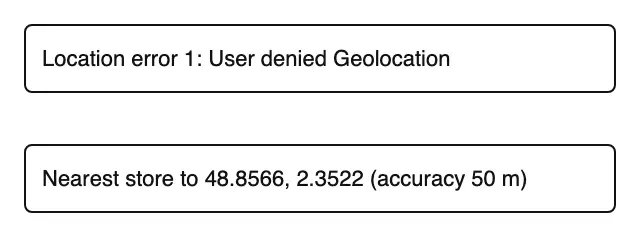
getCurrentPosition, captured with Puppeteer on 2026-10-15. Top: coordinates set but no permission granted. Bottom: the same coordinates with the geolocation permission granted for the page's origin.Setting the coordinates alone is not enough. Headless Chrome answered the top capture with error code 1, User denied Geolocation, because nobody granted the permission. This is the most common reason emulation "does not work".
What it changes, and what it does not
| Signal a site can use | Changed by geolocation emulation? | What does change it |
|---|---|---|
navigator.geolocation coordinates |
Yes | this setting |
| IP address (server-side GeoIP, CDN country headers) | No | a proxy or a machine in that country |
Accept-Language, navigator.language |
No | locale |
Time zone, Date output |
No | time zone emulation |
Most sites that show a different price, currency or cookie notice per country decide on the server, from the IP address. Geolocation emulation does nothing for those. It helps with pages that ask the browser for a position in JavaScript: maps, store finders, weather widgets, "use my location" buttons. For a convincing local capture, set coordinates, locale and time zone together, as in the Playwright listing below.
How it works technically
Chromium exposes the override through the DevTools Protocol command Emulation.setGeolocationOverride, with latitude, longitude and accuracy. The permission is separate: Browser.grantPermissions for an origin. Both apply per browser context, so parallel contexts can sit in different cities. The page receives the values in a normal GeolocationPosition object, with accuracy in meters, and cannot tell them apart from a real fix.
The setting in Puppeteer, Playwright and RenderScreenshot
Puppeteer. Grant the permission on the context, then set the position on the page.
import puppeteer from 'puppeteer';

const url = process.argv[2] ?? 'http://localhost:4630/geo';
const browser = await puppeteer.launch();
try {
  const context = await browser.createBrowserContext();
  // Without this grant the page gets "User denied Geolocation" in headless mode.
  await context.overridePermissions(new URL(url).origin, ['geolocation']);
  const page = await context.newPage();
  await page.setViewport({ width: 640, height: 120 });
  await page.setGeolocation({ latitude: 48.8566, longitude: 2.3522, accuracy: 50 }); // Paris

  await page.goto(url, { waitUntil: 'load' });
  await page.waitForSelector('body[data-geo]'); // the page writes data-geo when the callback runs
  console.log(await page.$eval('#out', (el) => el.textContent));
  await page.screenshot({ path: 'out/geo-puppeteer.png' });
} finally {
  await browser.close();
}
Output: Nearest store to 48.8566, 2.3522 (accuracy 50 m).
Playwright. Everything sits on the context, which makes it easy to set locale and time zone at the same time.
import { chromium } from 'playwright';

const url = process.argv[2] ?? 'http://localhost:4630/geo';
const browser = await chromium.launch();
try {
  const context = await browser.newContext({
    geolocation: { latitude: 35.6762, longitude: 139.6503, accuracy: 50 }, // Tokyo
    permissions: ['geolocation'],
    locale: 'ja-JP',
    timezoneId: 'Asia/Tokyo',
    viewport: { width: 640, height: 120 },
  });
  const page = await context.newPage();
  await page.goto(url);
  await page.locator('body[data-geo]').waitFor({ state: 'attached' });
  console.log(await page.locator('#out').textContent());
  await page.screenshot({ path: 'out/geo-playwright.png' });
} finally {
  await browser.close();
}
Output: Nearest store to 35.6762, 139.6503 (accuracy 50 m).
RenderScreenshot takes browser.geolocation with latitude, longitude and accuracy in a POST body. Combine it with locale and timezone in the same group. See browser options.
curl -X POST https://api.renderscreenshot.com/v1/screenshot \
  -H "Authorization: Bearer $RS_API_KEY" \
  -H "Content-Type: application/json" \
  -d '{
    "url": "https://example.com/stores",
    "browser": {
      "geolocation": { "latitude": 51.5074, "longitude": -0.1278, "accuracy": 100 },
      "locale": "en-GB",
      "timezone": "Europe/London"
    },
    "wait": { "until": "networkidle" }
  }' \
  --output stores-london.png
import { Client, TakeOptions } from 'renderscreenshot';

const client = new Client(process.env.RS_API_KEY);
const image = await client.take(
  TakeOptions.url('https://example.com/stores')
    .geolocation(51.5074, -0.1278)
    .locale('en-GB')
    .timezone('Europe/London')
    .waitFor('networkidle')
);
Routing a request through another country, which would change the IP address, is not available in the API today. The localized screenshots guide explains what you can and cannot localize.
Tested on 2026-10-15 with Node 22.18, Puppeteer 24.43.1 (headless shell, Chrome 148) and Playwright 1.64.1 (Chromium 156) against a local test page. The RenderScreenshot snippets follow the API docs and were not run for this page.
Common mistakes
- No permission grant. The page gets error 1 and shows its "location unavailable" state.
- Expecting local prices or content. IP-based decisions ignore this setting completely.
- Capturing before the callback.
getCurrentPositionis asynchronous. Wait for the element the page renders with the result, not just forload. - Mixed signals. Tokyo coordinates with an
en-USlocale and a UTC clock can trigger fraud or bot checks. Set the three together.
Related terms
- Accept-Language: the language signal that travels with every request.
- Time zone emulation: the clock that should match the location.
- Browser context: the scope where the override and permission apply.
To capture one page from several cities in a single script, get a free API key.