How to Screenshot Infinite Scroll Pages (Bounded)
Screenshot an infinite scroll page without hanging: stop after N items, at a max height or when the feed stops growing. Tested Playwright code and timings.

An infinite scroll page has no bottom, so "take a full-page screenshot" has no natural end. If you scroll until the page stops growing, your script hangs. If you do not scroll at all, you get the first batch of items. The fix is a bounded scroll: scroll in rounds, and stop at the first of four limits (item count, height, no growth, time). Then cut the image at a clean edge.
This post is part of our full-page screenshot guide. It covers the infinite-scroll case in depth, with code that I ran against a test feed I built for this article, and the timings from those runs.
Tested on 2026-10-15 with Node 22.18.0 and [email protected] (bundled Chromium), Python 3.14.8 with playwright 1.64.0, [email protected], on an Apple M1 Pro with macOS 27.0.1. All images on this page come from those runs.
The test page
Public feeds change every minute, so they make bad test targets. I wrote a small feed page instead: infinite-feed.html. It loads 10 cards per batch when a sentinel element under the list comes into view (an IntersectionObserver, the pattern most feeds use), with 300 ms of fake API latency. It has a sticky header. Query parameters change its behaviour:
| Parameter | Effect |
|---|---|
total=N |
The feed ends after N items, like a search with few results |
latency=MS |
Delay before each batch appears |
virtual=1 |
Keeps only about 30 rows in the DOM, like a virtualized list |
Save it next to the scripts and serve the folder with any static server, for example npx serve or python3 -m http.server.
What plain fullPage gives you
The first test: load the page and call page.screenshot({ fullPage: true }) with no scrolling.
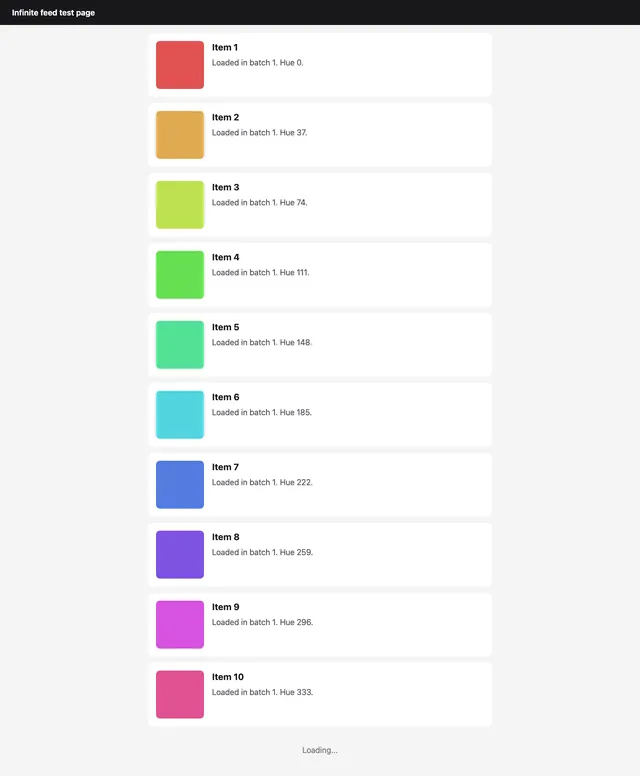
fullPage: true, no scrolling. 10 items, 1280 x 1553 px.You get the first batch. The page loads more items only when the sentinel scrolls into view, and nothing scrolled. Counting items before and after the capture gave 10 both times, so the capture itself did not trigger more loads on this page. Do not count on that: some pages measure the viewport in a scroll or resize handler and load more while the browser renders the tall image. That is one more reason to cut the image at a height you choose, as the script below does.
The bounded-scroll script
The script scrolls with real wheel events, then waits up to 2 seconds for the item count or the document height to grow. It stops at the first of four limits, then takes one full-page capture with a clip so the image ends where you decided.
// capture-feed.mjs - bounded full-page capture of an infinite-scroll page.
// Node 22+, [email protected]. Usage:
//   node capture-feed.mjs <url> <out.png> [--items=50] [--max-height=12000] [--idle=3] [--budget=20000]
import { chromium } from 'playwright';

const [url, out = 'feed.png', ...flags] = process.argv.slice(2);
if (!url) {
  console.error('usage: node capture-feed.mjs <url> <out.png> [--items=N] [--max-height=PX] [--idle=N] [--budget=MS]');
  process.exit(2);
}
const opt = Object.fromEntries(flags.map((f) => f.replace(/^--/, '').split('=')));
const ITEM_SELECTOR = opt.selector ?? 'article.item';
const MAX_ITEMS = Number(opt.items ?? Infinity);
const MAX_HEIGHT = Number(opt['max-height'] ?? 12000);
const MAX_IDLE = Number(opt.idle ?? 3); // rounds with no growth before we call it the end
const BUDGET = Number(opt.budget ?? 20000); // total scroll time in ms
const WAIT_FOR_GROWTH = 2000; // ms to wait for new items after each scroll

const browser = await chromium.launch();
try {
  const page = await browser.newPage({ viewport: { width: 1280, height: 800 } });
  await page.goto(url, { waitUntil: 'load' });

  const count = () => page.locator(ITEM_SELECTOR).count();
  const height = () => page.evaluate(() => document.scrollingElement.scrollHeight);

  const started = Date.now();
  let idle = 0;
  let reason = 'budget';
  while (Date.now() - started < BUDGET) {
    const [n, h] = [await count(), await height()];
    if (n >= MAX_ITEMS) { reason = 'items'; break; }
    if (h >= MAX_HEIGHT) { reason = 'max-height'; break; }
    if (idle >= MAX_IDLE) { reason = 'no-growth'; break; }

    await page.mouse.wheel(0, h); // real wheel events, so scroll listeners fire
    try {
      await page.waitForFunction(
        ([sel, n0, h0]) =>
          document.querySelectorAll(sel).length > n0 ||
          document.scrollingElement.scrollHeight > h0,
        [ITEM_SELECTOR, n, h],
        { timeout: WAIT_FOR_GROWTH },
      );
      idle = 0;
    } catch (err) {
      if (err.name !== 'TimeoutError') throw err;
      idle += 1;
    }
  }

  // Decide where the image ends: after the Nth item, or at the height cap.
  const items = await count();
  let bottom = Math.min(await height(), MAX_HEIGHT);
  if (Number.isFinite(MAX_ITEMS) && items >= MAX_ITEMS) {
    const box = await page.locator(ITEM_SELECTOR).nth(MAX_ITEMS - 1).boundingBox();
    const scrollY = await page.evaluate(() => scrollY);
    bottom = Math.ceil(box.y + scrollY + box.height + 12);
  }

  await page.evaluate(() => scrollTo(0, 0));
  await page.screenshot({
    path: out,
    fullPage: true,
    clip: { x: 0, y: 0, width: 1280, height: bottom },
  });
  console.log(JSON.stringify({ out, reason, items, bottom, ms: Date.now() - started }));
} finally {
  await browser.close();
}
Three details matter more than they look:
- Wait for growth, not for time.
waitForFunctionreturns as soon as the count or the height changes. A fixed sleep after each scroll is either too long (slow captures) or too short (missed batches on a slow API). - Check two signals. Some feeds append items without changing the height yet (images still loading). Others grow the height with skeleton rows before the items exist. Either change counts as progress.
- Rethrow everything except timeouts. A timeout means "no growth this round". Any other error, such as a closed page, must fail the run with a non-zero exit code.
The full file is also at capture-feed.mjs.
Choosing a stop rule
I ran each configuration three times against the local test page. The time is the scroll loop only (not browser start or encoding), so it shows the cost of each rule.
| Stop rule | Flags | Why it stopped | Items in DOM | Image height | Bytes (PNG) | Scroll time, 3 runs |
|---|---|---|---|---|---|---|
No scrolling (plain fullPage) |
none | n/a | 10 | 1,553 px | n/a | n/a |
| Item count | --items=30 |
items | 30 | 4,267 px | 182,929 | 1.16 / 1.40 / 1.14 s |
| Item count, larger | --items=100 --max-height=20000 |
items | 100 | 14,067 px | n/a | 3.98 / 4.04 / 3.76 s |
| Height cap | --max-height=6000 |
max-height | 50 | 6,000 px | 258,845 | 1.87 / 1.87 / 1.86 s |
| Feed ends at 25, idle 3 | ?total=25 |
no-growth | 25 | 3,653 px | 154,495 | 7.14 / 7.14 / 7.16 s |
| Feed ends at 25, idle 1 | ?total=25 --idle=1 |
no-growth | 25 | 3,653 px | n/a | 3.23 / 3.11 / 3.14 s |
| Time budget | --budget=3000 |
budget | 90 | 12,000 px (default cap) | 525,930 | 3.60 / 3.40 / 3.45 s |
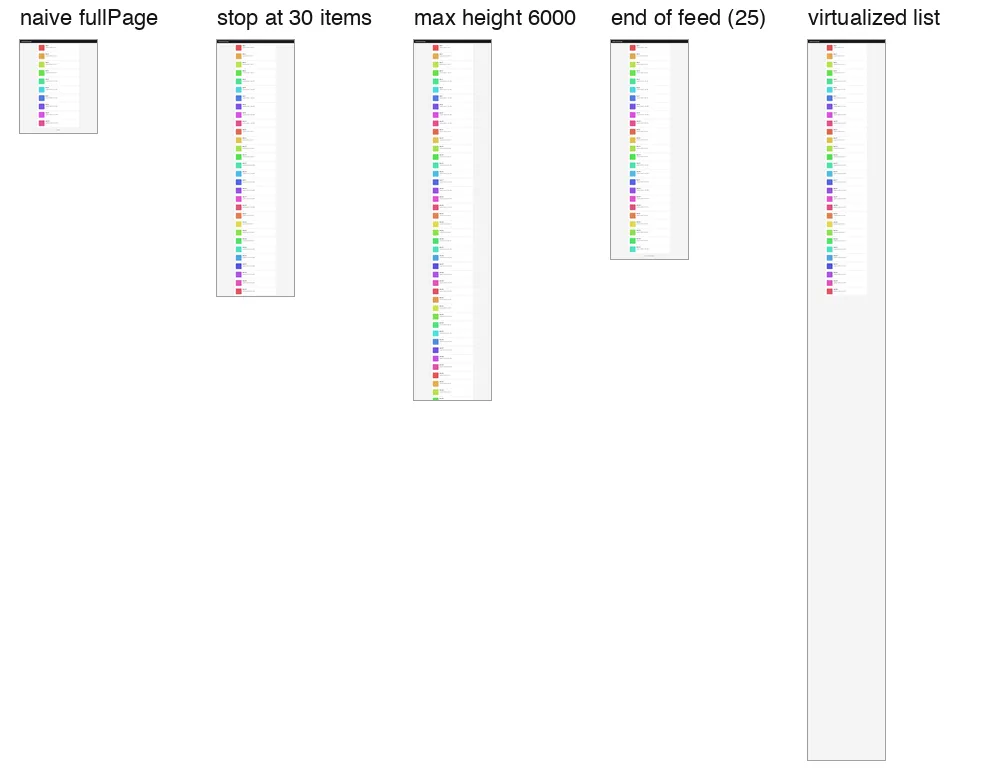
What the numbers say:
- The item count is the best rule when the page has a repeated item. It is fast, it is the number your user cares about ("the first 30 results"), and it cuts the image after a whole card.
- The no-growth rule costs
idle x waitat the end. With 3 idle rounds of 2 seconds, detecting the true end of a 25-item feed took about 7 seconds; with 1 idle round, about 3 seconds. One idle round is too few for a slow API, so tune the wait time to the page, not the round count. - A height cap cuts through content. At 6,000 px the image ends in the middle of item 43. It is a good safety limit and a poor primary rule.
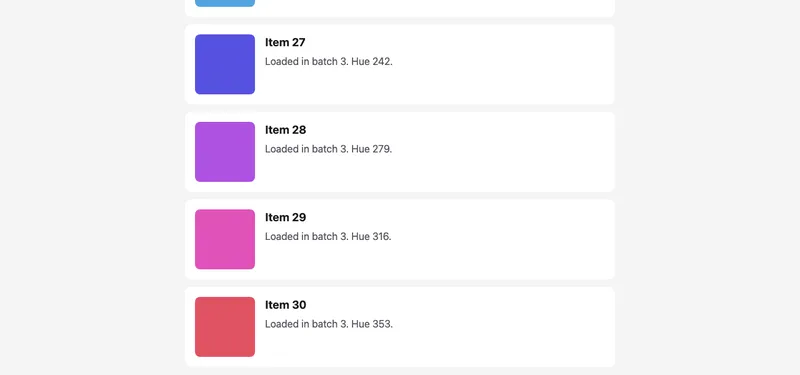
--items=30: the image ends 12 px under item 30.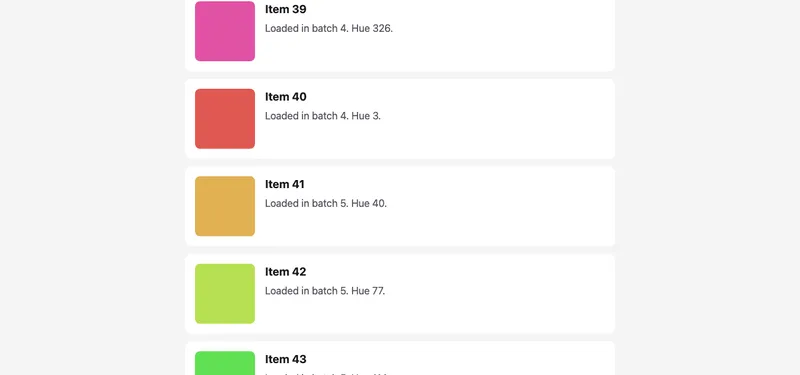
--max-height=6000: the cut goes through item 43.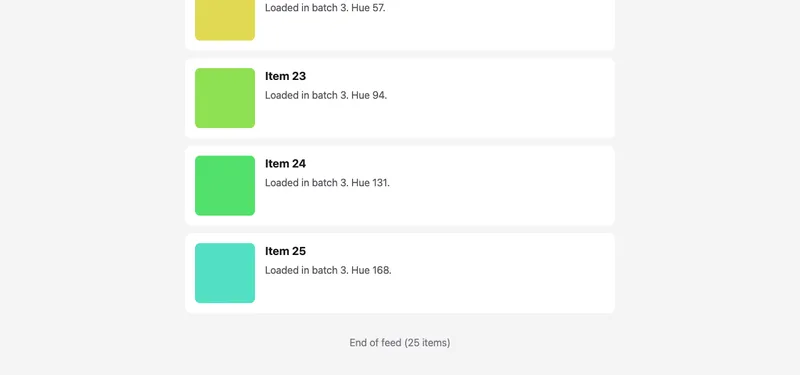
?total=25: the no-growth rule found the real end and the "End of feed" message.Always set all four limits, even if you rely on one. The time budget and the height cap protect you from pages that misbehave: a feed that loads one item per second forever, or a page that grows by a few pixels on every scroll because of an animation.
The same rule in Python
The Python API has the same names in snake case. This version stops at an item count only and keeps the no-growth guard.
# capture_feed.py - stop after N items. Python 3.10+, playwright==1.64.0
import sys
from playwright.sync_api import sync_playwright, TimeoutError as PWTimeout

URL, OUT, MAX_ITEMS = sys.argv[1], sys.argv[2], int(sys.argv[3])
ITEM = "article.item"

with sync_playwright() as p:
    browser = p.chromium.launch()
    try:
        page = browser.new_page(viewport={"width": 1280, "height": 800})
        page.goto(URL)
        items = page.locator(ITEM)
        idle = 0
        while items.count() < MAX_ITEMS and idle < 3:
            n = items.count()
            page.mouse.wheel(0, 10_000)
            try:
                page.wait_for_function(
                    "([sel, n]) => document.querySelectorAll(sel).length > n",
                    arg=[ITEM, n],
                    timeout=2000,
                )
                idle = 0
            except PWTimeout:
                idle += 1

        last = items.nth(min(items.count(), MAX_ITEMS) - 1)
        bottom = last.evaluate("el => el.getBoundingClientRect().bottom + scrollY")
        page.evaluate("scrollTo(0, 0)")
        page.screenshot(
            path=OUT,
            full_page=True,
            clip={"x": 0, "y": 0, "width": 1280, "height": int(bottom) + 12},
        )
        print(f"{OUT}: {items.count()} items in DOM, cut at {int(bottom) + 12}px")
    finally:
        browser.close()
Run with python capture_feed.py http://localhost:3000/infinite-feed.html feed.png 40. On the test page it printed 40 items in DOM, cut at 5666px.
Virtualized lists: the blank-bottom problem
Large feeds and data grids often use virtualization (react-window, TanStack Virtual and similar). The list keeps only the rows near the viewport in the DOM and fills the rest with padding, so the scroll height is right but most of the document is empty. A full-page capture draws that empty padding.
With ?virtual=1, the item-count rule never fires (the DOM never holds more than about 30 rows), so the script ran to the 12,000 px cap. After scrollTo(0, 0) the list rendered rows 1 to 30, and everything under them was blank:
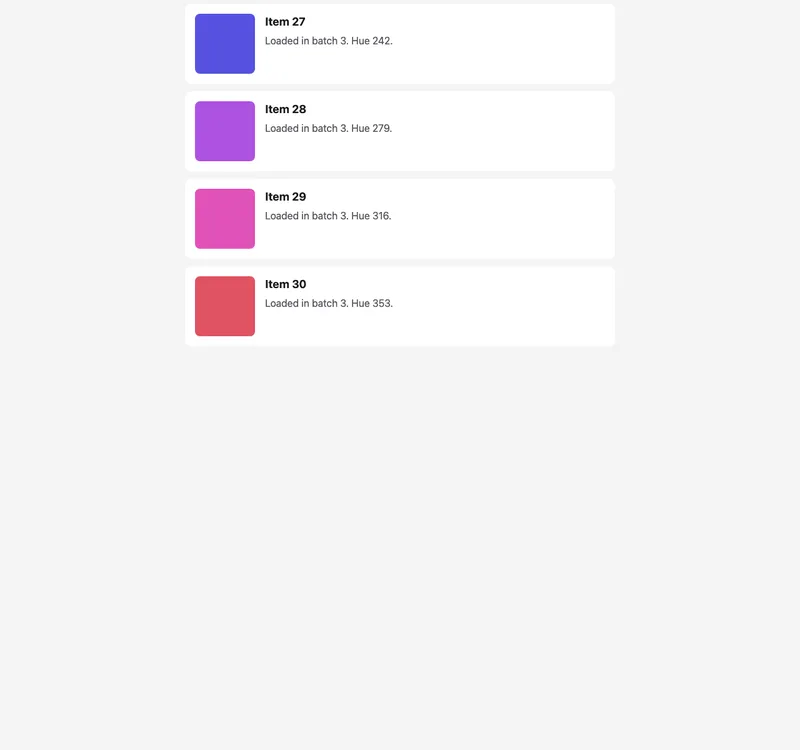
fullPage capture: rows exist only near the scroll position.The fix is to capture what is on screen at each scroll position and stitch the tiles. Hide the sticky header after the first tile, or it repeats in every tile.
// stitch-virtual.mjs - capture a virtualized list by scrolling and stitching viewport tiles.
// Node 22+, [email protected], [email protected]. Usage: node stitch-virtual.mjs <url> <out.png> <maxHeight>
import { chromium } from 'playwright';
import sharp from 'sharp';

const [url, out = 'stitched.png', maxHeight = '6000'] = process.argv.slice(2);
const W = 1280, VH = 800;

const browser = await chromium.launch();
try {
  const page = await browser.newPage({ viewport: { width: W, height: VH } });
  await page.goto(url);

  // 1. Load enough rows: scroll until the document is tall enough (or stops growing).
  for (let i = 0; i < 50; i++) {
    const h = await page.evaluate(() => document.scrollingElement.scrollHeight);
    if (h >= Number(maxHeight)) break;
    await page.mouse.wheel(0, h);
    await page.waitForFunction((h0) => document.scrollingElement.scrollHeight > h0, h, { timeout: 2000 })
      .catch((err) => { if (err.name !== 'TimeoutError') throw err; });
  }
  const total = Math.min(Number(maxHeight), await page.evaluate(() => document.scrollingElement.scrollHeight));

  // 2. Walk down one viewport at a time and grab what is rendered there.
  const tiles = [];
  for (let y = 0; y < total; y += VH) {
    await page.evaluate((y) => scrollTo(0, y), y);
    // Two animation frames: the scroll handler re-renders, then the browser paints.
    await page.evaluate(() => new Promise((r) => requestAnimationFrame(() => requestAnimationFrame(r))));
    const top = await page.evaluate(() => scrollY); // the last tile may not reach y
    tiles.push({ input: await page.screenshot(), top });
    if (y === 0) await page.addStyleTag({ content: 'header { visibility: hidden !important; }' });
  }

  // 3. Stitch. Later tiles overwrite the overlap at the bottom, which is fine: same pixels.
  await sharp({ create: { width: W, height: total, channels: 3, background: '#ffffff' } })
    .composite(tiles.map(({ input, top }) => ({ input, top, left: 0 })))
    .png()
    .toFile(out);
  console.log(JSON.stringify({ out, tiles: tiles.length, height: total }));
} finally {
  await browser.close();
}
Three runs each produced 8 tiles and a 6,000 px image with every row drawn and no visible seams:
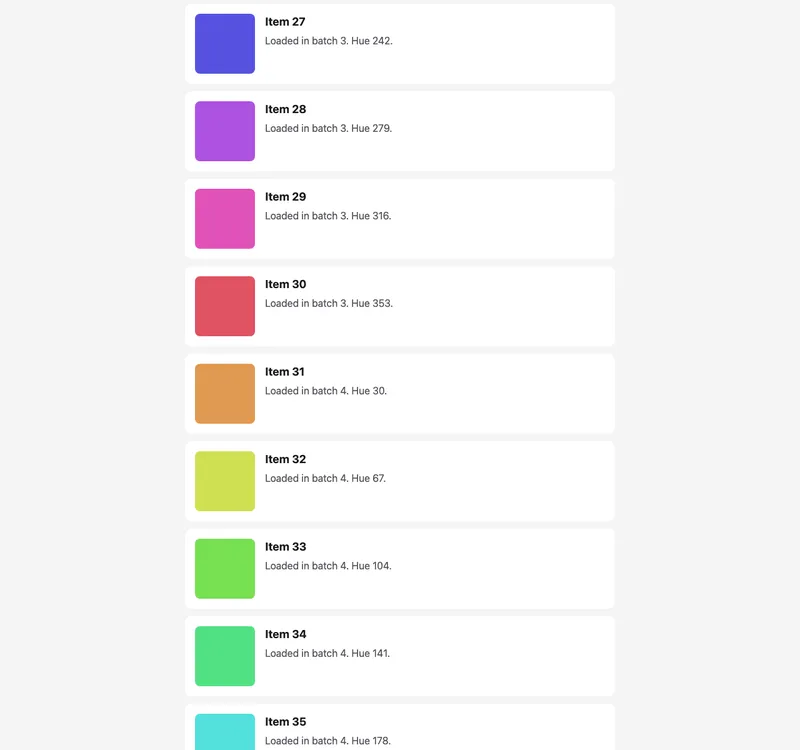
Stitching has costs. Anything with position: fixed (chat buttons, cookie bars) shows up in every tile unless you hide it, and animations that run during the walk can leave visible seams. Use it only when the page is virtualized; for normal feeds, the single capture above is simpler and exact. Our post on sticky headers in full-page captures covers the fixed-element problem in more detail.
The same idea with the RenderScreenshot API
Disclosure: RenderScreenshot is my product. The API has the height cap and the scroll pass built in, as documented in the capture parameters: capture.scroll.simulate scrolls the page step by step before the capture, scroll.delay sets the wait between steps, scroll.step sets the distance, and scroll.max_height (default 16,000 px) caps the image. These options are POST-only.
curl -X POST https://api.renderscreenshot.com/v1/screenshot \
  -H "Authorization: Bearer $RS_API_KEY" \
  -H "Content-Type: application/json" \
  -d '{
    "url": "https://example.com/feed",
    "capture": {
      "mode": "full_page",
      "scroll": { "simulate": true, "delay": 600, "max_height": 6000 }
    },
    "output": { "format": "webp", "quality": 80 }
  }' \
  -o feed.webp
What the API does not have: an item-count stop, a no-growth detector you can tune, or tile stitching for virtualized lists. If you need "exactly the first 30 results", the DIY script above is the right tool, or you set max_height to the height of 30 items when the item height is fixed. If the long image is going into a vision model, split it afterwards; the guide to splitting long screenshots has tested sharp and Pillow code. A free API key is enough to compare the API output with your local runs.
Troubleshooting
| Symptom | Cause | Fix |
|---|---|---|
| Only the first batch is in the image | No scroll before capture | Scroll in rounds until a stop rule fires |
| Script never ends | Only a "page stopped growing" rule, on a page that never stops | Add a time budget and a height cap |
| New items never load | The loader may listen for wheel or touch events that a scripted scrollTo does not send |
Use page.mouse.wheel(), or scroll the inner container if the feed scrolls inside a div |
| Feed scrolls inside a container, page height stays 800 px | The scroll element is a div with overflow: auto |
Measure and scroll that element, then capture it with an element screenshot |
| Bottom half of the image is blank | Virtualized list | Scroll and stitch tiles, or capture the visible window only |
| Last card is cut in half | Height cap was the stop reason | Stop on item count and clip after the Nth item |
| Images in later cards are grey boxes | Lazy images had no time to load | Wait for img.complete in the last batch before the capture, see lazy-loaded images |
| End detection takes many seconds | idle rounds x wait time |
Lower the wait time to what the page's API needs |
| Image larger than expected in MB | Tall PNG | Use WebP or JPEG for archives; PNG at 12,000 px was 526 KB here, but photo-heavy feeds are far larger |
For the general full-page cases (fixed heights, lazy images, the Chrome height limit), go back to the Puppeteer full-page screenshot guide.
Related in this topic
- Full Page Screenshots: Every Method Tested on One Page How to take a full page screenshot with DevTools, Puppeteer, Playwright, Selenium or an API. Each method tested on one 20,000 px page, with times and failures.
- Full Page Screenshot in Chrome Without an Extension Take a full page screenshot in Chrome with the DevTools command, the command line or a Console snippet. Tested limits, lazy images and fixed headers.
- Screenshot Lazy-Loaded Images: 5 Strategies Measured Why full page screenshots miss lazy-loaded images, and which scroll strategy fixes it. Five strategies measured in Chromium, Firefox and WebKit, with code.
- Full Page Screenshot in Firefox: Menu, Console and CLI Take a full page screenshot in Firefox with the built-in screenshot tool, the :screenshot command or the command line. Height limits measured, plus fixes.
- Full Page Screenshot in Safari on Mac and iPhone Take a full page screenshot in Safari: Web Inspector on Mac, Export as PDF, and Full Page on iPhone. WebKit limits measured, lazy images and fixed bars.
- Sticky Headers in Full Page Screenshots: 4 Bugs, 1 Fix Why full page screenshots repeat sticky headers, stretch 100vh heroes and put cookie bars mid-page. Each bug reproduced per tool, with a tested CSS fix.