Tofu is the empty rectangle a browser draws for a character when neither the requested fonts nor any fallback font on the machine contains a glyph for it; each box is the font's "missing glyph" (.notdef) shape.
On a laptop you rarely see it, because desktop systems ship fonts for most scripts. In headless rendering on servers it is common, because the server has whatever fonts its image installed and nothing else. This entry is part of the screenshot and rendering glossary.
A plain explanation
Text on a web page names fonts in a list: font-family: Inter, Helvetica, sans-serif. For each character, the browser walks that list. If no listed font has the character, it asks the operating system for any installed font that has it. This is font fallback. Only when that search finds nothing does it draw the missing-glyph box: tofu.
So tofu is not a font problem in the CSS sense. It is a property of the machine that renders the page. The same page can be perfect on your Mac and full of boxes in a container.
Fallback and tofu in one capture
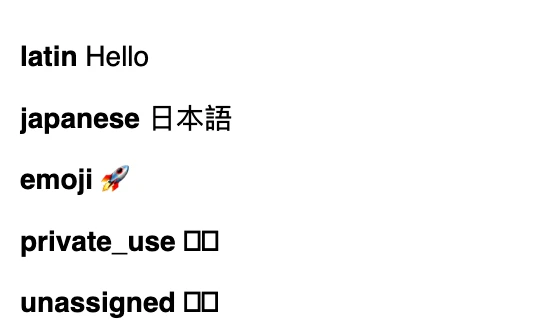
We also asked Chromium, through the DevTools Protocol method CSS.getPlatformFontsForNode, which font drew each line:
| Sample | Code points | Font reported by Chromium | Tofu? |
|---|---|---|---|
| latin | Hello |
Helvetica x5 | no |
| japanese | U+65E5 U+672C U+8A9E | PingFang (macOS CJK font) x3 | no |
| emoji | U+1F680 | Apple Color Emoji x1 | no |
| private_use | U+E000 U+E001 | Helvetica x2 | yes |
| unassigned | U+0378 U+0379 | Helvetica x2 | yes |
The last two rows are the useful finding. The font report names Helvetica for the tofu, because Helvetica's own missing-glyph shape drew the box. A check based on "which font was used" does not catch tofu. A pixel check does.
How it works technically
- Fallback is per character, not per string. One word can mix three fonts.
- The fallback list depends on the OS. macOS and Windows have large system font sets. Debian and Alpine container images often have only DejaVu or nothing, so CJK, Thai, Devanagari and emoji become tofu.
- Web fonts are often subset. A brand font with only Latin glyphs falls back for "é" or "ł" if the subset was too tight, and to tofu on a bare server.
- Some code points have no glyph anywhere. Private Use Area characters only work with the icon font that defines them. If that icon font fails to load, every icon becomes a box.
Detect tofu before you ship a capture
The trick: draw a code point that no font has (U+0378 is unassigned in Unicode) on a canvas in the page's font. That is the missing-glyph shape. Any character whose pixels are identical is tofu.
Puppeteer shows both the font report and the pixel test on the sample strings. Excerpt of the check:
// Fragment: runs inside the Puppeteer script after page.setContent(...).
const tofu = await page.evaluate((list) => {
  const font = getComputedStyle(document.body).font;
  const draw = (ch) => {
    const c = new OffscreenCanvas(64, 64);
    const ctx = c.getContext('2d');
    ctx.font = font;
    ctx.fillText(ch, 4, 48);
    return ctx.getImageData(0, 0, 64, 64).data.join(',');
  };
  const missing = draw('\u0378'); // U+0378 is unassigned: always the missing-glyph box
  return Object.fromEntries(Object.entries(list).map(([id, text]) =>
    [id, [...text].some((ch) => draw(ch) === missing)]));
}, samples);
console.log('tofu:', tofu);
// tofu: { latin: false, japanese: false, emoji: false, private_use: true, unassigned: true }
Playwright, as a complete gate for any URL: it lists missing characters and exits with code 1 instead of saving a broken image.
import { chromium } from 'playwright';

// Fail a capture when visible text contains characters drawn as empty boxes.
const url = process.argv[2] ?? 'https://example.com';
const browser = await chromium.launch();
try {
  const page = await browser.newPage();
  await page.goto(url, { waitUntil: 'load' });
  await page.evaluate(() => document.fonts.ready);

  const boxes = await page.evaluate(() => {
    const font = getComputedStyle(document.body).font;
    const draw = (ch) => {
      const ctx = new OffscreenCanvas(64, 64).getContext('2d');
      ctx.font = font;
      ctx.fillText(ch, 4, 48);
      return ctx.getImageData(0, 0, 64, 64).data.join(',');
    };
    const missing = draw('\u0378'); // unassigned code point: always the missing-glyph box
    const chars = new Set([...document.body.innerText].filter((ch) => ch.trim()));
    return [...chars].filter((ch) => draw(ch) === missing)
      .map((ch) => 'U+' + ch.codePointAt(0).toString(16).toUpperCase().padStart(4, '0'));
  });

  if (boxes.length) {
    console.error(`Missing glyphs on ${url}: ${boxes.join(' ')}`);
    process.exitCode = 1;
  } else {
    await page.screenshot({ path: 'out/tofu-checked.png' });
    console.log(`No missing glyphs on ${url}`);
  }
} finally {
  await browser.close();
}
Results: No missing glyphs on https://example.com, and for a test page containing U+E000, Missing glyphs on ...: U+E000 with exit code 1. The check uses the body font, so it can miss tofu inside elements with a different font stack. Run it per element if your page mixes fonts.
RenderScreenshot renders in Cloudflare Browser Run. Its supported fonts list (checked 2026-10-15) includes Noto CJK and other CJK fonts, Arabic, Thai, several Indic scripts and Noto Color Emoji, so the common causes of tofu on self-hosted Linux do not apply. There is no font option to set. For anything outside that list, load a web font in the page, or in your own HTML:
curl -X POST https://api.renderscreenshot.com/v1/screenshot \
  -H "Authorization: Bearer $RS_API_KEY" \
  -H "Content-Type: application/json" \
  -d '{
    "html": "<!doctype html><meta charset=\"utf-8\"><link rel=\"stylesheet\" href=\"https://fonts.googleapis.com/css2?family=Noto+Sans+Adlam&display=block\"><p style=\"font:48px Noto Sans Adlam,sans-serif\">𞤀𞤁𞤂</p>",
    "viewport": { "width": 800, "height": 200 },
    "wait": { "until": "networkidle" }
  }' \
  --output adlam.png
The emoji rendering guide and the localized screenshots guide cover the renderer's fonts in detail.
Tested on 2026-10-15 on macOS with Node 22.18, Puppeteer 24.43.1 (headless shell, Chrome 148) and Playwright 1.64.1 (Chromium 156). Font names in the table come from macOS; on Linux they differ. The RenderScreenshot request was not run for this page.
Common mistakes
- Testing fonts on your laptop only. Your Mac falls back to fonts the server does not have. Run the check where you render.
- Icon fonts with no fallback. When the icon font fails, every icon is a Private Use Area box. Prefer SVG icons in templates.
- Over-tight font subsets. A Latin-only subset makes user names with accents or non-Latin scripts fall back, or fail, in cards.
- Reading the font report as a tofu check. As the table shows, tofu is reported under the primary font's name.
Related terms
- Font-display: what shows while a web font is still loading.
- Web fonts loading: how and when a headless browser fetches fonts.
- Chrome DevTools Protocol: the source of the platform font report.
To render a page with the renderer's full font set, get a free API key.