font-display is a descriptor in a CSS @font-face rule that tells the browser what to draw while the web font is still downloading: invisible text, a fallback font, or the fallback for good.
font-display: swap is the most common value: show the fallback font at once, then swap in the web font when it arrives. For screenshots, the value decides whether an early capture shows blank text, the wrong font, or the right one. This entry is part of the screenshot and rendering glossary.
A plain explanation
A web font is a separate download. Until it arrives, the browser has to choose. It can hide the text and wait, or show the text in a font it already has. font-display makes that choice explicit through three periods:
- Block period: text is drawn invisibly. If the font arrives, it is used.
- Swap period: text is drawn in the fallback font. If the font arrives, it replaces the fallback.
- Failure period: the fallback stays, even if the font arrives later.
Each value sets different lengths for those periods:
| Value | Block period | Swap period | What a visitor sees on a slow font |
|---|---|---|---|
auto |
browser default; Chromium uses the block timings |
same as block in Chromium |
invisible text, then the web font |
block |
about 3 s | infinite | invisible text, then the web font |
swap |
very short | infinite | fallback, then the web font |
fallback |
about 100 ms | about 3 s | fallback; the web font only if it arrives within ~3 s |
optional |
about 100 ms | none | fallback, unless the font is already cached |
All five values, captured twice
We served a test font with a 3-second delay and captured a page for each value at 500 ms and at 4.5 seconds after navigation.
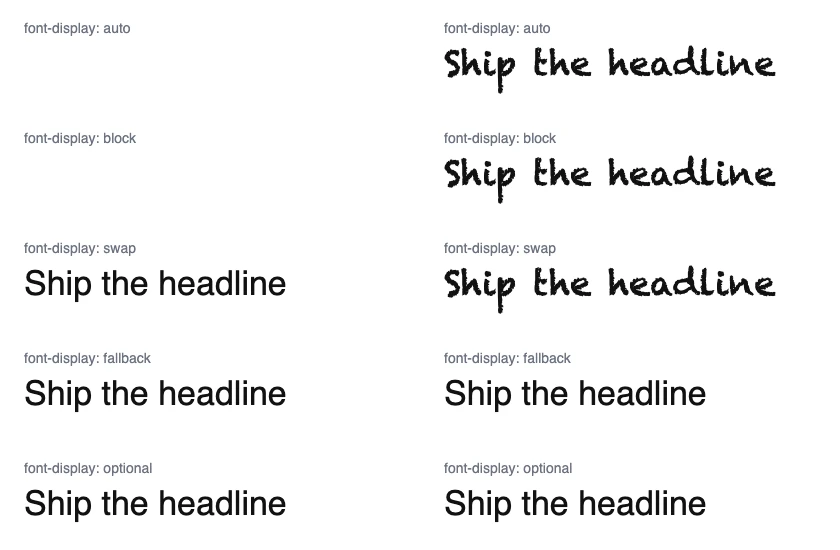
font-display value, with the web font delayed by 3 s, captured with Puppeteer at 500 ms (left) and 4.5 s (right) on 2026-10-15. At 4.5 s, document.fonts reported the font as loaded for all five.The last line of the caption is the trap. For fallback and optional, the font was downloaded and reported as loaded, but the page kept painting the fallback. A capture script that waits for document.fonts.ready and then shoots would pass its own check and still produce the wrong image.
How it works technically
The timers start when the browser first needs the font for text, not at navigation. Chromium's auto behaves like block for most fonts. A font in the HTTP cache or memory cache is usually ready within the short block period, which is why optional works on a second visit: we reloaded the optional page after one visit, with the font served with a long Cache-Control max-age, and the second capture used the web font.
Swaps also move text. A fallback with different widths and line heights reflows the paragraph when the web font arrives, which is a layout shift. The CSS descriptors size-adjust, ascent-override and descent-override on the fallback reduce that.
Settings in Puppeteer, Playwright and RenderScreenshot
Puppeteer. For optional or fallback fonts on pages you do not control, warm the cache with a first visit, then reload and capture. This only helps when the font is served with cache headers.
import puppeteer from 'puppeteer';

// Pages that use font-display: optional or fallback can keep the fallback font
// for the life of the page, even after document.fonts says "loaded".
// Warm the HTTP cache with one visit, then load again and capture.
const url = process.argv[2] ?? 'http://localhost:4630/fd?mode=optional';
const browser = await puppeteer.launch();
try {
  const page = await browser.newPage();
  await page.setViewport({ width: 420, height: 110 });

  await page.goto(url, { waitUntil: 'load' });
  await page.evaluate(() => document.fonts.ready); // first visit: font downloads into the cache

  await page.reload({ waitUntil: 'load' });
  await page.evaluate(() => document.fonts.ready);
  await page.screenshot({ path: 'out/fd-optional-warm.png' });
} finally {
  await browser.close();
}
Playwright. To check what is actually painted, ask Chromium through the DevTools Protocol which platform font drew the text.
import { chromium } from 'playwright';

// Wait for web fonts, then check that the text is painted with the web font,
// not only that the file finished downloading.
const url = process.argv[2] ?? 'http://localhost:4630/fd?mode=swap';
const browser = await chromium.launch();
try {
  const page = await browser.newPage({ viewport: { width: 420, height: 110 } });
  await page.goto(url, { waitUntil: 'load' });
  await page.evaluate(() => document.fonts.ready);

  // Ask Chromium which font actually drew the text node (DevTools Protocol).
  const cdp = await page.context().newCDPSession(page);
  const { root } = await cdp.send('DOM.getDocument');
  const { nodeId } = await cdp.send('DOM.querySelector', { nodeId: root.nodeId, selector: 'body' });
  await cdp.send('CSS.enable');
  const { fonts } = await cdp.send('CSS.getPlatformFontsForNode', { nodeId });
  console.log(fonts.map((f) => `${f.familyName} (${f.glyphCount} glyphs)`).join(', '));

  await page.screenshot({ path: 'out/fd-playwright.png' });
} finally {
  await browser.close();
}
On the swap page it printed Chalkduster (17 glyphs), Helvetica (18 glyphs): the 17-character headline in the web font, the label in Helvetica. On the optional page it printed Helvetica (39 glyphs): no web font on screen.
RenderScreenshot. The default load condition waits for fonts the page requests during the first load. For fonts that a script adds later, use networkidle. For swap fonts that arrive late, a short delay after networkidle covers the repaint. See the wait parameters.
curl --get https://api.renderscreenshot.com/v1/screenshot \
  -H "Authorization: Bearer $RS_API_KEY" \
  --data-urlencode 'url=https://example.com/blog/post' \
  -d preset=og_card -d delay=500 \
  --output card.png
import { Client, TakeOptions } from 'renderscreenshot';

const client = new Client(process.env.RS_API_KEY);
const image = await client.take(
  TakeOptions.url('https://example.com/blog/post').preset('og_card').waitFor('networkidle').delay(500)
);
When you send your own HTML, you set the descriptor yourself. Use font-display: block in templates for social cards, so a slow font gives a later image instead of a wrong one.
Tested on 2026-10-15 with Node 22.18, Puppeteer 24.43.1 (headless shell, Chrome 148) and Playwright 1.64.1 (Chromium 156) against a local server that delays the font by 3 s. The RenderScreenshot snippets follow the API docs and were not run for this page.
Common mistakes
optionalin image templates. On a cold renderer the font almost never wins. Your card ships in the fallback font.- Trusting
document.fonts.readyalone. It reports downloads. Check the painted font, as in the Playwright listing, when the font matters. - Blocking fonts to speed up captures. Blocking the
fontresource type is faster, and every capture uses the fallback. - Ignoring the reflow. A swap can push a button below the fold of a short viewport. Capture after the swap, not between.
Related terms
- Web fonts loading: the full font loading process in a headless browser.
- Font fallback and tofu: what happens when no font has the glyph at all.
- Cumulative layout shift: the reflow a font swap causes.
- Wait strategies: the conditions to wait on before the capture.
For timings of each wait condition on a page with a late font, read the wait strategies guide. To try them, get a free API key.