Cumulative layout shift (CLS) is a score for how much visible content moves unexpectedly while a page loads; for screenshots it explains why an early capture shows elements in places they will not stay.
Google uses CLS as one of the Core Web Vitals. For a capture tool the score matters less than the events behind it: every shift is a moment when a screenshot taken a little earlier would show a different page. This entry is part of the screenshot and rendering glossary.
A plain explanation
A browser draws a page as soon as it can, then redraws it as more resources arrive. If an image has no width and height, the browser gives it zero height until the file arrives. If a script inserts a promo bar at the top, everything below it moves down. Each of these moves is a layout shift.
A screenshot is one frame of that process. When the capture fires between the first paint and the last shift, you get a page that no visitor would see a second later: a button half-way up the screen, a headline in the fallback font, a gap where the hero image goes.
The same page, captured early and late
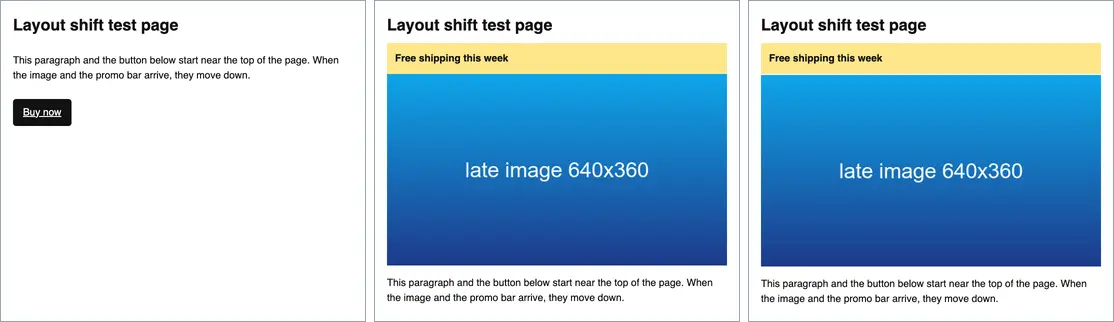
domcontentloaded. Middle: after the layout settled, CLS 0.172. Right: the same page with reserved space for the image and promo bar, CLS 0.000. Captures are scaled to 50%.The test page has an image without dimensions that arrives after 1.2 seconds and a promo bar that a script inserts at 1.5 seconds. Playwright recorded two shift entries, at 1,224 ms (0.106) and 1,528 ms (0.066), for a total of 0.172. Google's threshold for "good" is 0.1, so this page fails, and an early capture of it is wrong. The fixed version reserves space with aspect-ratio on the image and min-height on the promo slot. It recorded no shift entries at all.
How it works technically
Chromium reports each shift as a layout-shift performance entry. The value of an entry is the impact fraction (how much of the viewport the moving elements cover) multiplied by the distance fraction (how far they moved, relative to the viewport). Shifts within 500 ms of a user input are flagged with hadRecentInput and do not count.
The official CLS metric groups shifts into session windows and reports the largest window. For screenshot timing a simpler rule works better: track the time of the last shift, and capture once it is old enough. The two snippets below do exactly that.
Three things cause most shifts in captures:
- Images, iframes and embeds without a size. They take no space until they load. This is common with lazy loading.
- Content inserted above existing content. Cookie notices, promo bars, ads and "sign in" prompts.
- Web fonts. A fallback font with different metrics reflows text when the real font arrives. See font-display.
How to wait for the layout to settle
Puppeteer. Wait for the load event, then for one quiet second with no new shift.
import puppeteer from 'puppeteer';

const target = process.argv[2] ?? 'http://localhost:4630/cls';
const browser = await puppeteer.launch();
try {
  const page = await browser.newPage();
  await page.setViewport({ width: 728, height: 640 });

  // 1. Early capture: the DOM is parsed, but the image and promo bar are not in yet.
  await page.goto(target, { waitUntil: 'domcontentloaded' });
  await page.screenshot({ path: 'out/cls-early.png' });

  // 2. Wait for the load event, then until the layout stops moving:
  //    no new layout-shift entry for 1 second.
  await page.waitForFunction(() => document.readyState === 'complete');
  await page.evaluate(() => new Promise((resolve) => {
    let timer = setTimeout(resolve, 1000);
    new PerformanceObserver(() => {
      clearTimeout(timer);
      timer = setTimeout(resolve, 1000);
    }).observe({ type: 'layout-shift' });
  }));
  const cls = await page.evaluate(() => window.__cls);
  await page.screenshot({ path: 'out/cls-settled.png' });
  console.log(`${target} CLS=${cls.toFixed(3)}`);
} finally {
  await browser.close();
}
window.__cls is a sum the test page keeps itself. On a third-party page, use the Playwright approach, which installs its own observer.
Playwright. addInitScript records every shift from the first paint, before any page script runs. That also gives you a log you can attach to a failed visual test.
import { chromium } from 'playwright';

const target = process.argv[2] ?? 'http://localhost:4630/cls';
const browser = await chromium.launch();
try {
  const page = await browser.newPage({ viewport: { width: 728, height: 640 } });

  // Record every layout shift from the first paint, before any page script runs.
  await page.addInitScript(() => {
    window.__shifts = [];
    new PerformanceObserver((list) => {
      for (const e of list.getEntries()) window.__shifts.push({ t: e.startTime, v: e.value });
    }).observe({ type: 'layout-shift', buffered: true });
  });

  await page.goto(target, { waitUntil: 'load' });
  // Settle rule: the last shift is at least 1 second old.
  await page.waitForFunction(() => {
    const last = window.__shifts.at(-1);
    return performance.now() - (last ? last.t : 0) > 1000;
  }, null, { polling: 100 });

  const shifts = await page.evaluate(() => window.__shifts);
  const total = shifts.reduce((sum, s) => sum + s.v, 0);
  console.log(`${shifts.length} shifts, total ${total.toFixed(3)}`,
    shifts.map((s) => `${Math.round(s.t)}ms:${s.v.toFixed(3)}`).join(' '));
  await page.screenshot({ path: 'out/cls-playwright.png' });
} finally {
  await browser.close();
}
Output on the test page: 2 shifts, total 0.172 1224ms:0.106 1528ms:0.066. On the fixed page: 0 shifts, total 0.000.
RenderScreenshot. The API has no layout-shift wait, so combine the wait parameters: networkidle covers late images and fonts, delay covers content that a timer inserts, and for_selector is the most reliable when you know which element arrives last.
curl -X POST https://api.renderscreenshot.com/v1/screenshot \
  -H "Authorization: Bearer $RS_API_KEY" \
  -H "Content-Type: application/json" \
  -d '{
    "url": "https://example.com/product",
    "viewport": { "width": 1280, "height": 800 },
    "wait": { "until": "networkidle", "for_selector": ".promo", "delay": 500 }
  }' \
  --output settled.png
import { Client, TakeOptions } from 'renderscreenshot';

const client = new Client(process.env.RS_API_KEY);
const image = await client.take(
  TakeOptions.url('https://example.com/product').waitFor('networkidle').delay(1000)
);
When the late element is something you do not want in the image at all, such as a promo bar, remove it with page.remove instead of waiting for it. See page modifications.
Tested on 2026-10-15 with Node 22.18, Puppeteer 24.43.1 (headless shell, Chrome 148) and Playwright 1.64.1 (Chromium 156) against a local test page. The RenderScreenshot snippets follow the API docs and were not run for this page.
Common mistakes
- Treating
loadas "finished". On the test page,loadfired at about 1.2 seconds, but the promo bar shifted the layout again 300 ms later. - Fixed sleeps sized for your laptop. A 1-second delay works locally and fails on a slow origin. Wait for a condition, then add a short delay as a margin.
- Blaming the CLS score. A high CLS score tells you shifts happen. It does not tell you when, and the timing is what breaks captures.
- Fixing captures instead of pages. If you own the page, reserving space (
width/heightattributes,aspect-ratio,min-heightfor injected slots) fixes the screenshot and the score at once.
Related terms
- Wait strategies: the conditions you can wait on before a capture.
- Lazy loading: a common source of late images that shift content.
- Font-display: how web fonts swap in and reflow text.
- Above the fold: the area where a shift is most visible.
For a full comparison of wait conditions with timings, read the wait strategies guide. To try the waits on your own pages, get a free API key.