Lazy loading is a technique that delays the download of images, iframes or other content until the visitor scrolls near them, so the first screen loads faster and unseen content costs no bandwidth.
Browsers support it natively with loading="lazy" on <img> and <iframe>. Many sites still use a script instead: the real URL sits in a data-src attribute and an IntersectionObserver swaps it in when the element nears the viewport. Both kinds have the same effect on screenshots: content that was never near the viewport was never loaded. This entry is part of the screenshot and rendering glossary.
A plain explanation
A long article with 40 images does not need all 40 before the reader sees the headline. Lazy loading fetches the first few and waits on the rest. A reader who scrolls gets each image just before it comes into view. A reader who leaves after the intro never downloads the rest.
A headless browser that takes a full-page screenshot is not a reader. It does not scroll. It draws the whole page in one pass, so the lazy images below the load distance appear as empty boxes.
What a full-page capture misses
We built a test page with 12 images, each in its own 700-pixel section, all with loading="lazy". A local server logged each image request. Then we took two full-page captures at 1280 x 800 with Puppeteer.
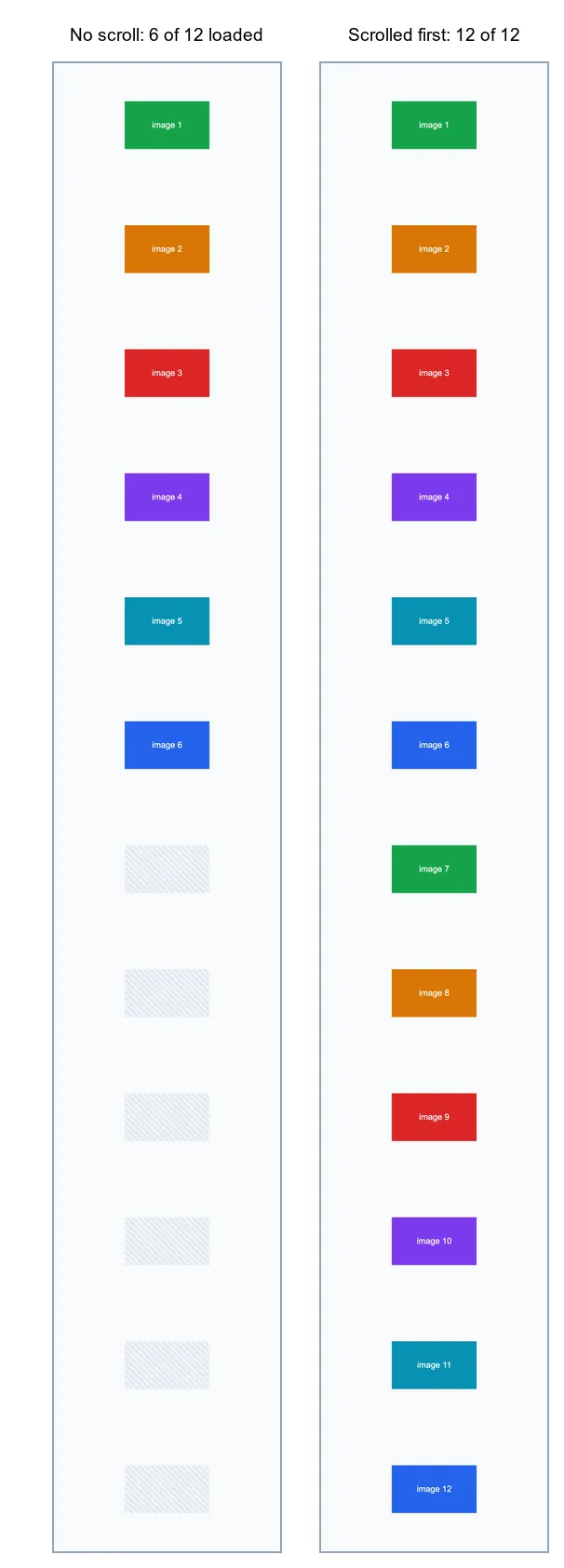
goto with networkidle0, then fullPage: true. Right: the same page after a scroll pass and an image wait. Both 1280 x 8412 pixels, scaled down. Captured with the Puppeteer script below on 2026-10-15.| Run | Images loaded | Requests the server saw |
|---|---|---|
| Load, wait for network idle, full-page capture | 6 of 12 | images 1 to 6 |
| Scroll in 600 px steps with 250 ms pauses, wait, capture | 12 of 12 | images 1 to 12 |
| Playwright, mouse-wheel scroll, wait, capture | 12 of 12 | images 1 to 12 |
In this run, image 6 started 2,915 pixels below the bottom of the viewport and loaded. Image 7 started 3,615 pixels below it and did not. The exact distance is a browser heuristic that can change with the version and the connection, so do not design around a number. Design around a scroll.
How it works technically
For native lazy loading, the browser keeps each loading="lazy" image in a pending state. As layout and scroll change, it checks the distance between each pending image and the viewport. When that distance falls under its threshold, it starts the request. Script-based lazy loaders do the same with an IntersectionObserver and a rootMargin.
Two consequences matter for automation:
- Network idle is not "all images loaded". Pending lazy images have no request, so the network is idle while they are missing. See wait strategies.
- A full-page screenshot does not scroll. The capture expands the drawing area, but the page's scroll position stays at the top, so observers and the native heuristic do not fire for the lower sections.
How to handle it in Puppeteer, Playwright and RenderScreenshot
Puppeteer. Scroll in steps, wait for every started image to finish, then capture. There is no page.waitForTimeout in Puppeteer v22 and later, so the pause is a plain promise.
import puppeteer from 'puppeteer';

const url = process.argv[2] ?? 'https://example.com';

async function scrollThrough(page, step = 600, pauseMs = 250) {
  await page.evaluate(async (step, pauseMs) => {
    const sleep = (ms) => new Promise((r) => setTimeout(r, ms));
    for (let y = 0; y < document.documentElement.scrollHeight; y += step) {
      window.scrollTo(0, y);
      await sleep(pauseMs);
    }
    window.scrollTo(0, 0);
  }, step, pauseMs);
}

const loadedImages = (page) =>
  page.$$eval('img', (imgs) => `${imgs.filter((i) => i.complete && i.naturalWidth > 0).length}/${imgs.length}`);

const browser = await puppeteer.launch();
try {
  const page = await browser.newPage();
  await page.setViewport({ width: 1280, height: 800 });

  await page.goto(url, { waitUntil: 'networkidle0' });
  console.log('no scroll:', await loadedImages(page));
  await page.screenshot({ path: 'lazy-no-scroll.png', fullPage: true });

  await scrollThrough(page);
  // Wait until every image that started loading has finished.
  await page.waitForFunction(() => [...document.images].every((i) => i.complete));
  console.log('after scroll:', await loadedImages(page));
  await page.screenshot({ path: 'lazy-scrolled.png', fullPage: true });
} finally {
  await browser.close();
}
Playwright. The mouse wheel fires real scroll events, which some script-based loaders need.
import { chromium } from 'playwright';

const url = process.argv[2] ?? 'https://example.com';
const browser = await chromium.launch();
try {
  const page = await browser.newPage({ viewport: { width: 1280, height: 800 } });
  await page.goto(url, { waitUntil: 'networkidle' });

  const height = await page.evaluate(() => document.documentElement.scrollHeight);
  for (let y = 0; y < height; y += 600) {
    await page.mouse.wheel(0, 600);
    await page.waitForTimeout(250); // Playwright still supports waitForTimeout; Puppeteer v22+ does not
  }
  await page.evaluate(() => window.scrollTo(0, 0));
  await page.waitForFunction(() => [...document.images].every((i) => i.complete));
  await page.screenshot({ path: 'lazy-playwright.png', fullPage: true });
  console.log('images loaded:', await page.$$eval('img', (a) => a.filter((i) => i.naturalWidth > 0).length));
} finally {
  await browser.close();
}
RenderScreenshot. Set capture.scroll.simulate to scroll the page before a full-page capture. scroll.delay is the pause per step (default 400 ms), scroll.step the distance (default one viewport), and scroll.max_height caps the capture at 16,000 pixels by default. The full_page preset turns scroll simulation on. See capture options.
curl -X POST https://api.renderscreenshot.com/v1/screenshot \
  -H "Authorization: Bearer $RS_API_KEY" \
  -H "Content-Type: application/json" \
  -d '{
    "url": "https://example.com/long-article",
    "capture": {
      "mode": "full_page",
      "scroll": { "simulate": true, "delay": 500 }
    },
    "wait": { "until": "networkidle" }
  }' \
  --output article.png
Tested on 2026-10-15 with Node 22.18, Puppeteer 24.43.1 (run in headless shell mode, Chrome 148) and Playwright 1.64.1 (Chromium 156), against a local 12-image test page. The RenderScreenshot request follows the API docs and was not run for this page.
Common mistakes
- One big jump to the bottom.
window.scrollTo(0, document.body.scrollHeight)skips the middle sections. Some loaders only fire for elements that pass through the viewport. - No pause between steps. The observer callback and the request need time. Too short a pause gives the same blank boxes.
- Infinite scroll treated as lazy loading. A feed that appends new items on scroll never ends. Cap the height or the number of steps.
- Lazy hero images.
loading="lazy"on an image above the fold slows the first view for real visitors.
Related terms
- Wait strategies: why network idle does not cover lazy content.
- Above the fold: the area that should never be lazy loaded.
- Headless browser: why automated captures do not scroll by themselves.
The deep guide, with script-based loaders and background images, is screenshotting lazy-loaded images. To capture long pages with scroll simulation built in, get a free API key.