IntersectionObserver is a browser API that calls a script function when an observed element starts or stops overlapping the viewport (or another root element) by a chosen amount, without the script having to listen to scroll events.
Lazy loaders, infinite scroll feeds, "fade in on scroll" animations and ad viewability counters all depend on it. This entry is part of the screenshot and rendering glossary. For the image side of the problem, see lazy loading.
A plain explanation
Before this API, a script that wanted to know "is this element on screen?" had to listen to every scroll event and measure positions, which was slow. Now the script says "tell me when this element is at least 25% inside the viewport" and the browser calls back when that happens. The browser does the geometry once per frame.
The result for a capture tool: anything that waits for an observer callback waits for the viewport to reach it. If the viewport never moves, the callback never runs.
What a full-page capture does to observers
We built a page with twelve 600 px sections. Each section is observed with threshold: 0.25 and turns green when its callback runs. The viewport was 800 x 800. We counted callbacks after each action.
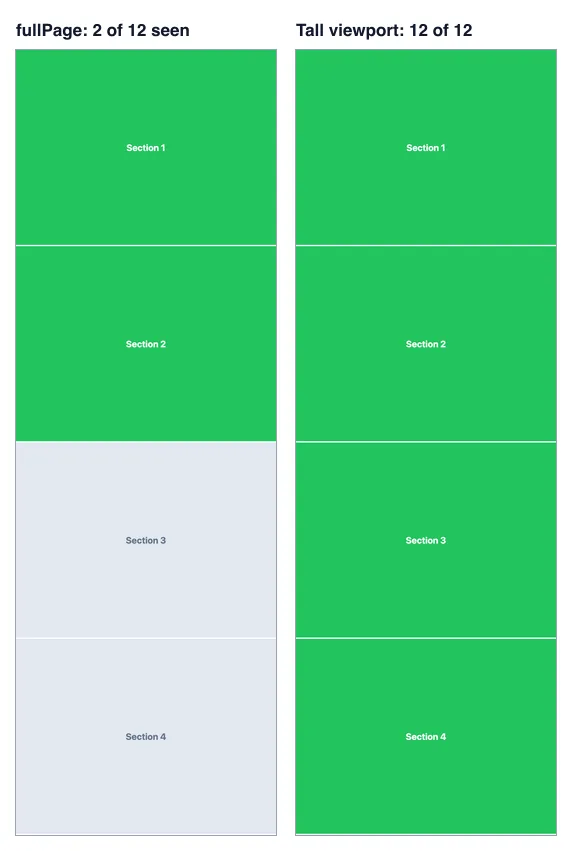
fullPage: true. Right: the same page after setViewport to the full page height (7,248 px). The top 2,416 px of each capture, scaled down. 2026-10-15.| Action | Sections seen (of 12) |
|---|---|
| Puppeteer: load | 2 |
| Puppeteer: full-page screenshot | 2 |
| Puppeteer: viewport set to page height (7,248 px) | 12 |
| Puppeteer: scroll through in 600 px steps | 12 |
| Playwright: load | 2 |
| Playwright: full-page screenshot | 2 |
A full-page capture paints the whole document, but the layout viewport and scroll position stay the same, so for the page nothing has changed. Two fixes worked: scroll through the page, or make the viewport as tall as the page. The second is faster, because every element intersects at once.
How it works technically
An observer has three settings. The root is the viewport, unless you pass a scrolling element. The rootMargin grows or shrinks the root's box, for example 0px 0px 200px 0px to start loading 200 px early. The threshold is one value or a list of values between 0 and 1: the share of the element that must be inside the box. On each rendering frame, the browser computes the overlap for every observed element and queues a callback when a threshold is crossed. Callbacks are asynchronous, so allow a frame or two before you check the result.
Because the root is the viewport, anything that changes the viewport size counts. That is why a tall viewport works: the root's box now covers the whole document.
How to trigger it in Puppeteer, Playwright and RenderScreenshot
Puppeteer. Make the viewport as tall as the page, wait for the callbacks and the requests they start, then capture.
import puppeteer from 'puppeteer';

const url = process.argv[2] ?? 'https://example.com';
const sleep = (ms) => new Promise((r) => setTimeout(r, ms));

const browser = await puppeteer.launch();
try {
  const page = await browser.newPage();
  await page.setViewport({ width: 1280, height: 800 });
  await page.goto(url, { waitUntil: 'networkidle0' });

  // Make the viewport as tall as the page: every observed element now
  // intersects the root, so every observer callback fires.
  const height = await page.evaluate(() => document.documentElement.scrollHeight);
  await page.setViewport({ width: 1280, height: Math.min(height, 16_000) });
  await sleep(300); // observer callbacks run on the next frames
  await page.waitForNetworkIdle({ idleTime: 500 }); // images the callbacks started

  await page.screenshot({ path: 'observed.png', fullPage: true });
  console.log('page height', height);
} finally {
  await browser.close();
}
Playwright.
import { chromium } from 'playwright';

const url = process.argv[2] ?? 'https://example.com';
const browser = await chromium.launch();
try {
  const page = await browser.newPage({ viewport: { width: 1280, height: 800 } });
  await page.goto(url, { waitUntil: 'networkidle' });
  const height = await page.evaluate(() => document.documentElement.scrollHeight);
  await page.setViewportSize({ width: 1280, height: Math.min(height, 16_000) });
  await page.waitForTimeout(300);
  await page.waitForLoadState('networkidle');
  await page.screenshot({ path: 'observed-pw.png', fullPage: true });
  console.log('page height', height);
} finally {
  await browser.close();
}
RenderScreenshot. Use scroll simulation with a step smaller than the viewport, so each element spends at least one pause inside it. For reveal animations that only add a class, you can also add the class yourself with page.scripts. See capture options and page modifications.
curl -X POST https://api.renderscreenshot.com/v1/screenshot \
  -H "Authorization: Bearer $RS_API_KEY" \
  -H "Content-Type: application/json" \
  -d '{
    "url": "https://example.com/landing",
    "capture": {
      "mode": "full_page",
      "scroll": { "simulate": true, "step": 400, "delay": 300 }
    },
    "page": {
      "scripts": ["document.querySelectorAll(\".reveal\").forEach((el) => el.classList.add(\"is-visible\"))"]
    }
  }' \
  --output landing.png
Tested on 2026-10-15 with Node 22.18.0, Puppeteer 25.14.0 (Chrome 155) and Playwright 1.64.1 (Chromium 156), against https://example.com and the local 12-section page (12 of 12 sections green in both outputs). The RenderScreenshot request follows the API docs and was not run for this page; .reveal and is-visible stand for your own class names.
Common mistakes
- Trusting
fullPageto trigger anything. It does not scroll and does not resize the viewport. - A tall viewport on a page with
100vhsections. Hero sections sized withvhgrow with the viewport. Check the layout, or scroll instead. - Checking too early. Callbacks run on a later frame. Wait a frame, then wait for the requests they started.
- Observers with a scrolling root. If the root is a scrolling
<div>, a tall window does not help. Scroll that element instead.
Related terms
- Lazy loading: the main reason pages use observers.
- Infinite scroll: observers on a sentinel that add new items.
- Viewport: the default root of every observer.
Our lazy loading study tests five capture strategies against four lazy-load patterns, including observer-based loaders. To capture long pages with scroll simulation built in, get a free API key.