An image MIME type (also called a media type or content type) is a standard label such as image/png or image/webp that tells a browser, crawler or program what format an image file is, usually sent in the HTTP Content-Type header.
The label has a type and a subtype separated by a slash. IANA keeps the official list. This entry is part of the screenshot and rendering glossary.
A plain explanation
A file name like shot.png is only a hint. On the web, the server's Content-Type header is the label that counts, and the file's first bytes are the truth. Browsers, link preview crawlers and image libraries use one or both to decide how to decode the file. Problems start when the three disagree: a WebP saved as .png, or a server that sends every file as application/octet-stream.
| Format | MIME type | First bytes (hex) | As text |
|---|---|---|---|
| PNG | image/png |
89 50 4E 47 0D 0A 1A 0A |
.PNG.... |
| JPEG | image/jpeg |
FF D8 FF |
|
| WebP | image/webp |
52 49 46 46 .. .. .. .. 57 45 42 50 |
RIFF....WEBP |
| AVIF | image/avif |
bytes 4 to 11: 66 74 79 70 61 76 69 66 |
ftypavif |
| GIF | image/gif |
47 49 46 38 39 61 |
GIF89a |
application/pdf |
25 50 44 46 2D |
%PDF- |
We read the PNG, JPEG, WebP and PDF rows from files that Chrome 155 produced through Puppeteer on 2026-10-15. Chrome's JPEG started FF D8 FF E0, the JFIF variant. AVIF and GIF come from their specifications.
What a wrong header does in Chrome
We served the same PNG with six Content-Type values, each with and without X-Content-Type-Options: nosniff, and loaded all twelve in <img> tags from a page on another origin (localhost loading from 127.0.0.1).
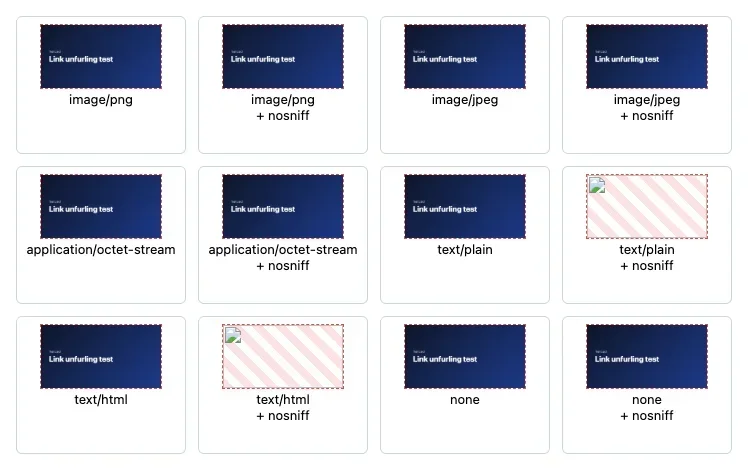
Content-Type sent |
Without nosniff |
With nosniff |
|---|---|---|
image/png (correct) |
Renders | Renders |
image/jpeg (wrong image type) |
Renders | Renders |
application/octet-stream |
Renders | Renders |
text/plain |
Renders | Blocked |
text/html |
Renders | Blocked |
| no header | Renders | Renders |
When the page and the images had the same origin, all twelve rendered. We also opened the image URLs directly as pages: with image/png and text/plain, Chrome showed the image, but with application/octet-stream it started a download and the navigation was aborted.
So inside an <img>, Chrome forgives a lot by reading the bytes. The header matters more elsewhere: for direct links, for cross-origin loads with nosniff, for CDNs that cache by type, and for link preview crawlers, which may reject an og:image whose type is not an image.
How it works technically
For an image request, Chrome looks at the declared type and at the first bytes. If the bytes match a known image signature, it decodes them, even when the header names another image type. X-Content-Type-Options: nosniff tells the browser not to second-guess the header. For cross-origin responses, Chrome's Opaque Response Blocking also refuses responses that are labelled as HTML, plain text or JSON when nosniff is set, because such responses could leak private data into another site's page. That combination is exactly what failed in our test.
How to set it in Puppeteer, Playwright and RenderScreenshot
The capture tools do not send a MIME type; they write bytes. Your job is to make the name, the header and the bytes agree.
Puppeteer. The type option chooses the encoder. Name the file after it.
import puppeteer from 'puppeteer';
import { writeFile } from 'node:fs/promises';

const url = process.argv[2] ?? 'https://example.com';
// Puppeteer picks the encoder from `type`, not from the file name.
const browser = await puppeteer.launch();
try {
  const page = await browser.newPage();
  await page.goto(url);
  const shot = await page.screenshot({ type: 'webp', quality: 80 });
  await writeFile('shot.webp', shot); // name it after the real type
  console.log('first bytes:', Buffer.from(shot).toString('latin1', 0, 4), Buffer.from(shot).toString('latin1', 8, 12));
} finally {
  await browser.close();
}
Playwright. Log the Content-Type of every image a page loads, which finds servers that mislabel files.
import { chromium } from 'playwright';

const url = process.argv[2] ?? 'https://example.com';
const browser = await chromium.launch();
try {
  const page = await browser.newPage();
  // Record the Content-Type of every image the page loads.
  page.on('response', (res) => {
    if (res.request().resourceType() === 'image') {
      console.log(res.status(), res.headers()['content-type'] ?? '(none)', res.url().slice(0, 80));
    }
  });
  await page.goto(url, { waitUntil: 'networkidle' });
  // Set type explicitly so the bytes always match the file name.
  await page.screenshot({ path: 'shot.jpg', type: 'jpeg', quality: 80 });
  console.log('wrote shot.jpg');
} finally {
  await browser.close();
}
Check the bytes before you serve them. Use this when files come from users or from other systems.
// Identify an image by its first bytes, whatever its extension or header says.
import { open } from 'node:fs/promises';

const SIGNATURES = [
  { mime: 'image/png', test: (b) => b.subarray(0, 8).equals(Buffer.from([0x89, 0x50, 0x4e, 0x47, 0x0d, 0x0a, 0x1a, 0x0a])) },
  { mime: 'image/jpeg', test: (b) => b[0] === 0xff && b[1] === 0xd8 && b[2] === 0xff },
  { mime: 'image/webp', test: (b) => b.toString('latin1', 0, 4) === 'RIFF' && b.toString('latin1', 8, 12) === 'WEBP' },
  { mime: 'image/gif', test: (b) => ['GIF87a', 'GIF89a'].includes(b.toString('latin1', 0, 6)) },
  { mime: 'image/avif', test: (b) => b.toString('latin1', 4, 8) === 'ftyp' && ['avif', 'avis'].includes(b.toString('latin1', 8, 12)) },
  { mime: 'application/pdf', test: (b) => b.toString('latin1', 0, 5) === '%PDF-' },
];

export async function sniff(path) {
  const fh = await open(path);
  try {
    const { buffer } = await fh.read(Buffer.alloc(16), 0, 16, 0);
    return SIGNATURES.find((s) => s.test(buffer))?.mime ?? 'application/octet-stream';
  } finally {
    await fh.close();
  }
}

for (const path of process.argv.slice(2)) console.log(path, await sniff(path));
RenderScreenshot. The response Content-Type follows output.format: image/png (the default), image/jpeg, image/webp or application/pdf. Check it with curl -D -:
curl -sS -D - -o shot.webp \
  "https://api.renderscreenshot.com/v1/screenshot?url=https://example.com&format=webp" \
  -H "Authorization: Bearer $RS_API_KEY" | grep -i '^content-type'
If you store the file and serve it yourself, copy that header, or derive it from the format you requested. See response formats and response headers.
Tested on 2026-10-15 with Node 22.18.0, Puppeteer 25.14.0 (Chrome 155) and Playwright 1.64.1 (Chromium 156) against https://example.com and a local test server; the sniffer identified a WebP, a JPEG, a PNG and a PDF correctly. The RenderScreenshot request follows the API docs and was not run for this page.
Common mistakes
image/jpg. It is not a registered type. Useimage/jpeg.- One type for every file. Object stores and CDNs often default to
application/octet-stream. Set the type on upload. - Converting without renaming. A PNG converted to WebP and saved as
.pnggets served asimage/pngby most static servers. - Sending a download header for inline images. Content-Disposition
attachmentmakes direct links download instead of display.
Related terms
- WebP and AVIF: newer formats whose types older tools may not know.
- Content-Disposition: the header that decides inline or download.
- MHTML: an archive in which every part carries its own MIME type.
To get images with the right type every time, get a free API key.