Website to GIF: Record a Scrolling Page with ffmpeg
Turn a website into a scrolling GIF with Playwright and an ffmpeg palette. File sizes measured for 13 settings, and when MP4 or WebP is the better choice.

To turn a website into a GIF, capture the page as a sequence of screenshots while it scrolls, then encode those frames with ffmpeg using a palette built from the frames. That is two commands: a short Playwright script and one ffmpeg call. The settings you pick in the second command decide whether the GIF is 0.6 MB or 5.6 MB, so most of this post is measurements.
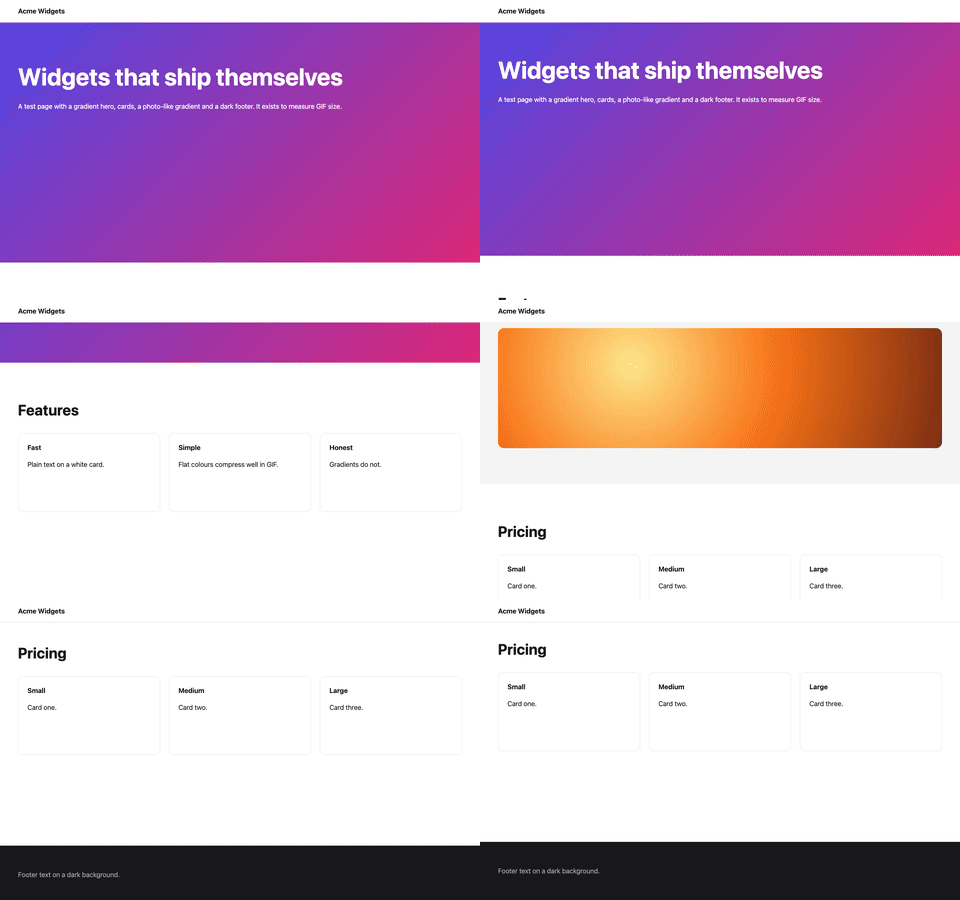
This is a do-it-yourself pipeline. RenderScreenshot does not output GIF or video; its formats are PNG, JPEG, WebP, AVIF and PDF. If you need still captures of long pages, start with the full-page screenshot guide.
Tested on 2026-10-15 with Node 22.18.0, [email protected] (bundled Chromium), [email protected] and ffmpeg 9.0.1 (Homebrew), on an Apple M1 Pro with macOS 27.0.1. The test target is a local static landing page I wrote for this post: a gradient hero, white cards, a photo-like radial gradient and a dark footer, 2,784 px tall.
Why frames, not screen recording
There are two ways to get motion out of a headless browser:
- Step and shoot. Scroll to a position, wait for paint, take a screenshot, repeat. Every frame is complete, the timing is exact, and a slow machine produces the same output as a fast one. It is slower than real time: 90 frames at 1280 x 800 took 9.0 s on a warm run (14.6 s on the first run).
- Record a video. Playwright's
recordVideocontext option records the page in real time to WebM. In my run it produced a 1280 x 800, 25 fps VP9 file of 5.5 s (1,029,644 bytes). This is the right choice when the page itself animates (CSS transitions, carousels, video), because step-and-shoot would freeze or skip that motion.
For a scrolling page, step and shoot gives cleaner GIFs: no dropped frames, no half-painted tiles, and you control the easing.
Step 1: capture the frames
The script scrolls with an ease-in-out curve, holds the first and last frame for one second, and turns off smooth scrolling and CSS animations so every frame is deterministic.
// frames.mjs - scroll a page and save one PNG per frame.
// Node 22+, [email protected]. Usage: node frames.mjs <url> <outDir> [seconds=4] [fps=15]
import { mkdir, rm } from 'node:fs/promises';
import { chromium } from 'playwright';

const [url, dir = 'frames', seconds = '4', fps = '15'] = process.argv.slice(2);
const FRAMES = Number(seconds) * Number(fps);
const HOLD = Number(fps); // hold the first and last frame for one second each

await rm(dir, { recursive: true, force: true });
await mkdir(dir, { recursive: true });

const browser = await chromium.launch();
try {
  const page = await browser.newPage({ viewport: { width: 1280, height: 800 } });
  await page.goto(url, { waitUntil: 'networkidle' });
  // No smooth scrolling, no caret, no CSS animations: every frame is deterministic.
  await page.addStyleTag({ content: 'html { scroll-behavior: auto !important; } *, *::before, *::after { animation-play-state: paused !important; caret-color: transparent !important; }' });

  const max = await page.evaluate(() => document.scrollingElement.scrollHeight - innerHeight);
  let n = 0;
  const shot = () => page.screenshot({ path: `${dir}/${String(n++).padStart(4, '0')}.png` });

  for (let i = 0; i < HOLD; i++) await shot();
  for (let i = 1; i <= FRAMES; i++) {
    const t = i / FRAMES;
    const eased = t < 0.5 ? 2 * t * t : 1 - (-2 * t + 2) ** 2 / 2; // ease in-out
    await page.evaluate((y) => scrollTo(0, y), Math.round(eased * max));
    await page.evaluate(() => new Promise((r) => requestAnimationFrame(() => requestAnimationFrame(r))));
    await shot();
  }
  for (let i = 0; i < HOLD; i++) await shot();
  console.log(JSON.stringify({ frames: n, scrolled: max }));
} finally {
  await browser.close();
}
npm i [email protected]
npx playwright install chromium
node frames.mjs http://localhost:3000/landing.html frames 4 15
# {"frames":90,"scrolled":1984}
The 90 PNG frames used 14 MB on disk. If the page loads more content as you scroll, load it before the first frame or the scroll distance changes mid-run; our post on infinite scroll pages has a bounded loader you can call first.
Step 2: encode with a palette
A GIF frame can use at most 256 colours. If you do not give ffmpeg a palette, it uses a generic one and dithers heavily to fake the missing colours. The fix is the two-filter pattern: palettegen scans your frames and picks the 256 (or fewer) colours they actually use, and paletteuse maps each frame to that palette.
ffmpeg -framerate 15 -i frames/%04d.png \
  -vf "fps=10,scale=480:-1:flags=lanczos,split[a][b];[a]palettegen=max_colors=128[p];[b][p]paletteuse" \
  landing-scroll-480.gif
Read the filter chain left to right: drop from 15 to 10 fps, scale to 480 px wide with the Lanczos filter, then split the stream so one copy builds the palette and the other is mapped through it. split lets you do both passes in one command instead of writing a palette PNG to disk first.
Measured: file size by setting
All rows encode the same 90 frames (6 seconds: 1 s hold, 4 s scroll, 1 s hold). "Default dither" is ffmpeg's sierra2_4a.
| # | Output | Width | fps | Palette | Dither | Bytes |
|---|---|---|---|---|---|---|
| 01 | GIF | 640 | 15 | ffmpeg default (no palettegen) | default | 4,283,650 |
| 02 | GIF | 1280 | 15 | palettegen | default | 5,640,399 |
| 03 | GIF | 640 | 15 | palettegen | default | 1,553,009 |
| 04 | GIF | 640 | 15 | palettegen stats_mode=diff |
bayer, diff_mode=rectangle |
2,079,923 |
| 05 | GIF | 640 | 10 | palettegen stats_mode=diff |
bayer, diff_mode=rectangle |
1,408,412 |
| 10 | GIF | 640 | 10 | palettegen | default | 1,032,839 |
| 11 | GIF | 640 | 10 | palettegen | bayer (scale 3) | 1,365,539 |
| 07 | GIF | 640 | 10 | palettegen stats_mode=diff |
none | 930,704 |
| 06 | GIF | 480 | 10 | palettegen 128 colours, stats_mode=diff |
bayer | 595,327 |
| 12 | GIF | 480 | 10 | palettegen 128 colours | default | 604,742 |
| 13 | Animated WebP (sharp, quality 70) | 640 | 10 | n/a | n/a | 183,894 |
| 08 | MP4, H.264 CRF 26 | 640 | 15 | n/a | n/a | 83,875 |
| 09 | MP4, H.264 CRF 26 | 1280 | 15 | n/a | n/a | 259,638 |
What I take from the table:
- The palette is the biggest single win. Same width and fps, generic palette vs palettegen: 4.28 MB vs 1.55 MB (rows 01 and 03).
- Width and frame rate multiply. 1280 px to 640 px and 15 to 10 fps took the palettegen GIF from 5.6 MB to 1.0 MB (rows 02 and 10).
- Advice you will read elsewhere did not help here.
stats_mode=diffwithdiff_mode=rectangleis designed for clips where only a small area changes between frames. In a scroll, every pixel moves on every frame, so it made the file larger (row 04 vs 03). Bayer dithering was also larger than the default for this content (row 11 vs 10). - Any video format beats GIF by an order of magnitude. The 640 px MP4 is 11 times smaller than the smallest 640 px GIF (row 08 vs 07) and shows the full colour range.
What the dither setting looks like
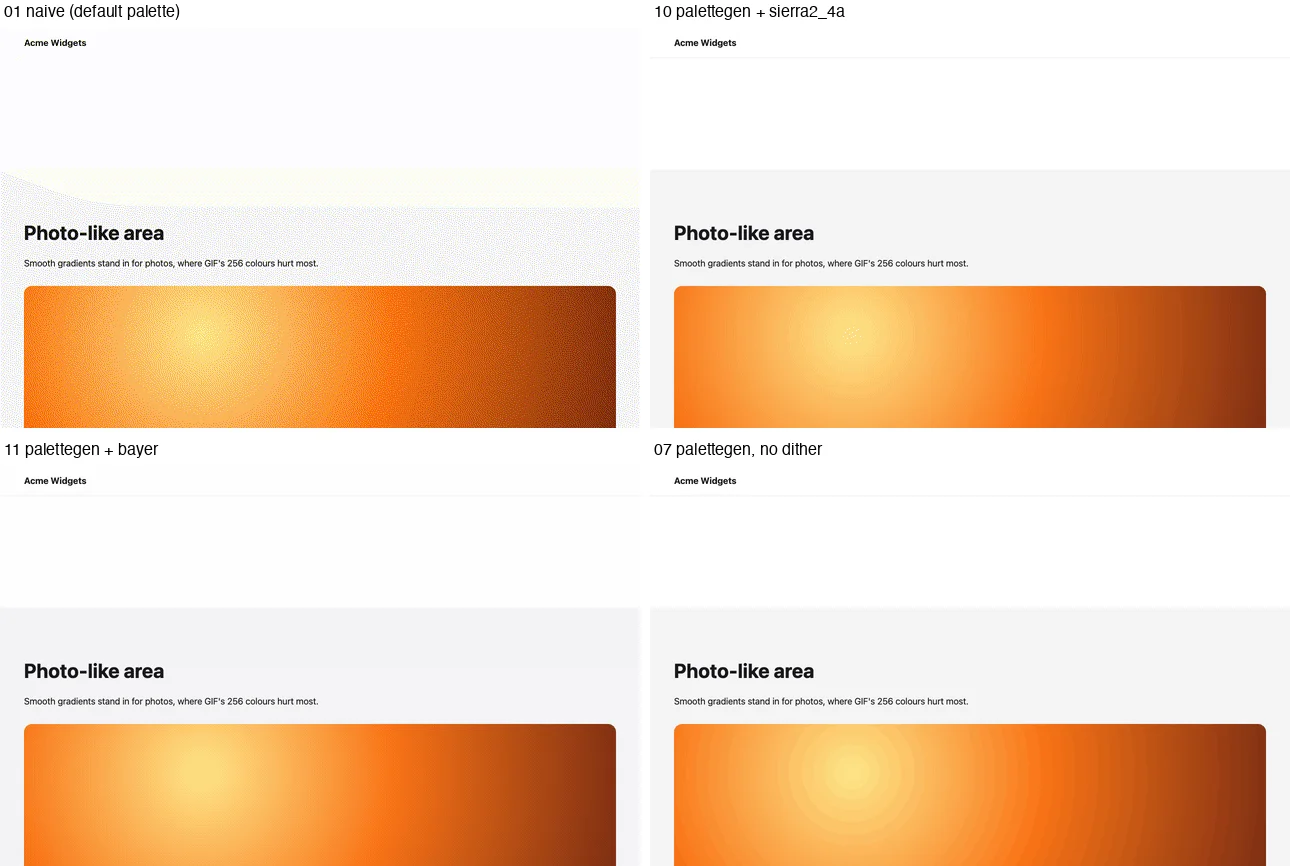

Pick by content. Flat UI (text, solid buttons, white cards) looks fine with dither=none, which is also the smallest GIF at a given size. Photos and gradients need dithering, or they band. If the page is mostly photos, GIF is the wrong format; use MP4 or WebP.
Delivering something smaller than a GIF
If the place you post to accepts video, send video. For a web page, a muted looping video behaves like a GIF:
<video src="landing-scroll-640.mp4" autoplay muted loop playsinline width="640" height="400"></video>
ffmpeg -framerate 15 -i frames/%04d.png \
  -vf "scale=640:-2:flags=lanczos,format=yuv420p" \
  -c:v libx264 -crf 26 -preset slow -movflags +faststart landing-scroll-640.mp4
format=yuv420p makes the file play in every browser and phone, -2 keeps the height even (H.264 needs it), and +faststart moves the index to the front so playback starts before the download ends.
When a GIF is required but the host also accepts animated WebP, sharp can build one from the same frames. My ffmpeg build had no libwebp encoder, which is common in package-manager builds, so this avoids a rebuild:
// webp.mjs - animated WebP from the same frames. [email protected]
import { readdir } from 'node:fs/promises';
import sharp from 'sharp';
const dir = process.argv[2] ?? 'frames';
const files = (await readdir(dir)).filter((f) => f.endsWith('.png')).sort()
  .filter((_, i) => i % 3 !== 2) // 15 fps -> 10 fps: keep 2 of every 3 frames
  .map((f) => `${dir}/${f}`);
const frames = await Promise.all(files.map((f) => sharp(f).resize(640).toBuffer()));
await sharp(frames, { join: { animated: true } })
  .webp({ quality: 70, delay: Array(frames.length).fill(100), loop: 0 })
  .toFile(process.argv[3] ?? 'landing-scroll-640.webp');
console.log(frames.length, 'frames');
The encoder merged identical hold frames, so the 60 input frames became 42 stored frames.
Recording real animations instead
For pages that move on their own, record video and convert it. Playwright writes the file when the context closes:
// record.mjs - record real-time video of a smooth scroll with Playwright, then convert with ffmpeg.
// Node 22+, [email protected].
import { chromium } from 'playwright';

const [url, dir = 'video'] = process.argv.slice(2);
const browser = await chromium.launch();
try {
  const context = await browser.newContext({
    viewport: { width: 1280, height: 800 },
    recordVideo: { dir, size: { width: 1280, height: 800 } },
  });
  const page = await context.newPage();
  await page.goto(url, { waitUntil: 'networkidle' });
  await page.evaluate(async () => {
    const max = document.scrollingElement.scrollHeight - innerHeight;
    const start = performance.now();
    await new Promise((done) => {
      const step = (now) => {
        const t = Math.min(1, (now - start) / 4000);
        scrollTo(0, max * t);
        t < 1 ? requestAnimationFrame(step) : done();
      };
      requestAnimationFrame(step);
    });
  });
  await new Promise((r) => setTimeout(r, 500)); // hold the last frame for half a second
  const video = page.video();
  await context.close(); // the video file is written on close
  console.log(await video.path());
} finally {
  await browser.close();
}
ffmpeg -i video/page@*.webm \
  -vf "fps=10,scale=480:-1:flags=lanczos,split[a][b];[a]palettegen=max_colors=128[p];[b][p]paletteuse" \
  recorded.gif
The recorded clip includes the page load at the start (the video begins when the page opens), so trim it with -ss 0.8 or similar before -i. Converted with the same 480 px settings, it was 816,982 bytes, larger than the step-and-shoot GIF because it is longer and has 25 source frames per second to sample from.
Troubleshooting
| Symptom | Cause | Fix |
|---|---|---|
| Speckled or tinted background | No palettegen; ffmpeg used a generic palette | Use the split, palettegen, paletteuse chain |
| Rings or bands in gradients and photos | dither=none |
Use the default dither, or deliver MP4 or WebP |
| GIF plays slightly slow | GIF delays are stored in hundredths of a second; 15 fps becomes 7/100 s per frame (14.3 fps) | Use 10, 20, 25 or 50 fps, which divide evenly |
| Jumps or torn frames | Screenshot taken before the scroll was painted | Wait two requestAnimationFrame callbacks after each scroll |
| Scroll distance changes during the clip | Lazy content loaded mid-run | Scroll to the bottom and back before the first frame |
| Sticky header flickers | A header that changes style on scroll | Pin its style with addStyleTag, or hide it |
Unknown encoder 'libwebp' |
ffmpeg built without libwebp | Use the sharp script above |
| MP4 does not play on a phone | Pixel format is not yuv420p |
Add format=yuv420p to the filter chain |
width not divisible by 2 |
Odd dimension with H.264 | Scale with -2 for the computed side |
The scripts used for this post are frames.mjs, record.mjs and encode.sh, which produces rows 01 to 09 of the size table. For still images of the same page, see screenshots in Playwright; for choosing between still formats, see the PNG vs JPEG vs WebP comparison.
Related in this topic
- Full Page Screenshots: Every Method Tested on One Page How to take a full page screenshot with DevTools, Puppeteer, Playwright, Selenium or an API. Each method tested on one 20,000 px page, with times and failures.
- Full Page Screenshot in Chrome Without an Extension Take a full page screenshot in Chrome with the DevTools command, the command line or a Console snippet. Tested limits, lazy images and fixed headers.
- Screenshot Lazy-Loaded Images: 5 Strategies Measured Why full page screenshots miss lazy-loaded images, and which scroll strategy fixes it. Five strategies measured in Chromium, Firefox and WebKit, with code.
- Full Page Screenshot in Firefox: Menu, Console and CLI Take a full page screenshot in Firefox with the built-in screenshot tool, the :screenshot command or the command line. Height limits measured, plus fixes.
- Full Page Screenshot in Safari on Mac and iPhone Take a full page screenshot in Safari: Web Inspector on Mac, Export as PDF, and Full Page on iPhone. WebKit limits measured, lazy images and fixed bars.
- Sticky Headers in Full Page Screenshots: 4 Bugs, 1 Fix Why full page screenshots repeat sticky headers, stretch 100vh heroes and put cookie bars mid-page. Each bug reproduced per tool, with a tested CSS fix.