CORS (Cross-Origin Resource Sharing) is the HTTP header protocol, led by Access-Control-Allow-Origin, that a server uses to let pages on other origins read its responses; for images it decides whether a page may use another site's image pixels in a canvas, and for fonts whether the font may load at all.
Developers usually meet CORS on fetch calls. In screenshots it shows up in quieter ways: a heading in the wrong font, a broken image icon, or a browser-side capture library that leaves holes where images should be. This entry is part of the screenshot glossary.
What it means in plain terms
An origin is scheme + host + port. https://app.example.com and https://cdn.example.com are different origins. By default, a page may display content from other origins but may not read it. CORS is how the other server says "you may read this":
Access-Control-Allow-Origin: *
Access-Control-Allow-Origin: https://app.example.com
For images and fonts, three cases matter:
| How the resource is used | Needs CORS headers? | What happens without them |
|---|---|---|
<img src="other-origin"> |
No | Image shows; canvas that draws it becomes tainted |
<img crossorigin="anonymous" src="other-origin"> |
Yes | Image fails to load (broken icon) |
@font-face { src: url(other-origin) } |
Yes | Font fails; fallback font is used |
canvas.toDataURL() after drawing a cross-origin image |
Yes, plus crossorigin on the img |
SecurityError |
What we measured
We served a test page from http://127.0.0.1:8080 and its image and font from http://localhost:8081, a different origin. The asset server added Access-Control-Allow-Origin: * only when asked. The page had a @font-face font, an image with crossorigin="anonymous", and a plain image that a script then drew to a canvas.
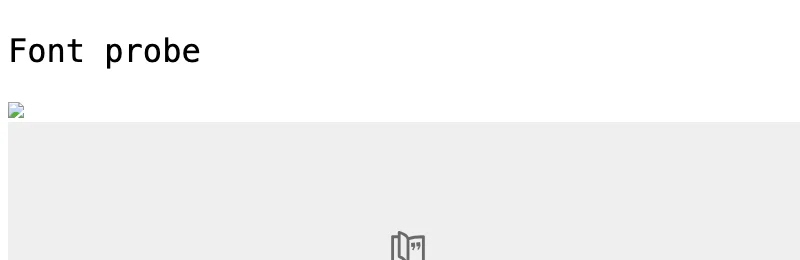
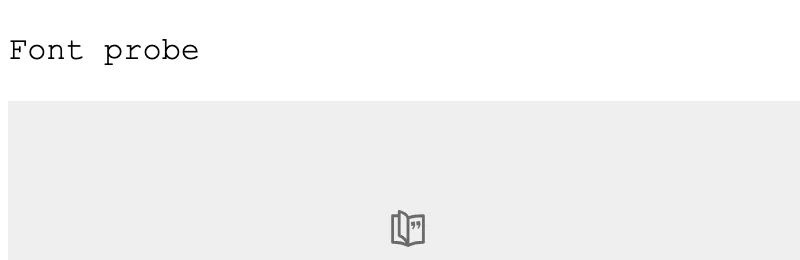
crossorigin image is a broken icon. Bottom: with Access-Control-Allow-Origin: *, both load. Captured at 800×600 and cropped to 800×260, with Puppeteer 24.43.1 and chrome-headless-shell 148 on 2026-10-15. Local renders, not API renders.| No CORS headers | Access-Control-Allow-Origin: * |
|
|---|---|---|
document.fonts status |
error |
loaded |
crossorigin image |
not loaded | loaded |
Plain image drawn to canvas, then toDataURL() |
SecurityError |
SecurityError |
The last row surprises people. The plain <img> has no crossorigin attribute, so it is fetched without CORS, and the canvas is tainted even when the server would have allowed it. See canvas tainting.
How it works technically
sequenceDiagram
  participant P as Page (origin A)
  participant S as Asset server (origin B)
  P->>S: GET /font.woff2  (Origin: A, mode cors)
  alt response has Access-Control-Allow-Origin: A or *
    S-->>P: 200 + ACAO header -> font used
  else no ACAO header
    S-->>P: 200, no header -> browser discards it, fallback font
  end
The server still sends the bytes. The browser decides whether the page may use them. That is why the request shows status 200 in the network log while the font fails.
The effect in Puppeteer, Playwright and RenderScreenshot
The script we used, for Puppeteer. Playwright needs the same code with chromium.launch() and page.evaluate:
import puppeteer from 'puppeteer';

const browser = await puppeteer.launch();
try {
  for (const query of ['', '?cors=1']) {
    const page = await browser.newPage();
    await page.goto(`http://127.0.0.1:8080/${query}`, { waitUntil: 'networkidle0' });
    const result = await page.evaluate(async () => {
      await document.fonts.ready;
      const [face] = [...document.fonts];
      const draw = (img) => {
        const canvas = document.createElement('canvas');
        canvas.width = img.naturalWidth;
        canvas.height = img.naturalHeight;
        canvas.getContext('2d').drawImage(img, 0, 0);
        try { canvas.toDataURL(); return 'readable'; } catch (e) { return e.name; }
      };
      const cors = document.getElementById('img');
      return {
        font: face.status,
        corsImgLoaded: cors.complete && cors.naturalWidth > 0,
        plainImgOnCanvas: draw(document.getElementById('plain')),
      };
    });
    console.log(query || '(no CORS headers)', result);
    await page.screenshot({ path: `cors${query ? '-on' : '-off'}.png` });
    await page.close();
  }
} finally {
  await browser.close();
}
Notice what the screenshot itself does: page.screenshot() captured the plain cross-origin image in both runs. The browser composites the painted page, so a server-side capture is not blocked by canvas tainting. Libraries that rebuild the page in a canvas inside the browser, such as html2canvas, are; see the html2canvas alternative.
RenderScreenshot captures the same way, from a real browser, so there is no CORS setting to send:
curl -G https://api.renderscreenshot.com/v1/screenshot \
  -H "Authorization: Bearer $RS_API_KEY" \
  --data-urlencode "url=https://app.example.com/report" \
  --output report.png
The fonts and crossorigin images on your page still need CORS headers from their servers, exactly as in a visitor's browser. If your own <img> tags embed captures, they do not need CORS: use the X-Cache-URL CDN link or a signed URL as the src.
Tested on 2026-10-15 on macOS 27 (arm64) with Node 22.18.0 and [email protected] (Chrome 148.0.7778.97, headless: 'shell'), against two local Node servers on different ports. The curl request was not run for this page.
Common mistakes
- Adding
crossoriginwithout server headers. It turns a working image into a broken one. Add both, or neither. - Caching one response for all origins. If the server echoes the request's
OriginintoAccess-Control-Allow-Origin, it must also sendVary: Origin, or a CDN can serve one origin's header to another. - Blaming the capture tool for a missing font. Check
document.fontsforerror. The fix is a header on the font server; see font fallback. - Confusing CORS with CSP. CORS is the other server granting access. CSP is the page limiting what it loads.
Related terms
To capture pages with every font and image the browser can load, create a free account.