A full page screenshot is an image of the entire scrollable document at the viewport's width, from the top of the page to the bottom, rather than only the part visible in the browser window.
The visible part is called the viewport. A 1280 x 800 viewport gives a 1280 x 800 image. A full page capture of the same page gives 1280 x the page's scroll height. This entry is part of the screenshot and rendering glossary.
A plain explanation
A browser window shows a rectangle of a page. Everything below it exists, but you have to scroll to see it. A normal screenshot copies the rectangle. A full page screenshot asks the browser to paint the whole document into one tall image, as if the window were as tall as the page.
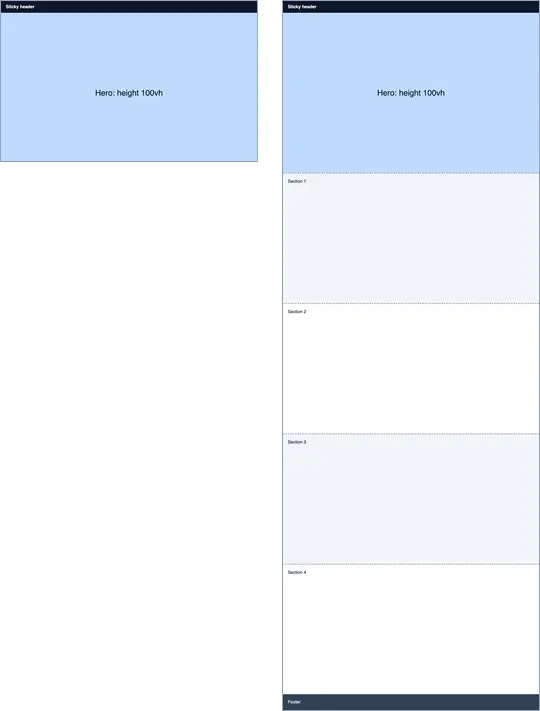
fullPage: true (1280 x 3546, right), both scaled to 20%. Playwright's full page capture of the page was also 1280 x 3546.How it works technically
The browser measures the document's scroll size, then renders an area of that size in one pass. Chromium can paint content outside the viewport, so modern tools do not stitch scrolled tiles together. Puppeteer calls this captureBeyondViewport, on by default for full page captures.
The viewport itself does not change during the capture, and that explains three effects you can see in the test page:
100vhstays one viewport tall. The hero, styledheight: 100vh, is 800 px in both images, not 3,546 px.- Sticky and fixed elements appear once, where they are at the current scroll position. Here the sticky header sits at the top. If you scroll down before capturing, a fixed header can end up in the middle of the image.
- Nothing is scrolled, so scroll-triggered content does not run. Lazy-loaded images stay empty, and animations that start on scroll stay in their start state. Pages with infinite scroll have no fixed bottom at all.
Very tall pages raise a final issue: image size. A 1280-wide capture of a 20,000 px article is a 25-megapixel image. Set an upper limit on the height, and consider JPEG or WebP for long pages.
The setting in Puppeteer, Playwright and RenderScreenshot
Puppeteer uses fullPage: true.
import puppeteer from 'puppeteer';

const url = process.argv[2] ?? `file://${process.cwd()}/fullpage-page.html`;
const browser = await puppeteer.launch();
try {
  const page = await browser.newPage();
  await page.setViewport({ width: 1280, height: 800 });
  await page.goto(url, { waitUntil: 'load' });

  const height = await page.evaluate(() => document.documentElement.scrollHeight);
  await page.screenshot({ path: 'out/fp-viewport.png' });                 // 1280 x 800
  await page.screenshot({ path: 'out/fp-full.png', fullPage: true });     // 1280 x scrollHeight
  console.log(`scrollHeight ${height}px`);
} finally {
  await browser.close();
}
Output: scrollHeight 3546px, matching the height of the full page image.
Playwright uses the same option name. This version scrolls through the page first so lazy content loads, then returns to the top so the sticky header is in its normal place.
import { chromium } from 'playwright';

const url = process.argv[2] ?? `file://${process.cwd()}/fullpage-page.html`;
const browser = await chromium.launch();
try {
  const page = await browser.newPage({ viewport: { width: 1280, height: 800 } });
  await page.goto(url);
  // Lazy content first: scroll to the end and back so below-the-fold images load.
  await page.evaluate(async () => {
    for (let y = 0; y < document.body.scrollHeight; y += innerHeight) {
      scrollTo(0, y);
      await new Promise((r) => setTimeout(r, 200));
    }
    scrollTo(0, 0);
  });
  await page.screenshot({ path: 'out/fp-playwright.png', fullPage: true });
} finally {
  await browser.close();
}
RenderScreenshot has three ways to ask for it, all documented in capture options:
full_page=trueon a GET request, orcapture.mode: "full_page"in a POST body.- The
full_pagepreset, which also turns on scroll simulation with a 400 ms delay between steps. .fullPage()in the SDKs.
curl --get https://api.renderscreenshot.com/v1/screenshot \
  -H "Authorization: Bearer $RS_API_KEY" \
  --data-urlencode 'url=https://example.com' \
  -d preset=full_page -d format=webp \
  --output full.webp
{
  "url": "https://example.com/blog/long-post",
  "capture": {
    "mode": "full_page",
    "scroll": { "simulate": true, "delay": 500, "max_height": 12000 }
  },
  "output": { "format": "webp", "quality": 80 }
}
import { Client, TakeOptions } from 'renderscreenshot';

const client = new Client(process.env.RS_API_KEY);
const image = await client.take(TakeOptions.url('https://example.com').fullPage().format('webp'));
capture.scroll.max_height caps the capture height, 16,000 px by default. The scroll simulation is the API's equivalent of the Playwright loop above.
Tested on 2026-10-15 with Node 22.18, Puppeteer 24.43.1 (headless shell, Chrome 148) and Playwright 1.64.1 (Chromium 156) against a local test page with a sticky header, a 100vh hero and four 600 px sections. The RenderScreenshot snippets follow the API docs and were not run for this page.
Common mistakes
- Expecting the tool to scroll.
fullPagepaints the document as it is. Scroll first if content depends on scrolling. - Full-height heroes. A
100vhormin-height: 100vhsection is sized by the viewport, so choose the viewport height on purpose. - Fixed overlays in the middle of the image. Chat widgets and cookie notices with
position: fixedappear once, wherever the scroll position puts them. Remove or block them before capturing. - No height limit. A runaway page can produce an image too large to store or view. Cap it.
Related terms
- Above the fold: the part a viewport capture shows.
- Lazy loading: why the bottom of a full page capture is often empty.
- Infinite scroll: pages that have no real bottom to capture.
For the full Puppeteer walkthrough, with sticky headers and lazy images, read the Puppeteer full page screenshot tutorial. To capture a long page without the scroll code, get a free API key.