The base URL of an HTML document is the absolute address that the browser resolves every relative URL against; when you render HTML from a string, that address is about:blank, so relative paths for images, stylesheets and scripts fail unless you set a base URL.
A page served from https://example.com/blog/post has a base URL taken from its address, so /img/logo.png becomes https://example.com/img/logo.png. HTML you pass to a renderer has no address. This entry is part of the screenshot and rendering glossary.
A plain explanation
A relative URL is half an address. /assets/card.css says "this path, on whatever site I am on". The browser completes it with the base URL. The base URL comes from, in order:
- the first
<base href="...">element in the document, if there is one; - otherwise, the document's own URL.
For HTML rendered from a string, step 2 gives about:blank. There is no site to be on, so the browser cannot build the full address.
Without and with a base URL
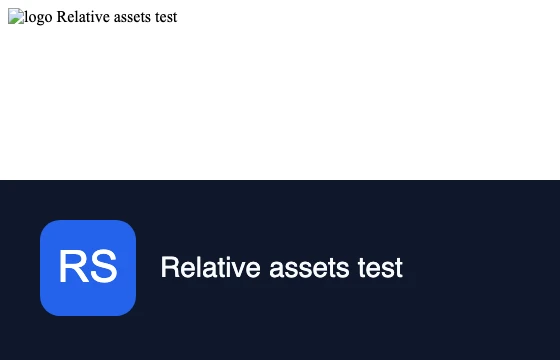
setContent on 2026-10-15. Top: no base URL, document.baseURI was about:blank; the stylesheet and logo did not load. Bottom: a <base href> pointing at the asset server; both loaded.Nothing in the top render reports an error to your code. The capture succeeds, and you get an unstyled image. That is why this problem reaches production.
How it works technically
- Resolution happens when the URL is used, with the base URL current at that moment. A
<base>added by script after the<img>is parsed comes too late for that image. - Only the first
<base href>counts. Later ones are ignored. - CSS files resolve against themselves.
url(fonts/brand.woff2)insidehttps://cdn.example.com/css/site.cssresolves tohttps://cdn.example.com/css/fonts/brand.woff2, whatever the document's base URL is. - Origin is separate from base. A
<base>changes how URLs are completed, not which origin the document belongs to. The page is stillabout:blankfor cookies,localStorageand CSP. If assets need cookies or the page checkslocation, serve the HTML at a real URL instead, as in the Playwright listing. - Fragment links such as
href="#top"also resolve against the base, which can turn in-page anchors into links to another page. This rarely matters for a static image, but it does for PDFs with clickable links.
Three fixes in Puppeteer, Playwright and RenderScreenshot
Puppeteer: add a <base> element first in <head>.
import puppeteer from 'puppeteer';

const body = `<div class="card"><img src="/assets/logo.svg" width="96" height="96" alt="logo">
  <span>Relative assets test</span></div>`;
const head = '<link rel="stylesheet" href="/assets/card.css">';
const base = process.env.ASSET_ORIGIN ?? 'http://localhost:4630/';

const browser = await puppeteer.launch();
try {
  const page = await browser.newPage();
  await page.setViewport({ width: 560, height: 180 });

  // 1. No base: the document URL is about:blank, so /assets/... cannot resolve.
  await page.setContent(`<!doctype html><html><head>${head}</head><body>${body}</body></html>`);
  console.log('without base:', await page.evaluate(() => document.baseURI));
  await page.screenshot({ path: 'out/base-missing.png' });

  // 2. A <base> element first in <head> gives every relative URL an origin.
  await page.setContent(
    `<!doctype html><html><head><base href="${base}">${head}</head><body>${body}</body></html>`,
    { waitUntil: 'load' });
  console.log('with base:   ', await page.evaluate(() => document.baseURI));
  await page.screenshot({ path: 'out/base-fixed.png' });
} finally {
  await browser.close();
}
Output: without base: about:blank, then with base: http://localhost:4630/.
Playwright: serve the HTML at a real address with page.route. The browser thinks it loaded pageUrl, so relative URLs, cookies and CSP behave as on that site, with no change to your markup.
import { chromium } from 'playwright';

// Serve your HTML as if it lived at a real address, so relative URLs, cookies
// and CSP behave as they would on that origin. No <base> tag needed.
const pageUrl = 'http://localhost:4630/render/card';
const html = `<!doctype html><html><head><link rel="stylesheet" href="/assets/card.css"></head>
  <body><div class="card"><img src="/assets/logo.svg" width="96" height="96" alt="logo">
  <span>Relative assets test</span></div></body></html>`;

const browser = await chromium.launch();
try {
  const page = await browser.newPage({ viewport: { width: 560, height: 180 } });
  await page.route(pageUrl, (route) =>
    route.fulfill({ status: 200, contentType: 'text/html; charset=utf-8', body: html }));
  await page.goto(pageUrl, { waitUntil: 'load' });
  console.log('baseURI:', await page.evaluate(() => document.baseURI));
  console.log('logo loaded:', await page.locator('img').evaluate((img) => img.naturalWidth > 0));
  await page.screenshot({ path: 'out/base-playwright.png' });
} finally {
  await browser.close();
}
Output: baseURI: http://localhost:4630/render/card and logo loaded: true. Puppeteer can do the same with page.setRequestInterception(true).
RenderScreenshot: send html_base_url with the html. It resolves relative URLs, loads external stylesheets and scripts from that site and sets document.baseURI. See content input.
curl -X POST https://api.renderscreenshot.com/v1/screenshot \
  -H "Authorization: Bearer $RS_API_KEY" \
  -H "Content-Type: application/json" \
  -d '{
    "html": "<!doctype html><html><head><link rel=\"stylesheet\" href=\"/assets/card.css\"></head><body><div class=\"card\"><img src=\"/assets/logo.svg\" width=\"96\" height=\"96\" alt=\"\"><span>Relative assets test</span></div></body></html>",
    "html_base_url": "https://assets.example.com",
    "viewport": { "width": 1200, "height": 630 }
  }' \
  --output card.png
The asset host must be reachable from the public internet, because the renderer fetches from there. For assets that live only on your laptop or in a private network, inline them as data URIs instead.
Tested on 2026-10-15 with Node 22.18, Puppeteer 24.43.1 (headless shell, Chrome 148) and Playwright 1.64.1 (Chromium 156) against a local asset server. The RenderScreenshot request follows the API docs and was not run for this page.
Common mistakes
<base>after the assets. Put it first in<head>. URLs parsed before it use the old base.- A base URL without a trailing slash.
https://example.com/assetsas base turnslogo.svgintohttps://example.com/logo.svg, because the last path segment is treated as a file. Usehttps://example.com/assets/. Root-relative paths (/logo.svg) are not affected. localhostas the base for a cloud renderer. The API's browser is not on your machine. Use a public host or data URIs.- Expecting CSS
url()to follow the base. Paths inside stylesheet files resolve against the stylesheet.
Related terms
- HTML to image: the workflow where this problem shows up most.
- Data URI (base64): embed small assets and skip resolution entirely.
- Content Security Policy: can block assets even when the URLs resolve.
For escaping, fonts and payload size in HTML templates, read the HTML to image guide. To render your own templates, get a free API key.