Hydration is the step in which client-side JavaScript takes over HTML that the server already rendered: the framework rebuilds its component state in the browser, attaches event handlers to the existing elements and then lets the page update itself.
React, Vue, Svelte, Angular and frameworks built on them (Next.js, Nuxt, SvelteKit, Remix, Astro islands) all hydrate. This entry is part of the screenshot and rendering glossary.
A plain explanation
Server rendering sends a complete HTML page, so a visitor sees content before any JavaScript runs. That HTML is static. Buttons do nothing yet, and parts that depend on the browser are still placeholders: the user's time zone, their saved theme, a chart, a price that comes from a client-side fetch.
Then the JavaScript bundle arrives. The framework walks the existing HTML, matches it to its components and attaches the handlers. After that, client-only parts render. For a person, this happens in a second or two. For a headless browser that captures at the load event, it has not happened yet.
What a capture at load misses
We built a test page whose server HTML shows "Loading price…", an empty chart and a disabled button. A script waits for a slow data call (1.5 seconds on our local server), fills in the price and the chart, enables the button and sets a data-hydrated attribute on <html>.
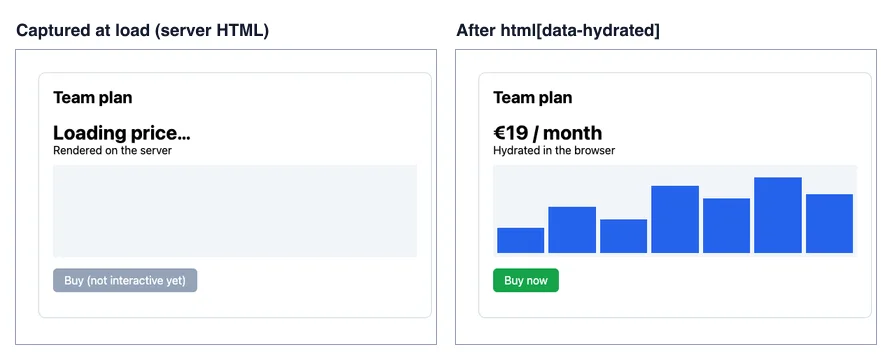
goto with waitUntil: 'load'. Right: the same page after waitForSelector('html[data-hydrated]'). Puppeteer 25.14.0, 600 x 420 viewport, 2026-10-15.| Wait condition (Puppeteer) | Time to return | Hydrated? |
|---|---|---|
domcontentloaded |
15 to 19 ms | No |
load |
10 to 12 ms | No |
networkidle0 |
2,913 to 3,006 ms | Yes |
load, then wait for html[data-hydrated] |
1,577 to 1,587 ms | Yes |
Playwright: goto, then locator wait for the marker |
1,819 to 1,840 ms | Yes |
Ranges are from three runs on a local server. networkidle2 returned before hydration in two runs (888 and 899 ms). In the third run it did not return for several minutes, so we left it out of the table. The selector wait was the fastest correct option, about 1.3 seconds faster than networkidle0.
How it works technically
The load event depends on the resources in the HTML: images, styles and the scripts in the document. It does not depend on fetches that those scripts start, on lazy chunks, or on effects that run after the first client render. That is why load was the first event to return here. Network idle comes closer, but it measures traffic, not your UI. It waits for an idle window after the last request, and it never ends on a page that polls or keeps a WebSocket open.
The reliable signal is one you set yourself. In React, an effect in the root component runs after hydration: useEffect(() => document.documentElement.dataset.hydrated = '', []). Set it after the data that matters has rendered, not only after the first effect.
How to set it in Puppeteer, Playwright and RenderScreenshot
Puppeteer.
import puppeteer from 'puppeteer';

const url = process.argv[2] ?? 'https://example.com';
// The marker your app sets once hydration has finished. Use 'p' to try it on example.com.
const ready = process.argv[3] ?? 'html[data-hydrated]';

const browser = await puppeteer.launch();
try {
  const page = await browser.newPage();
  await page.setViewport({ width: 1280, height: 800 });
  await page.goto(url, { waitUntil: 'load' });
  await page.waitForSelector(ready, { timeout: 15_000 });
  await page.screenshot({ path: 'hydrated.png' });
  console.log('captured after', ready);
} finally {
  await browser.close();
}
Playwright.
import { chromium } from 'playwright';

const url = process.argv[2] ?? 'https://example.com';
const ready = process.argv[3] ?? 'html[data-hydrated]';

const browser = await chromium.launch();
try {
  const page = await browser.newPage({ viewport: { width: 1280, height: 800 } });
  await page.goto(url);
  // 'attached' because the marker is an attribute, not a visible box.
  await page.locator(ready).first().waitFor({ state: 'attached', timeout: 15_000 });
  await page.screenshot({ path: 'hydrated-pw.png' });
  console.log('captured after', ready);
} finally {
  await browser.close();
}
RenderScreenshot. Use wait.for_selector with your marker. wait.timeout is in seconds, with a maximum of 60. See the wait parameters.
curl -X POST https://api.renderscreenshot.com/v1/screenshot \
  -H "Authorization: Bearer $RS_API_KEY" \
  -H "Content-Type: application/json" \
  -d '{
    "url": "https://example.com/pricing",
    "wait": {
      "for_selector": "html[data-hydrated]",
      "for_selector_mode": "attached",
      "timeout": 20
    }
  }' \
  --output pricing.png
With the Node SDK, the same wait is TakeOptions.url(url).waitForSelector('html[data-hydrated]').
Tested on 2026-10-15 with Node 22.18.0, Puppeteer 25.14.0 (Chrome 155) and Playwright 1.64.1 (Chromium 156), against https://example.com (with p as the selector) and the local hydration page. The RenderScreenshot request follows the API docs and was not run for this page.
Common mistakes
- A fixed delay instead of a signal. Two seconds works on your laptop and fails on a slow API day. It also wastes time on fast days.
- Waiting for a selector that the server HTML already has. If the server renders
.priceas a placeholder, waiting for.pricereturns at once. Wait for something only the client produces. - Hiding hydration mismatches. If server and client render different text, for example a date in two time zones, the framework may patch or re-render the tree. Set the browser time zone and locale to match what you expect.
- Theme flashes. Sites that read the saved theme on the client can show the light theme first. Wait for hydration, or set the color scheme explicitly.
Related terms
- Single-page application: the client renders everything, not only hydrates.
- Wait strategies: load, network idle and selector waits compared.
- Lazy loading: content that waits for scrolling, not for JavaScript.
The deep guide is screenshotting single-page applications. To capture hydrated pages with a selector wait, get a free API key.