A single page application (SPA) is a web app that loads one HTML shell and then builds every view in the browser with JavaScript, fetching data and changing the URL without a full page reload.
For a person, an SPA feels fast: clicks swap views instantly. For a headless browser, it is the most common reason for an empty screenshot. The browser's load event fires when the shell is ready, not when the content is. This entry is part of the screenshot and rendering glossary.
A plain explanation
A classic server-rendered page arrives as finished HTML. The text you see is in the first response. An SPA sends something close to <div id="app"></div> plus a script bundle. The bundle starts, asks an API for data, waits for the answer and then writes the view into the page. React, Vue, Angular and Svelte apps without server rendering all work this way.
Navigation inside the app does not load a new document either. The router changes the URL with the History API (/orders) or a fragment (/#/orders) and redraws part of the page.
What a capture sees, measured
We built a minimal SPA: a shell that fetches /api/orders, where the server answers after 1,200 ms, then renders three order cards. We loaded /orders with each wait condition and counted the cards present when the wait returned:
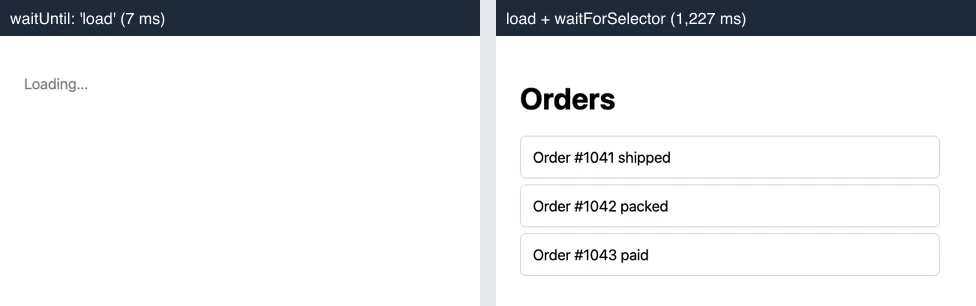
waitUntil: 'load' and after page.waitForSelector('.card[data-ready]'), 2026-10-15.| Wait condition | Returned after | Cards rendered |
|---|---|---|
Puppeteer domcontentloaded |
21 ms | 0 of 3 |
Puppeteer load |
7 ms | 0 of 3 |
Puppeteer networkidle2 |
1,006 ms | 0 of 3 |
Puppeteer networkidle0 |
2,010 ms | 3 of 3 |
Puppeteer load + waitForSelector |
1,227 ms | 3 of 3 |
Playwright networkidle |
1,714 ms | 3 of 3 |
Playwright locator.waitFor() |
1,319 ms | 3 of 3 |
Two results matter. networkidle2 returned while the data request was still open, because it tolerates two connections, so it captured the spinner. And the selector wait was the fastest correct option: it returned about 30 ms after the data arrived, while networkidle0 added its 500 ms quiet window on top. Times are from one run on a local server, so read them as relative, not absolute.
How it works technically
The browser fires DOMContentLoaded when the shell HTML is parsed and load when its scripts, styles and images have arrived. Neither event knows about requests the app makes afterwards with fetch. Network-idle waits are a guess made by the automation library: no connections for 500 ms. A selector wait checks for the content itself, which is why it is the only condition that knows the page is done.
Client-side routing adds a second trap. A pushState navigation does not fire load again, so code that clicks a link and then waits for a load event waits forever. Wait for an element of the new view instead.
How to wait for it in Puppeteer, Playwright and RenderScreenshot
Puppeteer. Navigate, then wait for an element that only the rendered view contains:
import puppeteer from 'puppeteer';

const browser = await puppeteer.launch();
try {
  const page = await browser.newPage();
  await page.setViewport({ width: 1280, height: 800 });
  await page.goto('https://app.example.com/orders', { waitUntil: 'load' });
  await page.waitForSelector('.card[data-ready]', { visible: true, timeout: 15_000 });
  await page.screenshot({ path: 'orders.png' });
} finally {
  await browser.close();
}
Playwright. Locators wait on their own; waitFor() makes the intent explicit:
import { chromium } from 'playwright';

const browser = await chromium.launch();
try {
  const page = await browser.newPage({ viewport: { width: 1280, height: 800 } });
  await page.goto('https://app.example.com/orders');
  await page.locator('.card').first().waitFor({ state: 'visible', timeout: 15_000 });
  await page.screenshot({ path: 'orders.png' });
} finally {
  await browser.close();
}
RenderScreenshot. Put the selector in wait.for_selector. The request fails with an error instead of returning a spinner if the element never appears within wait.timeout seconds. See the wait parameters.
curl -X POST https://api.renderscreenshot.com/v1/screenshot \
  -H "Authorization: Bearer $RS_API_KEY" \
  -H "Content-Type: application/json" \
  -d '{
    "url": "https://app.example.com/orders",
    "wait": { "for_selector": ".card[data-ready]", "timeout": 20 }
  }' \
  --output orders.png
import { Client, TakeOptions } from 'renderscreenshot';

const client = new Client(process.env.RS_API_KEY);
const image = await client.take(
  TakeOptions.url('https://app.example.com/orders').waitForSelector('.card[data-ready]'),
);
The measurement and the Puppeteer and Playwright patterns were tested on 2026-10-15 with Node 22.18, Puppeteer 24.43.1 (headless shell mode, Chrome 148) and Playwright 1.64.1 (Chromium 156) against the local test SPA. app.example.com is a placeholder. The RenderScreenshot snippets follow the API docs and were not run for this page.
Common mistakes
- A fixed delay.
delay: 3000works until the API is slow once. It also costs three seconds on every fast capture. - Waiting for the container.
#appexists in the shell, so it is ready at once. Pick an element the data creates, such as a list item, or adata-readyattribute your app sets. - Porting
networkidle2. As measured above, it can return before the data. Playwright and RenderScreenshot have no equivalent; theirnetworkidlemeans zero connections. - Deep links that 404. With history routing, a direct request for
/ordersneeds a server fallback to the shell. Test the URL in a fresh browser before you blame the capture.
Related terms
- Wait strategies: every ready condition, compared across tools.
- Hydration: server-rendered HTML that the SPA bundle then takes over.
- Lazy loading: images that only load when scrolled into view, a second cause of incomplete captures.
The SPA screenshot tutorial covers framework-specific readiness checks and routing in depth. To try a selector wait on your own app, get a free API key.