Link unfurling is the process in which a chat app, social network or other client fetches a URL that someone shared, reads the page's metadata (Open Graph tags, Twitter card tags, oEmbed or the plain title), and shows the result as a preview card with a title, description and image.
Slack, Discord, Microsoft Teams, iMessage, WhatsApp, LinkedIn and Mastodon all unfurl links, each with its own rules. This entry is part of the screenshot and rendering glossary. For the product side, see link previews.
A plain explanation
When you paste a link, the app does not show you the page. Its server (or sometimes your device) downloads the page's HTML, looks for a few known tags, downloads the image those tags point to, and draws a card. If the tags are missing, the card falls back to the page title, or the app shows a bare link.
The person who shares the link controls nothing here. The page owner does: the tags in the HTML decide what every unfurl shows.
What an unfurler sees
We wrote a short unfurler in Node (below): it fetches the HTML without running JavaScript, reads og:* tags, and falls back to <title>. Then we ran it on three pages.
| Page | What the unfurler read |
|---|---|
| https://example.com | Title "Example Domain". No description, no image. |
| Local page with OG tags in the HTML | Title, description, image URL and an oEmbed link |
| Local single-page app that adds the same tags with JavaScript | Title "Loading…". No description, no image. |
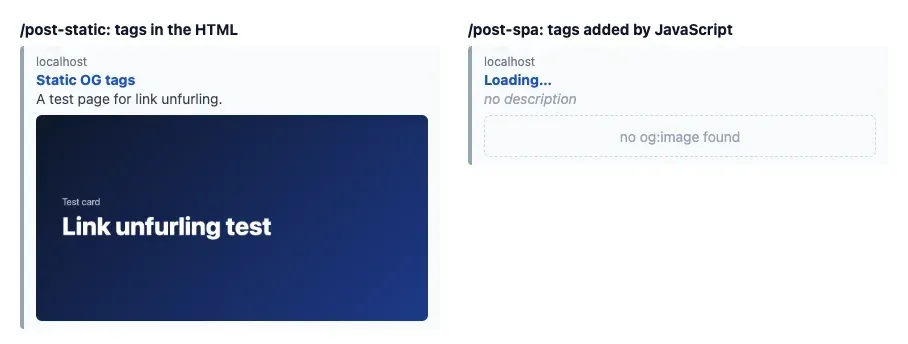
The single-page app had all four tags once its script ran: Puppeteer read og:title as "Tags added by JavaScript". The unfurler never ran that script, so it saw the placeholder title. This is the most common reason for a blank preview on a client-rendered site.
How it works technically
The unfurler sends a request with its own bot user agent, follows redirects, and many unfurlers stop reading after a size limit, so tags belong early in <head>. It prefers Open Graph tags, then Twitter card tags, then the <title> and meta description. Some apps, Slack among them, also check for an oEmbed discovery link, which lets a provider return a richer embed. The image is a second request, so it must be publicly reachable, a format the app supports, and a sensible size: the OG image entry covers sizes. The result is cached, so a fix to your page does not change cards that already exist.
How to check it in Puppeteer, Playwright and RenderScreenshot
A plain unfurler (Node). This is what most platforms do: no browser, no JavaScript.
// A minimal unfurler: fetch the HTML (no JavaScript), read OG tags, fall back to <title>. // Usage: node unfurl.mjs <url> export async function unfurl(url) { const res = await fetch(url, { headers: { 'user-agent': 'ExampleUnfurler/1.0', accept: 'text/html' }, redirect: 'follow', signal: AbortSignal.timeout(5000) }); if (!res.ok) throw new Error(`HTTP ${res.status} for ${url}`); const html = (await res.text()).slice(0, 500_000); const meta = {}; for (const m of html.matchAll(/<meta\s+[^>]*>/gi)) { const prop = /(?:property|name)=["']([^"']+)["']/i.exec(m[0])?.[1]; const content = /content=["']([^"']*)["']/i.exec(m[0])?.[1]; if (prop && content !== undefined) meta[prop.toLowerCase()] = content; } const title = /<title[^>]*>([^<]*)<\/title>/i.exec(html)?.[1]?.trim(); const oembed = /<link\s+[^>]*type=["']application\/json\+oembed["'][^>]*>/i.exec(html)?.[0]; return { title: meta['og:title'] ?? meta['twitter:title'] ?? title ?? url, description: meta['og:description'] ?? meta.description ?? null, image: meta['og:image'] ?? meta['twitter:image'] ?? null, oembed: oembed ? /href=["']([^"']+)["']/i.exec(oembed)?.[1].replaceAll('&', '&') : null, }; } if (import.meta.url === `file://${process.argv[1]}`) { console.log(await unfurl(process.argv[2] ?? 'https://example.com')); }
Playwright. Compare the raw HTML with the rendered DOM. Any tag that only exists after JavaScript is a tag unfurlers miss. The script exits with code 1 when it finds one, so it can run in CI.
// Compare the OG tags a crawler sees (raw HTML) with the tags in the rendered DOM.
import { chromium } from 'playwright';

const url = process.argv[2] ?? 'https://example.com';
const OG = /<meta\s+[^>]*property=["'](og:[^"']+)["'][^>]*>/gi;

const browser = await chromium.launch();
try {
  const page = await browser.newPage();
  const raw = await (await page.request.get(url)).text(); // no JavaScript, like an unfurler
  const inRaw = new Set([...raw.matchAll(OG)].map((m) => m[1]));
  await page.goto(url, { waitUntil: 'networkidle' });
  const inDom = await page.locator('meta[property^="og:"]').evaluateAll((ms) => ms.map((m) => m.getAttribute('property')));
  const jsOnly = inDom.filter((p) => !inRaw.has(p));
  console.log('in raw HTML:', [...inRaw].join(', ') || 'none');
  console.log('only after JavaScript:', jsOnly.join(', ') || 'none');
  if (jsOnly.length) process.exitCode = 1; // unfurlers will not see these
} finally {
  await browser.close();
}
Puppeteer. Read the rendered tags and capture a 1200 x 630 view of the page, the size most cards use.
// Render the page, read its OG tags, and capture what og:image would show.
import puppeteer from 'puppeteer';

const url = process.argv[2] ?? 'https://example.com';
const browser = await puppeteer.launch();
try {
  const page = await browser.newPage();
  await page.setViewport({ width: 1200, height: 630 }); // the usual og:image size
  await page.goto(url, { waitUntil: 'networkidle0' });
  const og = await page.$$eval('meta[property^="og:"]', (ms) =>
    Object.fromEntries(ms.map((m) => [m.getAttribute('property'), m.content])));
  console.log(Object.keys(og).length ? og : 'no og: tags in the rendered page');
  await page.screenshot({ path: 'card-1200x630.png' });
} finally {
  await browser.close();
}
RenderScreenshot. Give every page an og:image without designing one: point the tag at a signed URL with the og_card preset (1200 x 630). The unfurler fetches it like any image, and RenderScreenshot caches the rendered image, so repeat fetches do not render the page again. Put the tag in the server HTML, not in client JavaScript.
<meta property="og:image"
      content="https://api.renderscreenshot.com/v1/screenshot?expires=1792644628&key_id=rs_pub_...&preset=og_card&url=https%3A%2F%2Fexample.com%2Fblog%2Fmy-post&signature=...">
Build the URL on your server with the signing function from the signed URL docs; never put a secret key in the page.
Tested on 2026-10-15 with Node 22.18.0, Puppeteer 25.14.0 (Chrome 155) and Playwright 1.64.1 (Chromium 156), against https://example.com and the two local pages. The signed URL above is a shape example and was not fetched.
Common mistakes
- Tags added by JavaScript. Most unfurlers do not run it. Render the tags on the server.
- Relative image URLs. Use an absolute
https://URL inog:image. - Images behind auth or bot protection. The unfurler's image request must succeed without cookies.
- Expecting instant updates. Old cards stay cached. Plan a refresh step per platform.
Related terms
- Open Graph protocol: the tags most unfurlers read first.
- OG image: the image in the card, with size rules.
- oEmbed: the richer, provider-side alternative.
- Twitter card: X's own tag set.
To test how your pages unfurl, try the link preview checker. To create card images for every page, get a free API key.