prefers-reduced-motion is a CSS media feature that reports whether the user asked the operating system to minimise non-essential motion, so a page can replace animations with an instant, static result.
It exists for accessibility: large movement on screen can cause nausea or dizziness for people with vestibular disorders. For anyone who captures pages, it has a second use. A page that honours it stops moving, and a page that stops moving gives the same screenshot every time. This entry is part of the screenshot glossary.
What it means in plain terms
macOS, iOS, Windows and Android all have a "reduce motion" or "show animations" switch. The browser passes that choice to every page as prefers-reduced-motion: reduce or no-preference. A well-built site has CSS that says "if the reader prefers less motion, skip the fade-in and show the final state". A site without that CSS animates either way.
A headless browser has no person and no system switch, so it reports no-preference unless you set the value. Entrance animations then play during your capture, and the screenshot shows whatever frame the clock happened to reach.
The same page, both values, 300 ms after load
We built a test hero with two entrance animations: a heading that rises and fades in over 1.2 seconds, and a bar that grows over 1.5 seconds. Its CSS has one reduced-motion rule that turns both animations off.
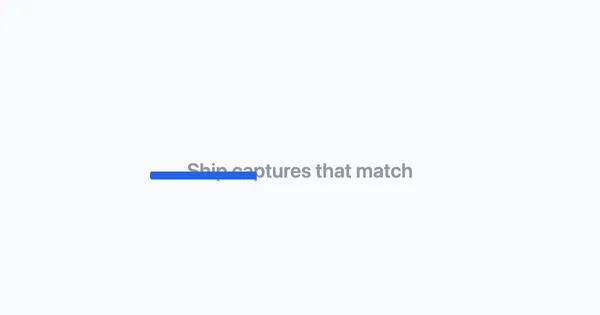
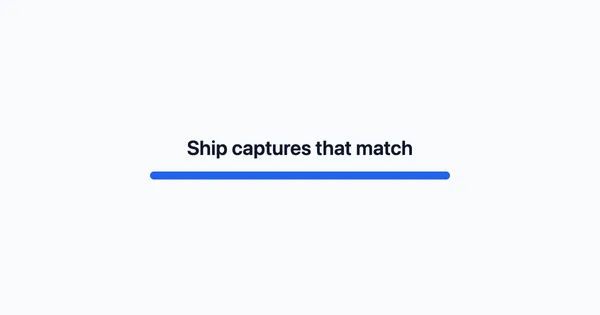
prefers-reduced-motion emulated as no-preference (top) and reduce (bottom). Puppeteer 25.14.0 and headless Chrome 155, 2026-10-15, scaled to 600×315 WebP.To put a number on "repeatable", we captured the page twice per value, once 300 ms and once 600 ms after load, and compared the two images with pixelmatch at threshold 0.1:
| Emulated value | Pixels that differ between the 300 ms and 600 ms captures |
|---|---|
no-preference |
8,239 (8,240 on a second run) |
reduce |
0 (0 on a second run) |
With motion allowed, the result depends on timing. With motion reduced, it does not. That is the property a pixel diff in a visual test needs.
How it works technically
The page reads the value in CSS:
.hero-title { animation: rise 1.2s ease-out both; }

@media (prefers-reduced-motion: reduce) {
  .hero-title { animation: none; }
}
or in JavaScript, with matchMedia('(prefers-reduced-motion: reduce)').matches. Animation libraries often check it once at start-up, so the emulated value must be in place before the page loads. Setting it after navigation fixes the CSS, but a script that already read false keeps animating.
animation: none is the important detail on the page side. A rule that only shortens the duration still leaves a first frame, and some sites do exactly that.
How to set it
Puppeteer
import puppeteer from 'puppeteer';

const browser = await puppeteer.launch();
try {
  const page = await browser.newPage();
  await page.setViewport({ width: 1200, height: 630 });
  // Before goto, so the first style calculation and start-up scripts see it.
  await page.emulateMediaFeatures([{ name: 'prefers-reduced-motion', value: 'reduce' }]);
  await page.goto('https://example.com', { waitUntil: 'load' });

  console.log('reduce =', await page.evaluate(() => matchMedia('(prefers-reduced-motion: reduce)').matches));
  await page.screenshot({ path: 'still.png' });
} finally {
  await browser.close();
}
Playwright
import { chromium } from 'playwright';

const browser = await chromium.launch();
try {
  // reducedMotion is a context option: every page in the context gets it.
  const context = await browser.newContext({ reducedMotion: 'reduce', viewport: { width: 1200, height: 630 } });
  const page = await context.newPage();
  await page.goto('https://example.com');
  console.log('reduce =', await page.evaluate(() => matchMedia('(prefers-reduced-motion: reduce)').matches));
  await page.screenshot({ path: 'still-pw.png' });

  // Switch on the same page without a new context.
  await page.emulateMedia({ reducedMotion: 'no-preference' });
} finally {
  await browser.close();
}
Tested on 2026-10-15 with Node 22.18.0, [email protected] (Chrome 155) and [email protected] (Chromium 156), against the test hero above and example.com. Both printed true for the reduce check, and Playwright reported false after the switch.
Playwright Test also has animations: 'disabled' on toHaveScreenshot. That option fast-forwards CSS animations and transitions in the page itself, so it works even on sites that ignore the media feature. Puppeteer has no equivalent; inject *, *::before, *::after { animation: none !important; transition: none !important; } with page.addStyleTag if you need it.
RenderScreenshot
Set browser.reduced_motion to true in a POST request. The renderer applies it before navigation, together with the colour scheme:
curl -sS --fail -X POST https://api.renderscreenshot.com/v1/screenshot \
  -H "Authorization: Bearer $RS_API_KEY" \
  -H "Content-Type: application/json" \
  -d '{"url": "https://example.com", "preset": "og_card", "browser": {"reduced_motion": true}}' \
  -o still.png
reduced_motion is a POST option; the flat GET parameters do not include it. For sites that animate regardless, add the CSS rule above through page.styles, or a wait.delay. See browser options for the full list.
Common mistakes
- Setting it after
goto. CSS reacts, but a library that read the value on load keeps its first answer. - Treating it as a freeze button. It is a request. JavaScript carousels, canvas and video often ignore it.
- Removing animations for real users. Emulate the preference in the capture only. Do not ship CSS that disables motion for everyone.
- Mixing values across baselines. A baseline captured with motion and a test run without it differ on every animated page.
Related terms
- prefers-color-scheme: the sibling media feature for light and dark themes.
- Pixel diff: why the 8,239-pixel difference above fails a visual test.
- Wait strategies: the other way to beat animations, by waiting for them to end.
- Cumulative layout shift: movement that comes from late content, not from animation.
To capture your own page with motion reduced, get a free API key and run the request above.