The shadow DOM is a separate, encapsulated DOM tree attached to a host element, so that the markup and CSS inside it are hidden from the rest of the page: outside selectors do not match inside it, and outside styles do not leak in.
It is the part of the Web Components standard that lets a widget keep its own markup and styles. Video players, embedded chat, design-system components and several consent banners use it. This entry is part of the screenshot glossary.
What it means in plain terms
A normal page is one tree of elements. A shadow root adds a second tree hanging off one element, the host. The browser draws both together, so on screen nothing looks different. To code, the inside of that second tree is private.
That privacy breaks three things people do before a screenshot: finding an element to capture, hiding an element, and injecting CSS to restyle it. All three fail silently. The selector matches nothing, and the capture shows the widget unchanged.
Shadow roots come in two modes. Open roots expose element.shadowRoot to scripts. Closed roots return null there, so only the component itself can reach inside.
A test page with both kinds
We built a pricing page with a <price-card> component in an open shadow root and a <consent-banner> in a closed one.
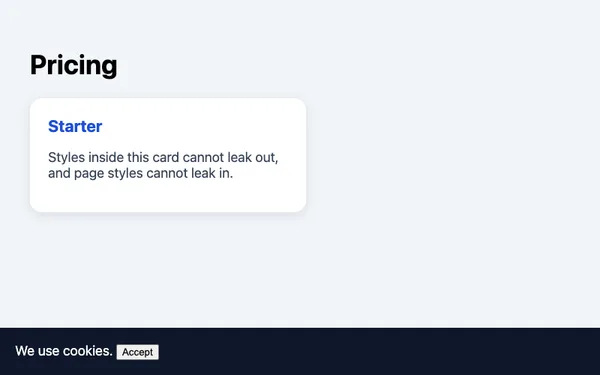
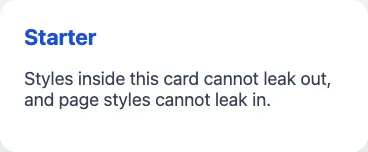
price-card >>> .card, at its natural 368×152. Puppeteer 25.14.0 and headless Chrome 155, 2026-10-15, WebP.What each method found on that page:
| Query | Open root (.card) |
Closed root (.panel) |
|---|---|---|
document.querySelector / querySelectorAll |
Not found | Not found |
host.shadowRoot.querySelectorAll in a page script |
Found | shadowRoot is null |
Puppeteer page.$('host >>> .selector') |
Found | Not found |
Playwright page.locator('.selector') |
Found (pierces by default) | Not found |
How it works technically
A component creates its root with attachShadow:
customElements.define('price-card', class extends HTMLElement {
  connectedCallback() {
    const root = this.attachShadow({ mode: 'open' }); // 'closed' hides root from outside scripts
    const style = document.createElement('style');
    style.textContent = '.card { padding: 24px; border-radius: 16px; }';
    const card = document.createElement('div');
    card.className = 'card';
    card.textContent = this.getAttribute('plan'); // textContent: the attribute is never parsed as HTML
    root.append(style, card);
  }
});
Styles defined inside the root apply only inside it, and page stylesheets do not reach in. Two exceptions let the outside style a component on purpose: inherited properties such as color and font-family, and parts the component exports with part="...", which the page targets with price-card::part(name).
How to set it
Puppeteer
Puppeteer's >>> combinator crosses open shadow roots at any depth:
import puppeteer from 'puppeteer';

const browser = await puppeteer.launch();
try {
  const page = await browser.newPage();
  await page.setViewport({ width: 800, height: 500 });
  await page.goto(process.env.TARGET ?? 'https://example.com', { waitUntil: 'load' });

  console.log('plain selector:', await page.evaluate(() => document.querySelector('.card')));
  const card = await page.$('price-card >>> .card'); // pierces open roots
  if (!card) throw new Error('card not found');
  await card.screenshot({ path: 'card.png' });
} finally {
  await browser.close();
}
Playwright
Playwright's CSS locators pierce open shadow roots with no special syntax:
import { chromium } from 'playwright';

const browser = await chromium.launch();
try {
  const page = await browser.newPage({ viewport: { width: 800, height: 500 } });
  await page.goto(process.env.TARGET ?? 'https://example.com');

  await page.locator('.card').screenshot({ path: 'card-pw.png' });  // inside an open root
  await page.locator('consent-banner').evaluate((el) => el.remove()); // closed root: act on the host
  await page.screenshot({ path: 'page-no-banner.png' });
} finally {
  await browser.close();
}
Tested on 2026-10-15 with Node 22.18.0, [email protected] (Chrome 155) and [email protected] (Chromium 156), with TARGET pointing at the test page above. Both saved the card; Playwright's .panel count in the closed root was 0. XPath locators in Playwright do not pierce shadow roots; stay with CSS.
RenderScreenshot
Work with the host element, which is part of the normal page:
- Capture a component. Use element capture with the host's tag as the selector, for example
price-card. The host's box contains everything its shadow root draws. - Remove a component. Put the host's selector in
page.remove. Removing a closed-root banner this way works, because you never need to see inside it. - Change something inside an open root.
page.hideandpage.removematch selectors in the main document only, so usepage.scripts, which runs in the page after load:
curl -sS --fail -X POST https://api.renderscreenshot.com/v1/screenshot \
  -H "Authorization: Bearer $RS_API_KEY" \
  -H "Content-Type: application/json" \
  -d '{"url": "https://example.com", "page": {"scripts": ["document.querySelectorAll(\"price-card\").forEach(h => h.shadowRoot?.querySelector(\".promo\")?.remove())"], "remove": ["consent-banner"]}}' \
  -o page.png
Replace the tag names with the ones on your page; example.com has no components. The element screenshots guide and the page modifications reference cover the options.
Common mistakes
- Trusting a selector that "works in DevTools". The Elements panel shows shadow content, but
document.querySelectorin the console does not find it. - Injecting page CSS to hide something inside a component. Page styles do not cross the boundary. Hide the host, or style it through
::part. - Trying to pierce a closed root. Act on the host instead.
- Capturing before the component renders. Custom elements upgrade when their script loads. Wait for the host, or for an element inside an open root, before capture.
Related terms
- Cookie consent banner: several consent tools render in shadow roots.
- Accessibility tree: shadow content appears there, which helps agents that read it.
- Full-page screenshot: what you get once components are rendered and unwanted ones removed.
- Wait strategies: how to wait for components to upgrade.
To capture a web component on your own page, create a free account and use the host element as the selector.