A social card is the preview box that a social network or chat app builds when someone shares a link: an image, a title, a short description and the domain, assembled by the platform from the page's meta tags.
People also call it a link preview, a share card or an unfurl. The terms overlap; "social card" usually means the whole box, while OG image means only its picture. This entry is part of the screenshot and rendering glossary.
A plain explanation
You do not send a social card. You publish the ingredients, and every platform bakes its own card from them. A crawler fetches your page, reads the tags in the <head>, downloads the image and draws the box in its own style. That is why the same link looks slightly different in a chat app, a feed and a messaging app.
| Card part | Where the platform reads it | Fallback when the tag is missing |
|---|---|---|
| Image | og:image, or twitter:image on X |
No image, or one the platform picks from the page |
| Title | og:title, twitter:title |
The page <title> |
| Description | og:description, twitter:description |
<meta name="description"> or nothing |
| Domain | The shared URL, or og:url |
Always shown |
| Layout (large or small image) | twitter:card on X; the platform's choice elsewhere |
The platform's default |
The Open Graph protocol entry explains the tags and how crawlers read them. The Twitter card entry covers the X-specific card types.
One template, three card shapes
The image is the only part you design, and card slots do not share one shape. We wrote one HTML template that sizes its text from the viewport height, then rendered it at the three card presets RenderScreenshot ships:
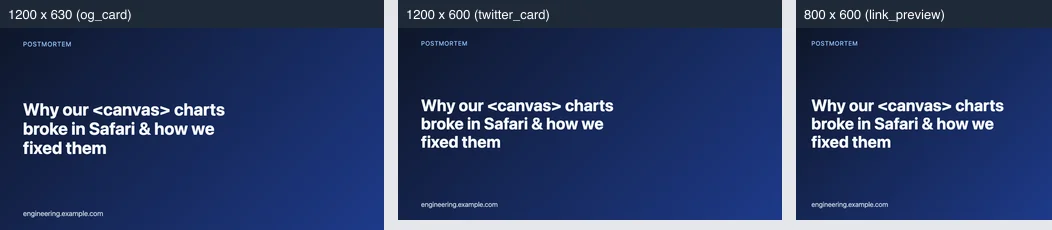
| Size (preset) | PNG bytes | WebP bytes (quality 85) |
|---|---|---|
1200 x 630 (og_card) |
339,848 | 22,268 |
1200 x 600 (twitter_card) |
316,580 | 21,234 |
800 x 600 (link_preview) |
219,972 | 20,652 |
The gradient background is what made the PNGs large: smooth colour ramps compress badly in lossless formats. A flat background would shrink them several times. Check that the platforms you target accept WebP before you switch.
The headline in that test was Why our <canvas> charts broke in Safari & how we fixed them. It rendered as text, not as a broken <canvas> tag, because the template escapes every value. Card titles usually come from user or CMS input, so escaping is not optional.
How it works technically
- Someone shares
https://example.com/post. The platform's crawler requests the HTML, usually without running JavaScript. - It reads the meta tags, then downloads the image URL with no cookies.
- It stores the finished card and reuses it for everyone who shares the same URL, often for days.
So the image must be reachable without login, present in the server-rendered HTML, and stable at its URL. If you generate it on demand, the first crawler request waits for the render, so a cached image URL matters.
How to render one in Puppeteer, Playwright and RenderScreenshot
The template, shared by both browser scripts (card.mjs):
const esc = (s) => String(s).replace(/[&<>"']/g, (c) => ({ '&': '&', '<': '<', '>': '>', '"': '"', "'": ''' })[c]); export const cardHtml = ({ title, site }) => `<!doctype html><meta charset="utf-8"> <style> html, body { margin: 0; width: 100vw; height: 100vh; } body { box-sizing: border-box; padding: 6vh 6vw; display: flex; flex-direction: column; justify-content: space-between; background: #0f172a; color: #f8fafc; font-family: system-ui, sans-serif; } h1 { margin: auto 0; font-size: clamp(28px, 8.5vh, 64px); line-height: 1.12; max-width: 20ch; } p { margin: 0; font-size: 3.6vh; color: #cbd5e1; } </style> <h1>${esc(title)}</h1><p>${esc(site)}</p>`;
Puppeteer:
import puppeteer from 'puppeteer';
import { cardHtml } from './card.mjs';

const browser = await puppeteer.launch();
try {
  const page = await browser.newPage();
  await page.setViewport({ width: 1200, height: 630 });
  await page.setContent(cardHtml({ title: 'Release notes: October', site: 'example.com' }));
  await page.screenshot({ path: 'card.png' });
} finally {
  await browser.close();
}
Playwright:
import { chromium } from 'playwright';
import { cardHtml } from './card.mjs';

const browser = await chromium.launch();
try {
  const page = await browser.newPage({ viewport: { width: 1200, height: 630 } });
  await page.setContent(cardHtml({ title: 'Release notes: October', site: 'example.com' }));
  await page.screenshot({ path: 'card.png' });
} finally {
  await browser.close();
}
RenderScreenshot. Send the same HTML with a card preset, or capture a page URL with preset=og_card. The presets reference lists every size.
import { Client, TakeOptions } from 'renderscreenshot';
import { cardHtml } from './card.mjs';

const client = new Client(process.env.RS_API_KEY);
const image = await client.take(
  TakeOptions.html(cardHtml({ title: 'Release notes: October', site: 'example.com' })).preset('og_card'),
);
The template, the escaping and both browser scripts were tested on 2026-10-15 with Node 22.18, Puppeteer 24.43.1 (headless shell mode, Chrome 148) and Playwright 1.64.1 (Chromium 156). The RenderScreenshot snippet follows the SDK docs and was not run for this page.
Common mistakes
- Text at the edges. Some layouts crop the sides or show a square. Keep the headline inside a central safe area.
- Tags added by client-side JavaScript. Most crawlers read only the first HTML response.
- An image behind authentication. The crawler has no cookies. Use a public URL, or a signed URL with a long expiry.
- Unescaped titles. A title with
<or&breaks the layout or injects markup into your template.
Related terms
- OG image: the picture inside the card, its size and format.
- Twitter card: the X card types and their tags.
- Open Graph protocol: the meta tags every card is built from.
Before you ship, run through the social card checklist. To render your own card template at every preset size, get a free API key.