Satori is an open-source JavaScript library from Vercel that converts a tree of HTML-like elements (usually written as JSX) with inline CSS into an SVG image, using its own layout engine instead of a browser.
It is the engine behind @vercel/og and Next.js ImageResponse, and it exists for one job: drawing OG images and other cards fast, in places where a headless browser is too heavy. This entry is part of the screenshot glossary.
What it means in plain terms
A browser draws a page by loading HTML, CSS, fonts and scripts, laying everything out, and painting pixels. Satori skips almost all of that. You give it a description of a card: "a dark box, 1200 by 630, with three lines of text in this font". It works out where each piece goes and writes the result as SVG, with each line of text turned into vector paths.
Because there is no browser, it starts in milliseconds and fits into small serverless bundles. Because there is no browser, it also cannot do what a browser does: no URLs, no JavaScript, no external stylesheets, and only the CSS it implements.
A card rendered by satori
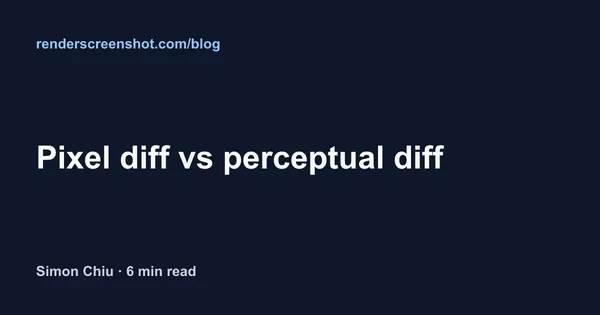
We timed that card and the same layout as HTML in headless Chrome, on one machine (macOS, Apple M1 Pro, Node 22.18.0):
| Step | satori + resvg | Puppeteer 25.14.0, Chrome 155 |
|---|---|---|
| One-time start-up | First resvg call about 1.26 s (native module load) | Browser launch about 365 ms |
| Each render, warm | satori 35 to 37 ms + resvg 138 to 150 ms | 69 to 102 ms (setContent + screenshot) |
| PNG size | 25,061 bytes | 29,630 bytes |
Four satori runs and two Puppeteer runs of three renders each. One machine, no network involved; treat the numbers as an order of magnitude, not a benchmark.
The result surprised us: with a browser already running, Chrome was faster per card than satori plus resvg. Satori's advantage is not raw speed. It is that it needs no browser at all, so it runs on edge runtimes and starts cold without a Chromium download.
How it works technically
- Input. An element tree, the same shape React produces:
{ type: 'div', props: { style, children } }. JSX compiles to it. - Fonts. You pass font files as buffers. Satori has no system fonts. With none, it throws "No fonts are loaded".
- Layout. A flexbox engine (Yoga) computes positions. Layout is flexbox-first: give containers
display: 'flex'. - Text. Satori shapes text with the fonts you gave it and converts each glyph to an SVG path, so the SVG needs no fonts later.
- Output. An SVG string. Rasterise it with resvg (or another SVG renderer) to get PNG.
It ignores things a browser would apply. In our tests with 0.57.2, a Tailwind-style className was ignored silently (satori has its own tw prop for that), and an image whose src points at a private address such as 127.0.0.1 was refused with an "SSRF protection" error.
How to use it, and the browser equivalent
Satori
import satori from 'satori';
import { Resvg } from '@resvg/resvg-js';
import { readFile, writeFile } from 'node:fs/promises';

const font = await readFile(process.env.FONT_PATH); // any .ttf or .otf you have a licence for
const h = (type, style, children) => ({ type, props: { style, children } }); // what JSX compiles to

const card = h('div', {
  width: '100%', height: '100%', boxSizing: 'border-box', display: 'flex', flexDirection: 'column',
  justifyContent: 'space-between', padding: 72, background: '#0f172a', color: '#f8fafc',
}, [
  h('div', { fontSize: 28, color: '#93c5fd' }, 'renderscreenshot.com/blog'),
  h('div', { fontSize: 64, lineHeight: 1.1 }, 'Pixel diff vs perceptual diff'),
  h('div', { display: 'flex', fontSize: 28, color: '#cbd5e1' }, 'Simon Chiu · 6 min read'),
]);

const svg = await satori(card, {
  width: 1200,
  height: 630,
  fonts: [{ name: 'Card', data: font, weight: 700, style: 'normal' }],
});
await writeFile('card.png', new Resvg(svg).render().asPng());
Our first render lost its bottom line. Without boxSizing: 'border-box', the 72 px padding was added to the 100% width and height, as in normal CSS, and the last line landed below the 630 px canvas.
Puppeteer or Playwright
Neither library has a satori mode. The equivalent is to load the card as HTML and screenshot it:
import puppeteer from 'puppeteer';

const html = `<div style="width:1200px;height:630px;box-sizing:border-box;display:flex;
  flex-direction:column;justify-content:space-between;padding:72px;background:#0f172a;
  color:#f8fafc;font:700 28px Arial,sans-serif">
  <div style="color:#93c5fd">renderscreenshot.com/blog</div>
  <div style="font-size:64px;line-height:1.1">Pixel diff vs perceptual diff</div>
  <div style="color:#cbd5e1">Simon Chiu · 6 min read</div></div>`;

const browser = await puppeteer.launch();
try {
  const page = await browser.newPage();
  await page.setViewport({ width: 1200, height: 630 });
  await page.setContent(`<body style="margin:0">${html}</body>`, { waitUntil: 'load' });
  await page.screenshot({ path: 'card-chrome.png' });
} finally {
  await browser.close();
}
In Playwright the same three calls are browser.newPage({ viewport }), page.setContent(...) and page.screenshot(...). Full CSS (grid, web fonts, filters) and JavaScript are available, at the cost of running Chromium.
RenderScreenshot
Send the same HTML to the API with the og_card preset (1200×630) and get a PNG back from a hosted browser:
import { Client, TakeOptions } from 'renderscreenshot';
import { writeFile } from 'node:fs/promises';

const client = new Client(process.env.RS_API_KEY);
const image = await client.take(TakeOptions.html(html).preset('og_card')); // html from the snippet above
await writeFile('card-api.png', image);
Tested on 2026-10-15 with Node 22.18.0, [email protected], @resvg/[email protected] and [email protected]. The RenderScreenshot snippet was not run against the live API for this page.
Common mistakes
- Expecting browser CSS. Satori implements a subset. Check its README before you design a template around a property.
- Forgetting fonts, or weights. Satori uses only the font data you pass. Pass a file for every weight and style the template uses.
- Choosing satori to capture a live page. It cannot load URLs. Use a browser or a screenshot API.
- Building image sources from user input. Text becomes vector paths, so it cannot inject markup, but an image
srctaken from a query string can still point anywhere. Validate it.
Related terms
- OG image: the main thing satori is used to draw.
- HTML to image: the browser-based way to turn markup into pixels.
- Headless browser: what satori replaces, and what it cannot do.
- Social card: the card formats each network expects.
For a deeper head-to-head, read satori vs Puppeteer for OG images. To render cards from HTML without hosting a browser, get a free API key.